Category: Subjects

Flow Control | Stop and Wait Protocol

Flow Control in Computer Networks-


In computer networks, flow control is defined as-


A set of procedures which are used for restricting the amount of data that a sender can send to the receiver.


Flow Control Protocols-


There are various flow control protocols which are classified as-
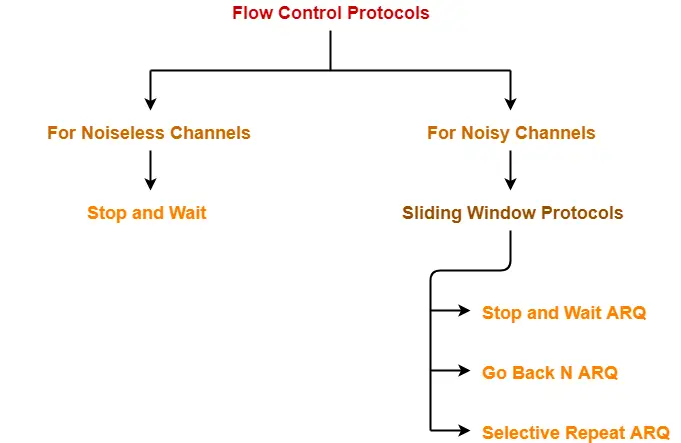


In this article, we will discuss about stop and wait protocol.


Stop and Wait Protocol-


Stop and Wait Protocol is the simplest flow control protocol.


It works under the following assumptions-

  • Communication channel is perfect.
  • No error occurs during transmission.


Working-


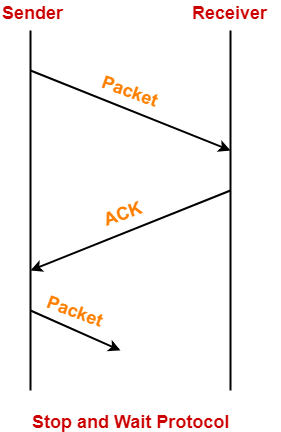
The working of a stop and wait protocol may be explained as-

  • Sender sends a data packet to the receiver.
  • Sender stops and waits for the acknowledgement for the sent packet from the receiver.
  • Receiver receives and processes the data packet.
  • Receiver sends an acknowledgement to the sender.
  • After receiving the acknowledgement, sender sends the next data packet to the receiver.


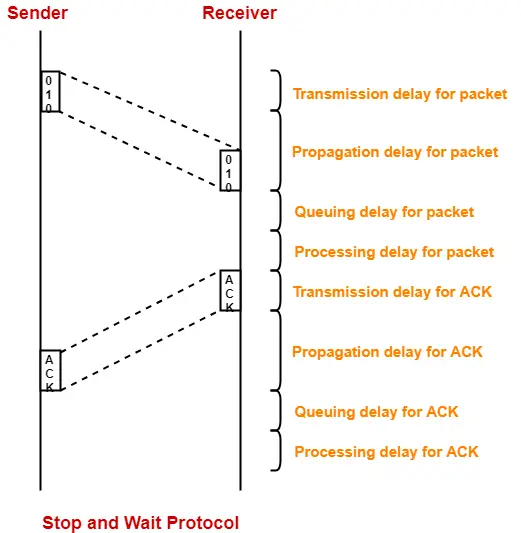
These steps are illustrated below-


Analysis-


Now, let us analyze in depth how the transmission is actually carried out-


  • Sender puts the data packet on the transmission link.
  • Data packet propagates towards the receiver’s end.
  • Data packet reaches the receiver and waits in its buffer.
  • Receiver processes the data packet.
  • Receiver puts the acknowledgement on the transmission link.
  • Acknowledgement propagates towards the sender’s end.
  • Acknowledgement reaches the sender and waits in its buffer.
  • Sender processes the acknowledgement.


These steps are illustrated below-


Also Read- Delays in Computer Networks


Total Time-


Total time taken in sending one data packet

= (Transmission delay + Propagation delay + Queuing delay + Processing delay)packet

+

(Transmission delay + Propagation delay + Queuing delay + Processing delay)ACK


Assume-

  • Queuing delay and processing delay to be zero at both sender and receiver side.
  • Transmission time for the acknowledgement to be zero since it’s size is very small.


Under the above assumptions.


Total time taken in sending one data packet

= (Transmission delay + Propagation delay)packet + (Propagation delay)ACK


We know,

  • Propagation delay depends on the distance and speed.
  • So, it would be same for both data packet and acknowledgement.


So, we have-


Total time taken in sending one data packet

= (Transmission delay)packet + 2 x Propagation delay


Efficiency-


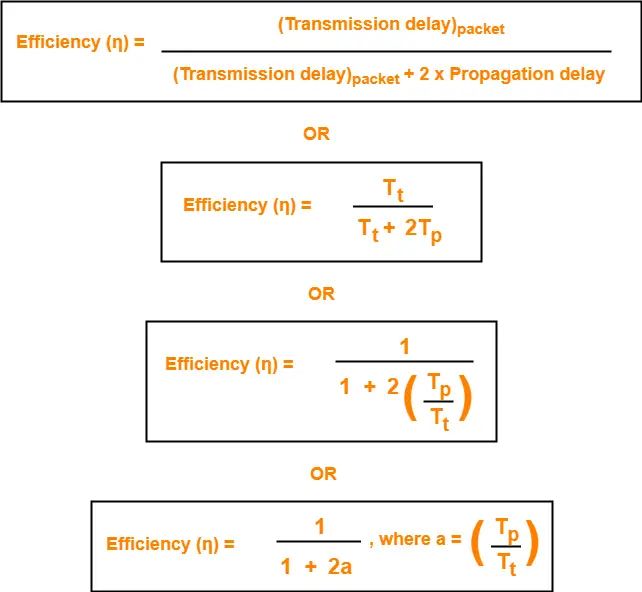
Efficiency of any flow control control protocol is given by-


Efficiency (η) = Useful Time / Total Time


where-

  • Useful time = Transmission delay of data packet = (Transmission delay)packet
  • Useless time = Time for which sender is forced to wait and do nothing = 2 x Propagation delay
  • Total time = Useful time + Useless time


Thus,


Factors Affecting Efficiency-


We know,

Efficiency (η)

= (Transmission delay)packet / { (Transmission delay)packet + 2 x Propagation delay }


Dividing numerator and denominator by  (Transmission delay)packet, we get-
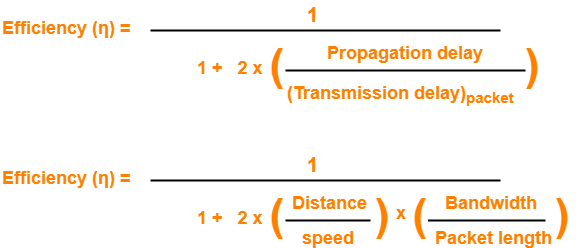


From here, we can observe-

  • Efficiency (η) ∝ 1 / Distance between sender and receiver
  • Efficiency (η) ∝ 1 / Bandwidth
  • Efficiency (η) ∝ Transmission speed
  • Efficiency (η) ∝ Length of data packet


Throughput-


  • Number of bits that can be sent through the channel per second is called as its throughput.



Round Trip Time-


Round Trip Time = 2 x Propagation delay


Advantages-


The advantages of stop and wait protocol are-

  • It is very simple to implement.
  • The incoming packet from receiver is always an acknowledgement.


Limitations-


The limitations of stop and wait protocol are-


Point-01:


It is extremely inefficient because-

  • It makes the transmission process extremely slow.
  • It does not use the bandwidth entirely as each single packet and acknowledgement uses the entire time to traverse the link.


Point-02:


If the data packet sent by the sender gets lost, then-

  • Sender will keep waiting for the acknowledgement for infinite time.
  • Receiver will keep waiting for the data packet for infinite time.


Point-03:


If acknowledgement sent by the receiver gets lost, then-

  • Sender will keep waiting for the acknowledgement for infinite time.
  • Receiver will keep waiting for another data packet for infinite time.


Important Notes-


Note-01:


Efficiency may also be referred by the following names-

  • Line Utilization
  • Link Utilization
  • Sender Utilization
  • Utilization of Sender


Note-02:


Throughput may also be referred by the following names-

  • Bandwidth Utilization
  • Effective Bandwidth
  • Maximum data rate possible
  • Maximum achievable throughput


Note-03:


Stop and Wait protocol performs better for LANs than WANs.

This is because-

  • Efficiency of the protocol is inversely proportional to the distance between sender and receiver.
  • So, the protocol performs better where the distance between sender and receiver is less.
  • The distance is less in LANs as compared to WANs.


To gain better understanding about Stop and Wait Protocol,

Watch this Video Lecture


Next Article- Stop and Wait ARQ


Get more notes and other study material of Computer Networks.

Watch video lectures by visiting our YouTube channel LearnVidFun.
Simplex | Half Duplex | Full Duplex

Types of Communication Channels-


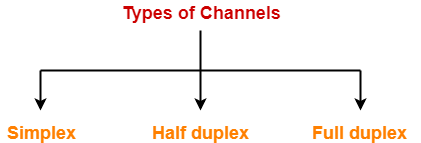
In computer networking, there are 3 types of communication channels-


  1. Simplex channel
  2. Half duplex channel
  3. Full duplex channel


1. Simplex Channel-


  • A simplex communication channel can send the signals only in one direction.
  • Thus, entire bandwidth of the channel can be used during the transmission.


Example-


Radio station

  • Radio station is a good example of a simplex communication channel.
  • A radio station always sends signals to its audience.
  • It never receives signals from the audience.


2. Half Duplex Channel-


  • A half duplex communication channel can send signals in both the directions but in only one direction at a time.
  • It may be considered as a simplex communication channel whose transmission direction can be switched.


Example-


Walkie-Talkie

  • Walkie-Talkie is a good example of a half duplex channel.
  • Walkie-talkie has a push-to-talk button.
  • This button is used to turn on the transmitter but turn off the receiver.
  • When the button is pressed, transmitter can not hear the receiver but receiver can hear the transmitter.


3. Full Duplex Channel-


  • A full duplex communication channel can send signals in both the directions at the same time.
  • Full duplex communication channels greatly increases the efficiency of communication.


Example-


Telephone

  • Telephone is a good example of a full duplex channel.
  • Both the persons can speak as well as hear each other at the same time.


Channel Capacity-


The total number of bits a channel can hold is called as its capacity.


Capacity of a half duplex channel

= Bandwidth x Propagation delay


Capacity of a full duplex channel

= 2 x Capacity of a half duplex channel

= 2 x Bandwidth x Propagation delay


To gain better understanding about communication channels in networking,

Watch this Video Lecture


Next Article- Stop and Wait Protocol


Get more notes and other study material of Computer Networks.

Watch video lectures by visiting our YouTube channel LearnVidFun.

Delays in Computer Networks | Formulas

Delays in Computer Networks-


Consider-

  • Two hosts A and B are connected over a transmission link / transmission media.
  • A data packet is sent by the Host A to Host B.


Following different types of delay occur during transmission-


  1. Transmission delay
  2. Propagation delay
  3. Queuing delay
  4. Processing delay


1. Transmission Delay-


Time taken to put the data packet on the transmission link is called as transmission delay.


Mathematically,

  • Transmission delay ∝ Length / Size of data packet
  • Transmission delay ∝ 1 / Bandwidth


Thus,


2. Propagation Delay-


Time taken for one bit to travel from sender to receiver end of the link is called as propagation delay.


Mathematically,

  • Propagation delay ∝ Distance between sender and receiver
  • Propagation delay ∝ 1 / transmission speed


Thus,


3. Queuing Delay-


Time spent by the data packet waiting in the queue before it is taken for execution is called as queuing delay.


  • It depends on the congestion in the network.


4. Processing Delay-


Time taken by the processor to process the data packet is called as processing delay.


  • It depends on the speed of the processor.
  • Processing of the data packet helps in detecting bit level errors that occurs during transmission.


Important Points-


Note-01:


Total delay in sending one data packet or End to End time

= Transmission delay + Propagation delay + Queuing delay + Processing delay


Note-02:


In optical fibre, transmission speed of data packet = 2.1 x 10⁸ m/sec


  • In optical fibre, signals travel with 70% speed of light.

70% speed of light

= 0.7 x 3 x 108 m/sec

= 2.1 x 108 m/sec

  • So, consider transmission speed = 2.1 x 10⁸ m/sec for calculations when using optical fibre.


Note-03:


Both queuing delay and processing delay are dependent on the state of the system.


This is because-

  • If destination host is busy doing some heavy processing, then these delays will increase.
  • If destination host is free, then data packets will be processed immediately and these delays will decrease.


Note-04:


  • For any particular transmission link, bandwidth and transmission speed are always constant.
  • This is because they are properties of the transmission medium.


Note-05:


Bandwidth is always expressed in powers of 10 and data is always expressed in powers of 2.

(Remember while solving numerical problems)


Examples-


  • 1 kilo bytes = 210 bytes
  • 1 kilo bits = 210 bits
  • 1 Mega bytes = 220 bytes
  • 1 kilo bytes per second = 103 bytes per second
  • 1 kilo bits per second = 103 bits per second
  • 1 Mega bytes per second = 106 bytes per second


To gain better understanding about delays in computer networks,

Watch this Video Lecture


Next Article- Types Of Channels in Computer Networks


Get more notes and other study material of Computer Networks.

Watch video lectures by visiting our YouTube channel LearnVidFun.

Subnet Mask | Subnet Mask Use

Subnet Mask-


Before you go through this article, make sure that you have gone through the previous article on Subnet Mask.


We have discussed-

  • Subnet mask is a 32 bit address consisting of a sequence of 1’s and 0’s.
  • It is used to determine to which subnet the given IP Address belongs to.


In this article, we will discuss how subnet mask is used by the host assigned to it.


Concept To Know-


When any host connects to the internet, ISP provides following 4 things to the host-

  1. IP Address
  2. Default Gateway
  3. Subnet Mask
  4. DNS


1. IP Address-


  • ISP assigns an IP Address to the host so that it can be uniquely identified on the Internet.


2. Default Gateway-


  • Default router connected to the network in which the host is present is the default gateway for the host.


3. Subnet Mask-


  • Subnet mask is a 32 bit number that is assigned to the host.
  • It is used to determine to which network the given IP Address belongs to.


4. Domain Name Service (DNS)-


Subnet Mask Use-


Subnet mask is used to determine to which network the given IP Address belongs to.


  • Host use its subnet mask to determine whether the other host it wants to communicate with is present within the same network or not.
  • If the destination host is present within the same network, then source host sends the packet directly to the destination host.
  • If the destination host is present in some other network, then source host routes the packet to the default gateway (router).
  • Router then sends the packet to the destination host.


Example-


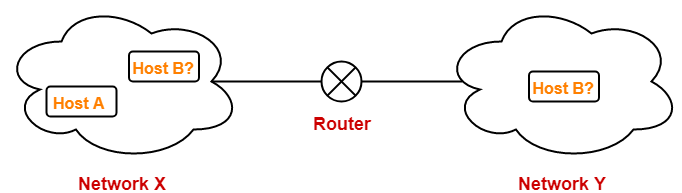
Consider-

  • There is a host A present in some network X.
  • There is a host B.
  • Host A wants to send a packet to host B.


Before transmitting the packet, host A determines whether host B is present within the same network or not.


Here,

  • Host A = Source host
  • Host B = Destination host


To determine whether destination host is present within the same network or not, source host follows the following steps-


Step-01:


  • Source host computes its own network address using its own IP Address and subnet mask.
  • After computation, source host obtains its network address with respect to itself.


Step-02:


  • Source host computes the network address of destination host using destination IP Address and its own subnet mask.
  • After computation, source host obtains the network address of destination host with respect to itself.


Step-03:


Source host compares the two results obtained in the above steps.

Then, following two cases are possible-


Case-01:


If the results are same,

  • Source host assumes that the destination host is present within the same network.
  • Source host sends the packet directly to the destination host.


Case-02:


If the results are different,

  • Source host assumes that the destination host is present in some other network.
  • Source host sends the packet via router to the destination host.


Important Points-


Note-01:


  • Each host knows only its own subnet mask.
  • It does not know the subnet mask of any other host.


Note-02:


  • The conclusion drawn by a host about the presence of other host within the same or different network might be wrong.


Note-03:


  • Consider host A draws some conclusion about host B.
  • Then, same conclusion might not be drawn by host B about host A.
  • Both the hosts have to perform the above procedure separately at their ends to conclude anything.


PRACTICE PROBLEMS BASED ON USE OF SUBNET MASK-


Problem-01:


Two computers C1 and C2 are configured as follows-

  • C1 has IP Address 203.197.2.53 and net mask 255.255.128.0
  • C2 has IP Address 203.197.75.201 and net mask 255.255.192.0


Which one of the following statements is true?

  1. C1 and C2 both assume they are on the same network
  2. C2 assumes C1 is on same network but C1 assumes C2 is on a different network
  3. C1 assumes C2 is on same network but C2 assumes C1 is on a different network
  4. C1 and C2 both assume they are on different networks


Solution-


At Computer C1-


C1 computes its network address using its own IP Address and subnet mask as-

203.197.2.53 AND 255.255.128.0

= 203.197.0.0


C1 computes the network address of C2 using IP Address of C2 and its own subnet mask as-

203.197.75.201 AND 255.255.128.0

= 203.197.0.0


Since both the results are same, so C1 assumes that C2 is on the same network.


At Computer C2-


C2 computes its network address using its own IP Address and subnet mask as-

203.197.75.201 AND 255.255.192.0

= 203.197.64.0


C2 computes the network address of C1 using IP Address of C1 and its own subnet mask as-

203.197.2.53 AND 255.255.192.0

= 203.197.0.0


Since both the results are different, so C2 assumes that C1 is on a different network.

Thus, Option (C) is correct.


Problem-02:


The subnet mask for a particular network is 255.255.31.0. Which of the following pairs of IP Addresses could belong to this network?

  1. 172.57.88.62 and 172.56.87.233
  2. 10.35.28.2 and 10.35.29.4
  3. 191.203.31.87 and 191.234.31.88
  4. 128.8.129.43 and 128.8.161.55


Solution-


Let the given two IP Addresses belong to Host A and Host B.


Checking Option (A)-


  • Host A IP Address = 172.57.88.62
  • Host B IP Address = 172.56.87.233


At Host A-


Host A computes its network address using its own IP Address and subnet mask-

172.57.88.62 AND 255.255.31.0

= 172.57.24.0


Host A computes the network address of Host B using IP Address of Host B and its own subnet mask-

172.56.87.233 AND 255.255.31.0

= 172.56.23.0


Since both the results are different, so host A assumes that host B is on a different network.

Thus, both can’t belong to the same network.

Hence, this option gets eliminated.


Checking Option (B)-


  • Host A IP Address = 10.35.28.2
  • Host B IP Address = 10.35.29.4


At Host A-


Host A computes its network address using its own IP Address and subnet mask-

10.35.28.2 AND 255.255.31.0

= 10.35.28.0


Host A computes the network address of Host B using IP Address of Host B and its own subnet mask-

10.35.29.4 AND 255.255.31.0

= 10.35.29.0


Since both the results are different, so host A assumes that host B is on a different network.

Thus, both can’t belong to the same network.

Hence, this option gets eliminated.


Checking Option (C)-


  • Host A IP Address = 191.203.31.87
  • Host B IP Address = 191.234.31.88


At Host A-


Host A computes its network address using its own IP Address and subnet mask-

191.203.31.87 AND 255.255.31.0

= 191.203.31.0


Host A computes the network address of Host B using IP Address of Host B and its own subnet mask-

191.234.31.88 AND 255.255.31.0

= 191.234.31.0


Since both the results are same, so host A assumes that host B is on the same network.


At Host B-


Host B computes its network address using its own IP Address and subnet mask-

191.234.31.88 AND 255.255.31.0

= 191.234.31.0


Host B computes the network address of Host A using IP Address of Host A and its own subnet mask-

191.203.31.87 AND 255.255.31.0

= 191.203.31.0


Since both the results are different, so host B assumes that host A is on a different network.

Thus, both can’t belong to the same network.

Hence, this option gets eliminated.


Checking Option (D)-


  • Host A IP Address = 128.8.129.43
  • Host B IP Address = 128.8.161.55


At Host A-


Host A computes its network address using its own IP Address and subnet mask-

128.8.129.43 AND 255.255.31.0

= 128.8.1.0


Host A computes the network address of Host B using IP Address of Host B and its own subnet mask-

128.8.161.55 AND 255.255.31.0

= 128.8.1.0


Since both the results are same, so host A assumes that host B is on the same network.


At Host B-


Host B computes its network address using its own IP Address and subnet mask-

128.8.161.55 AND 255.255.31.0

= 128.8.1.0


Host B computes the network address of Host A using IP Address of Host A and its own subnet mask-

128.8.129.43 AND 255.255.31.0

= 128.8.1.0


Since both the results are same, so host B assumes that host A is on the same network.

Thus, both the hosts assume that they belong to the same network.

Hence, Option (D) is correct.


To gain better understanding about Subnet Mask Use,

Watch this Video Lecture


Next Article- Internet Protocol Version 4 | IPv4 Header


Get more notes and other study material of Computer Networks.

Watch video lectures by visiting our YouTube channel LearnVidFun.

Classless Addressing | CIDR in Networking

IP Addressing-


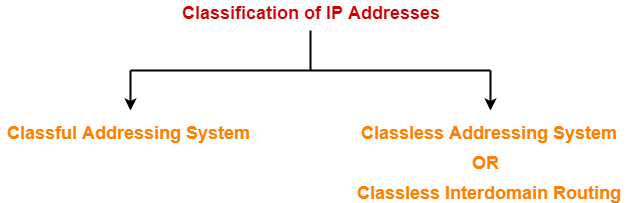
There are two systems in which IP Addresses are classified-


  1. Classful Addressing System
  2. Classless Addressing System


In this article, we will discuss about Classless Addressing System.

Learn about Classful Addressing System.


Classless Addressing-


  • Classless Addressing is an improved IP Addressing system.
  • It makes the allocation of IP Addresses more efficient.
  • It replaces the older classful addressing system based on classes.
  • It is also known as Classless Inter Domain Routing (CIDR).


CIDR Block-


When a user asks for specific number of IP Addresses,

  • CIDR dynamically assigns a block of IP Addresses based on certain rules.
  • This block contains the required number of IP Addresses as demanded by the user.
  • This block of IP Addresses is called as a CIDR block.


Rules For Creating CIDR Block-


A CIDR block is created based on the following 3 rules-


Rule-01:


  • All the IP Addresses in the CIDR block must be contiguous.


Rule-02:


  • The size of the block must be presentable as power of 2.
  • Size of the block is the total number of IP Addresses contained in the block.
  • Size of any CIDR block will always be in the form 21, 22, 23, 24, 25 and so on.


Rule-03:


  • First IP Address of the block must be divisible by the size of the block.


REMEMBER


If any binary pattern consisting of (m + n) bits is divided by 2n, then-

  • Remainder is least significant n bits
  • Quotient is most significant m bits


So, any binary pattern is divisible by 2n, if and only if its least significant n bits are 0.


Examples-


Consider a binary pattern-

01100100.00000001.00000010.01000000

(represented as 100.1.2.64)

  • It is divisible by 25 since its least significant 5 bits are zero.
  • It is divisible by 26 since its least significant 6 bits are zero.
  • It is not divisible by 27 since its least significant 7 bits are not zero.


CIDR Notation-


CIDR IP Addresses look like-

a.b.c.d / n


  • They end with a slash followed by a number called as IP network prefix.
  • IP network prefix tells the number of bits used for the identification of network.
  • Remaining bits are used for the identification of hosts in the network.


Example-


An example of CIDR IP Address is-

182.0.1.2 / 28


It suggests-

  • 28 bits are used for the identification of network.
  • Remaining 4 bits are used for the identification of hosts in the network.


PRACTICE PROBLEMS BASED ON CLASSLESS INTER DOMAIN ROUTING-


Problem-01:


Given the CIDR representation 20.10.30.35 / 27. Find the range of IP Addresses in the CIDR block.


Solution-


Given CIDR representation is 20.10.30.35 / 27.


It suggests-

  • 27 bits are used for the identification of network.
  • Remaining 5 bits are used for the identification of hosts in the network.


Given CIDR IP Address may be represented as-

00010100.00001010.00011110.00100011 / 27


So,

  • First IP Address = 00010100.00001010.00011110.00100000 = 20.10.30.32
  • Last IP Address = 00010100.00001010.00011110.00111111 = 20.10.30.63


Thus, Range of IP Addresses = [ 20.10.30.32 , 20.10.30.63]


Problem-02:


Given the CIDR representation 100.1.2.35 / 20. Find the range of IP Addresses in the CIDR block.


Solution-


Given CIDR representation is 100.1.2.35 / 20.


It suggests-

  • 20 bits are used for the identification of network.
  • Remaining 12 bits are used for the identification of hosts in the network.


Given CIDR IP Address may be represented as-

01100100.00000001.00000010.00100011 / 20


So,

  • First IP Address = 01100100.00000001.00000000.00000000 = 100.1.0.0
  • Last IP Address = 01100100.00000001.00001111.11111111 = 100.1.15.255


Thus, Range of IP Addresses = [ 100.1.0.0 , 100.1.15.255]


Problem-03:


Consider a block of IP Addresses ranging from 100.1.2.32 to 100.1.2.47.

  1. Is it a CIDR block?
  2. If yes, give the CIDR representation.


Solution-


For any given block to be a CIDR block, 3 rules must be satisfied-


Rule-01:


  • According to Rule-01, all the IP Addresses must be contiguous.
  • Clearly, all the given IP Addresses are contiguous.
  • So, Rule-01 is satisfied.


Rule-02:


  • According to Rule-02, size of the block must be presentable as 2n.
  • Number of IP Addresses in the given block = 47 – 32 + 1 = 16.
  • Size of the block = 16 which can be represented as 24.
  • So, Rule-02 is satisfied.


Rule-03:


  • According to Rule-03, first IP Address must be divisible by size of the block.
  • So, 100.1.2.32 must be divisible by 24.
  • 100.1.2.32 = 100.1.2.00100000 is divisible by 24 since its 4 least significant bits are zero.
  • So, Rule-03 is satisfied.


Since all the rules are satisfied, therefore given block is a CIDR block.


CIDR Representation-


We have-

  • Size of the block = Total number of IP Addresses = 24.
  • To have 24 total number of IP Addresses, total 4 bits are required in the Host ID part.
  • So, Number of bits present in the Network ID part = 32 – 4 = 28.


Thus,

CIDR Representation = 100.1.2.32 / 28


NOTE-


For writing the CIDR representation,

  • We can choose to mention any IP Address from the CIDR block.
  • The chosen IP Address is followed by a slash and IP network prefix.
  • We generally choose to mention the first IP Address.


Problem-04:


Consider a block of IP Addresses ranging from 150.10.20.64 to 150.10.20.127.

  1. Is it a CIDR block?
  2. If yes, give the CIDR representation.


Solution-


For any given block to be a CIDR block, 3 rules must be satisfied-


Rule-01:


  • According to Rule-01, all the IP Addresses must be contiguous.
  • Clearly, all the given IP Addresses are contiguous.
  • So, Rule-01 is satisfied.


Rule-02:


  • According to Rule-02, size of the block must be presentable as 2n.
  • Number of IP Addresses in given block = 127 – 64 + 1 = 64.
  • Size of the block = 64 which can be represented as 26.
  • So, Rule-02 is satisfied.


Rule-03:


  • According to Rule-03, first IP Address must be divisible by size of the block.
  • So, 150.10.20.64 must be divisible by 26.
  • 150.10.20.64 = 150.10.20.01000000 is divisible by 26 since its 6 least significant bits are zero.
  • So, Rule-03 is satisfied.


Since all the rules are satisfied, therefore given block is a CIDR block.


CIDR Representation-


We have-

  • Size of the block = Total number of IP Addresses = 26.
  • To have 26 total number of IP Addresses, 6 bits are required in the Host ID part.
  • So, Number of bits in the Network ID part = 32 – 6 = 26.


Thus,

CIDR Representation = 150.10.20.64 / 26


Problem-05:


Perform CIDR aggregation on the following IP Addresses-

128.56.24.0/24

128.56.25.0/24

128.56.26.0/24

128.56.27.0/24


Solution-


All the 4 given entities represent CIDR block in itself.

We have to now perform the aggregation of these 4 blocks.


Rule-01:


  • According to Rule-01, all the IP Addresses must be contiguous.
  • Clearly, all the IP Addresses are contiguous.
  • So, Rule-01 is satisfied.


Rule-02:


  • According to Rule-02, size of the block must be presentable as 2n.
  • Total number of IP Addresses = 28 + 28 + 28 + 28 = 22 x 28 = 210.
  • So, Rule-02 is satisfied.


Rule-03:


  • According to Rule-03, first IP Address must be divisible by size of the block.
  • So, 128.56.24.0 must be divisible by 210.
  • 128.56.24.0 = 128.56.00011000.00000000 is divisible by 210 since its 10 least significant bits are zero.
  • So, Rule-03 is satisfied.


Since all the 3 rules are satisfied, so they can be aggregated.


CIDR Representation-


We have-

  • Size of the block = Total number of IP Addresses = 210.
  • To have 210 total number of IP Addresses, 10 bits are required in the Host ID part.
  • So, Number of bits in the Network ID part = 32 – 10 = 22.


Thus,

CIDR Representation = 128.56.24.0/22


Problem-06:


Perform CIDR aggregation on the following IP Addresses-

200.96.86.0/24

200.96.87.0/24

200.96.88.0/24

200.96.89.0/24


Solution-


All the 4 given entities represent CIDR block in itself.

We have to now perform the aggregation of these 4 blocks.


Rule-01:


  • According to Rule-01, all the IP Addresses must be contiguous.
  • Clearly, all the IP Addresses are contiguous.
  • So, Rule-01 is satisfied.


Rule-02:


  • According to Rule-02, size of the block must be presentable as 2n.
  • Total number of IP Addresses = 28 + 28 + 28 + 28 = 22 x 28 = 210.
  • So, Rule-02 is satisfied.


Rule-03:


  • According to Rule-03, first IP Address must be divisible by size of the block.
  • So, 200.96.86.0 must be divisible by 210.
  • 200.96.86.0 = 200.96.01010110.00000000 is not divisible by 210 since its 10 least significant bits are not zero.
  • So, Rule-03 is unsatisfied.


Since all the 3 rules are not satisfied, so they can not be aggregated.


To gain better understanding about Classless Addressing,

Watch this Video Lecture


Next Article- Subnetting | Examples


Get more notes and other study material of Computer Networks.

Watch video lectures by visiting our YouTube channel LearnVidFun.