Category: Subjects

IP Address in Networking | Problems

IP Address in Networking-


Before you go through this article, make sure that you have gone through the previous article on IP Address.


We have discussed-

  • IP Address is a unique address assigned to each computing device in an IP network.
  • ISP assigns IP Address to all the devices present on its network.
  • Casting refers to transmitting data (stream of packets) over the network.


Also Read- Types of Casting


In this article, we will discuss some practice problems based on IP Address.


Important Points-


Point-01:


For any given IP Address,

  • If the range of first octet is [1, 126], then IP Address belongs to class A.
  • If the range of first octet is [128, 191], then IP Address belongs to class B.
  • If the range of first octet is [192, 223], then IP Address belongs to class C.
  • If the range of first octet is [224, 239], then IP Address belongs to class D.
  • If the range of first octet is [240, 254], then IP Address belongs to class E.


Point-02:


For any given IP Address,

  • IP Address of its network is obtained by setting all its Host ID part bits to 0.


Point-03:


For any given IP Address,

  • Direct Broadcast Address is obtained by setting all its Host ID part bits to 1.


Point-04:


  • For any given IP Address, limited Broadcast Address is obtained by setting all its bits to 1.
  • For any network, its limited broadcast address is always 255.255.255.255


Point-05:


  • Class D IP Addresses are not divided into Net ID and Host ID parts.
  • Class E IP Addresses are not divided into Net ID and Host ID parts.


PRACTICE PROBLEMS BASED ON IP ADDRESS IN NETWORKING-


Problem-01:


For the following IP Addresses-

  1. 1.2.3.4
  2. 10.15.20.60
  3. 130.1.2.3
  4. 150.0.150.150
  5. 200.1.10.100
  6. 220.15.1.10
  7. 250.0.1.2
  8. 300.1.2.3


Identify the Class, Network IP Address, Direct broadcast address and Limited broadcast address of each IP Address.


Solution-


Part-A:


Given IP Address is-

1.2.3.4


  • IP Address belongs to class A
  • Network IP Address = 1.0.0.0
  • Direct Broadcast Address = 1.255.255.255
  • Limited Broadcast Address = 255.255.255.255


Part-B:


Given IP Address is-

10.15.20.60


  • IP Address belongs to class A
  • Network IP Address = 10.0.0.0
  • Direct Broadcast Address = 10.255.255.255
  • Limited Broadcast Address = 255.255.255.255


Part-C:


Given IP Address is-

130.1.2.3


  • IP Address belongs to class B
  • Network IP Address = 130.1.0.0
  • Direct Broadcast Address = 130.1.255.255
  • Limited Broadcast Address = 255.255.255.255


Part-D:


Given IP Address is-

150.0.150.150


  • IP Address belongs to class B
  • Network IP Address = 150.0.0.0
  • Direct Broadcast Address = 150.0.255.255
  • Limited Broadcast Address = 255.255.255.255


Part-E:


Given IP Address is-

200.1.10.100


  • IP Address belongs to class C
  • Network IP Address = 200.1.10.0
  • Direct Broadcast Address = 200.1.10.255
  • Limited Broadcast Address = 255.255.255.255


Part-F:


Given IP Address is-

220.15.1.10


  • IP Address belongs to class C
  • Network IP Address = 220.15.1.0
  • Direct Broadcast Address = 220.15.1.255
  • Limited Broadcast Address = 255.255.255.255


Part-G:


Given IP Address is-

250.0.1.2


  • IP Address belongs to class E
  • Network IP Address = Not available
  • Direct Broadcast Address = Not available
  • Limited Broadcast Address = Not available


Part-H:


Given IP Address is-

300.1.2.3


  • This is not a valid IP Address.
  • This is because for any given IP Address, the range of its first octet is always [1, 254].
  • First and Last IP Addresses are reserved.


Problem-02:


A device has two or more IP Addresses, the device is called-

  1. Workstation
  2. Router
  3. Gateway
  4. All of these


Solution-


  • All the given devices have a network layer.
  • So, they will have at least one IP Address.


In TCP/IP suite-

  • Workstation and gateway have all the 5 layers.
  • Router has only 3 layers last layer being network layer.


Workstation-


  • A user may configure more than one IP Addresses in his workstation / computer.
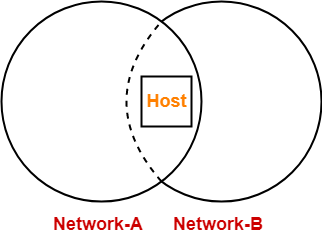
  • With more than one IP Address, it remains present in more than one networks.
  • So, if one network goes down, it is always reachable from other networks.


The following figure shows a host present in more than one networks-


  • It is important to note that IP Addresses are assigned to interfaces.
  • When we buy a new laptop, we usually get 2-3 interfaces.
  • Thus, a workstation can have more than one IP Addresses.


Router-


  • A router may be connected to various interfaces.
  • Each interface has a unique IP Address.
  • Thus, a router may also have more than IP Addresses.
  • Similar is the case with gateways because gateways are extension of routers.


Thus, Option (D) is correct.


Problem-03:


A host with IP Address 200.100.1.1 wants to send a packet to all the hosts in the same network.

What will be-

  1. Source IP Address
  2. Destination IP Address


Solution-


  1. Source IP Address = IP Address of the sender = 200.100.1.1
  2. Destination IP Address = Limited Broadcast Address = 255.255.255.255


Problem-04:


A host with IP Address 10.100.100.100 wants to use loop back testing.

What will be-

  1. Source IP Address
  2. Destination IP Address


Solution-


  • Source IP Address = 10.100.100.100
  • Destination IP Address = Loopback Testing Address = 127.0.0.1


Problem-05:


How many bits are allocated for Network ID and Host ID in 23.192.157.234 address?


Solution-


Given IP Address belongs to class A.

Thus,

  • Number of bits reserved for Network ID = 8
  • Number of bits reserved for Host ID = 24


Problem-06:


Which devices can use logical addressing system?

  1. Hub
  2. Switch
  3. Bridge
  4. Router


Solution-


  • Devices which have network layer as the last layer can only use logical addressing system.
  • Devices which have data link layer as the last layer can only use physical addressing system.
  • IP Addresses are the logical addresses and MAC Addresses are the physical addresses.


Option-A:


  • Hub can neither use physical addressing system nor logical addressing system.
  • This is because it has physical layer as the last layer.


Option-B:


  • Switch can use physical addressing system but not logical addressing system.
  • This is because it has data link layer as the last layer.


Option-C:


  • Bridge can use physical addressing system but not logical addressing system.
  • This is because it has data link layer as the last layer.


Option-D:


  • Router can use physical addressing system as well as logical addressing system.
  • This is because it has network layer as the last layer.


Thus, option (D) is correct.


Problem-07:


What is the network ID of the IP Address 230.100.123.70?


Solution-


  • Given IP Address belongs to class D.
  • Class D IP Addresses are not divided into the Network ID and Host ID parts.
  • Thus, there is no network ID for the given IP Address.


Problem-08:


Match the following-


Column-I:


  1. 200.10.192.100
  2. 7.10.230.1
  3. 128.1.1.254
  4. 255.255.255.255
  5. 100.255.255.255


Column-II:


  1. Class A
  2. Limited Broadcast Address
  3. Direct Broadcast Address
  4. Class C
  5. Class B


Solution-


(I, D), (II, A), (III, E), (IV, B), (V, C)


Problem-09:


Suppose that instead of using 16 bits for network part of a class B Address, 20 bits have been used. How many class B networks would have been possible?


Solution-


  • Total 20 bits are used for Network ID of class B.
  • The first two bits are always set to 10.
  • Then, with 18 bits, number of networks possible = 218


Problem-10:


What is the default mask for 192.0.46.10?


Solution-


  • Given IP Address belongs to class C.
  • For class C, default mask = 255.255.255.0


Next Article- Classless Addressing


Get more notes and other study material of Computer Networks.

Watch video lectures by visiting our YouTube channel LearnVidFun.
TCP Sequence Number | Wrap Around Time

Transmission Control Protocol-


Before you go through this article, make sure that you have gone through the previous article on TCP in Networking.


We have discussed-

  • TCP continuously receives data from the application layer.
  • It divides the data into chunks where each chunk is a collection of bytes.
  • It then creates TCP segments by adding a TCP header to the data chunks.


TCP segment = TCP header + Data chunk


Also Read- TCP Header


In this article, we will discuss about TCP Sequence Number.


TCP Sequence Number-


  • Each TCP segment sent by the sender contains some bytes of data.
  • TCP assigns a unique number to each data byte for its identification.
  • This unique number is called as TCP Sequence Number.


Purpose-


Sequence number serves the following purposes-

  • It helps to identify each data byte uniquely.
  • It helps in the segmentation of data into TCP segments and reassemble them later.
  • It helps to keep track of how much data has been transferred and received.
  • It helps to put the data back into the correct order if it is received in the wrong order.
  • It helps to request data when it has been lost in transit.


Maximum Number of Sequence Numbers-


  • In TCP header, sequence number is a 32 bit field.
  • So, maximum number of possible sequence numbers = 232.
  • These sequence numbers lie in the range [0 , 232 – 1].


NOTE-


  • Maximum number of possible sequence numbers = 232.
  • This does not imply that only 232 bytes = 4 GB data can be sent using TCP.
  • The concept of wrap around allows to send unlimited data using TCP.


Concept Of Wrap Around-


The concept of wrap around states-


After all the 232 sequence numbers are used up and more data is to be sent,

the sequence numbers can be wrapped around and used again from the starting.


In general,

  • If the initial sequence number chosen is X.
  • Then sequence numbers are used from X to 232 – 1 and then from to 0 to X-1.
  • Then, sequence numbers are wrapped around to send more data.


Example-


  • Consider the initial sequence number used is 0.
  • Then after sending 4 GB data, all the sequence numbers would get used up.
  • To send more data, sequence numbers are reused from the starting.
  • Wrapping around can be done again and again to send more and more data.


Wrap Around Time-


  • Time taken to use up all the 232 sequence numbers is called as wrap around time.
  • It depends on the bandwidth of the network i.e. the rate at which the bytes go out.
  • More the bandwidth, lesser the wrap around time and vice versa.


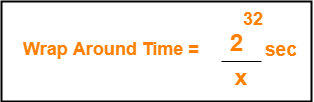
Wrap Around Time ∝ 1 / Bandwidth


Formula-


If bandwidth of the network = x bytes/sec, then-


Life Time Of TCP Segment-


In modern computers,

  • Life time of a TCP segment is 180 seconds or 3 minutes.
  • It means after sending a TCP segment, it might reach the receiver taking 3 minutes in the worst case.


How Wrap Around Is Possible?


It is possible to wrap around the sequence numbers because-

  • The life time of a TCP segment is just 180 seconds.
  • Wrap around time is much greater than life time of a TCP segment.
  • So, by the time the sequence numbers wrap around, there is no probability of existing any segment having the same sequence number.
  • Thus, even after wrapping around, the sequence number of all the bytes will be unique at any given time.


Reducing Wrap Around Time-


Wrap around time can be reduced to the life time of a TCP segment.


This is because-

  • After the life time of a segment completes, it is considered that the segment no longer exists.
  • So, sequence numbers used by the segment frees up and can be reused.


To reduce the wrap around time to the life time of segment,

  • There must exist as many sequence numbers as there are number of data bytes sent in time equal to life time of segment.


Formula-


Number of bits required in the sequence number field

so that wrap around time becomes equal to lifetime of TCP segment

= log2 (lifetime of TCP segment x Bandwidth)


  • The number of bits will be greater than 32 bits.
  • The extra bits are appended in the Options field of TCP header.


PRACTICE PROBLEMS BASED ON WRAP AROUND TIME IN TCP-


Problem-01:


Given the bandwidth of a network is 1 MB / sec. Calculate the wrap around time.


Solution-


We know,

  • Wrap around time = Time taken to use all the 232 sequence numbers.
  • TCP assigns 1 sequence number to each byte of data.


To calculate wrap around time, we just need to calculate how much time will be taken to send 232 bytes of data.


Now,

  • Given bandwidth = 1 MB / sec = 106 bytes / sec.
  • It means 106 bytes of data is sent in time = 1 sec.
  • So, 232 bytes of data will be sent in time = ( 1 / 106 ) x 232 sec.
  • On solving, we get 1.19 hours.


Thus,

  • It will take 1.19 hours to consume all the 232 sequence numbers if bandwidth = 1 MB / sec.
  • Wrap Around Time = 1.19 hours.


Alternatively,

Using the formula, we have-

Wrap Around Time

= 232 / 106 sec

= 1.19 hours


Problem-02:


If bandwidth of the network is 1 GBps, how many extra bits will have to be appended in the Options field so that wrap around time becomes equal to the life time of segment?


Solution-


For wrap around time to become equal to the life time of TCP segment,

Number of sequence numbers required = Number of bytes sent in life time of TCP segment


We know-

  • Life time of TCP segment = 180 sec.
  • Bandwidth of the network = 1 GBps (Given)


Now,

  • Number of bytes transferred in 1 sec = 1 GB
  • So, number of bytes transferred in 180 sec = 180 GB = 180 x 230 bytes
  • So, number of sequence numbers required = 180 x 230


Suppose y number of bits in the sequence number field are required to represent the value 180 x 230.


So, we have-

2y = 180 x 230

ylog2 = log(180 x 230)

y = log2(180 x 230)

y = log2180 + log2230

y = 7.49 + 30

y ≅ 38


From here,

  • Total number of bits required for sequence numbers = 38 bits.
  • In TCP header, sequence number field is a 32 bit field.
  • So, extra bits required to be appended in the Options field = 38 – 32 = 6 bits.


Alternatively,

Using the formula, we have-

Total bits required

= log2 (life time of TCP segment x bandwidth)

= log2 ( 180 x 230)

= log2180 + log2230

= 7.49 + 30

= 38


From here,

  • Total number of bits required for sequence numbers = 38 bits.
  • In TCP header, sequence number field is a 32 bit field.
  • So, extra bits required to be appended in the Options field = 38 – 32 = 6 bits.


Problem-03:


In a network that has a maximum TPDU size of 128 bytes, a maximum TPDU lifetime of 30 sec and 8 bit sequence number, what is the maximum data rate per connection?

(TPDU is Transport layer protocol data unit which is the segment.)


Solution-


Given-

  • Maximum segment size (MSS) = 128 bytes
  • Segment lifetime = 30 sec
  • Bits in sequence number = 8


Now,

  • Maximum number of possible sequence numbers using 8 bits = 28 = 256.
  • So, maximum number of bytes that can be uniquely identified = 256 bytes.
  • Lifetime of a segment = 30 seconds.
  • So, maximum amount of data that can be sent in 30 seconds = 256 bytes.


Thus,

Maximum data rate per connection

= 256 bytes / 30 seconds

≈ 68 bits/sec


Problem-04:


Suppose that the advertised window 1 MB long. If a sequence number is selected at random from the entire sequence number space, what is the probability that the sequence number falls inside the advertised window?


Solution-


We know,

  • Number of bits in sequence number field = 32 bits.
  • So, Maximum number of sequence numbers possible = 232.
  • 232 bytes of data can be labeled uniquely with these sequence numbers.
  • Advertised window size = 1 MB = 220 bytes which uses 220 sequence numbers.


Therefore,

Required probability

= 220 / 232

= 1 / 212


Next Article- Three Way Handshake


Get more notes and other study material of Computer Networks.

Watch video lectures by visiting our YouTube channel LearnVidFun.
Unicast Broadcast Multicast | IP Address

IP Address in Networking-


Before you go through this article, make sure that you have gone through the previous article on IP Address.


We have discussed-

  • IP Address is a 32 bit address that uniquely identifies each device on the network.
  • It is assigned by ISP to each device present on its network.


In this article, we will discuss about casting.


Casting in Networking-


Transmitting data (stream of packets) over the network is termed as casting.


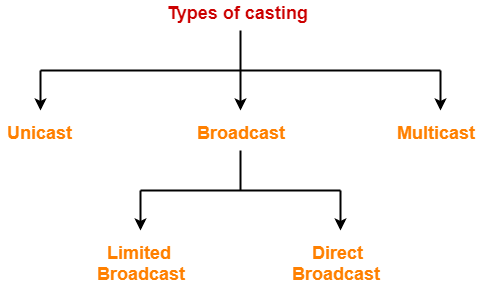
Types Of Casting-


  1. Unicast
  2. Broadcast
  3. Multicast


1. Unicast-


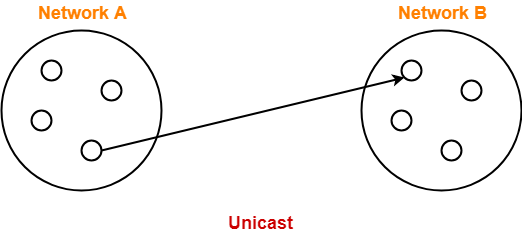
  • Transmitting data from one source host to one destination host is called as unicast.
  • It is a one to one transmission.


Example-


Host A having IP Address 11.1.2.3 sending data to host B having IP Address 20.12.4.2.

Here,

  • Source Address = IP Address of host A = 11.1.2.3
  • Destination Address = IP Address of host B = 20.12.4.2


2. Broadcast-


  • Transmitting data from one source host to all other hosts residing in the same or other network is called as broadcast.
  • It is a one to all transmission.


Based on recipient’s network, it is classified as-

  1. Limited Broadcast
  2. Direct Broadcast


A. Limited Broadcast-


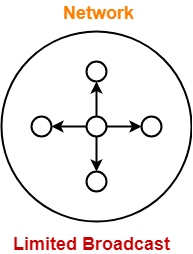
  • Transmitting data from one source host to all other hosts residing in the same network is called as limited broadcast.


NOTE

Limited Broadcast Address for any network

= All 32 bits set to 1

= 11111111.11111111.11111111.11111111

= 255.255.255.255


Example-


Host A having IP Address 11.1.2.3 sending data to all other hosts residing in the same network.

Here,

  • Source Address = IP Address of host A = 11.1.2.3
  • Destination Address = 255.255.255.255


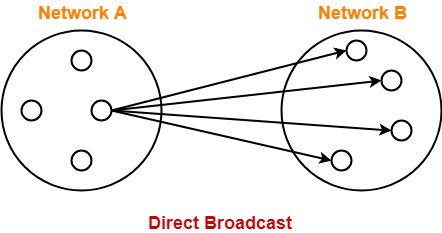
B. Direct Broadcast-


  • Transmitting data from one source host to all other hosts residing in some other network is called as direct broadcast.


NOTE

Direct Broadcast Address for any network is the IP Address where-

  • Network ID is the IP Address of the network where all the destination hosts are present.
  • Host ID bits are all set to 1.


Example-


Host A having IP Address 11.1.2.3 sending data to all other hosts residing in the network having IP Address 20.0.0.0

Here,

  • Source Address = IP Address of host A = 11.1.2.3
  • Destination Address = 20.255.255.255


3. Multicast-


  • Transmitting data from one source host to a particular group of hosts having interest in receiving the data is called as multicast.
  • It is a one to many transmission.


Examples-


  • Sending a message to a particular group of people on whatsapp
  • Sending an email to a particular group of people
  • Video conference or teleconference


MAC Address Vs IP Address-


The following table summarizes the differences between MAC Address and IP Address-


MAC Address IP Address
It stands for Media Access Control Address. It stands for Internet Protocol Address.
MAC Address identifies the physical address of a computer on the internet. IP Address identifies the connection of a computer on the internet.
Manufacturer of NIC card assigns the MAC Address. Network Administrator or ISP assigns the IP Address.
Reverse Address Resolution Protocol (RARP) is used for resolving physical (MAC) Address into IP address. Address Resolution Protocol (ARP) is used for resolving IP Address into physical (MAC) address.


NOTE-


  • Multicast makes use of IGMP (Internet Group Management Protocol) to identify its group.
  • Each group is assigned with an IP Address from class D of IPv4.


To gain better understanding about Unicast Broadcast Multicast,

Watch this Video Lecture


Next Article- Practice Problems On IP Address


Get more notes and other study material of Computer Networks.

Watch video lectures by visiting our YouTube channel LearnVidFun.
IP Address in Networking | Classes of IP Address

IP Address in Networking-


In networking,

  • IP Address is short for Internet Protocol Address.
  • It is a unique address assigned to each computing device in an IP network.
  • ISP assigns IP Address to all the devices present on its network.
  • Computing devices use IP Address to identify and communicate with other devices in the IP network.


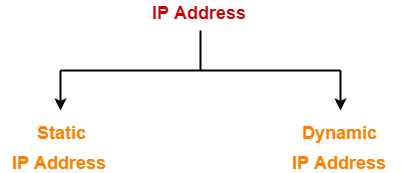
Types Of IP Address-


IP Addresses may be of the following two types-


  1. Static IP Address
  2. Dynamic IP Address


1. Static IP Address-


  • Static IP Address is an IP Address that once assigned to a network element always remains the same.
  • They are configured manually.


NOTE

  • Some ISPs do not provide static IP addresses.
  • Static IP Addresses are more costly than dynamic IP Addresses.


2. Dynamic IP Address-


  • Dynamic IP Address is a temporarily assigned IP Address to a network element.
  • It can be assigned to a different device if it is not in use.
  • DHCP or PPPoE assigns dynamic IP addresses.


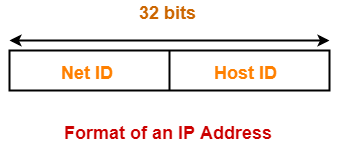
IP Address Format-


  • IP Address is a 32 bit binary address written as 4 numbers separated by dots.
  • The 4 numbers are called as octets where each octet has 8 bits.
  • The octets are divided into 2 components- Net ID and Host ID.


  1. Network ID represents the IP Address of the network and is used to identify the network.
  2. Host ID represents the IP Address of the host and is used to identify the host within the network.


IP Address Example-


Example of an IP Address is-

00000001.10100000.00001010.11110000

(Binary Representation)

OR

1.160.10.240

(Decimal Representation)


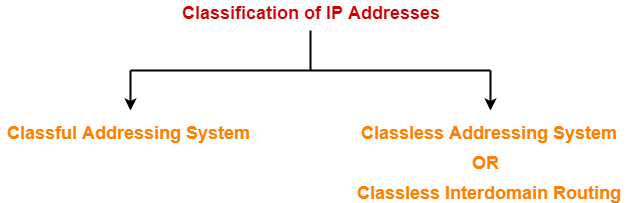
IP Addressing-


There are two systems in which IP Addresses are classified-


  1. Classful Addressing System
  2. Classless Addressing System


In this article, we will discuss about Classful Addressing System.

Learn about Classless Addressing System.


Classful Addressing-


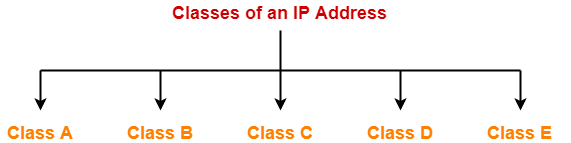
In Classful Addressing System, IP Addresses are organized into following 5 classes-


  1. Class A
  2. Class B
  3. Class C
  4. Class D
  5. Class E


1. Class A-


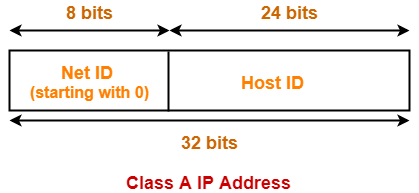
If the 32 bit binary address starts with a bit 0, then IP Address belongs to class A.


In class A IP Address,

  • The first 8 bits are used for the Network ID.
  • The remaining 24 bits are used for the Host ID.


Total Number Of IP Addresses-


Total number of IP Addresses available in class A

= Numbers possible due to remaining available 31 bits

= 231


Total Number Of Networks-


Total number of networks available in class A

= Numbers possible due to remaining available 7 bits in the Net ID – 2

= 27 – 2

= 126

(The reason of subtracting 2 is explained later.)


Total Number Of Hosts-


Total number of hosts that can be configured in class A

= Numbers possible due to available 24 bits in the Host ID – 2

= 224 – 2

(The reason of subtracting 2 is explained later.)


Range Of 1st Octet-


We have-

  • Minimum value of 1st octet = 00000000 = 0
  • Maximum value of 1st octet = 01111111 = 127


From here,

  • Range of 1st octet = [0, 127]
  • But 2 networks are reserved and unused.
  • So, Range of 1st octet = [1, 126]


Use-


  • Class A is used by organizations requiring very large size networks like NASA, Pentagon etc.


2. Class B-


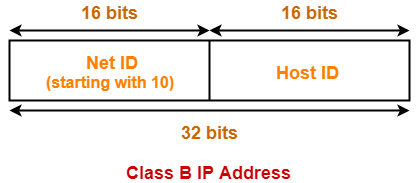
If the 32 bit binary address starts with bits 10, then IP Address belongs to class B.


In class B IP Address,

  • The first 16 bits are used for the Network ID.
  • The remaining 16 bits are used for the Host ID.


Total Number Of IP Addresses-


Total number of IP Addresses available in class B

= Numbers possible due to remaining available 30 bits

= 230


Total Number Of Networks-


Total number of networks available in class B

= Numbers possible due to remaining available 14 bits in the Net ID

= 214


Total Number Of Hosts-


Total number of hosts that can be configured in class B

= Numbers possible due to available 16 bits in the Host ID – 2

= 216 – 2


Range Of 1st Octet-


We have-

  • Minimum value of 1st octet = 10000000 = 128
  • Maximum value of 1st octet = 10111111 = 191


So, Range of 1st octet = [128, 191]


Use-


  • Class B is used by organizations requiring medium size networks like IRCTC, banks etc.


3. Class C-


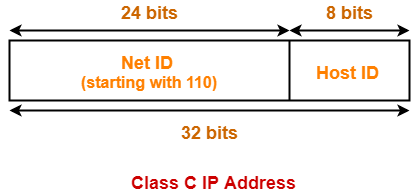
If the 32 bit binary address starts with bits 110, then IP Address belongs to class C.


In class C IP Address,

  • The first 24 bits are used for the Network ID.
  • The remaining 8 bits are used for the Host ID.


Total Number Of IP Addresses-


Total number of IP Addresses available in class C

= Numbers possible due to remaining available 29 bits

= 229


Total Number Of Networks-


Total number of networks available in class C

= Numbers possible due to remaining available 21 bits in the Net ID

= 221


Total Number Of Hosts-


Total number of hosts that can be configured in class C

= Numbers possible due to available 8 bits in the Host ID – 2

= 28 – 2


Range Of 1st Octet-


We have-

  • Minimum value of 1st octet = 11000000 = 192
  • Maximum value of 1st octet = 110111111 = 223


So, Range of 1st octet = [192, 223]


Use-


  • Class C is used by organizations requiring small to medium size networks.
  • For example- engineering colleges, small universities, small offices etc.


4. Class D-


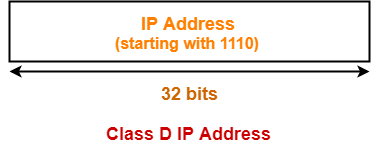
If the 32 bit binary address starts with bits 1110, then IP Address belongs to class D.


  • Class D is not divided into Network ID and Host ID.


Total Number Of IP Addresses-


Total number of IP Addresses available in class D

= Numbers possible due to remaining available 28 bits

= 228


Range Of 1st Octet-


We have-

  • Minimum value of 1st octet = 11100000 = 224
  • Maximum value of 1st octet = 11101111 = 239


So, Range of 1st octet = [224, 239]


Use-


  • Class D is reserved for multicasting.
  • In multicasting, there is no need to extract host address from the IP Address.
  • This is because data is not destined for a particular host.


5. Class E-


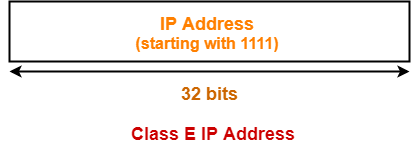
If the 32 bit binary address starts with bits 1111, then IP Address belongs to class E.


  • Class E is not divided into Network ID and Host ID.


Total Number Of IP Addresses-


Total number of IP Addresses available in class E

= Numbers possible due to remaining available 28 bits

= 228


Range Of 1st Octet-


We have-

  • Minimum value of 1st octet = 11110000 = 240
  • Maximum value of 1st octet = 11111111 = 255


So, Range of 1st octet = [240, 255]


Use-


  • Class E is reserved for future or experimental purposes.


Classes of IP Address-


All the classes of IP Address are summarized in the following table-


Class of IP Address Total Number of IP Addresses  1st Octet Decimal Range Number of Networks available Hosts per network Default Subnet Mask
Class A 231 1 – 126 27 – 2 224 – 2 255.0.0.0
Class B 230 128 – 191 214 216 – 2 255.255.0.0
Class C 229 192 – 223 221 28 – 2 255.255.255.0
Class D 228 224 – 239 Not defined Not defined Not defined
Class E 228 240 – 254 Not defined Not defined Not defined


Also Read- Practice Problems On IP Addressing


Important Notes-


Note-01:


  • All the hosts in a single network always have the same network ID but different Host ID.
  • However, two hosts in two different networks can have the same host ID.


Note-02:


  • A single network interface can be associated with more than one IP Address.


Note-03:


  • There is no relation between MAC Address and IP Address of a host.


Note-04:


  • IP Address of the network called Net ID is obtained by setting all the bits for Host ID to zero.


Note-05:


  • Class A Networks accounts for half of the total available IP Addresses.


Note-06:


In class A, total number of IP Addresses available for networks are 2 less.


  • This is to account for the two reserved network IP Addresses 0.xxx.xxx.xxx and 127.xxx.xxx.xxx.
  • IP Address 0.0.0.0 is reserved for broadcasting requirements.
  • IP Address 127.0.0.1 is reserved for loopback address used for software testing.


Note-07:


In all the classes, total number of hosts that can be configured are 2 less.


  • This is to account for the two reserved IP addresses in which all the bits for host ID are either zero or one.
  • When all Host ID bits are 0, it represents the Network ID for the network.
  • When all Host ID bits are 1, it represents the Broadcast Address.


Note-08:


  • Only those devices which have the network layer will have IP Address.
  •  So, switches, hubs and repeaters does not have any IP Address.


To gain better understanding about IP Addresses,

Watch this Video Lecture


Next Article- Casting | Types of Casting


Get more notes and other study material of Computer Networks.

Watch video lectures by visiting our YouTube channel LearnVidFun.
IP Fragmentation | Fragmentation in Networking

IP Fragmentation-


  • IP Fragmentation is a process of dividing the datagram into fragments during its transmission.
  • It is done by intermediary devices such as routers at the destination host at network layer.


Need-


  • Each network has its maximum transmission unit (MTU).
  • It dictates the maximum size of the packet that can be transmitted through it.
  • Data packets of size greater than MTU can not be transmitted through the network.
  • So, datagrams are divided into fragments of size less than or equal to MTU.


Datagram Fragmentation-


When router receives a datagram to transmit further, it examines the following-

  • Size of the datagram
  • MTU of the destination network
  • DF bit value in the IP header


Then, following cases are possible-


Case-01:


  • Size of the datagram is found to be smaller than or equal to MTU.
  • In this case, router transmits the datagram without any fragmentation.


Case-02:


  • Size of the datagram is found to be greater than MTU and DF bit set to 1.
  • In this case, router discards the datagram.


Case-03:


  • Size of the datagram is found to be greater than MTU and DF bit set to 0.
  • In this case, router divides the datagram into fragments of size less than or equal to MTU.
  • Router attaches an IP header with each fragment making the following changes in it.
  • Then, router transmits all the fragments of the datagram.


Changes Made By Router-


Router makes the following changes in IP header of each fragment-

  • It changes the value of total length field to the size of fragment.
  • It sets the MF bit to 1 for all the fragments except the last one.
  • For the last fragment, it sets the MF bit to 0.
  • It sets the fragment offset field value.
  • It recalculates the header checksum.


Also Read- IPv4 Header


IP Fragmentation Examples-


Now, lets us discuss some examples of IP fragmentation to understand how the fragmentation is actually carried out.


Example-01:


Consider-

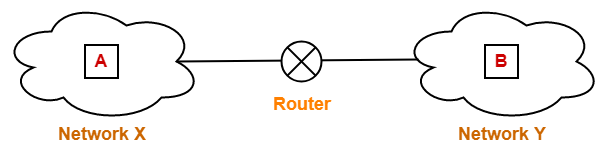
  • There is a host A present in network X having MTU = 520 bytes.
  • There is a host B present in network Y having MTU = 200 bytes.
  • Host A wants to send a message to host B.


Consider router receives a datagram from host A having-

  • Header length = 20 bytes
  • Payload length = 500 bytes
  • Total length = 520 bytes
  • DF bit set to 0


Now, router works in the following steps-


Step-01:


Router examines the datagram and finds-

  • Size of the datagram = 520 bytes
  • Destination is network Y having MTU = 200 bytes
  • DF bit is set to 0


Router concludes-

  • Size of the datagram is greater than MTU.
  • So, it will have to divide the datagram into fragments.
  • DF bit is set to 0.
  • So, it is allowed to create fragments of the datagram.


Step-02:


Router decides the amount of data that it should transmit in each fragment.


Router knows-

  • MTU of the destination network = 200 bytes.
  • So, maximum total length of any fragment can be only 200 bytes.
  • Out of 200 bytes, 20 bytes will be taken by the header.
  • So, maximum amount of data that can be sent in any fragment = 180 bytes.


Router uses the following rule to choose the amount of data that will be transmitted in one fragment-


RULE


The amount of data sent in one fragment is chosen such that-

  • It is as large as possible but less than or equal to MTU.
  • It is a multiple of 8 so that pure decimal value can be obtained for the fragment offset field.


NOTE


  • It is not compulsory for the last fragment to contain the amount of data that is a multiple of 8.
  • This is because it does not have to decide the fragment offset value for any other fragment.


Following the above rule,

  • Router decides to send maximum 176 bytes of data in one fragment.
  • This is because it is the greatest value that is a multiple of 8 and less than MTU.


Step-03:


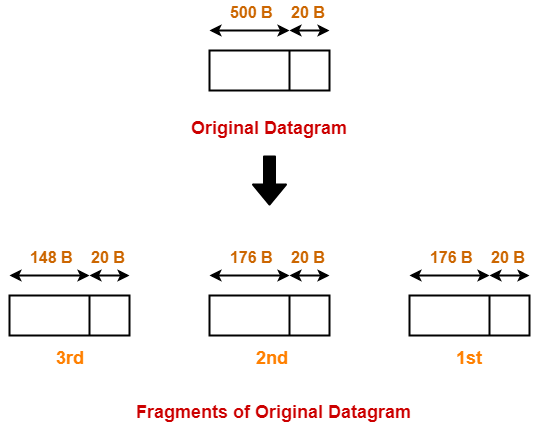
Router creates three fragments of the original datagram where-

  • First fragment contains the data = 176 bytes
  • Second fragment contains the data = 176 byes
  • Third fragment contains the data = 148 bytes


The information contained in the IP header of each fragment is-


Header Information Of 1st Fragment-


  • Header length field value = 20 / 4 = 5
  • Total length field value = 176 + 20 = 196
  • MF bit = 1
  • Fragment offset field value = 0
  • Header checksum is recalculated.
  • Identification number is same as that of original datagram.


Header Information Of 2nd Fragment-


  • Header length field value = 20 / 4 = 5
  • Total length field value = 176 + 20 = 196
  • MF bit = 1
  • Fragment offset field value = 176 / 8 = 22
  • Header checksum is recalculated.
  • Identification number is same as that of original datagram.


Header Information Of 3rd Fragment-


  • Header length field value = 20 / 4 = 5
  • Total length field value = 148 + 20 = 168
  • MF bit = 0
  • Fragment offset field value = (176 + 176) / 8 = 44
  • Header checksum is recalculated.
  • Identification number is same as that of original datagram.


Router transmits all the fragments.


Step-04:


At destination side,

  • Receiver receives 3 fragments of the datagram.
  • Reassembly algorithm is applied to combine all the fragments to obtain the original datagram.


Example-02:


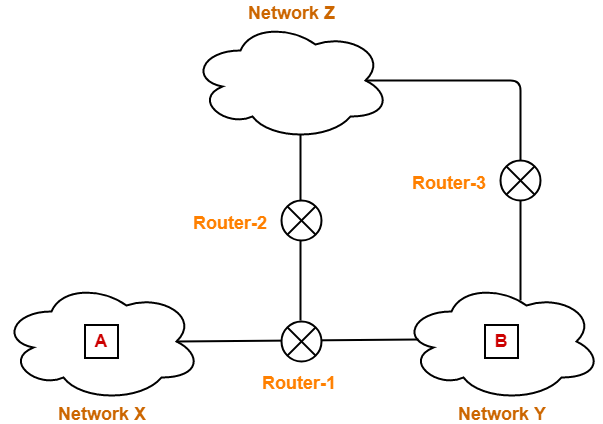
Consider-

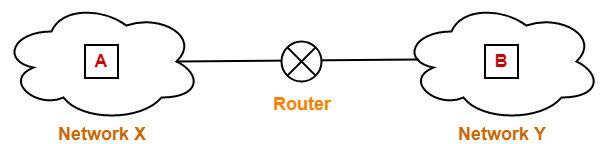
  • There is a host A present in network X having MTU = 520 bytes.
  • There is a host B present in network Y having MTU = 200 bytes.
  • There exists a network Z having MTU = 110 bytes.
  • Host A wants to send a message to host B.


Consider Router-1 receives a datagram from host A having-

  • Header length = 20 bytes
  • Payload length = 500 bytes
  • Total length = 520 bytes
  • DF bit set to 0


Consider Router-1 divides the datagram into 3 fragments as discussed in Example-01.


Then,

  • First fragment contains the data = 176 bytes
  • Second fragment contains the data = 176 byes
  • Third fragment contains the data = 148 bytes


Now, consider-

  • First and third fragment reaches the destination directly.
  • However,  second fragment takes its way through network Z and reach the destination through Router-3.


Journey Of Second Fragment-


Now, let us discuss the journey of fragment-2 and how it finally reaches the destination.


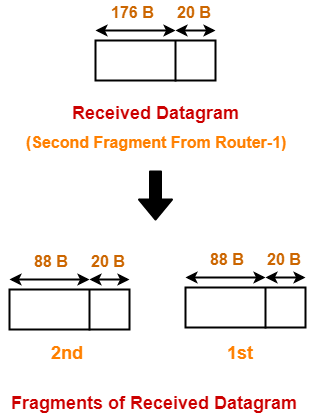
Router-2 receives a datagram (second fragment of original datagram) where-

  • Header length = 20 bytes
  • Payload length = 176 bytes
  • Total length = 196 bytes
  • DF bit set to 0


Now, Router-2 works in the following steps-


Step-01:


Router-2 examines the datagram and finds-

  • Size of the datagram = 196 bytes
  • Destination is network Z having MTU = 110 bytes
  • DF bit is set to 0


Router-2 concludes-

  • Size of the datagram is greater than MTU.
  • So, it will have to divide the datagram into fragments.
  • DF bit is set to 0.
  • So, it is allowed to create fragments of the datagram.


Step-02:


Router-2 decides the amount of data that it should transmit in each fragment.


Router-2 knows-

  • MTU of the destination network = 110 bytes.
  • So, maximum total length of any fragment can be only 110 bytes.
  • Out of 110 bytes, 20 bytes will be taken by the header.
  • So, maximum amount of data that can be sent in any fragment = 90 bytes.


Following the rule,

  • Router-2 decides to send maximum 88 bytes of data in one fragment.
  • This is because it is the greatest value that is a multiple of 8 and less than MTU.


Step-03:


Router-2 creates two fragments of the received datagram where-

  • First fragment contains the data = 88 bytes
  • Second fragment contains the data = 88 byes


The information contained in the IP header of each fragment is-


Header Information Of 1st Fragment-


  • Header length field value = 20 / 4 = 5
  • Total length field value = 88 + 20 = 108
  • MF bit = 1
  • Fragment offset field value = 176 / 8 = 22
  • Header checksum is recalculated.
  • Identification number is same as that of original datagram.


NOTE-


  • This fragment is NOT the first fragment of the original datagram.
  • It is the first fragment of the datagram received by Router-2.
  • The datagram received by Router-2 is the second fragment of the original datagram.
  • This datagram will serve as the second fragment of the original datagram.
  • Therefore, fragment offset field is set according to the first fragment of the original datagram.


Header Information Of 2nd Fragment-


  • Header length field value = 20 / 4 = 5
  • Total length field value = 88 + 20 = 108
  • MF bit = 1
  • Fragment offset field value = (176 + 88) / 8 = 33
  • Header checksum is recalculated.
  • Identification number is same as that of original datagram.


NOTE-


  • This fragment is NOT the last fragment of the original datagram.
  • It is the last fragment of the datagram received by Router-2.
  • The datagram received by Router-2 is the second fragment of the original datagram.
  • This datagram will serve as the third fragment of the original datagram.
  • There is another fragment of the original datagram that follows it.
  • That is why, here MF bit is not set to 0.


Router-2 transmits both the fragments which reaches the destination through Router-3.

Router-3 performs no fragmentation.


Step-04:


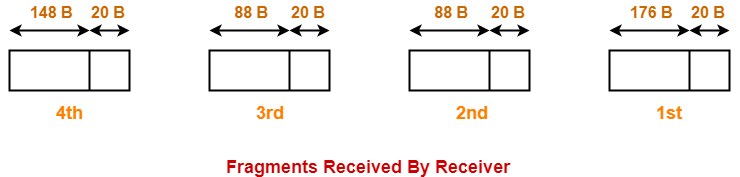
At destination side,

  • Receiver receives 4 fragments of the datagram.
  • Reassembly algorithm is applied to combine all the fragments to obtain the original datagram.


Reassembly Algorithm-


Receiver applies the following steps for reassembly of all the fragments-

  1. It identifies whether datagram is fragmented or not using MF bit and Fragment offset field.
  2. It identifies all the fragments belonging to the same datagram using identification field.
  3. It identifies the first fragment. Fragment with offset field value = 0 is the first fragment.
  4. It identifies the subsequent fragments using total length, header length and fragment offset.
  5. It repeats step-04 until MF bit = 0.


Fragment Offset field value for the next subsequent fragment

= ( Payload length of the current fragment / 8 ) + Offset field value of the current fragment

= ( Total length – Header length / 8 ) + Offset field value of the current fragment


Fragmentation Overhead-


  • Fragmentation of datagram increases the overhead.
  • This is because after fragmentation, IP header has to be attached with each fragment.


Total Overhead

= (Total number of fragmented datagrams – 1) x size of IP header


Efficiency = Useful bytes transferred / Total bytes transferred

OR

Efficiency = Data without header / Data with header


Bandwidth Utilization or Throughput = Efficiency x Bandwidth


Important Notes-


Note-01:


  • Source side does not require fragmentation due to wise segmentation by transport layer.
  • The transport layer looks at the datagram data limit and frame data limit.
  • Then, it performs segmentation in such a way that the resulting data can easily fit in a frame.
  • Thus, there is no need of fragmentation at the source side.


Note-02:


  • Datagrams from the same source to the same destination may take different routes in the network.


Note-03:


  • Fragment offset field value is set to 0 for the first fragmented datagram.
  • MF bit is set to 1 for all the fragmented datagrams except the last one.


Note-04:


  • Unique combinations of MF bit value and fragment offset value.


MF bit Offset value Represents
1 0 1st Fragment
1 !=0 Intermediate Fragment
0 !=0 Last Fragment
0 0 No Fragmentation


Note-05:


  • Identification number for all the fragments is same as that of the original datagram.
  • This is to identify all the fragments of the same datagram while re-assembling them.


Note-06:


  • Consider datagram goes through a path where different intermediaries having different bandwidths.
  • Then, while calculating the throughput, consider the minimum bandwidth since it act as a bottleneck.


Note-07:


  • Fragmentation is done by intermediary devices such as routers.
  • The reassembly of fragmented datagrams is done only after reaching the destination.


Note-08:


Reassembly is not done at the routers because-

  • All the fragments may not meet at the router.
  • Fragmented datagrams may reach the destination through independent paths.
  • There may be a need for further fragmentation.


Note-09:


If a fragment (say parent) is re fragmented into multiple datagrams then-

  1. The fragment offset value for the first re-fragment is always same as its parent.
  2. The MF bit bit value for the last re-fragment is always same as its parent.


To gain better understanding about IP Fragmentation,

Watch this Video Lecture


Next Article- Practice Problems On IP Fragmentation


Get more notes and other study material of Computer Networks.

Watch video lectures by visiting our YouTube channel LearnVidFun.