Month: May 2018

Participation Constraints | DBMS

Participation Constraints-


Before you go through this article, make sure that you have gone through the previous article on Introduction to ER Diagrams.


Participation constraints define the least number of relationship instances in which an entity must compulsorily participate.


Types of Participation Constraints-


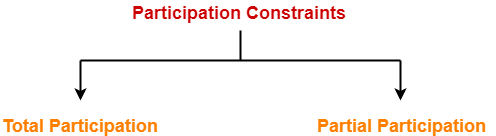
There are two types of participation constraints-


  1. Total participation
  2. Partial participation


1. Total Participation-


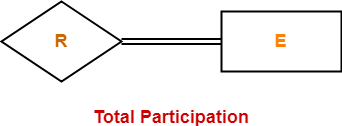
  • It specifies that each entity in the entity set must compulsorily participate in at least one relationship instance in that relationship set.
  • That is why, it is also called as mandatory participation.
  • Total participation is represented using a double line between the entity set and relationship set.


Example-


Here,

  • Double line between the entity set “Student” and relationship set “Enrolled in” signifies total participation.
  • It specifies that each student must be enrolled in at least one course.


Also read- Relationship Sets in DBMS and Entity Sets in DBMS


2. Partial Participation-


  • It specifies that each entity in the entity set may or may not participate in the relationship instance in that relationship set.
  • That is why, it is also called as optional participation.
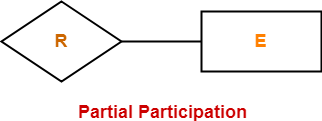
  • Partial participation is represented using a single line between the entity set and relationship set.


Example-


Here,

  • Single line between the entity set “Course” and relationship set “Enrolled in” signifies partial participation.
  • It specifies that there might exist some courses for which no enrollments are made.


Relationship between Cardinality and Participation Constraints-


Minimum cardinality tells whether the participation is partial or total.

  • If minimum cardinality = 0, then it signifies partial participation.
  • If minimum cardinality = 1, then it signifies total participation.

Maximum cardinality tells the maximum number of entities that participates in a relationship set.


Next Article- Types of Attributes in DBMS


Get more notes and other study material of Database Management System (DBMS).

Watch video lectures by visiting our YouTube channel LearnVidFun.

Relationship Sets | DBMS

Relationship in DBMS-


Before you go through this article, make sure that you have gone through the previous article on Introduction to ER Diagrams.


A relationship is defined as an association among several entities.


Example-


‘Enrolled in’ is a relationship that exists between entities Student and Course.


Also read- Entity Sets in DBMS


Relationship Set-


A relationship set is a set of relationships of same type.


Example-


Set representation of above ER diagram is-


Degree of a Relationship Set-


The number of entity sets that participate in a relationship set is termed as the degree of that relationship set. Thus,


Degree of a relationship set = Number of entity sets participating in a relationship set


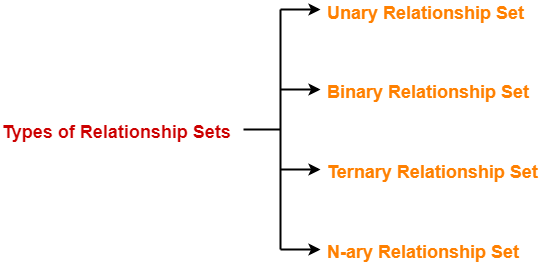
Types of Relationship Sets-


On the basis of degree of a relationship set, a relationship set can be classified into the following types-


  1. Unary relationship set
  2. Binary relationship set
  3. Ternary relationship set
  4. N-ary relationship set


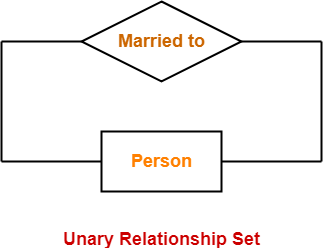
1. Unary Relationship Set-


Unary relationship set is a relationship set where only one entity set participates in a relationship set.


Example-

One person is married to only one person


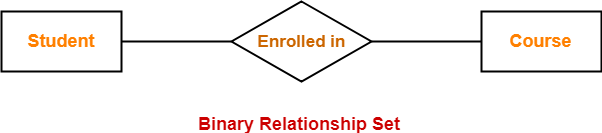
2. Binary Relationship Set-


Binary relationship set is a relationship set where two entity sets participate in a relationship set.


Example-

Student is enrolled in a Course


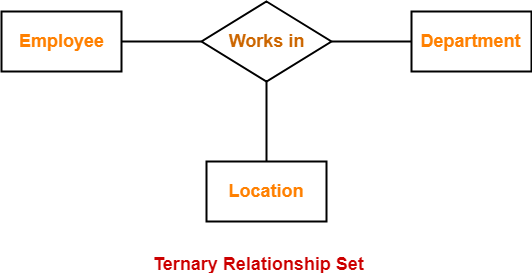
3. Ternary Relationship Set-


Ternary relationship set is a relationship set where three entity sets participate in a relationship set.


Example-


4. N-ary Relationship Set-


N-ary relationship set is a relationship set where ‘n’ entity sets participate in a relationship set.


Next Article- Cardinality in ER Diagram


Get more notes and other study material of Database Management System (DBMS).

Watch video lectures by visiting our YouTube channel LearnVidFun.

Graph Isomorphism | Isomorphic Graphs | Examples | Problems

Graph Isomorphism-


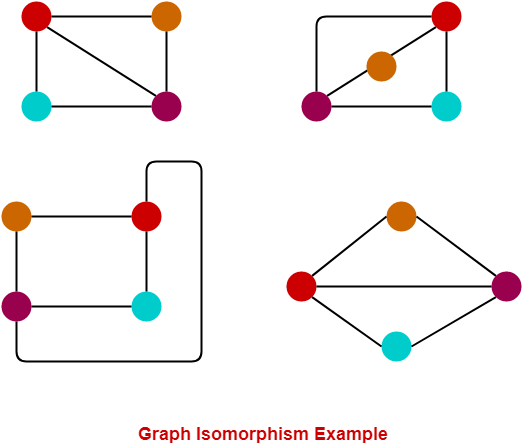
Graph Isomorphism is a phenomenon of existing the same graph in more than one forms.

Such graphs are called as Isomorphic graphs.


Graph Isomorphism Example-


Here,

  • The same graph exists in multiple forms.
  • Therefore, they are Isomorphic graphs.


Graph Isomorphism Conditions-


For any two graphs to be isomorphic, following 4 conditions must be satisfied-


  • Number of vertices in both the graphs must be same.
  • Number of edges in both the graphs must be same.
  • Degree sequence of both the graphs must be same.
  • If a cycle of length k is formed by the vertices { v1 , v2 , ….. , v} in one graph, then a cycle of same length k must be formed by the vertices { f(v1) , f(v2) , ….. , f(vk) } in the other graph as well.


Degree Sequence

Degree sequence of a graph is defined as a sequence of the degree of all the vertices in ascending order.


Important Points-


  • The above 4 conditions are just the necessary conditions for any two graphs to be isomorphic.
  • They are not at all sufficient to prove that the two graphs are isomorphic.
  • If all the 4 conditions satisfy, even then it can’t be said that the graphs are surely isomorphic.
  • However, if any condition violates, then it can be said that the graphs are surely not isomorphic.


Sufficient Conditions-


The following conditions are the sufficient conditions to prove any two graphs isomorphic.

If any one of these conditions satisfy, then it can be said that the graphs are surely isomorphic.


  • Two graphs are isomorphic if and only if their complement graphs are isomorphic.
  • Two graphs are isomorphic if their adjacency matrices are same.
  • Two graphs are isomorphic if their corresponding sub-graphs obtained by deleting some vertices of one graph and their corresponding images in the other graph are isomorphic.


PRACTICE PROBLEMS BASED ON GRAPH ISOMORPHISM-


Problem-01:


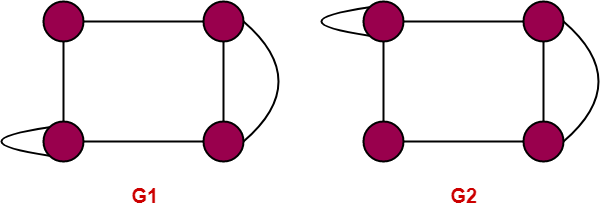
Are the following two graphs isomorphic?


Solution-


Checking Necessary Conditions-


Condition-01:


  • Number of vertices in graph G1 = 4
  • Number of vertices in graph G2 = 4


Here,

  • Both the graphs G1 and G2 have same number of vertices.
  • So, Condition-01 satisfies.


Condition-02:


  • Number of edges in graph G1 = 5
  • Number of edges in graph G2 = 6


Here,

  • Both the graphs G1 and G2 have different number of edges.
  • So, Condition-02 violates.


Since Condition-02 violates, so given graphs can not be isomorphic.

∴ G1 and G2 are not isomorphic graphs.


Problem-02:


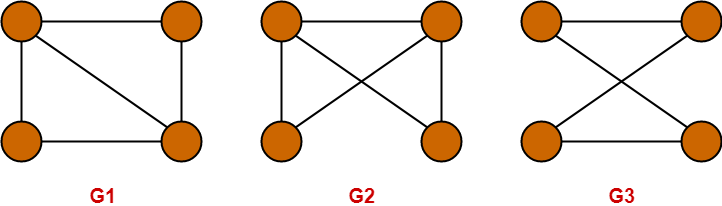
Which of the following graphs are isomorphic?


Solution-


Checking Necessary Conditions-


Condition-01:


  • Number of vertices in graph G1 = 4
  • Number of vertices in graph G2 = 4
  • Number of vertices in graph G3 = 4


Here,

  • All the graphs G1, G2 and G3 have same number of vertices.
  • So, Condition-01 satisfies.


Condition-02:


  • Number of edges in graph G1 = 5
  • Number of edges in graph G2 = 5
  • Number of edges in graph G3 = 4


Here,

  • The graphs G1 and G2 have same number of edges.
  • So, Condition-02 satisfies for the graphs G1 and G2.
  • However, the graphs (G1, G2) and G3 have different number of edges.
  • So, Condition-02 violates for the graphs (G1, G2) and G3.


Since Condition-02 violates for the graphs (G1, G2) and G3, so they can not be isomorphic.

∴ G3 is neither isomorphic to G1 nor G2.


Since Condition-02 satisfies for the graphs G1 and G2, so they may be isomorphic.

∴ G1 may be isomorphic to G2.


Now, let us continue to check for the graphs G1 and G2.


Condition-03:


  • Degree Sequence of graph G1 = { 2 , 2 , 3 , 3 }
  • Degree Sequence of graph G2 = { 2 , 2 , 3 , 3 }


Here,

  • Both the graphs G1 and G2 have same degree sequence.
  • So, Condition-03 satisfies.


Condition-04:


  • Both the graphs contain two cycles each of length 3 formed by the vertices having degrees { 2 , 3 , 3 }
  • It means both the graphs G1 and G2 have same cycles in them.
  • So, Condition-04 satisfies.


Thus,

  • All the 4 necessary conditions are satisfied.
  • So, graphs G1 and G2 may be isomorphic.


Now, let us check the sufficient condition.


Checking Sufficient Condition-


We know that two graphs are surely isomorphic if and only if their complement graphs are isomorphic.


So, let us draw the complement graphs of G1 and G2.

The complement graphs of G1 and G2 are-
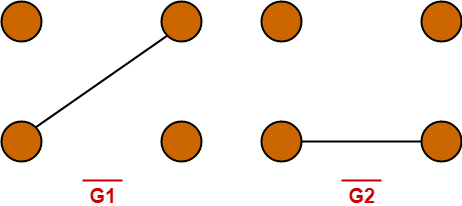


Clearly, Complement graphs of G1 and G2 are isomorphic.

∴ Graphs G1 and G2 are isomorphic graphs.


Problem-03:


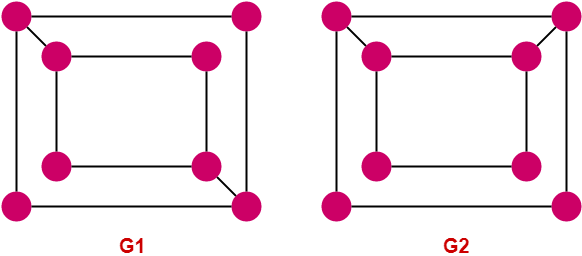
Are the following two graphs isomorphic?


Solution-


Checking Necessary Conditions-


Condition-01:


  • Number of vertices in graph G1 = 8
  • Number of vertices in graph G2 = 8


Here,

  • Both the graphs G1 and G2 have same number of vertices.
  • So, Condition-01 satisfies.


Condition-02:


  • Number of edges in graph G1 = 10
  • Number of edges in graph G2 = 10


Here,

  • Both the graphs G1 and G2 have same number of edges.
  • So, Condition-02 satisfies.


Condition-03:


  • Degree Sequence of graph G1 = { 2 , 2 , 2 , 2 , 3 , 3 , 3 , 3 }
  • Degree Sequence of graph G2 = { 2 , 2 , 2 , 2 , 3 , 3 , 3 , 3 }


Here,

  • Both the graphs G1 and G2 have same degree sequence.
  • So, Condition-03 satisfies.


Condition-04:


  • In graph G1, degree-3 vertices form a cycle of length 4.
  • In graph G2, degree-3 vertices do not form a 4-cycle as the vertices are not adjacent.


Here,

  • Both the graphs G1 and G2 do not contain same cycles in them.
  • So, Condition-04 violates.


Since Condition-04 violates, so given graphs can not be isomorphic.

∴ G1 and G2 are not isomorphic graphs.


To gain better understanding about Graph Isomorphism,

Watch this Video Lecture


Next Article- Complement of Graph


Get more notes and other study material of Graph Theory.

Watch video lectures by visiting our YouTube channel LearnVidFun.
finalize method in Java

What is finalize() method in Java?


  • finalize( ) method is a method of Object class which is called just before the destruction of an object by the garbage collector.
  • After finalize( ) method gets executed completely, the object automatically gets destroyed.
  • The purpose of calling finalize method is to perform activities related to clean up, resource deallocation etc.


Prototype-


Rules for finalize() method-


Rule-01:


We can override finalize( ) method in our class based on our requirements to define our own clean up activities.

finalize( )
{
    // Clean up activities
    // Resource deallocation activities
}


Rule-02:


When garbage collector calls the finalize( ) method, it is called on that object which has to be destroyed and the finalize( ) method of corresponding class gets executed.


Example-

Consider the following program-

class Test
{
    public static void main(String[ ] args)                   // A "main thread" gets introduced
    {
        String s = new String("Gate Vidyalay");               // A String object gets created
        s = null;                                             // String Object becomes eligible for garbage collection
        System.gc( );                                         // A request is made to JVM for running garbage collector ; A "gc thread" gets introduced
        System.out.println("End of main method");
    }

    public void finalize( )                                   // Test class finalize( ) method
    {
        System.out.println("Finalize method of Test class");
    }
}

Output-

End of main method


Analysis-


  • In the above program, we first created a new String object and then made it eligible for garbage collection by nullifying its reference variable. We then requested the JVM to run the garbage collector for collecting the String object.
  • According to rule-02, because a String object has become eligible for garbage collection, so we expect the garbage collector to call String class finalize( ) method which is known to have empty implementation and not the finalize( ) method of Test class.
  • The output of the program clearly shows that the finalize( ) method of String class gets executed and not the finalize( ) method of Test class because the print statement of finalize( ) method of Test class does not get executed.

This justifies our rule-02.


Rule-03:


We can call the finalize( ) method explicitly based on our requirements.

If called explicitly, finalize( ) method will execute as a normal method and object will not be destroyed. The object will be destroyed only when the finalize( ) method is called by the garbage collector itself.


Example-

Consider the following program-

class Test
{
   public static void main(String[ ] args)         // A "main thread" gets introduced
   {
      Test t = new Test( );                        // A Test object gets created
      t.finalize( );                               // Finalize( ) method is called explicitly
      t = null;                                    // Test object becomes eligible for garbage collection
      System.gc( );                                // A request is made to JVM for running garbage collector ; A "gc thread" gets introduced
      System.out.println("End of main method");
   }

   public void finalize( )                         // Test class finalize( ) method
   {
      System.out.println("Finalize method called");
   }
}

Output-

There are two possible outputs-

Finalize method called
End of main method
Finalize method called

         OR

Finalize method called 
End of main method


Analysis-


  • In the above program, we first created a new Test object and then called the finalize( ) method explicitly which executed the finalize( ) method of Test class and “Finalize method called” got printed on the console but the object did not get destroy. This justifies our rule-03.
  • Then, we made the Test object eligible for garbage collection by nullifying its reference variable and then introduced a gc thread in the system which requested the JVM to run the garbage collector for collecting the Test object.
  • Then, two threads got introduced in the system- main thread and gc thread.
  • We can’t predict exactly which thread completes its execution first. So, two outputs are possible as shown.


Rule-04:


  • If finalize( ) method is called explicitly by the programmer and while executing that finalize( ) method if any kind of exception occurs which is uncaught i.e. no catch block is present to catch the exception, then the program will terminate abnormally by raising that exception.
  • If finalize( ) method is called by the garbage collector and while executing that finalize( ) method if any kind of exception occurs which is uncaught i.e. no catch block is present to catch the exception, then JVM will ignore that exception and rest of the program will be executed normally.


Example-

Consider the following program-

class Test
{
   public static void main(String[ ] args)
   {
      Test t = new Test( );                              // A Test object gets created
      t.finalize( );                                     // Statement-01 (say)
      t = null;                                          // Test object becomes eligible for garbage collection
      System.gc( );                                      // A request is made to JVM for running garbage collector
      System.out.println("End of main method");
   }

   public void finalize( )                               // Test class finalize( ) method
   {
      System.out.println("Finalize method called");
      System.out.println(10/0);                          // This statement gives rise to Arithmetic Exception
   }
}


Case-01: When statement-01 is not commented-


  • When statement-01 is not commented, t.finalize( ); statement remains active which calls the finalize( ) method explicitly.
  • Finalize( ) method tries to evaluate the expression 10/0 which gives rise to an arithmetic exception and program terminates by raising that exception as shown by the output.


Output-

finalize method called
"Exception in thread "main" java.lang.ArithmeticException: / by zero"


Case-02: When statement-01 is commented-


  • When statement-01 is commented, t.finalize( ); statement goes dead and thus no explicit call is made to the finalize( ) method.
  • Now, the arithmetic exception raised by the implicit call to finalize( ) method is ignored by the JVM and the rest of the program executes normally as shown by the output.
  • Two outputs are possible because two threads exist in the system – main thread and gc thread and these threads can complete their execution in any order.


Output-

finalize method called
End of main method

        OR

End of main method
finalize method called


Rule-05:


Garbage collector calls the finalize( ) method only once on any object even though that object becomes eligible for garbage collection multiple times.


Get more notes and other study material of Core Java.

Watch video lectures by visiting our YouTube channel LearnVidFun.
Cardinality in ER Diagram | DBMS

Cardinality Constraint-


Before you go through this article, make sure that you have gone through the previous article on Introduction to ER Diagrams.


Cardinality constraint defines the maximum number of relationship instances in which an entity can participate.


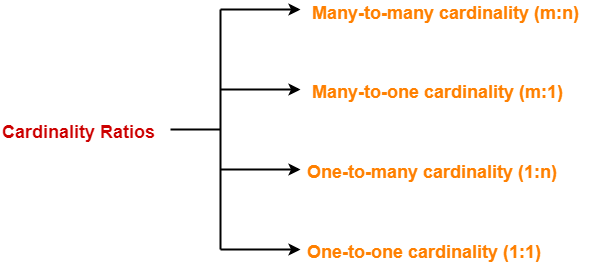
Types of Cardinality Ratios-


There are 4 types of cardinality ratios-


  1. Many-to-Many cardinality (m:n)
  2. Many-to-One cardinality (m:1)
  3. One-to-Many cardinality (1:n)
  4. One-to-One cardinality (1:1 )


Also read- Relationship Sets in DBMS and Entity Sets in DBMS


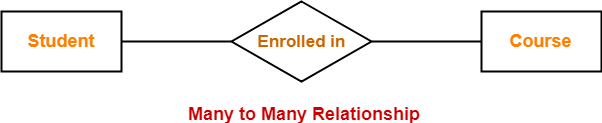
1. Many-to-Many Cardinality-


By this cardinality constraint,

  • An entity in set A can be associated with any number (zero or more) of entities in set B.
  • An entity in set B can be associated with any number (zero or more) of entities in set A.


Symbol Used-


Example-


Consider the following ER diagram-


Here,

  • One student can enroll in any number (zero or more) of courses.
  • One course can be enrolled by any number (zero or more) of students.


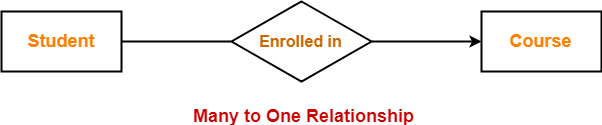
2. Many-to-One Cardinality-


By this cardinality constraint,

  • An entity in set A can be associated with at most one entity in set B.
  • An entity in set B can be associated with any number (zero or more) of entities in set A.


Symbol Used-


Example-


Consider the following ER diagram-


Here,

  • One student can enroll in at most one course.
  • One course can be enrolled by any number (zero or more) of students.


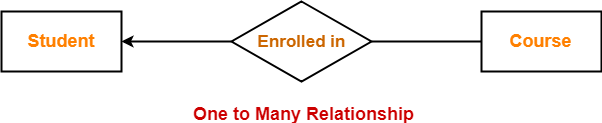
3. One-to-Many Cardinality-


By this cardinality constraint,

  • An entity in set A can be associated with any number (zero or more) of entities in set B.
  • An entity in set B can be associated with at most one entity in set A.


Symbol Used-


Example-


Consider the following ER diagram-


Here,

  • One student can enroll in any number (zero or more) of courses.
  • One course can be enrolled by at most one student.


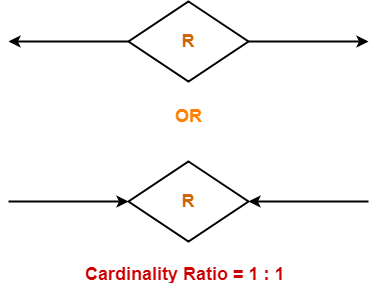
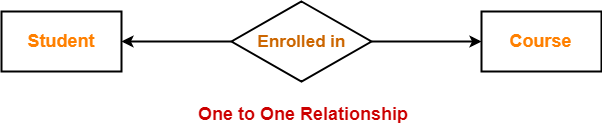
4. One-to-One Cardinality-


By this cardinality constraint,

  • An entity in set A can be associated with at most one entity in set B.
  • An entity in set B can be associated with at most one entity in set A.


Symbol Used-


Example-


Consider the following ER diagram-


Here,

  • One student can enroll in at most one course.
  • One course can be enrolled by at most one student.


Next Article- Participation Constraints


Get more notes and other study material of Database Management System (DBMS).

Watch video lectures by visiting our YouTube channel LearnVidFun.