Month: May 2018

ER Diagrams | ER Diagram Symbols

ER diagram-


  • ER diagram or Entity Relationship diagram is a conceptual model that gives the graphical representation of the logical structure of the database.
  • It shows all the constraints and relationships that exist among the different components.


Components of ER diagram-


An ER diagram is mainly composed of following three components-

  1. Entity Sets
  2. Attributes
  3. Relationship Set


Example-


Consider the following Student table-


Roll_no Name Age
1 Akshay 20
2 Rahul 19
3 Pooja 20
4 Aarti 19


This complete table is referred to as “Student Entity Set” and each row represents an “entity”.


Representation as ER Diagram-


The above table may be represented as ER diagram as-
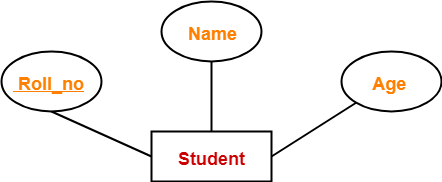


Here,

  • Roll_no is a primary key that can identify each entity uniquely.
  • Thus, by using student’s roll number, a student can be identified uniquely.


ER Diagram Symbols-


An ER diagram is composed of several components and each component in ER diagram is represented using a specific symbol.

ER diagram symbols are discussed below-


1. For Entity Sets-


An entity set is a set of same type of entities.

An entity refers to any object having-

  • Either a physical existence such as a particular person, office, house or car.
  • Or a conceptual existence such as a school or a company.


An entity set may be of the following two types-
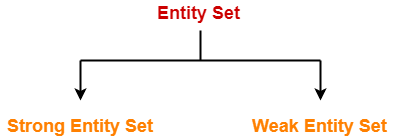


  1. Strong entity set
  2. Weak entity set


1. Strong Entity Set-


  • A strong entity set possess its own primary key.
  • It is represented using a single rectangle.


2. Weak Entity Set-


  • A weak entity set do not possess its own primary key.
  • It is represented using a double rectangle.
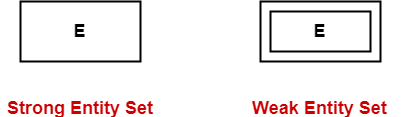


Read more- Entity Sets in DBMS


2. For Relationship Sets-


  • Relationship defines an association among several entities.
  • A relationship set is a set of same type of relationships.


A relationship set may be of the following two types-
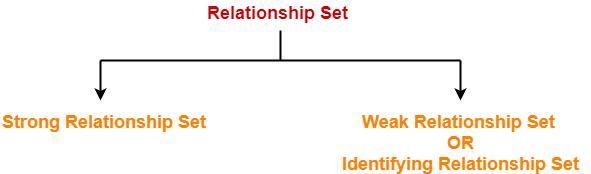


  1. Strong relationship set
  2. Weak relationship set


1. Strong Relationship Set-


  • A strong relationship exists between two strong entity sets.
  • It is represented using a diamond symbol.


2. Weak Relationship Set-


  • A weak or identifying relationship exists between the strong and weak entity set.
  • It is represented using a double diamond symbol.



Read more- Relationship Sets in DBMS


3. For Attributes-


  • Attributes are the properties which describes the entities of an entity set.
  • There are several types of attributes.
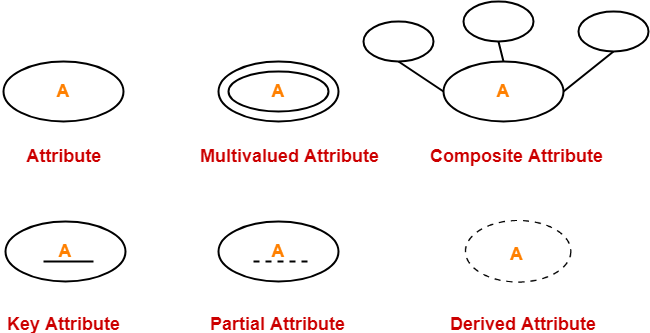


Read more- Attributes in ER Diagram


4. For Participation Constraints-


Participation constraint defines the least number of relationship instances in which an entity has to necessarily participate.

There are two types of participation constraints-
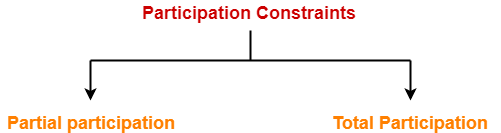


  1. Partial participation
  2. Total participation


1. Partial Participation-


Partial participation is represented using a single line between the entity set and relationship set.


2. Total Participation-


Total participation is represented using a double line between the entity set and relationship set.



Read more- Participation Constraints in DBMS


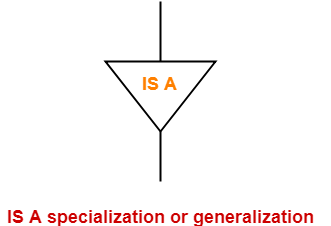
5. For Specialization and Generalization-


  • Generalization is a process of forming a generalized super class by extracting the common characteristics from two or more classes.
  • Specialization is a reverse process of generalization where a super class is divided into sub classes by assigning the specific characteristics of sub classes to them.


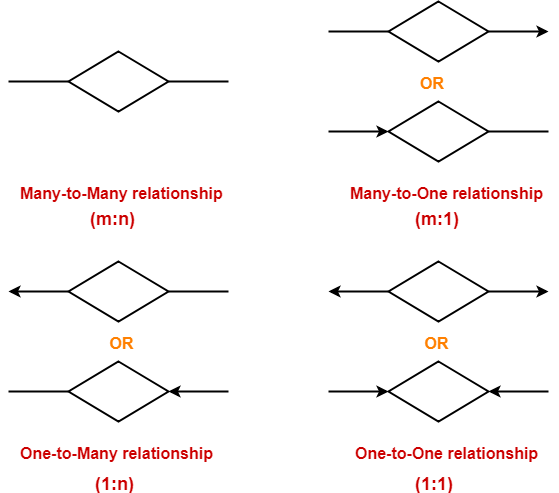
6. For Cardinality Constraints / Ratios-


Cardinality constraint defines the maximum number of relationship instances in which an entity can participate.

There are 4 types of cardinality ratios-
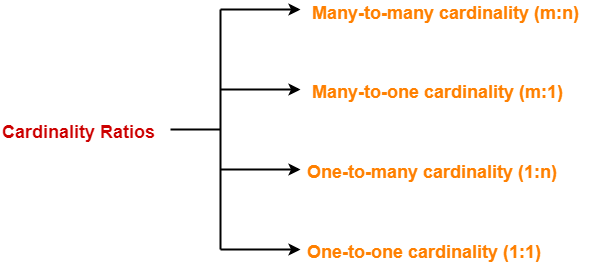


  1. Many-to-many cardinality (m:n)
  2. Many-to-one cardinality (m:1)
  3. One-to-many cardinality (1:n)
  4. One-to-one cardinality (1:1)


Read more- Cardinality Ratios in DBMS

Next Article- Entity Sets in DBMS


Get more notes and other study material of Database Management System (DBMS).

Watch video lectures by visiting our YouTube channel LearnVidFun.
Entity Sets in DBMS

Entity Set in DBMS-


Before you go through this article, make sure that you have gone through the previous article on Introduction to ER Diagrams.


An entity set is a set of same type of entities.


An entity refers to any object having-

  • Either a physical existence such as a particular person, office, house or car.
  • Or a conceptual existence such as a school, a university, a company or a job.


In ER diagram,

  • Attributes are associated with an entity set.
  • Attributes describe the properties of entities in the entity set.
  • Based on the values of certain attributes, an entity can be identified uniquely.


Types of Entity Sets-


An entity set may be of the following two types-


  1. Strong entity set
  2. Weak entity set


1. Strong Entity Set-


  • A strong entity set is an entity set that contains sufficient attributes to uniquely identify all its entities.
  • In other words, a primary key exists for a strong entity set.
  • Primary key of a strong entity set is represented by underlining it.


Symbols Used-


  • A single rectangle is used for representing a strong entity set.
  • A diamond symbol is used for representing the relationship that exists between two strong entity sets.
  • A single line is used for representing the connection of the strong entity set with the relationship set.
  • A double line is used for representing the total participation of an entity set with the relationship set.
  • Total participation may or may not exist in the relationship.


Example-


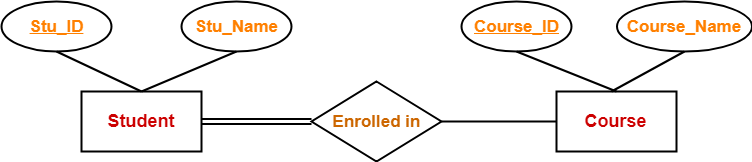
Consider the following ER diagram-


In this ER diagram,


  • Two strong entity sets “Student” and “Course” are related to each other.
  • Student ID and Student name are the attributes of entity set “Student”.
  • Student ID is the primary key using which any student can be identified uniquely.
  • Course ID and Course name are the attributes of entity set “Course”.
  • Course ID is the primary key using which any course can be identified uniquely.
  • Double line between Student and relationship set signifies total participation.
  • It suggests that each student must be enrolled in at least one course.
  • Single line between Course and relationship set signifies partial participation.
  • It suggests that there might exist some courses for which no enrollments are made.


2. Weak Entity Set-


  • A weak entity set is an entity set that does not contain sufficient attributes to uniquely identify its entities.
  • In other words, a primary key does not exist for a weak entity set.
  • However, it contains a partial key called as a discriminator.
  • Discriminator can identify a group of entities from the entity set.
  • Discriminator is represented by underlining with a dashed line.


NOTE-


  • The combination of discriminator and primary key of the strong entity set makes it possible to uniquely identify all entities of the weak entity set.
  • Thus, this combination serves as a primary key for the weak entity set.
  • Clearly, this primary key is not formed by the weak entity set completely.


Symbols Used-


  • A double rectangle is used for representing a weak entity set.
  • A double diamond symbol is used for representing the relationship that exists between the strong and weak entity sets and this relationship is known as identifying relationship.
  • A double line is used for representing the connection of the weak entity set with the relationship set.
  • Total participation always exists in the identifying relationship.


Example-


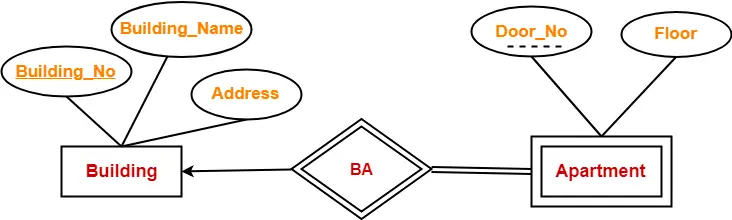
Consider the following ER diagram-


In this ER diagram,


  • One strong entity set “Building” and one weak entity set “Apartment” are related to each other.
  • Strong entity set “Building” has building number as its primary key.
  • Door number is the discriminator of the weak entity set “Apartment”.
  • This is because door number alone can not identify an apartment uniquely as there may be several other buildings having the same door number.
  • Double line between Apartment and relationship set signifies total participation.
  • It suggests that each apartment must be present in at least one building.
  • Single line between Building and relationship set signifies partial participation.
  • It suggests that there might exist some buildings which has no apartment.


To uniquely identify any apartment,

  • First, building number is required to identify the particular building.
  • Secondly, door number of the apartment is required to uniquely identify the apartment.


Thus,

Primary key of Apartment

= Primary key of Building + Its own discriminator

= Building number + Door number


Differences between Strong entity set and Weak entity set-


Strong entity set Weak entity set
A single rectangle is used for the representation of a strong entity set. A double rectangle is used for the representation of a weak entity set.
It contains sufficient attributes to form its primary key. It does not contain sufficient attributes to form its primary key.
A diamond symbol is used for the representation of the relationship that exists between the two strong entity sets. A double diamond symbol is used for the representation of the identifying relationship that exists between the strong and weak entity set.
A single line is used for the representation of the connection between the strong entity set and the relationship. A double line is used for the representation of the connection between the weak entity set and the relationship set.
Total participation may or may not exist in the relationship. Total participation always exists in the identifying relationship.


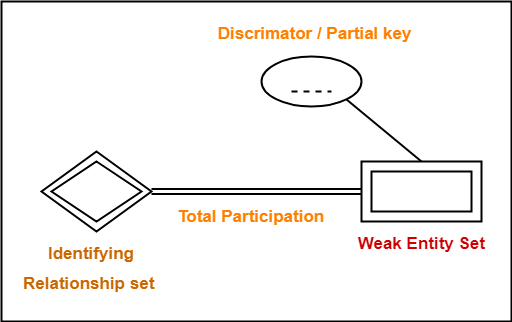
Important Note-


In ER diagram, weak entity set is always present in total participation with the identifying relationship set.

So, we always have the picture like shown here-


Next Article- Relationship Sets in DBMS


Get more notes and other study material of Database Management System (DBMS).

Watch video lectures by visiting our YouTube channel LearnVidFun.

Schedules in DBMS | Types of Schedules in DBMS

Schedules in DBMS-


Before you go through this article, make sure that you have gone through the previous article on Transactions in DBMS.


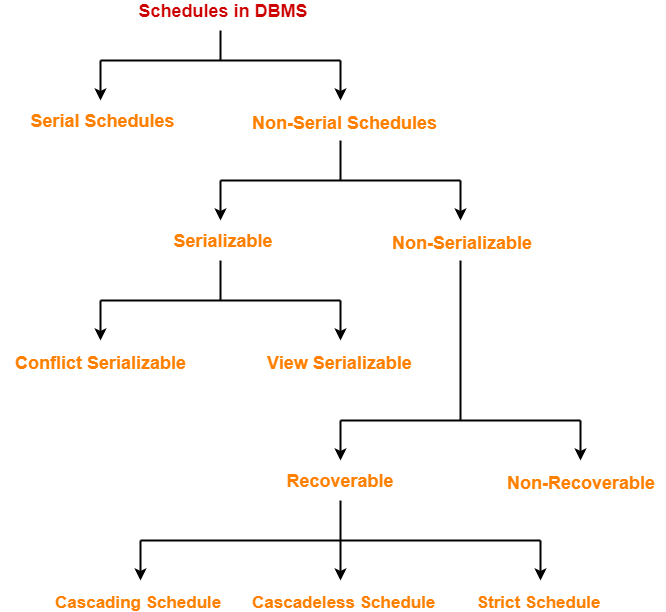
The order in which the operations of multiple transactions appear for execution is called as a schedule.


Types of Schedules-


In DBMS, schedules may be classified as-


In this article, we will discuss about Serial and Non-Serial Schedules.


Serial Schedules-


In serial schedules,

  • All the transactions execute serially one after the other.
  • When one transaction executes, no other transaction is allowed to execute.


Characteristics-


Serial schedules are always-

  • Consistent
  • Recoverable
  • Cascadeless
  • Strict


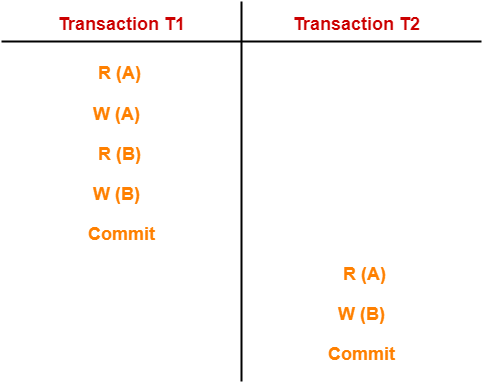
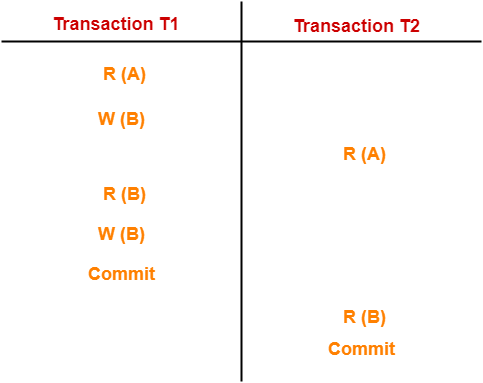
Example-01:


In this schedule,

  • There are two transactions T1 and T2 executing serially one after the other.
  • Transaction T1 executes first.
  • After T1 completes its execution, transaction T2 executes.
  • So, this schedule is an example of a Serial Schedule.


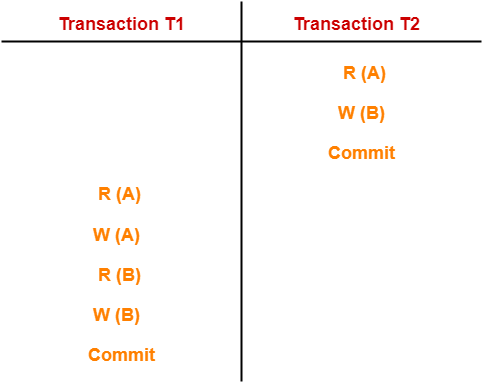
Example-02:


In this schedule,

  • There are two transactions T1 and T2 executing serially one after the other.
  • Transaction T2 executes first.
  • After T2 completes its execution, transaction T1 executes.
  • So, this schedule is an example of a Serial Schedule.


Non-Serial Schedules-


In non-serial schedules,

  • Multiple transactions execute concurrently.
  • Operations of all the transactions are inter leaved or mixed with each other.


Characteristics-


Non-serial schedules are NOT always-

  • Consistent
  • Recoverable
  • Cascadeless
  • Strict


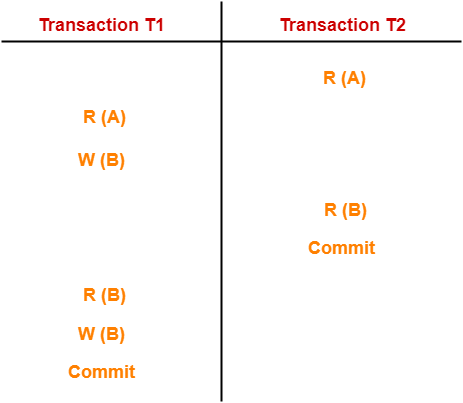
Example-01:


In this schedule,

  • There are two transactions T1 and T2 executing concurrently.
  • The operations of T1 and T2 are interleaved.
  • So, this schedule is an example of a Non-Serial Schedule.


Example-02:


In this schedule,

  • There are two transactions T1 and T2 executing concurrently.
  • The operations of T1 and T2 are interleaved.
  • So, this schedule is an example of a Non-Serial Schedule.


Finding Number Of Schedules-


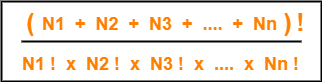
Consider there are n number of transactions T1, T2, T3 …. , Tn with N1, N2, N3 …. , Nn number of operations respectively.


Total Number of Schedules-


Total number of possible schedules (serial + non-serial) is given by-


Total Number of Serial Schedules-


Total number of serial schedules

= Number of different ways of arranging n transactions

= n!


Total Number of Non-Serial Schedules-


Total number of non-serial schedules

= Total number of schedules – Total number of serial schedules


PRACTICE PROBLEM BASED ON FINDING NUMBER OF SCHEDULES-


Problem-


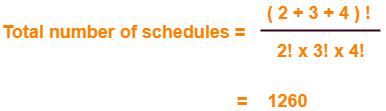
Consider there are three transactions with 2, 3, 4 operations respectively, find-

  1. How many total number of schedules are possible?
  2. How many total number of serial schedules are possible?
  3. How many total number of non-serial schedules are possible?


Solution-


Total Number of Schedules-


Using the above formula, we have-


Total Number of Serial Schedules-


Total number of serial schedules

= Number of different ways of arranging 3 transactions

= 3!

= 6


Total Number of Non-Serial Schedules-


Total number of non-serial schedules

= Total number of schedules – Total number of serial schedules

= 1260 – 6

= 1254


Next Article- Serializability in DBMS


Get more notes and other study material of Database Management System (DBMS).

Watch video lectures by visiting our YouTube channel LearnVidFun.
Constructors in Java

Elements of a class in Java-

Java is a class based language where the entire code is written inside a class.

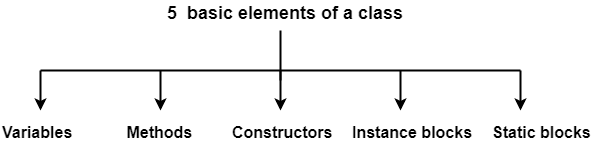
Any class written in Java consists of the following 5 elements-

  1. Variables
  2. Methods
  3. Constructors
  4. Instance blocks
  5. Static blocks


In this post, we will discuss about the constructors of Java in detail.


Constructors in Java-


Constructor is an element of a class which serves the following two purposes-

  1. Constructors can be used to initialize the instance variables during object creation. (Main purpose)
  2. Constructors can also be used to write the logic of the program which has to be executed automatically on the creation of the objects.


When do constructors execute?


Constructors are automatically executed on the creation of the objects. Whenever any new object gets created, the constructor corresponding to it is automatically executed.


Rules for writing the constructors in Java-


There are some rules which we must keep in our minds while working with the constructors. They are as follows-


Rule-01:


The constructor name and the class name must always be same. So, the while naming the constructor, always make sure that it is same as class name.


Rule-02:


Constructors can never have any return type (not even void) and that’s why constructors can not return any value explicitly.

However, constructors return instance of the current class implicitly.


Note-

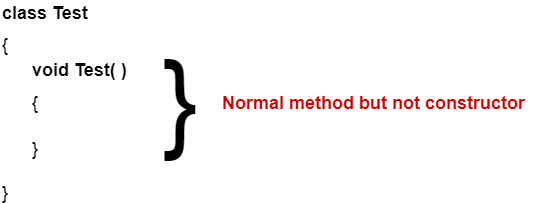
If we mention some return type of the constructor by mistake, then we will not get any compile time error or run time error. Compiler considers it as a normal instance method.


Example-


So, it is perfectly legal to have a method in class having exactly same name as class name but it is not recommended.


Rule-03:


Only the following listed modifiers can be used for constructors-

  • public
  • private
  • protected
  • default

If we try to use any other modifier, then compiler generates a compile time error saying-

“modifier xxx is not allowed here”


Rule-04:


The very first line inside every constructor (whether default or parameterized) has to be either this( ) or super( ) with or without arguments where this( ) calls the current class constructor and super( ) calls the super class constructor.

If we don’t mention any of these calling methods, compiler always calls the super class constructor method automatically by writing super( ) as a first statement inside every constructor.


Types of Constructors in Java-


Constructors are mainly classified into 2 types-

  1. Default constructor
  2. Parameterized constructors


1. Default Constructor-


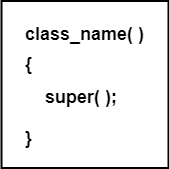
  • Default constructor is a 0 argument constructor which contains a no argument call to super class constructor.
  • To assign default values to the newly created objects is the main responsibility of default constructor.
  • Compiler writes a default constructor in the code only if the programmer does not write any constructor in the class.
  • The access modifier of default constructor is always same as class modifier. But this rule is applicable only for “public” and “default” modifiers.


Syntax-


When will compiler add a default constructor?


Compiler adds a default constructor to the code only when the programmer writes no constructor in his code from his side.

If programmer writes any constructor in his code, then the compiler does not add any constructor from its side.

Then, it is the responsibility of the programmer to write the default constructor in his code if he requires it.

In that case, it’s no more called a default constructor rather it is called a 0 argument constructor as it is written by the programmer and not added by default by the compiler.

So, It is important to note that-


Every default constructor is a 0 argument constructor but every 0 argument constructor is not a default constructor.


2. Parameterized Constructors-


  • Parameterized constructors are the constructors having specific number of arguments passed to them.
  • The purpose of parameterized constructors is to assign user-wanted specific values to the instance variables of different objects.


Difference between default constructor and parameterized constructors-


Default Constructor Parameterized Constructors
Default constructor is always a 0 argument constructor. Parameterized constructor have specific number of arguments passed to them.
Default constructor is written by the compiler. Parameterized constructor is written explicitly by the programmer.
Default constructor initializes the instance variables of every object with the same values which are the predefined default values of the variables. Parameterized constructor initializes the instance variables of every object with the different values which are the values passed to the constructor by the programmer while creating the objects.


Programmer Code and Compiler Generated Code-


It is interesting to know how the code written by the programmer is modified by the compiler after the compilation.

Based on the rules and concepts mentioned above, compiler modifies the programmer’s code.

This has been illustrated with the help of following cases-


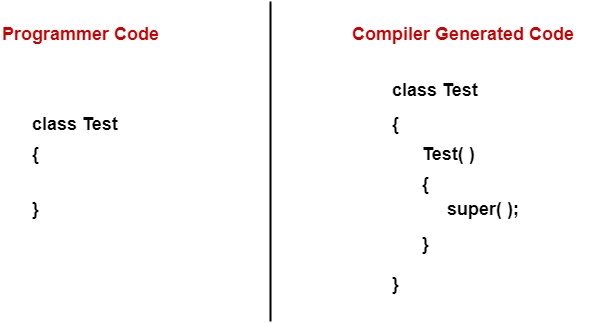
Case-01:


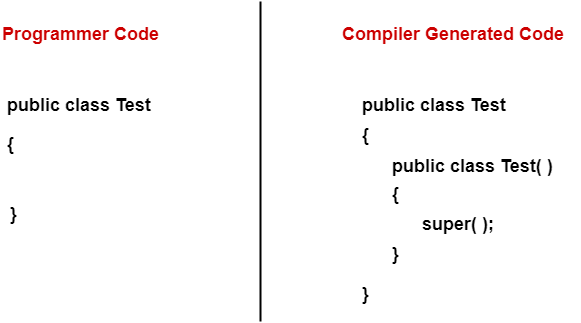
Here, the programmer does not write any constructor inside the class from his side. So, compiler adds the default constructor from its side as shown.


Case-02:


This case is similar to case-01 except that here the class has been declared with modifier “public” by the programmer. So, compiler adds the modifier “public” to the default constructor that it adds from its side.

(Refer rule-03 above)


Case-03:


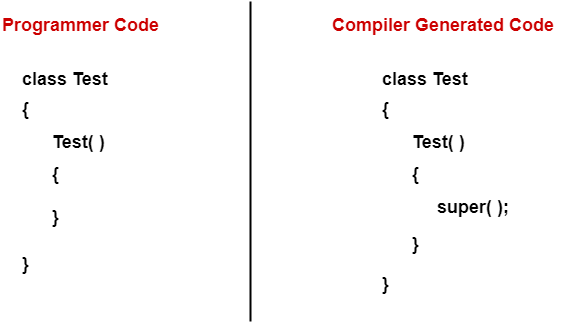
Here, the programmer writes a 0 argument constructor explicitly. So, compiler does not add the default constructor from its side.

However, because inside every constructor, first statement has to be either this( ) or super( ) and because programmer does not write anything out of these from his side so compiler adds the super( ) statement from its side which is a call to the super class constructor.

(Refer rule-04 above)


Program illustrating the use of constructors in Java-

class Student
{  
    int roll_no;  
    String stu_name;  
      
    Student(int i , String n)               // Parameterized constructor
    {  
       roll_no = i;                         // Instance Variable
       stu_name = n;                        // Instance Variable
    }  

    void display()
    {
       System.out.println(roll_no+" "+stu_name);
    }  
   
    public static void main(String args[])
    {  
       Student s1 = new Student(1,"Akshay");  
       Student s2 = new Student(2,"Rajat");  
       s1.display();  
       s2.display();  
    }  
}

Output-

1 Akshay
2 Rajat


Analysis-


In the above program, programmer defines one parameterized constructor with 2 parameters. So, now compiler adds no default constructor to the code and neither the programmer has written any 0 argument constructor.

So, in the above code if we write the following statement in the main method-

Student s3 = new Student( );

Then, a compile time error would be raised by the compiler because there is no 0 argument constructor Student( ) in the code.


Get more notes and other study material of Core Java.

Watch video lectures by visiting our YouTube channel LearnVidFun.
Instance blocks in Java

Elements of a class in Java-

Java is a class based language where the entire code is written inside a class.

Any class written in Java consists of the following 5 elements-

  1. Variables
  2. Methods
  3. Constructors
  4. Instance blocks
  5. Static blocks


In this post, we will discuss about the instance blocks of Java in detail.


Instance blocks in Java-


Instance block is an element of a class which serves the same two purposes as served by the constructors.

These two purposes are-

  1. Just like constructors, instance blocks can be used to initialize the instance variables during object creation.
  2. Just like constructors, instance blocks can also be used to write the logic of the program which has to be executed automatically for all objects during their creation. (Main Purpose)


When do instance blocks execute?


If any instance block exists in the program, then for every object during its creation, first of all that instance block will be executed and then its specific constructor will be executed.


Need of instance blocks-


Because instance blocks are executed whenever the object of any kind is created, so if we want to write a logic which we want to execute on the creation of all kinds of objects, then using instance blocks is a good idea to avoid writing the same logic inside every constructor.


Note-


Although instance blocks can be used for the initialization of objects but we generally don’t use them for the initialization of objects because they can not accept the parameters.

However, if we still use instance blocks for the purpose of initialization, then all the objects will have to be initialized with the same values which is practically useless.

That is why, we mainly use constructors for the initialization of objects.


Syntax-

{
   // This is called as instance block
}


Program illustrating the use of instance blocks-

class Test
{
   Test( )                                            // This constructor will get executed for 1st kind of object 
   {
      System.out.println("0 argument constructor");
   }

   Test(int a)                                        // This constructor will get executed for 2nd kind of object
   {
      System.out.println("1 argument constructor");
   }

   Test(int a , int b)                                // This constructor will get executed for 3rd kind of object
   {
      System.out.println("2 arguments constructor");
   }

   {                                                  // Creation of an instance block
      System.out.println("Instance block");          
   }

   public static void main(String[ ] args)
   {
      new Test( );                                      // Object of 1st kind
      new Test(10);                                     // Object of 2nd kind
      new Test(10,20);                                  // Object of 3rd kind
   }
}

OUTPUT-

Instance block
0 argument constructor
Instance block
1 argument constructor
Instance block
2 arguments constructor


It can be clearly observed from the above program that whenever any object gets created, first of all instance block is executed and then its specific constructor is executed.


Multiple instance blocks-


  • It is possible to have multiple instance blocks inside a single class.
  • The execution of these multiple instance blocks take place from top to bottom.


Program illustrating the use of multiple instance blocks-

class Test
{
   Test( )
   {
      System.out.println("0 argument constructor");
   }

   Test(int a)
   {
      System.out.println("1 argument constructor");
   }

   {
      System.out.println("Instance block-01");
   }

   {
      System.out.println("Instance block-02");
   }

   public static void main(String[ ] args)
   {
      new Test( );
      new Test(10);
   }
}

OUTPUT-

Instance block-01
Instance block-02
0 argument constructor
Instance block-01
Instance block-02
1 argument constructor


Important Points to note-


  • Instance block will be executed only once for each object during its creation.
  • So, the number of times an instance block is executed signifies the number of objects created in the program.
  • The execution of instance block depends only on the object creation and not on the execution of a constructor.


Comparison between instance block and constructor-


Instance block Constructor
Instance block logic are common for all the objects. Constructor logic are specific to the objects.
Instance block will be executed only once for each object during its creation. We can execute the constructors multiple times for a single object by placing the call to them in other constructors.
Instance block will be executed only as many times as there are number of objects created in the program. It is not necessary for the constructors as they may be called explicitly.
Instance blocks are mainly used for writing the common logic which we want to execute for all the objects. Constructors are mainly used for the initializing of objects.


Get more notes and other study material of Core Java.

Watch video lectures by visiting our YouTube channel LearnVidFun.