Month: May 2018

Variables in Java with examples

Elements of a class in Java-

Java is a class based language where the entire code is written inside a class.

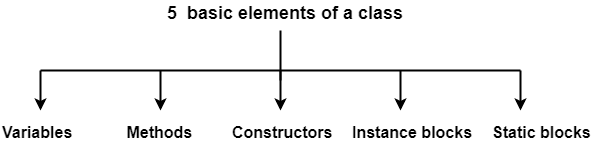
Any class written in Java consists of the following 5 elements-

  1. Variables
  2. Methods
  3. Constructors
  4. Instance blocks
  5. Static blocks


In this post, we will discuss about the variables of Java in detail.

[the_ad id=”10341″]

Variables in Java-


  • Variable is an element of a class that is used for storing the values.
  • It is basically a name that is assigned to a memory location where a particular value is stored.


Concept of Areas in Java-

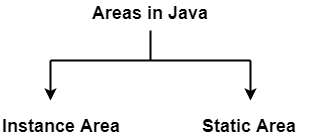
In any java program, the area can be classified into 2 types-

  1. Instance Area
  2. Static Area


1. Instance area-

Instance area is the area inside instance methods or instance blocks or constructors.

Example-

void m1( )           // "Instance Method" 
{ 
   // This area is called "Instance Area" 
}


2. Static area-

Static area is the area inside static methods or static blocks.

Example-

static void m1( )   // Static Method
{
   // This area is called "Static Area"
}


Types of Variables in Java-


Variables in Java can be broadly classified into following three types-
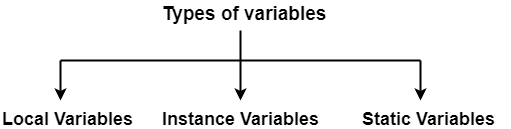


1. Local Variables-


  • Variables declared inside the methods or constructors or blocks are called as local variables.
  • The scope of local variables is within that particular method or constructor or block in which they have been declared.
  • Local variables are allocated memory when the method or constructor or block in which they are declared is invoked and memory is released after that particular method or constructor or block is executed.
  • Stack memory is allocated for storing local variables.
  • JVM takes no responsibility for assigning default value to the local variables. It is the responsibility of the programmer to initialize the local variables explicitly before using them otherwise syntax error is raised. It is important to note that no error will be raised as long as the uninitialized local variables are not used.


How to access local variables?


  • They can be called directly with their names.


2. Instance Variables-


  • Variables declared outside the methods or constructors or blocks but inside the class are called as instance variables.
  • The scope of instance variables is inside the class and therefore all methods, constructors and blocks can access them.
  • Instance variables are allocated memory during object creation and memory is released during object destruction. If no object is created, then no memory is allocated.
  • For each object, a separate copy of instance variable is created.
  • Heap memory is allocated for storing instance variables.
  • It is the responsibility of the JVM to assign default value to the instance variables as per the type of variable.


How to access instance variables?


  • Instance variables can be called directly inside the instance area.
  • Instance variables can not be called directly inside the static area and necessarily requires an object reference for calling them.


3. Static Variables-


  • Variables declared with “static” modifier outside the methods or constructors or blocks but inside the class are called as static methods.
  • The scope of static variables is inside the class and therefore all methods, constructors and blocks can access them.
  • Static variables are allocated memory during loading of .class file by the JVM and memory is released during unloading of .class file.
  • A single copy gets created for the static variables and this single copy is shared by all the objects belonging to that class.
  • Non-heap memory is allocated for storing static variables.
  • It is the responsibility of the JVM to assign default value to the static variables as per the type of variable.


Since, static variables are associated with the entire class, they are popularly called as class variables.


How to access static variables?


  • It is allowed to call static variables by using class name and dot operator. (Recommended)
  • It is allowed to call static variables directly within the same package.
  • It is allowed to call static variables by using object reference and dot operator.


NOTE-


  • Although static variables can be accessed using object reference and dot operator but it is not recommended because it does not make it clear that we are talking about the class variables.

Always make a habit of calling the static variables using class name and dot operator.


Default values of the variables-


JVM assigns default value to the instance and static variables automatically when the programmer does not initialize the variables with some value.

However, JVM takes no responsibility for initializing the local variables with default values.

The default values are assigned as per the following table-


Data Type of the variable Default Value
byte 0
short 0
int 0
long 0
float 0.0
double 0.0
char <single space>
Boolean False
class Null


Real life example illustrating where to use what kind of variable-


  • We must declare the variable as instance variable if the value of that variable will be different for different objects.
  • We must declare the variable as static variable if the value of that variable will be same for different objects so as to save the memory.


Example-01:


  • If we are creating a class ‘Student‘, then in that class all the Student objects will obviously have different names but the school name for all the students will be definitely same.
  • So, we can declare the variable ‘student_name’ as instance variable and variable ‘school_name‘ as static variable.
  • If we would have declared variable ‘school_name‘ as instance variable, then one copy of it would have been created for each Student object and the memory would be wasted unnecessarily.


class Student
{
   static String school_name;
   String student_name;
}


Example-02:


  • If we are creating a class ‘Employee‘, then in that class all the Employee objects will obviously have different names but the company name for all the employees will be definitely same.
  • So, we can declare the variable ’employee_name’ as instance variable and variable ‘company_name‘ as static variable.
  • If we would have declared variable ‘company_name‘ as instance variable, then one copy of it would have been created for each Employee object and the memory would be wasted unnecessarily.


class Employee
{
   static String company_name;
   String employee_name;
}


Comparison table of different types of variables in Java-


  Local Variables Instance Variables Static Variables
Declaration place Inside the methods or constructors or blocks. Outside the methods or constructors or blocks but inside the class. Outside the methods or constructors or blocks but inside the class.
Scope Within that particular method or constructor or block in which they have been declared. Inside the class. Inside the class.
Time of memory allocation Memory is allocated when the method or constructor or block in which they are declared is invoked. Memory is allocated during object creation. Memory is allocated during loading of .class file by the JVM.
Time of memory deallocation Memory is released after that particular method or constructor or block is executed. Memory is released during object destruction. Memory is released during unloading of .class file.
Storing place Stack memory Heap memory Non-heap memory
Assigning of default values Responsibility of programmer to initialize with values.

JVM takes no responsibility for initializing with default values.

Responsibility of JVM to initialize with default values Responsibility of JVM to initialize with default values
Accessing method Can be called directly with name. Can be called directly inside the instance area but inside the static area requires an object reference. Recommended way is by using class name and dot operator.


Program illustrating how to use different kinds of variables-

class Test
{
   int a = 10;                              // "Instance Variable"
   static int b = 20;                       // "Static Variable"

   void print( )                            // "Instance method"
   {
      System.out.println(a);                // "Accessing instance variable directly in instance area"
   }

   public static void main(String[ ] args)
   {
      Test t = new Test( );                 // "Object Creation"
      System.out.println(t.a);              // "Accessing instance variable using object reference in static area"
      System.out.println(b);                // "Accessing static variable directly within same package"
      System.out.println(t.b);              // "Accessing static variable using object reference"
      System.out.println(Test.b);           // "Accessing static variable using class name and dot operator"
      t.print();                            // "Accessing instance method using object reference in static area"
   }
}

OUTPUT-

10
20
20
20
10


Get more notes and other study material of Core Java.

Watch video lectures by visiting our YouTube channel LearnVidFun.
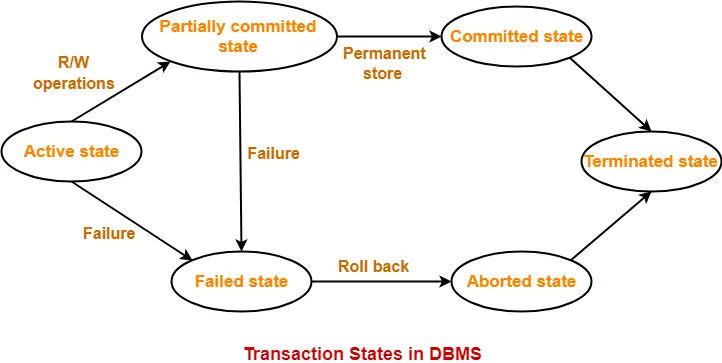
Transaction States in DBMS

Transaction in DBMS-


“Transaction is a set of operations which are all logically related.”

OR

“Transaction is a single logical unit of work formed by a set of operations.”


Operations in Transaction-


The main operations in a transaction are-

  1. Read Operation
  2. Write Operation


1. Read Operation-


  • Read operation reads the data from the database and then stores it in the buffer in main memory.
  • For example- Read(A) instruction will read the value of A from the database and will store it in the buffer in main memory.


2. Write Operation-


  • Write operation writes the updated data value back to the database from the buffer.
  • For example- Write(A) will write the updated value of A from the buffer to the database.


Transaction States-


A transaction goes through many different states throughout its life cycle.

These states are called as transaction states.

Transaction states are as follows-

  1. Active state
  2. Partially committed state
  3. Committed state
  4. Failed state
  5. Aborted state
  6. Terminated state


1. Active State-


  • This is the first state in the life cycle of a transaction.
  • A transaction is called in an active state as long as its instructions are getting executed.
  • All the changes made by the transaction now are stored in the buffer in main memory.


2. Partially Committed State-


  • After the last instruction of transaction has executed, it enters into a partially committed state.
  • After entering this state, the transaction is considered to be partially committed.
  • It is not considered fully committed because all the changes made by the transaction are still stored in the buffer in main memory.


3. Committed State-


  • After all the changes made by the transaction have been successfully stored into the database, it enters into a committed state.
  • Now, the transaction is considered to be fully committed.


NOTE-


  • After a transaction has entered the committed state, it is not possible to roll back the transaction.
  • In other words, it is not possible to undo the changes that has been made by the transaction.
  • This is because the system is updated into a new consistent state.
  • The only way to undo the changes is by carrying out another transaction called as compensating transaction that performs the reverse operations.


4. Failed State-


  • When a transaction is getting executed in the active state or partially committed state and some failure occurs due to which it becomes impossible to continue the execution, it enters into a failed state.


5. Aborted State-


  • After the transaction has failed and entered into a failed state, all the changes made by it have to be undone.
  • To undo the changes made by the transaction, it becomes necessary to roll back the transaction.
  • After the transaction has rolled back completely, it enters into an aborted state.


6. Terminated State-


  • This is the last state in the life cycle of a transaction.
  • After entering the committed state or aborted state, the transaction finally enters into a terminated state where its life cycle finally comes to an end.


Next Article- ACID Properties of Transaction


Get more notes and other study material of Database Management System (DBMS).

Watch video lectures by visiting our YouTube channel LearnVidFun.

main method in Java

What is main method in Java?


  • main method is a starting point in the program from where the code execution is started by the JVM.
  • If JVM does not find the main method inside the code according to the specifications configured inside it, it raises an error.


Syntax of main method in Java-


JVM always looks for the main method having the following signatures-

public static void main (String[ ] args)


  • main method is public so that it can be accessed from anywhere and is available to other programs like JVM.
  • main method is static so that it can be accessed even without objects and this allows JVM to access this method as there exists no object in the starting.
  • main method is void because it does not return anything to the JVM.
  • main method has been named main because this name is configured inside the JVM.
  • main method contains the arguments list String[ ] args which are “command line arguments” to store the values which are passed to the main method.


Note-


The above syntax is very strict and if we try to modify it, run time error is generated saying-

"Error: Main method not found in class Test, please define the main method as:
   public static void main(String[] args)"

However, there are some acceptable changes which can be made.


Acceptable changes in the syntax of main method in Java-


Change-01:


Because in Java, the order in which the modifiers appear is not important, so instead of “public static“, we can comfortably write “static public“.


Change-02:


We can declare String[ ] args in any valid form such as-

  • String [ ]args
  • String args[ ]


Change-03:


Instead of args, we can use any valid java identifier.


Change-04:


In place of of String[ ], var-arg String parameter can be taken as String…

So, String[ ] args is same as String… args


Change-05:


We can also declare the main method with the following modifiers-

  • final
  • synchronized
  • strictfp


Rules to remember while using main method in Java-


Rule-01:


The concept of method overloading can be used for the main method but JVM will always execute only that main method implicitly which satisfies the specifications configured inside it.

It is the responsibility of the programmer to call other modified versions of the main method explicitly.

Example-

class Test
{
   public static void main(String[ ]  args)
   {
      System.out.println("main method called implicitly by the JVM");
   }

   public static void main(int[ ]  args)
   {
      System.out.println("main method called explicitly by the programmer");
   }
}

Output-

main method called implicitly by the JVM

This output clearly justifies our rule-01.


Rule-02:


We can use the concept of inheritance for all the static methods including the main method.

Thus, if there exists a child class not containing the main method, then while executing the child class, main method of the parent class will be executed.


Rule-03:


It appears as if the concept of overriding is applicable for static methods but it is not overriding, it is actually method hiding.


Rule-04:


It is possible to configure our own method in JVM instead of main method but for that customization of JVM is required i.e. some changes will have to be made inside the JVM.


Interview Questions based on main method in Java-


Question-01:

Is it possible to compile the java code successfully without main method?

Answer-

Yes, the java code compiles successfully even without the main method in it.

Reason-

Compiler is just responsible to check whether the code written follows the syntax rules or not. So, if the code is written following the correct syntax rules, it will not raise any error.

Example-

public class Test
{
   // statements
}

Clearly, the above class does not contain any main method.

Now, if we try to compile the above code, it compiles successfully without raising any error.


Question-02:

Is it possible to execute the java code successfully without main method?

Answer-

Although the java code compiles successfully even without the main method but it does not execute successfully without main method.

Reason-

At run time, JVM always looks for the main method having particular syntax which is configured inside it to start the execution of the program and if it does not find that main method, it raises an error.


NOTE-

Till JDK version 1.6, it was allowed to execute a class not containing a main method but from version 1.7 on wards, it has been made compulsory to have a main method inside the class for executing it.


Example-

public class Test
{
   // statements
}

Clearly, the above class does not contain any main method.

Now, if we try to execute the above code, it does not execute successfully and raises the following error-

Output-

"Error: Main method not found in class Test, please define the main method as:
   public static void main(String[] args)"


Question-03:

Is it possible to print some statements successfully on the console without main method?

Answer-

  • It was possible till JDK version 1.6 only by writing those statements inside the static block because till version 1.6, the static blocks were executed irrespective of the fact whether we have main method inside our program or not.
  • But from JDK version 1.7 on wards, the static blocks are executed only if we have main method in our program.
  • So, now it is not possible to print any statement without having main method in our program.


Question-04:

Which of the following main method declarations are valid in java?

  1. public static void main (String… args)
  2. static final synchronized strictfp public void main (String[ ] args)
  3. public static void main (String args)
  4. final synchronized strictfp public void main (String[ ] args)
  5. public static void Main (String[ ] args)
  6. public static int main (String[ ]  args)
  7. final synchronized strictfp public static void main (String[ ] args)
  8. public void main (String[ ]  args)

Answer-

  1. Valid
  2. Valid
  3. Invalid (We need a String array to pass as argument and not String type variable)
  4. Invalid (static keyword is absent)
  5. Invalid (‘M’ must be small in spelling of main)
  6. Invalid (Return type of main method must be void)
  7. Valid
  8. Invalid (static keyword is absent)

Note-

  • In none of the above declarations, we will get compile time error. All declarations will compile successfully.
  • Except in (1), (2) and (7), we will get run time error.


Get more notes and other study material of Core Java.

Watch video lectures by visiting our YouTube channel LearnVidFun.
Methods in Java

Elements of a class-

Java is a class based language where the entire code is written inside a class.

Any class written in Java consists of the following 5 elements-

  1. Variables
  2. Methods
  3. Constructors
  4. Instance blocks
  5. Static blocks


In this post, we will discuss about the methods of Java in detail.


Methods in Java-


Method is an element of a class that is used for writing the logic of the program as it is not allowed to write the logic of the program directly inside a class.


Example-

Writing the logic for addition of two numbers as shown below is not allowed-

class Test
{
   int a = 50;
   int b = 100;
   System.out.println(a+b);
}

The logic for addition of two numbers has to be written using a method as shown below-

class Test
{
   int a = 50;
   int b = 100;

   void add( )
   {
      System.out.println(a+b);
   }
}


Types of Methods in Java-


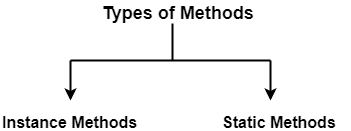
There are mainly two types of methods in Java-

  1. Instance methods
  2. Static methods


1. Instance Methods-


  • The methods that are associated with the objects of the class and not to the class as a whole are called as instance methods.
  • Every individual object owns its unique copy of all the instance methods belonging to that class.
  • The call made to the instance methods is resolved at run time through dynamic binding.
  • Overriding of instance methods is allowed.


How to access instance methods?


Just like instance variables,

  • Instance methods can be called directly inside the instance area.
  • Instance methods can not be called directly inside the static area and necessarily requires an object reference for calling them.


2. Static Methods-


  • The methods that are associated with the entire class and not to the individual objects are called as static methods.
  • A single copy gets created for the static methods and this single copy is shared by all the objects belonging to that class.
  • Static methods are declared with the ‘static’ modifier.
  • The call made to the static methods is resolved at compile time through static binding by the compiler.
  • Overriding of static methods is not at all allowed.
  • Static methods can be used to write the code that is common and is meant to be shared among all the instances.


Since, static methods are associated with the entire class, they are popularly called as class methods.


How to access static methods?


Just like static variables,

  • Static methods can be called by using class name and dot operator. (Recommended)
  • Static methods can be called directly within the same package.
  • Static methods can be called by using object reference and dot operator.


NOTE-


  • Although static methods can be accessed using object reference and dot operator but it is not recommended because it does not make it clear that we are talking about the class methods.

Always make a habit of calling the static methods by using class name and dot operator.


Difference between Instance methods and Static methods-


Instance Methods Static Methods
Instance methods are associated with the objects of the class and not to the class as a whole. Static methods are associated with the entire class and not to the individual objects.
Every individual object owns its unique copy of all the instance methods belonging that class. A single copy gets created for the static methods and this single copy is shared by all the objects associated to that class.
The call made to the instance methods is resolved at run time through dynamic binding. The call made to the static methods is resolved at compile time through static binding by the compiler.
Overriding of instance methods is allowed. Overriding of static methods is not at all allowed.


Important rules you must know about methods in Java-


Rule-01:

As in any other programming language, it is perfectly allowed to define your own methods in Java known as “user defined methods”.

Syntax-

modifiers_list return_type method_name (param_list) throws Exception
{
    //method body
}


Rule-02:

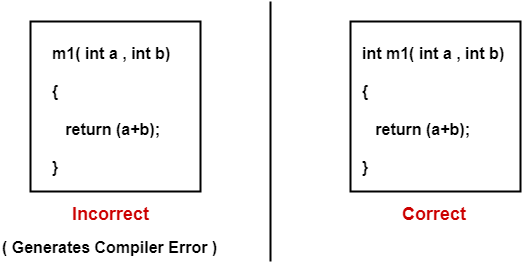
It is compulsory to mention the return type when defining methods in Java.

Example- 


Rule-03:

Calling a method from another method is perfectly allowed in Java.

Example-

class Test
{
   void m1( )
   {
      m2( );                                      // call to method m2( ) from method m1( ) 
      System.out.println("m1 method called");
   }

   void m2( )
   {
      System.out.println("m2 method called");
   }

   public static void main(String[ ] args)
   {
      Test t = new Test( );                      // Object creation
      t.m1( );                                   // Call to method m1( ) from main method
   }
}


Rule-04:

Inside a class, two methods with the same signatures (duplicate methods) are not allowed even if their return types are different.


NOTE

Method signature includes only these two things- method name and parameter list.


Rule-05:

Declaring a method inside another method is called as inner method. Inner methods are not allowed in Java. However, the concept of Inner classes is fully supported by Java.


Rule-06:

Inside static methods, ‘this‘ keyword is not allowed (static area) as there is no instance for ‘this’ to refer to inside static methods.


Rule-07:

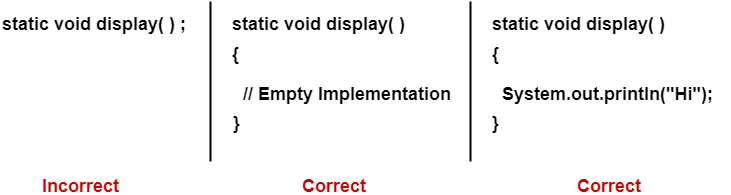
Static methods must be given implementation (at least empty implementation) otherwise compile time error will be generated.

Example-


Examples based on using methods in Java-


Example-01:

class Test
{
   void m1( )                                 // Instance Method
   {                                                                         
      System.out.println("m1 method called");                               
   }                                                                                

   static void m2( )                          // Static Method
   {
      System.out.println("m2 method called");
   }

   public static void main(String[ ] args)
   {
      Test t = new Test( );                    // Object Creation
      t.m1( );                                 // Call to instance method m1( ) using object reference
      Test.m2( );                              // Call to static method m2( ) using class name and dot operator
   }
}

OUTPUT-

m1 method called

m2 method called


Example-02:

class Test
{
   void m1(int a , char ch)                 // Instance Method
   {
      System.out.println("m1 method called");
      System.out.println(a);
      System.out.println(ch);
   }

   static void m2(String str , double d)    // Static Method
   {
      System.out.println("m2 method called");
      System.out.println(str);
      System.out.println(d);
   }

   public static void main(String[ ] args)
   {
      Test t = new Test( );                 // Object Creation
      t.m1(50,'G');                         // Call to instance method m1( ) using object reference
      Test.m2("Gate Vidyalay",50.5);        // Call to static method m2( ) using class name and dot operator
   }
}

OUTPUT-

m1 method called

50

G

m2 method called

Gate Vidyalay

50.5


Get more notes and other study material of Core Java.

Watch video lectures by visiting our YouTube channel LearnVidFun.
Garbage Collection in Java | How to make object eligible for Garbage Collection

Garbage Collection in Java-


  • It is recommended that if there exist some objects which are not required anymore, programmers make those objects eligible for garbage collection.


Thumb rule

An object qualifies for garbage collection if and only if it does not contain any external reference to it.


  • So, an object can be made eligible for garbage collection be removing all the external references pointing to it.


Ways to make an object eligible for garbage collection in Java-


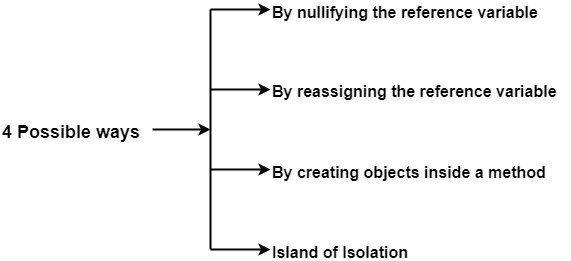
There are 4 different ways in which an object can be made eligible for the purpose of garbage collection-


  1. By nullifying the reference variable
  2. By reassigning the reference variable
  3. By creating objects inside a method
  4. Island of Isolation


1. By nullifying the reference variable-


As the name suggests,

In this method, programmer assigns null to the reference variables of all those objects which are no longer required. This makes the useless objects automatically eligible for the purpose of garbage collection.


Example-

Consider the following lines of code-

1. Student s1 = new Student( );
2. Student s2 = new Student( );
3.            .
4.            .
5.            .
6.            .
7.         s1 = null;
8.            .
9.            .
10.           .
11.           .
12.        s2 = null;
13.           .
14.           .
15.           .
16.           .

Now, let us perform the analysis of the above lines of code-

Analysis-


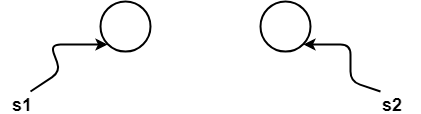
  • Statement-1 and Statement-2 create two Student objects where reference variable s1 references the first object and reference variable s2 references the second object as shown-


  • Till statement-6, there exists no object which is eligible for garbage collection.
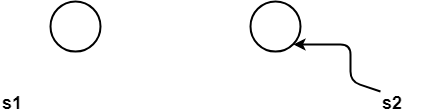
  • After the execution of statement-7, the first object referenced by s1 becomes eligible for garbage collection as the null reference gets assigned to it as shown-


  • After the execution of statement-12, the second object referenced by s2 also becomes eligible for garbage collection as the null reference gets assigned to it as shown-


2. By reassigning the reference variable-


As the name suggests,

In this method, programmer reassigns the reference variables of all those objects which are no longer needed to some other objects. This makes the useless objects automatically eligible for the purpose of garbage collection.


Example-

Consider the following lines of code-

1. Student s1 = new Student( );
2. Student s2 = new Student( );
3.            .
4.            .
5.            .
6.            .
7.         s1 = new Student( );
8.            .
9.            .
10.           .
11.           .
12.        s2 = s1;
13.           .
14.           .
15.           .
16.           .

Now, let us perform the analysis of the above lines of code-

Analysis-


  • Statement-1 and Statement-2 create two Student objects where reference variable s1 references the first object and reference variable s2 references the second object as shown-


  • Till statement-6, there exists no object which is eligible for garbage collection.
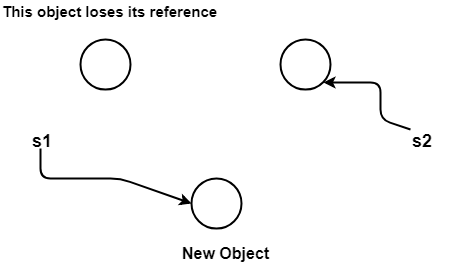
  • Statement-7 creates a new Student object and reassigns the reference variable s1 to this new object. As a result, first object loses its reference and becomes eligible for garbage collection.


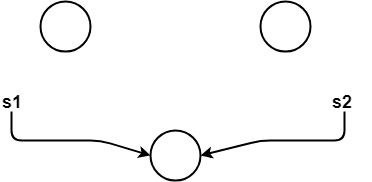
  • Statement-12 makes the second object also eligible for garbage collection as it makes the reference variable s2 point to the object to which the reference variable s1 points.


3. By creating objects inside a method-


As the name suggests,

In this method, programmer creates the objects inside the methods because after the method gets executed completely, objects present inside the method body automatically becomes eligible for the purpose of garbage collection.

The reason behind it is that the reference variables are the local variables of the method and after the method has executed completely, all the local variables are automatically destroyed.


Example-

Consider the following lines of code-

1. class Test
2. {
3.    public static void main(String[ ] args)
4.    {
5.        m1( );
6.    }
7.    
8.    public static void m1( )
9.    {
10.       Student s1 = new Student( );
11.       Student s2 = new Student( );
12.   }
13.}

Now, let us perform the analysis of the above lines of code-

Analysis-


After the execution of method m1( ) in the main method i.e. after executing statement-5, both the objects becomes eligible for garbage collection and can be collected by the garbage collector.


4. Island of Isolation-


  • Island of Isolation describes the situation where there exists one or more objects in the program which are not accessible from anywhere in the application as they contain no external reference to them.
  • It is not possible to access such objects through any means as they have no external reference to them and thus they become eligible for garbage collection.
  • So, it appears as if the objects are stuck on some isolated island and they can not be accessed through any means. Hence, the name “Island of Isolation” is quite apt.


NOTE-

It is interesting to note that a single object having no reference to it is also an island of isolation.


Example-

Consider the following lines of code-

1. class Demo
2. {
3.    Demo d;
4.
5.    public static void main(string[ ] args)
6.    {
7.        Demo d1 = new Demo( );
8.        Demo d2 = new Demo( );
9.        Demo d3 = new Demo( );
10.               .
11.               .
12.               .
13.               .
14.          d1.d = d2;
15.          d2.d = d3;
16.          d3.d = d1;
17.               .
18.               .
19.               .
20.               .
21.            d1 = null;
22.            d2 = null;
23.            d3 = null;
24.   }
25. }

Now, let us perform the analysis of the above lines of code-

Analysis-


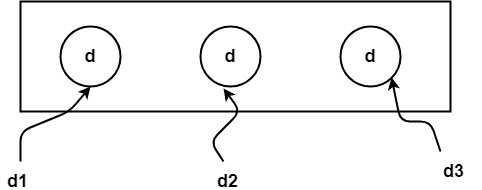
  • Statement-7, statement-8 and statement-9 create three Student objects which are referenced by the reference variables d1, d2 and d3 respectively as shown-


Till now, each object is having exactly one reference variable and no object is eligible for garbage collection.

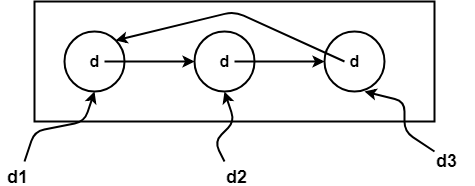
  • Statement-14 assigns a copy of d2 to d1.d. So, now d1.d points to the object of d2.
  • Statement-15 assigns a copy of d3 to d2.d. So, now d2.d points to the object of d3.
  • Statement-16 assigns a copy of d1 to d3.d. So, now d3.d points to the object of d1.


Till now, each object is having exactly two reference variables and no object is eligible for garbage collection.


  • Statement-21 assigns null to the reference variable d1. Thus, now d1 references to no one. Still, no object is eligible for garbage collection.
  • Statement-22 assigns null to the reference variable d2. Thus, now d2 references to no one. Still, no object is eligible for garbage collection.
  • Statement-23 assigns null to the reference variable d3. Thus, now d3 references to no one.


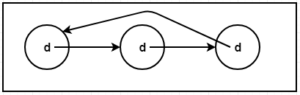
Now, all the three objects become eligible for garbage collection as now there does not exist even one external reference to them.


An isolated island is created where all the three objects are stuck and there is no communication with any active part of the application.

All the three objects internally references each other but there is no external reference which makes the three objects eligible for garbage collection.


Island of Isolation


Get more notes and other study material of Core Java.

Watch video lectures by visiting our YouTube channel LearnVidFun.