Month: November 2018

Paging in OS | Formulas | Practice Problems

Paging in OS-


Before you go through this article, make sure that you have gone through the previous article on Paging in OS.


We have discussed-

  • Paging is a non-contiguous memory allocation technique.
  • Page Table is a data structure that performs the mapping of page number to the frame number.


Important Formulas-


The following list of formulas is very useful for solving the numerical problems based on paging.


For Main Memory-


  • Physical Address Space = Size of main memory
  • Size of main memory = Total number of frames x Page size
  • Frame size = Page size
  • If number of frames in main memory = 2X, then number of bits in frame number = X bits
  • If Page size = 2X Bytes, then number of bits in page offset = X bits
  • If size of main memory = 2X Bytes, then number of bits in physical address = X bits


For Process-


  • Virtual Address Space = Size of process
  • Number of pages the process is divided = Process size / Page size
  • If process size = 2X bytes, then number of bits in virtual address space = X bits


For Page Table-


  • Size of page table = Number of entries in page table x Page table entry size
  • Number of entries in pages table = Number of pages the process is divided
  • Page table entry size = Number of bits in frame number + Number of bits used for optional fields if any


NOTE-


  • In general, if the given address consists of ‘n’ bits, then using ‘n’ bits, 2n locations are possible.
  • Then, size of memory = 2n x Size of one location.
  • If the memory is byte-addressable, then size of one location = 1 byte.
  • Thus, size of memory = 2n bytes.
  • If the memory is word-addressable where 1 word = m bytes, then size of one location = m bytes.
  • Thus, size of memory = 2n x m bytes.


PRACTICE PROBLEMS BASED ON PAGING AND PAGE TABLE-


Problem-01:


Calculate the size of memory if its address consists of 22 bits and the memory is 2-byte addressable.


Solution-


We have-

  • Number of locations possible with 22 bits = 222 locations
  • It is given that the size of one location = 2 bytes


Thus, Size of memory

= 222 x 2 bytes

= 223 bytes

= 8 MB


Problem-02:


Calculate the number of bits required in the address for memory having size of 16 GB. Assume the memory is 4-byte addressable.


Solution-


Let ‘n’ number of bits are required. Then, Size of memory = 2n x 4 bytes.

Since, the given memory has size of 16 GB, so we have-

2n x 4 bytes = 16 GB

2n x 4 = 16 G

2n x 22 = 234

2n = 232

∴ n = 32 bits


Problem-03:


Consider a system with byte-addressable memory, 32 bit logical addresses, 4 kilobyte page size and page table entries of 4 bytes each. The size of the page table in the system in megabytes is _____.

  1. 2
  2. 4
  3. 8
  4. 16


Solution-


Given-

  • Number of bits in logical address = 32 bits
  • Page size = 4KB
  • Page table entry size = 4 bytes


Process Size-


Number of bits in logical address = 32 bits

Thus,

Process size

= 232 B

= 4 GB


Number of Entries in Page Table-


Number of pages the process is divided

= Process size / Page size

= 4 GB / 4 KB

= 220 pages


Thus,

Number of entries in page table = 220 entries


Page Table Size-


Page table size

= Number of entries in page table x Page table entry size

= 220 x 4 bytes

= 4 MB


Thus, Option (B) is correct.


Problem-04:


Consider a machine with 64 MB physical memory and a 32 bit virtual address space. If the page size is 4 KB, what is the approximate size of the page table?

  1. 16 MB
  2. 8 MB
  3. 2 MB
  4. 24 MB


Solution-


Given-

  • Size of main memory = 64 MB
  • Number of bits in virtual address space = 32 bits
  • Page size = 4 KB


We will consider that the memory is byte addressable.


Number of Bits in Physical Address-


Size of main memory

= 64 MB

= 226 B

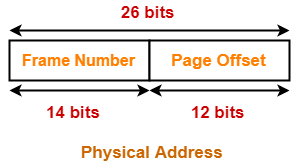
Thus, Number of bits in physical address = 26 bits


Number of Frames in Main Memory-


Number of frames in main memory

= Size of main memory / Frame size

= 64 MB / 4 KB

= 226 B / 212 B

= 214

Thus, Number of bits in frame number = 14 bits


Number of Bits in Page Offset-


We have,

Page size

= 4 KB

= 212 B

Thus, Number of bits in page offset = 12 bits


So, Physical address is-


Process Size-


Number of bits in virtual address space = 32 bits

Thus,

Process size

= 232 B

= 4 GB


Number of Entries in Page Table-


Number of pages the process is divided

= Process size / Page size

= 4 GB / 4 KB

= 220 pages


Thus, Number of entries in page table = 220 entries


Page Table Size-


Page table size

= Number of entries in page table x Page table entry size

= Number of entries in page table x Number of bits in frame number

= 220 x 14 bits

= 220 x 16 bits      (Approximating 14 bits ≈ 16 bits)

= 220 x 2 bytes

= 2 MB


Thus, Option (C) is correct.


Problem-05:


In a virtual memory system, size of virtual address is 32-bit, size of physical address is 30-bit, page size is 4 Kbyte and size of each page table entry is 32-bit. The main memory is byte addressable. Which one of the following is the maximum number of bits that can be used for storing protection and other information in each page table entry?

  1. 2
  2. 10
  3. 12
  4. 14


Solution-


Given-

  • Number of bits in virtual address = 32 bits
  • Number of bits in physical address = 30 bits
  • Page size = 4 KB
  • Page table entry size = 32 bits


Size of Main Memory-


Number of bits in physical address = 30 bits

Thus,

Size of main memory

= 230 B

= 1 GB


Number of Frames in Main Memory-


Number of frames in main memory

= Size of main memory / Frame size

= 1 GB / 4 KB

= 230 B / 212 B

= 218

Thus, Number of bits in frame number = 18 bits


Number of Bits used for Storing other Information-


Maximum number of bits that can be used for storing protection and other information

= Page table entry size – Number of bits in frame number

= 32 bits – 18 bits

= 14 bits


Thus, Option (D) is correct.


To gain better understanding about solving numerical problems on paging,

Watch this Video Lecture


Next Article- Optimal Page Size | Practice Problems


Get more notes and other study material of Operating System.

Watch video lectures by visiting our YouTube channel LearnVidFun.
Page Table | Paging in Operating System

Paging in OS-


Before you go through this article, make sure that you have gone through the previous article on Paging in OS.


We have discussed-

  • Paging is a non-contiguous memory allocation technique.
  • The logical address generated by the CPU is translated into the physical address using the page table.


In this article, we will discuss about Page Table.


Page Table-


  • Page table is a data structure.
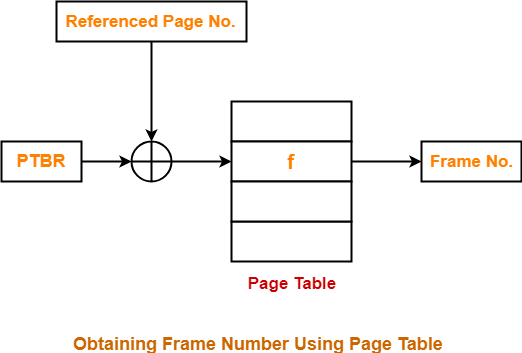
  • It maps the page number referenced by the CPU to the frame number where that page is stored.


Characteristics-


  • Page table is stored in the main memory.
  • Number of entries in a page table = Number of pages in which the process is divided.
  • Page Table Base Register (PTBR) contains the base address of page table.
  • Each process has its own independent page table.


Working-


  • Page Table Base Register (PTBR) provides the base address of the page table.
  • The base address of the page table is added with the page number referenced by the CPU.
  • It gives the entry of the page table containing the frame number where the referenced page is stored.


Page Table Entry-


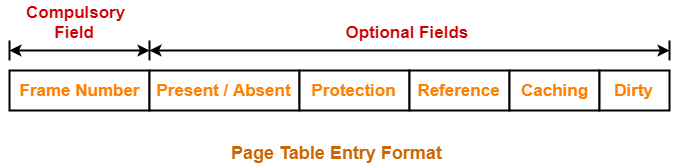
  • A page table entry contains several information about the page.
  • The information contained in the page table entry varies from operating system to operating system.
  • The most important information in a page table entry is frame number.


In general, each entry of a page table contains the following information-


1. Frame Number-


  • Frame number specifies the frame where the page is stored in the main memory.
  • The number of bits in frame number depends on the number of frames in the main memory.


2. Present / Absent Bit-


  • This bit is also sometimes called as valid / invalid bit.
  • This bit specifies whether that page is present in the main memory or not.
  • If the page is not present in the main memory, then this bit is set to 0 otherwise set to 1.


NOTE

  • If the required page is not present in the main memory, then it is called as Page Fault.
  • A page fault requires page initialization.
  • The required page has to be initialized (fetched) from the secondary memory and brought into the main memory.


3. Protection Bit-


  • This bit is also sometimes called as “Read / Write bit“.
  • This bit is concerned with the page protection.
  • It specifies the permission to perform read and write operation on the page.
  • If only read operation is allowed to be performed and no writing is allowed, then this bit is set to 0.
  • If both read and write operation are allowed to be performed, then this bit is set to 1.


4. Reference Bit-


  • Reference bit specifies whether that page has been referenced in the last clock cycle or not.
  • If the page has been referenced recently, then this bit is set to 1 otherwise set to 0.


NOTE

  • Reference bit is useful for page replacement policy.
  • A page that has not been referenced recently is considered a good candidate for page replacement in LRU page replacement policy.


5. Caching Enabled / Disabled-


  • This bit enables or disables the caching of page.
  • Whenever freshness in the data is required, then caching is disabled using this bit.
  • If caching of the page is disabled, then this bit is set to 1 otherwise set to 0.


6. Dirty Bit-


  • This bit is also sometimes called as “Modified bit“.
  • This bit specifies whether that page has been modified or not.
  • If the page has been modified, then this bit is set to 1 otherwise set to 0.


NOTE

In case the page is modified,

  • Before replacing the modified page with some other page, it has to be written back in the secondary memory to avoid losing the data.
  • Dirty bit helps to avoid unnecessary writes.
  • This is because if the page is not modified, then it can be directly replaced by another page without any need of writing it back to the disk.


To gain better understanding about Page Table Entry,

Watch this Video Lecture


Next Article- Paging Important Formulas


Get more notes and other study material of Operating System.

Watch video lectures by visiting our YouTube channel LearnVidFun.
Paging | Memory Management | Operating System

Non-Contiguous Memory Allocation-


  • Non-contiguous memory allocation is a memory allocation technique.
  • It allows to store parts of a single process in a non-contiguous fashion.
  • Thus, different parts of the same process can be stored at different places in the main memory.


Techniques-


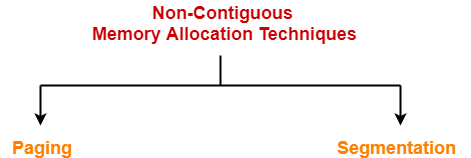
There are two popular techniques used for non-contiguous memory allocation-


  1. Paging
  2. Segmentation


In this article, we will discuss about Paging.

Learn about Segmentation.


Paging-


  • Paging is a fixed size partitioning scheme.
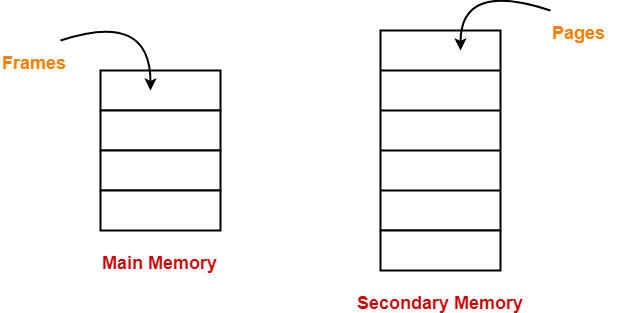
  • In paging, secondary memory and main memory are divided into equal fixed size partitions.
  • The partitions of secondary memory are called as pages.
  • The partitions of main memory are called as frames.


  • Each process is divided into parts where size of each part is same as page size.
  • The size of the last part may be less than the page size.
  • The pages of process are stored in the frames of main memory depending upon their availability.


Example-


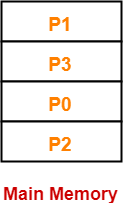
  • Consider a process is divided into 4 pages P0, P1, P2 and P3.
  • Depending upon the availability, these pages may be stored in the main memory frames in a non-contiguous fashion as shown-


Also Read- Contiguous Memory Allocation


Translating Logical Address into Physical Address-


  • CPU always generates a logical address.
  • A physical address is needed to access the main memory.


Following steps are followed to translate logical address into physical address-


Step-01:


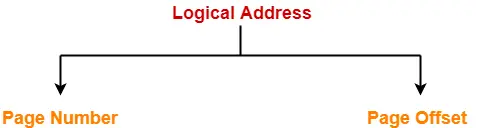
CPU generates a logical address consisting of two parts-

  1. Page Number
  2. Page Offset


  • Page Number specifies the specific page of the process from which CPU wants to read the data.
  • Page Offset specifies the specific word on the page that CPU wants to read.


Step-02:


For the page number generated by the CPU,

  • Page Table provides the corresponding frame number (base address of the frame) where that page is stored in the main memory.


Step-03:


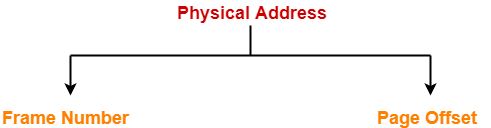
  • The frame number combined with the page offset forms the required physical address.


  • Frame number specifies the specific frame where the required page is stored.
  • Page Offset specifies the specific word that has to be read from that page.


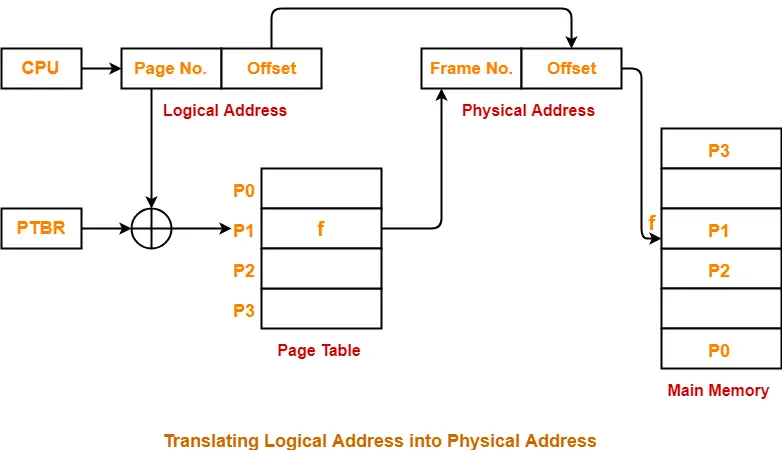
Diagram-


The following diagram illustrates the above steps of translating logical address into physical address-


Advantages-


The advantages of paging are-

  • It allows to store parts of a single process in a non-contiguous fashion.
  • It solves the problem of external fragmentation.


Disadvantages-


The disadvantages of paging are-

  • It suffers from internal fragmentation.
  • There is an overhead of maintaining a page table for each process.
  • The time taken to fetch the instruction increases since now two memory accesses are required.


To gain better understanding about Paging,

Watch this Video Lecture


Next Article- Page Table | Page Table Entry


Get more notes and other study material of Operating System.

Watch video lectures by visiting our YouTube channel LearnVidFun.
C-LOOK Algorithm | Disk Scheduling Algorithms

Disk Scheduling Algorithms-


Before you go through this article, make sure that you have gone through the previous article on Disk Scheduling.


We have discussed-

  • Disk scheduling algorithms are used to schedule multiple requests for accessing the disk.
  • The purpose of disk scheduling algorithms is to reduce the total seek time.


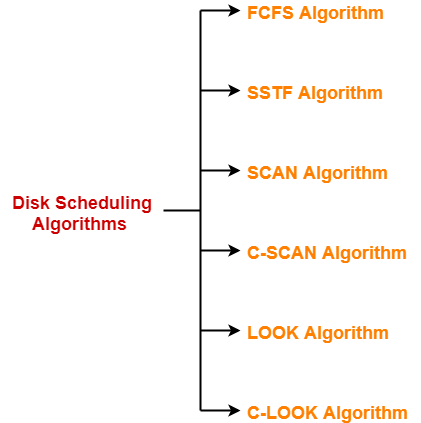
Various disk scheduling algorithms are-


In this article, we will discuss about C-LOOK Disk Scheduling Algorithm.


C-LOOK Disk Scheduling Algorithm-


  • Circular-LOOK Algorithm is an improved version of the LOOK Algorithm.
  • Head starts from the first request at one end of the disk and moves towards the last request at the other end servicing all the requests in between.
  • After reaching the last request at the other end, head reverses its direction.
  • It then returns to the first request at the starting end without servicing any request in between.
  • The same process repeats.


Also Read- SCAN Disk Scheduling Algorithm


Advantages-


  • It does not causes the head to move till the ends of the disk when there are no requests to be serviced.
  • It reduces the waiting time for the cylinders just visited by the head.
  • It provides better performance as compared to LOOK Algorithm.
  • It does not lead to starvation.
  • It provides low variance in response time and waiting time.


Disadvantages-


  • There is an overhead of finding the end requests.


Also Read- C-SCAN Disk Scheduling Algorithm


PRACTICE PROBLEMS BASED ON C-LOOK DISK SCHEDULING ALGORITHM-


Problem-01:


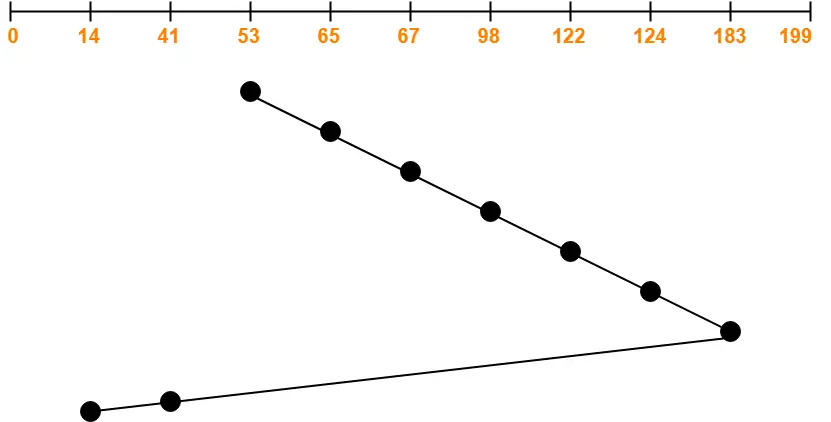
Consider a disk queue with requests for I/O to blocks on cylinders 98, 183, 41, 122, 14, 124, 65, 67. The C-LOOK scheduling algorithm is used. The head is initially at cylinder number 53 moving towards larger cylinder numbers on its servicing pass. The cylinders are numbered from 0 to 199. The total head movement (in number of cylinders) incurred while servicing these requests is _______.


Solution-


Total head movements incurred while servicing these requests

= (65 – 53) + (67 – 65) + (98 – 67) + (122 – 98) + (124 – 122) + (183 – 124) + (183 – 14) + (41 – 14)

= 12 + 2 + 31 + 24 + 2 + 59 + 169 + 27

= 326


Alternatively,

Total head movements incurred while servicing these requests

= (183 – 53) + (183 – 14) + (41 – 14)

= 130 + 169 + 27

= 326


Problem-02:


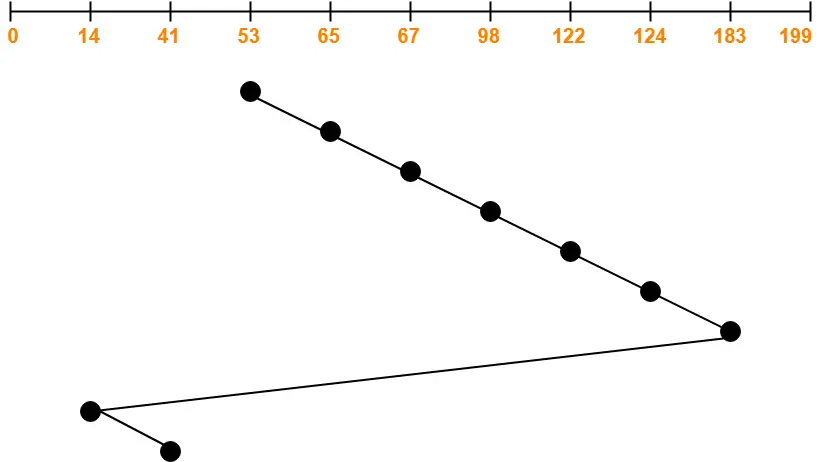
Consider a disk queue with requests for I/O to blocks on cylinders 47, 38, 121, 191, 87, 11, 92, 10. The C-LOOK scheduling algorithm is used. The head is initially at cylinder number 63 moving towards larger cylinder numbers on its servicing pass. The cylinders are numbered from 0 to 199. The total head movement (in number of cylinders) incurred while servicing these requests is _______.


Solution-


Total head movements incurred while servicing these requests

= (87 – 63) + (92 – 87) + (121 – 92) + (191 – 121) + (191 – 10) + (11 – 10) + (38 – 11) + (47 – 38)

= 24 + 5 + 29 + 70 + 181 + 1 + 27 + 9

= 346


Alternatively,

Total head movements incurred while servicing these requests

= (191 – 63) + (191 – 10) + (47 – 10)

= 128 + 181 + 37

= 346


To gain better understanding about C-LOOK Disk Scheduling Algorithm,

Watch this Video Lecture


Get more notes and other study material of Operating System.

Watch video lectures by visiting our YouTube channel LearnVidFun.
LOOK Algorithm | Disk Scheduling Algorithms

Disk Scheduling Algorithms-


Before you go through this article, make sure that you have gone through the previous article on Disk Scheduling.


We have discussed-

  • Disk scheduling algorithms are used to schedule multiple requests for accessing the disk.
  • The purpose of disk scheduling algorithms is to reduce the total seek time.


Various disk scheduling algorithms are-


In this article, we will discuss about LOOK Disk Scheduling Algorithm.


LOOK Disk Scheduling Algorithm-


  • LOOK Algorithm is an improved version of the SCAN Algorithm.
  • Head starts from the first request at one end of the disk and moves towards the last request at the other end servicing all the requests in between.
  • After reaching the last request at the other end, head reverses its direction.
  • It then returns to the first request at the starting end servicing all the requests in between.
  • The same process repeats.


Also Read- C-SCAN Disk Scheduling Algorithm


NOTE-


The main difference between SCAN Algorithm and LOOK Algorithm is-

  • SCAN Algorithm scans all the cylinders of the disk starting from one end to the other end even if there are no requests at the ends.
  • LOOK Algorithm scans all the cylinders of the disk starting from the first request at one end to the last request at the other end.


Advantages-


  • It does not causes the head to move till the ends of the disk when there are no requests to be serviced.
  • It provides better performance as compared to SCAN Algorithm.
  • It does not lead to starvation.
  • It provides low variance in response time and waiting time.


Disadvantages-


  • There is an overhead of finding the end requests.
  • It causes long waiting time for the cylinders just visited by the head.


PRACTICE PROBLEM BASED ON LOOK DISK SCHEDULING ALGORITHM-


Problem-


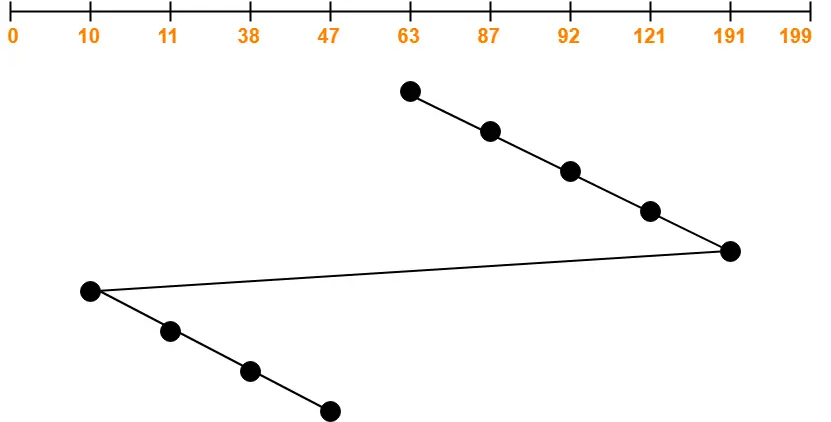
Consider a disk queue with requests for I/O to blocks on cylinders 98, 183, 41, 122, 14, 124, 65, 67. The LOOK scheduling algorithm is used. The head is initially at cylinder number 53 moving towards larger cylinder numbers on its servicing pass. The cylinders are numbered from 0 to 199. The total head movement (in number of cylinders) incurred while servicing these requests is _______.


Solution-


Total head movements incurred while servicing these requests

= (65 – 53) + (67 – 65) + (98 – 67) + (122 – 98) + (124 – 122) + (183 – 124) + (183 – 41) + (41 – 14)

= 12 + 2 + 31 + 24 + 2 + 59 + 142 + 27

= 299


Alternatively,

Total head movements incurred while servicing these requests

= (183 – 53) + (183 – 14)

= 130 + 169

= 299


To gain better understanding about LOOK Disk Scheduling Algorithm,

Watch this Video Lecture


Next Article- C-LOOK Disk Scheduling Algorithm


Get more notes and other study material of Operating System.

Watch video lectures by visiting our YouTube channel LearnVidFun.