Category: Posts

GATE 2026: Complete Exam Information

GATE 2026: Complete Exam Information for M.Tech, ME & PHD Programs


The GATE exam, also called the Graduate Aptitude Test in Engineering, is a national exam that students take after finishing or nearing the end of their engineering or science degree. The purpose of this exam is to help students get admission into M.Tech, ME, or PhD programs at renowned institutions. Every year, around 8 to 9 lakh students apply for GATE. The exam is conducted by IISc Bengaluru and the seven IITs, and the responsibility of organising it changes from one IIT to another each year. The application process is done completely online and usually stays open for about a month, with some extra days available if students apply with a late fee. The exam is held in a computer-based format, and students are given three hours to complete it. A GATE score stays valid for three years, which means students can use it later for admissions or job opportunities.


Highlights of GATE


IISc Bangalore and seven IITs conduct GATE, and each year, one of these institutes is responsible for conducting this exam. Find a quick overview of GATE exam in the table shown below:


Feature Details
Courses Offered Admission to M.Tech, ME, MS, and PhD programmes; also used for PSU recruitment, such as IOCL, ONGC, Power Grid and others
Conducting Body Conducted every year by IISc Bengaluru and the seven IITs on a rotational basis.
Age Limit No age limit, students, graduates, and working professionals can apply.
Eligibility Candidates who have completed or are in the final year of a Bachelor’s degree in Engineering, Technology, Architecture, or Science-related fields.
Exam Mode & Duration Held online as a computer-based test with a duration of 3 hours.
Application Process Fully online and remains open for around one month, with an additional late-fee window
Score Validity GATE score is valid for 3 years for admissions and job opportunities.
Number of Applicants Around 8–9 lakh students apply every year
Subject Options Candidates can choose from multiple subject papers based on their academic
background and interests.


Eligibility Criteria for GATE


The eligibility rules for the GATE exam are simple. There is no age limit, and even students who are still completing their degree can appear for this exam. The criteria focus mainly on educational qualification, year of study, and valid documentation. Below are the detailed eligibility requirements for GATE exam:


Educational Qualification Requirement:

Students must have completed or be currently studying in the final year of a Bachelor’s degree in Engineering, Technology, Architecture, or a Science-related field.


Accepted Degree Types:

Eligible degrees include BE, BTech, BArch, BSc, BPharma, BS, and equivalent degrees from recognised universities or institutions.


Final-Year Students Can Apply:

Students who are in the final year or later of their qualifying degree can appear for the exam, provided they upload the required proof.


No Age Limit:

There is no maximum or minimum age restriction, making the exam open to fresh graduates and working professionals.


Nationality Flexibility:

Indian students, as well as foreign nationals from countries like Nepal, Bangladesh, Sri Lanka, Ethiopia, and UAE, can apply.


Required Documents:

Candidates must upload educational proof (certificate or final-year confirmation), a valid photo ID, and other details during registration.


How to Apply for GATE?


Applying for the GATE exam is done online; hence, students can complete it from home using a laptop or mobile device. The registration happens through the official GATE application portal, where candidates need to fill in their details, upload documents, and pay the fee. The application window usually stays open for about a month, with an extra period available for late submissions. Following the correct steps makes the process smooth and avoids mistakes that could lead to form rejection.


  • Visit the official GATE application portal when registration opens.
  • Create a new account using a valid email ID, mobile number, and password.
  • Log in to the portal and fill out personal, academic, and communication details.
  • Select the preferred GATE paper, exam city choices, and other required options.
  • Upload scanned documents, including photo, signature, and eligibility proof, in the correct format.
  • Pay the application fee online using a debit card, a credit card, UPI, or net banking.
  • SC/ ST/ PwD/ Female Candidates: INR 1000 (Regular period, single paper), and INR 1500 (Extended period, single paper)
  • All other candidates: INR 2000 (Regular period, single paper), and INR 2500 (Extended period, single paper)
  • Review the form carefully and submit it before the deadline.
  • Download and save the confirmation page for future reference.


Subject Specialisation for GATE


Students preparing for GATE can score better by focusing on subjects that match their strengths, have higher exam weightage, and align with their desired specialisation.

Listed below are the major GATE branches along with their specialisations:


Engineering Branch Key Specialisation Areas
Electronics & Telecommunication Engineering VLSI Design Tool Technology, Integrated Electronics & Circuits, Micro Electronics, Microwave Engineering, Communication Engineering, Telecommunication Technology & Management, Optoelectronics & Optical Communication, Nanotechnology, Digital Signal Processing, Control & Automation
Electrical Engineering Power Electronics, Machines & Drives, Power Systems, Control & Automation, Digital Signal Processing, Instrumentation Technology
Mechanical Engineering Design of Mechanical Equipment or Machine Design, Thermal
Engineering, Manufacturing Science & Engineering, Production Engineering, Industrial Engineering, Material Science & Management
Civil Engineering Structural Engineering, Geotechnical Engineering, Construction Engineering & Management, Transportation Engineering, Environmental Engineering, Earthquake Engineering, Water Resources Engineering, Rock Engineering & Underground Structure
Computer Science and Engineering & Information Technology Computer Science, Information Technology, Information Security, Software Engineering, Distributed Computing, Image Processing, Computer Systems and Hardware, Database and Information Systems, Programming Languages, Computer Networks and Distributed Systems, Artificial Intelligence, Advanced Computing


Exam Pattern for GATE Exam


GATE 2026 follows a unified exam pattern for most papers, but there are some subject-specific variations in the mark distribution. Every paper has a General Aptitude (GA) section, and then the rest comes from the chosen subjects. The total duration is always 3 hours, and the exam is held in computer-based mode. Questions are of three types: MCQ, MSQ, and NAT, and the total marks are 100 for every paper. Tabulated below is the complete GATE 2026 Exam Pattern for students’ reference:


Paper Code (Subject) GA Marks Subject / Compulsory Section Optional / Additional Section Total Marks Duration
AE, AG, BM, BT, CE, CH, CS, EC, EE, ES, IN, ME, MN, MT, NM, PE, PI, TF 15 85 marks from core subject (includes Engineering Mathematics for some) 100 180 min
CY, DA, EY, MA, PH, ST 15 85 marks from the subject (no separate Maths) 100 180 min
AR (Architecture & Planning) 15 Part A (Compulsory) = 60 marks Part B (choose B1 Architecture or B2 Planning) = 25 marks 100 180 min
GE (Geomatics Engineering) 15 Part A (Surveying & Mapping / common) = 55 marks Part B (choose B1 or B2) = 30 marks 100 180 min
GG (Geology & Geophysics) 15 Part A = 25 marks Part B1 (Geology) or B2 (Geophysics) = 60 marks 100 180 min
XE (Engineering Mathematics + Optional Sections) 15 Section A (Engineering Mathematics) = 15 marks TWO more sections (chosen by candidate), each of 35 marks 100 180 min
XH (Reasoning & Comprehension + Optional) 15 Section B1 (Reasoning & Comprehension) = 25 marks Choose one additional section = 60 marks 100 180 min
XL (Chemistry + Life Sciences) 15 Section P (Chemistry) = 25 marks Choose any TWO other life science sections = 2 × 30 marks 100 180 min


Syllabus of GATE


The GATE syllabus covers a wide range of topics based on the subject paper chosen by the candidate. While every paper has its own subjects, all students are required to answer a common General Aptitude section. The syllabus mainly focuses on testing core understanding, analytical thinking, and problem-solving ability. Below is an overview of the syllabus for GATE exam presented in a tabular format:


Syllabus Component Key Topics Covered
General Aptitude (GA) Verbal ability, logical reasoning, numerical ability, data interpretation, basic English usage.
Engineering Mathematics (for selected papers) Linear algebra, calculus, probability, differential equations, complex numbers, numerical methods.
Computer Science (CS) Programming, data structures, algorithms, operating systems,
DBMS, theory of computation, networks
Electronics & Communication (EC) Signals and systems, circuits, digital electronics, communication theory, EMT, control systems
Mechanical Engineering (ME) Thermodynamics, fluid mechanics, manufacturing, strength of materials, heat transfer, and design
Civil Engineering (CE) Structural engineering, geotechnical engineering, environmental engineering, surveying, and transportation
Electrical Engineering (EE) Electric circuits, power systems, machines, control systems, signals, electromagnetics
Chemical Engineering (CH) Chemical reaction engineering, heat transfer, mass transfer, process calculations, fluid flow
Biotechnology (BT) Cell biology, molecular biology, bioprocessing, genetics, microbiology, and bioinformatics basics
Physics (PH) Mechanics, quantum physics, mathematical physics, thermodynamics, electronics, EM theory
Mathematics (MA) Algebra, analysis, calculus, topology, ODE/PDE, numerical methods, statistics
Life Sciences (XL) Chemistry (compulsory), plus two sections from biochemistry, botany, microbiology, zoology, and food technology
Humanities & Social Sciences (XH) Reasoning and comprehension (compulsory), plus optional sections like sociology, psychology, philosophy, linguistics, economics, and English
Architecture & Planning (AR) Planning, building materials, structures, design, sustainability,
and urban development


Preparation Tips for GATE


Here are some simple and student-friendly tips to help aspirants get ready for the GATE exam:


Know the syllabus well:

Before starting their preparation, aspirants must check the GATE syllabus for their chosen paper and note the key topics. This helps candidates study with a clear direction and avoid putting time into areas that are not included.


Understand the exam pattern:

Students must be familiar with the marks distribution, types of questions, and the role of General Aptitude. This allows aspirants to plan better and focus on sections that carry more weight.


Focus on core subject concepts:

Since most marks come from the core paper, candidates should strengthen fundamental theories, formulas, and applications. Clear concepts help students solve tricky and analytical questions.


Solve previous year papers:

Practicing past GATE papers helps students understand the difficulty level, question flow, and commonly repeated concepts. It also builds confidence and improves problem-solving ability.


Take regular mock tests:

Candidates must attempt mock tests to improve speed, accuracy, and time management. It also helps students identify weak areas that need extra attention.


Make short and revision-friendly notes:

Aspirants should prepare quick notes for formulas, definitions, and key points. These notes become extremely useful during the last phase of preparation.


Stay consistent and avoid stress:

Students should make a simple study routine and follow it steadily. Proper breaks, rest, and a calm mindset help aspirants perform better in preparation and on exam day.


Cutoff for GATE


The GATE cutoff for the general category sees the highest competition, and for the CSE branch, the general cutoff usually ranges from 30 to 31. On the other hand, the OBC-NCL or EWS cutoff remains at 27.5. Check out the subject-wise and category-wise Exam Cutoff in the table presented below:


Subject General OBC-NCL / EWS SC / ST / PwD
Computer Science & Engineering (CSE) 30.0 – 31.0 27.5 20.0
Data Science (DA) 31.0 – 32.0 27.5 20.0
Mechanical Engineering (ME) 32.0 29.5 23.0
Electrical Engineering (EE) 26.0 – 27.0 23.5 – 24.0 17.5
Electronics & Communication Engineering (ECE) 25.0 – 26.0 23.5 17.5
Civil Engineering (CE) 30.0 – 31.0 27.5 20.0


List of Colleges Accepting GATE Score


GATE scores are widely accepted across India for postgraduate admissions, like M.Tech/M.E/M.Sc and research programs. Other than IITs, IIITs, and NITs, there are central and state universities that accept GATE scores. Students can check out the list provided below for more details:


Institute / College
Indian Institutes of Technology (IITs)
National Institutes of Technology (NITs)
Indian Institutes of Information Technology (IIITs)
Indian Institute of Science (IISc), Bengaluru
Indian Institutes of Engineering Science and Technology (IIEST)
Indian Institutes of Science Education and Research (IISERs)
Centre for Development of Advanced Computing (CDAC)
Jawaharlal Nehru University (JNU)
Delhi Technological University (DTU)
Netaji Subhas University of Technology (NSUT)
Jadavpur University
Anna University
Vellore Institute of Technology (VIT)
Birla Institute of Technology, Mesra
Punjab Engineering College (PEC)
COEP Technological University, Pune
Aligarh Muslim University (AMU)
Thapar Institute of Engineering & Technology
SRM Institute of Science & Technology
Defence Research & Development Organisation (DRDO)


Summing Up


Preparing for the GATE exam can feel challenging, but if students have the right approach and strategy, they can make the preparation feel much easier. Students are required to choose the right specialisation, understand the syllabus and exam pattern well, aim for top scores, and sit for the exam with confidence. This way, they can easily achieve their expected score and get into their desired college.


From FAQ to Face-Time:Answering with Avatars

From FAQs to Face-Time: Answering Customer Questions with Avatars


Ever wished your company could directly address every customer, without hiring twice the support staff? That’s precisely the kind of quantum jump companies are taking by bringing avatars into their communication. What used to be multiple typed-out responses or stale tutorial recordings can now be converted to interactive, person-to-person moments, without anyone having to grab a camera. Imagine a customer visits your product’s support page and instead of a scroll of text, they’re met with a smiling face guiding them through the number one five FAQs. Or imagine someone launching your app for the first time and rather than a procedural walkthrough, they’re greeted by a brief, customized welcome message from a digital ambassador. These interactions aren’t just handy, they’re memorable.


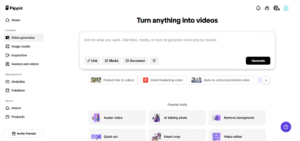
And here’s the interesting part: with a link to video, you can demonstrate to your audience just how simple it is to integrate these avatar-driven interactions into your everyday content. With platforms like Pippit, brands are revolutionizing how users interact with tutorials, demos, and on boarding sequences.


Why your FAQ page might need a face


Customers yearn for clarity. But occasionally consuming a long support page isn’t always the most silky smooth experience. With avatars, you can turn your frequently asked questions into visual answers. Picture this: a user asking, ‘How do I reset my password?’ Rather than directing them to a static article, you provide them with a 30-second avatar-powered clip that guides them step by step. It’s like it’s human, it injects personality, and it saves support teams hours upon hours.


This visual change also plays to current attention spans. Short videos presented via an avatar engage more attention than mere text. And when your avatar incorporates your brand’s style, tone, and audience, it speaks volumes of authority.


Interactive tutorials that actually teach


Tutorial apps are neglected, particularly if they appear as pop-ups or slides. Yet picture going into an app and seeing a guide, someone who resembles a legitimate representative, who says she can take you through the initial steps. Avatars make online interactions feel more intuitive and less robotic. For instance, a banking app can utilize avatars to describe major features such as how to initiate a transfer, monitor spending, or lock a card. Each step is akin to getting a one-on-one session, but without an actual agent. It’s the ultimate combination of efficiency and personalization.


Friendly faces in your dms


Messaging is another influential area where avatars are altering the tone. Rather than a dry, robotic message, consumers can receive a brief video message that answers their question. Whether a purchase inquiry or just a hello, that extra visual element increases engagement, and brand recognition. It also brings a sense of warmth to pre-recorded messages. Saying, ‘We’ll get back to you in 24 hours,’ in the voice of a friendly avatar, is much more friendly than a bland text message.


What Drives These Videos?


And you may be wondering how these videos are created. Well, that’s where intelligent tools enter the picture. Brands can make videos that contain speech, images, and characters, without capturing anything in a studio. One particularly thrilling way is through photo to video AI, which turns photos into expressive, talking avatars that convey your message with crispness and panache. You can construct the entire customer experience on this. From feature demos to support clips, it’s all about showing your solutions in formats that folks actually want to see.


Before you begin, get to know the real star: your custom avatar


Before I dive into the how-to, let’s discuss your main character, the custom avatar. This is not a generic character. It’s one that represents your brand. You can customize their voice, appearance, facial expression, and even mannerisms, building a digital spokesperson that is on-brand no matter what situation you put them in. Having a custom avatar, makes your videos consistent. It builds familiarity. Whether you’re answering a common query or guiding someone through account setup, your avatar becomes the face customers trust.


The friendly guide: 3 steps to making avatar-based videos with Pippit

Step into character: creating support videos that feel personal


Step 1: Access avatars and voices


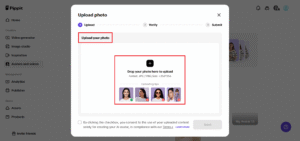
Begin by signing in to your Pippit account. Go to the page titled ‘avatars and voices.’ Click the ‘+’ symbol to start uploading a profile photo which will be the starting point for your avatar.


Step 2: Upload your photo profile


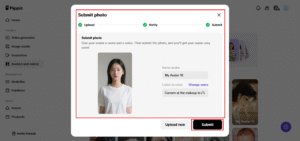
Once you’re on the upload page, drag your image into position. Pippit will then walk you through labeling your avatar, choosing a voice that suits your tone, and posting your image. In a few moments, your avatar will be available to customize with various appearances, expressions, and voices.


Step 3: Customize and export


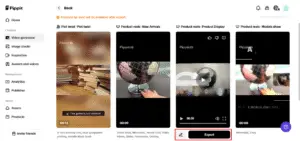
Once you have your avatar complete, click ‘apply’ to go into edit mode. There, you can script your message and turn it into speech. Add polish, music, transitions, even your own branding. Once you’re happy, click ‘Export’ and select your final resolution and file format.


How to use these videos throughout your business


  • On support pages: Respond to the top 5 FAQs in video form.
  • Within onboarding flows: Welcome users with a step-by-step tour.
  • Within direct messages: Offer personable-looking answers to frequent questions.
  • On social media: Answer follower questions in story-style videos.
The loveliness of this system is scalability. Record once, reuse everywhere.


Final thought: it’s time to humanize your help desk


These days, people expect assistance quickly and, ideally, cheerfully. This is what videos with avatars provide: amiable, always-on reactions that seem normal and human. And it’s easier than ever to create these videos using tools like Pippit. If your company is ready to move beyond text and create richer interactions with your users, this is your time. Interested in seeing how it works? Begin constructing your avatar support assistant with Pippit today!

Smart Way To Get More Views From Old Content

Repurpose, Reuse, And Reshare: The Smart Way To Get More Views From Old Content


In the fast-changing world of content creation, it can feel hard to always create new work. But a smart creator knows that something made well once can keep giving to people again and again. You do not have to make all content from nothing every time. A better way to grow over time is to focus on what you already have in your library. When you use, share, or change your earlier content, you help your work go further and reach more people. This is a good way to get more from your old posts and make your audience happy with new views on things they know. This guide will show you how to use your past work so it can help you more in the future.


Identify Your Top Performers

  • Begin your journey by looking back at times when you did well.
  • Use your analytics to find the content that connected best with your audience.
  • Look for posts that got high engagement, shares, or a lot of good comments.
  • These top-performing pieces are important because they have already shown their worth.
  • Focusing on what has already worked is a good and strong way to move forward.
  • This is where you will find many packages for accounts of all sizes.


Transform the Format

  • One of the best ways to use your content again is to change how it looks and feels.
  • A written article can turn into a short video or a slideshow that catches the eye.
  • A long video can be split into several short clips, quotes, or even an article with useful ideas.
  • This kind of change lets you share your content with people who like to get things in different ways.
  • It is a fun process, and it helps you add something new to your main ideas.
  • This way, your important message gets to more people and in the way that works for them.


Update and Refresh the Data

  • Evergreen content is a great thing to have, but it can always get better if you take time to update it.
  • Look at your older posts to check if any numbers, stories, or ideas feel old now.
  • Adding new details or up-to-date info makes your content feel fresh and useful.
  • A small update shows your users that the website works hard to give the most up-to-date and exact information.
  • This step also gives you a good chance to share your content again and get people interested.
  • It’s the best way to make sure your collection of posts stays in a place people trust.


Create a Thematic Series

  • Take one part of your content and turn it into a series with more than one post.
  • A full guide can be split into weekly tips. Each tip will get its post.
  • This is a good way to give useful content often. It all comes from the same idea.
  • Doing this helps to keep people interested for a longer time.
  • A series lets you go into smaller topics. This gives more help and know-how to your readers.
  • It’s a great way to build a strong story for your brand.


Repurpose for a Different Audience

  • Think about how your content can help a new group of people in your audience.
  • A step-by-step, technical guide can be changed into an easy-to-read introduction for beginners.
  • This helps you reach new followers without having to make everything new.
  • Changing your content shows that you care about what your community needs.
  • It’s a great way to grow your reach and help everyone feel welcome.
  • This plan helps bring in a wider mix of people to your brand.


Host a Live Session or Discussion

  • You can use your old content to start a live chat or talk with your viewers.
  • A blog post can be used as a plan for a live Q&A or to have a longer talk with your group.
  • This helps you connect with your people right now and answer what they want to know.
  • Live talks are a great way to make a better connection with others.
  • They give your group a chance to feel listened to and important.
  • It’s a fun and lively way to share your past ideas in a new way.


 Create a User-Generated Content Campaign

  • Motivate your audience to connect with your older content in a fresh way.
  • Invite them to tell their own stories or share what happened to them about a past post.
  • This helps your content become something that brings the community together.
  • When users add their ideas, it feels real and can help make more people join in.
  • It helps your audience feel that they make and shape things with you.
  • This way, you build a circle of nice talks and shared learning with all.


The journey of a creator does not need you to always chase new ideas. Instead, it should feel happy and smart to use what you already have in your creative space. You can change the format, update details, and put the best work front and center. This helps build a strong and lasting content area for you that keeps growing. With this helpful way to work, you can find many packages for accounts of all sizes which will also save your time and make you feel less tired. You can also give your group more good information on a regular basis. Old content is full of ways to help you. With your creative mind and a fresh plan, you can use your work to make a better and bigger future for your brand.


Video Formula:How to Create Viral Content

The Share-Worthy Video Formula: How to Create Viral Content


In today’s world, video is not just a type of media. It has become the way people all over the globe talk to each other online. A video can grab your focus, make you feel something, and tell a story you care about like nothing else. With so many videos out there, people want to know how to make one others will notice and want to share. Being seen by many can help a person or a brand become popular really fast. Going viral sounds exciting.

But it’s not just about random luck. You have to know how people feel and what makes them click. You need to tell stories in a way that hooks others. You should also make sure the videos work well for how people watch them today. This piece will show the key parts that make a video easy to share. It will give a step-by-step plan for creating content that many people want to watch and spread.


The Hook: Grabbing Attention Fast


This is about how the first few seconds matter. You need to get people’s attention quickly. If you do not, they move on to the next thing. It is important to say something strong right at the start. A good hook helps people want to know more. This is what keeps them here in the first place. The internet has a lot of things that take your focus away. If you don’t get people’s attention in the first three seconds, you will most likely lose them for good. It must be strong enough to make someone stop scrolling.

  • Start with a bold statement or question: Ask a strong question or make a surprising claim that gets people interested.
  • Use fast-paced editing and engaging visuals: Use quick cuts, upbeat music, and pictures that grab the eye. This can help your video get noticed fast.
  • Tap into a universal emotion: Begin with something people feel or know. This could be an odd fact, a funny bit, or something that annoys many. If you want your content to be seen by lots of people, you can also use services that help your videos get more views with fast delivery. This helps your video grow and get traction.


The Emotional Core: Evoke a Strong Feeling


Viral content is linked to a strong feeling. People share videos when they feel something.

  • Inspiration and awe: Videos to inspire, lift people up, or show great talent or beauty are shared by many.
  • Joy and humor: Content that makes people laugh is a proven way that helps it go viral. The use of funny scripts, smart editing, or jokes people know can work well.
  • Surprise and shock: A twist done right or a moment that shocks can get more shares, since people feel good sharing things they did not see coming.
  • Nostalgia: Bringing back memories most people know can make others feel connected. This will often lead to a lot of shares.

The Production: Good Quality Doesn’t Always Cost A Lot


A video that looks good helps your content feel more professional, but in the viral world, “high quality” is about the video being clear, bright, and simple to watch. It does not have to be made with a professional camera.

  • Good audio is a must-have: Bad audio can mess up an otherwise good video. A small, extra mic can help you make sure your sound is clear.
  • Enough lighting for videos: It’s often good and cheap to use natural light. Check that your video looks bright and people can see you or what you want to show.
  • Keep editing simple and tidy: You just want people to see and understand your video easily so try to avoid much editing. A neat and clear video looks good.
  • Add text and easy graphics that grab attention: Words on the screen or easy pictures can help make key ideas stand out. This also helps your video feel lively and keeps people watching.


The Timing and Trends: Be Relevant and Timely


Jumping on a trend can help more people find your video. This gives your video a ready-made group of viewers.

  • Use the right hashtags: Do some checking and pick hashtags that get used a lot and fit your video’s topic well.
  • Be timely: Make videos about holidays, things happening now, or what is going on in the seasons. This helps you join what people talk about the most.
  • Don’t force it: Even though trends are strong, your video needs to feel true to your brand. Don’t follow a trend that does not match your message.


Making share-worthy content means mixing art and science. You need to know how people feel. You have to tell your story in a way people want to listen. Your video should be set up for different platforms people use. Use current trends to get people interested.

Each part of the way gives you a chance to reach your viewers better. When you start making your video, keep in mind that the quality is important. A smart push, like getting views with fast delivery, can help show your work to more people. This extra step lets your videos get noticed and gives them a better shot at going viral. The videos people like best are those that grab attention at first and last in people’s minds. The biggest part is making viewers feel connected. Real connection is the best way to make people want to share what you made.


Ways To Increase Views Across Social Platforms

Top Strategies to Increase Views Across Social Platforms


In a world where many people post content, it can be hard to stand out and get enough views in social media. More views help you be seen by others, and even help the websites and apps show your work to more people to reach. When you use smart steps the right way and keep working at it, you can reach more people. This way, your posts will get the right amount of attention. Here are the best ways to boost your view counts on different platforms. There are no shortcuts or extra stuff.


Focus on Strong Visual Hooks and Early Engagement


The first few seconds of your content are very important, and they can make people stay and watch, or they might just scroll by. You can get more views from Celebian when your content grabs attention quickly and encourages people to interact early. This boost can help your posts perform much better.

  • Start with movement, questions, or bold visuals.
  • Use strong captions and text on the screen right from the start.
  • Ask for likes, shares, or comments immediately.
  • Add subtitles so mobile viewers stay engaged.


First impressions play a big role in how people react to new content. A strong hook keeps viewers watching longer, which increases the chances of your content being shown to more people.


Post Consistently With a Content Calendar


Keeping things steady helps the audience know what to expect. When your posts come at regular times, your content stays in the algorithm. A steady way of posting also helps your channel work better as a whole.

  • Plan your posts for the times when most people are online.
  • Keep a good mix of video, stories, and reels.
  • Use the platform’s tools to help you decide how often to post.
  • Make lots of content in one go so you can keep posting without getting too tired.


Leverage Trends Without Losing Authenticity


Jumping on trends can help more people find you. But it’s key to fit them to your area or topic. When you use fresh ideas with trending things, you get better engagement.

  • Use trending audio, but add your own special touch to it.
  • Remix popular formats to fit your own content style.
  • Join hashtag challenges that match your message.
  • Add your thoughts to popular posts in your area.
  • Combine trending things with learning or niche value.


Use Captions, Hashtags, and CTAs Strategically


Using the right captions and tags can greatly increase the reach of your content. Clear calls to action encourage people to interact, which in turn helps you gain even more visibility.

  • Mix broad and niche hashtags to expand your audience.
  • Encourage engagement with prompts like “Share your thoughts below” or “Save this for later.”
  • Tag relevant accounts to boost the chances of your content being discovered.
  • Keep calls to action short, simple, and focused on driving specific interactions.

Even small adjustments to your text can make a big difference. A clear message paired with a thoughtful strategy ensures that your visuals and designs capture attention more effectively.


Boost Underperforming Posts With Paid View Campaigns


If you see that your content’s growth slows down, you can boost it by using a few paid promotions. A small ad spend can help you reach more people and get your content noticed again.

  • Promote content that already does well on its own.
  • Target by what people are interested in, what they do, or who they are.
  • Run A/B tests to see which type of post works best.
  • Limit spending to content that can do really well.
  • Use what you learn to make future posts better, even if you stop running ads.


Sometimes, a little push can help you reach many people. Paid support works best when you also have good organic roots.


Getting more views is not just about going viral — it’s about using the right steps on purpose. One smart way to grow is to get more views from Celebian, which helps you maximize your reach. Working with the right people also makes a difference. Keep checking what gets good results, and over time, your content will attract more views and engagement. This steady growth gives you a stronger spot on all platforms.