Category: Posts

Convert Notes into Digital Text in Seconds

Convert Classroom Notes into Digital Text in Seconds (Step-by-Step Guide)


If you are typing your classroom notes manually on your computer to digitize them, you’re wasting your time. Because when something can be done in seconds, why spend hours on it?

There are many methods that you can use to convert your classroom notes into digital files, and it would only take a minute or less. Want to learn how?

Read this blog till the very end, and you will know. It explains several helpful methods you can use to instantly convert your notes into digital documents for easy access and editing.


How to Convert Classroom Notes into Digital Text?


Here, we will explore different methods for converting handwritten classroom notes into digital text using built-in smartphone features, online tools, and AI-based applications.


Method #1: Using Smartphone Built-in Feature


Modern smartphones now provide built-in features that can be used to extract text from an image and save it in a document file. For instance, iPhone offers the Live Text feature, which lets you extract text from any image. It is powered by advanced OCR, and you don’t need to use a third-party application for that.

On the other hand, in Android, you can upload the picture of your classroom notes into Google Lens, and it will extract the text from it. You can then save that text in Notepad or Google Docs.


Step-by-Step Guide


On iPhone:


Step-01:

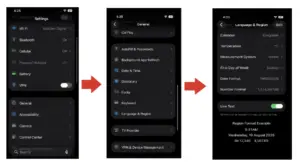
First, you need to enable “Live Text” on your iPhone. It is only available in iOS 15 or later versions. Open Settings > General > Language & Region > Live Text. Toggle on this feature, and you will be able to use it on your phone.


Step-02:

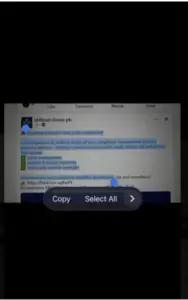
Now, go to your Photos app and open your handwriting notes pictures. Hold on to the text, and it will scan the area and let you copy the whole text or part of it.


Step-03:

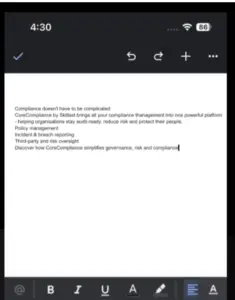
Select the text, go to your Google Docs or Notes, and paste it in there.


Do the same process for other pictures of your classroom notes, and within a few minutes, you will save them digitally for easy access and editing.


On Android:

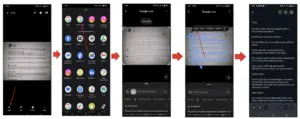
  1. Go to your phone gallery and open your picture.
  2. Click on the “Share” button and share that picture to Google Lens, if the application is installed on your phone.
  3. Google Lens will analyze your picture, retrieve text, and allow you to copy it to the clipboard.
  4. You can then paste the copied text into your Google Docs and save it on your mobile phone.


Check the image below of how this whole process works.


This is how you can digitize classroom notes on your Android quickly.


Method #2: Using Handwriting to Text Converter


If you’re using an iPhone that does not support iOS 15, or you don’t want to use any application on an Android phone, the best option is an online handwriting to text converter. Such a tool uses OCR (Optical Character Recognition) technology to identify text in images and convert them in editable format.


Step-by-Step Guide:


Here’s how you can use a text extraction tool to transform your physical notes into digital text.

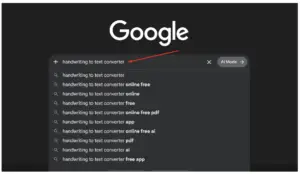
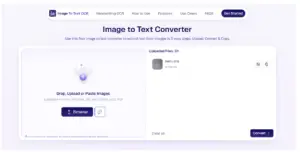
1. Find a Reliable Tool: Search “handwriting to text converter” or “image to text converter” on your browser, and you will see multiple options. Pick the one that suits you best. We have picked ImagetoTextOCR hanwriting to text converter for illustration purposes.


2. Upload your Images: You can upload multiple pictures at a time and extract text from them simultaneously. The tool also lets you drag and drop the picture, paste an image URL, or use your device’s camera to capture photos of physical notes (on mobile).


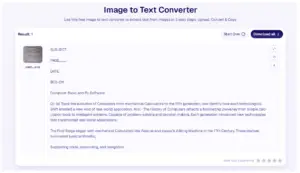
3. Let the Tool Do its Process: The tool will take some time to analyze text within an image, extract it in the same format, and provide you with the editable version. 


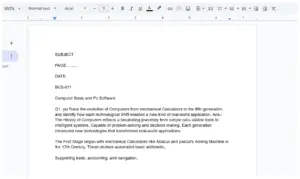
4. Copy the Text: You can then copy the extracted text, paste it into your Google Docs or Notepad, and save the file on your device or cloud storage for quick access.


This is how you can use an online handwriting OCR tool to digitize your classroom notes in seconds.


Method #3: Using ChatGPT


You can use ChatGPT on your mobile or desktop to convert your handwritten notes into digital text. Compared to using a handwriting to text tool, this method will take a little time.


Step-by-Step Guide:


Here’s the step-by-step guide on how you can make use of ChatGPT to convert your handwritten classroom notes into digital text.

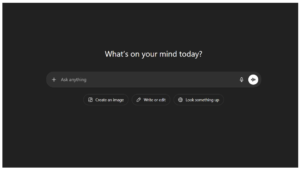
  • Open ChatGPT and make sure you are signed in.

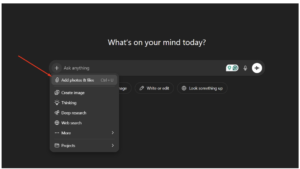
  • There you will see a plus (+) icon. Click on it and you will see the “Add photos & files” option.

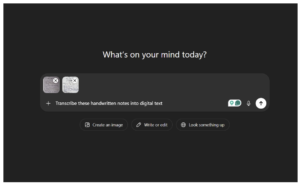
  • Upload pictures of your classroom notes and make sure to number each page to keep the order.
  • Add a prompt like “Transcribe these handwritten notes into digital text,” and hit the “Enter” button.


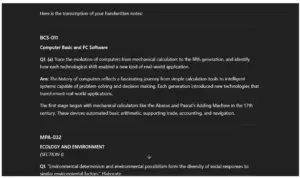
  • ChatGPT will automatically understand the text within the image and provide the extracted text.

  • Copy the retrieved text and paste it into your Notepad or Google Docs.

This is how you can use ChatGPT to convert your classroom notes into digital text instantly.


Useful Tips to Efficiently Convert Classroom Notes into Digital Text


Here are some tips that you must keep in mind while digitizing your handwritten text notes:

  • Always take clear, high-resolution photos of your notes.
  • Ensure proper lighting to improve text recognition accuracy.
  • Keep pages flat and avoid shadows or folds in images.
  • Organize images in the correct order before converting.
  • Double-check the extracted text for minor OCR errors.
  • Save your final files in cloud storage for easy access anytime.

Final Thoughts


Digitizing your classroom notes has never been easier or faster thanks to modern tools like smartphone OCR features, online converters, and AI-based solutions such as ChatGPT. Instead of spending hours typing everything manually, you can now convert handwritten notes into editable digital text within minutes. The above-discussed methods not only save time but also improve the organization and accessibility of your study material. So, pick the method that fits your device and start transforming your notes into smart, searchable digital documents today.


10 Useful Things to Know About AI Detection Tools

10 Useful Things to Know About AI Detection Tools


Have you ever read a piece of text and asked yourself, “Was this written by a person or by AI?”

AI writing is now common in blogs, emails, essays, social posts, product pages, and reports. Because of that, many people use AI detection tools to better understand how a text may have been created. These tools can be helpful for teachers, editors, students, writers, marketers, and business teams.

AI detection is not about judging writing. It is about getting more context. A tool can give you a signal, and then you can use your own thinking to make a fair call.


1. AI Detection Tools Look for Writing Patterns


AI detection tools review text and look for patterns that may appear in AI-written content.

These patterns can include:

  • Sentence structure
  • Word choice
  • Repetition
  • Predictable phrasing
  • Smooth but generic flow
  • Lack of personal detail

For example, AI-written text may sound polished but may not include real-life examples, opinions, or small human details. A human writer may add context like, “I tested this method last week,” or “This reminded me of a customer question I once handled.”


2. They Give Probability, Not a Final Answer


An AI detection result is usually a probability. It may say the text is likely human-written, likely AI-written, or mixed.

That does not mean the tool is giving a legal-style final decision. It is giving a reading based on patterns.

For example, if a tool says a paragraph is 70% likely to be AI-written, that means the text has signals often linked with AI writing. A smart next step is to read the content yourself and check if it has original thinking, clear examples, and natural flow.


3. Clear Human Writing Often Has Specific Details


Human writing often includes lived experience, small observations, and natural variation.

For example, compare these two lines:


Generic line

AI tools can help people write better content faster.


More human line

I use AI tools when I need a rough outline, but I still rewrite the examples because my readers usually need real cases, not broad advice.

The second line feels more personal because it includes a real use case and a clear reason. AI detection tools often read such details as more natural because they show context and intent.


4. AI Detection Can Help With Content Review


AI detection tools are useful during content checks. They can help editors, teachers, and managers review text more carefully.

A content team may use an AI detector before publishing an article to see if the writing sounds too generic. A teacher may use one to start a fair review of a student essay. A freelancer may use one to check if their draft sounds natural before sending it to a client.

The tool does not replace judgment. It supports it.


5. Short Text Can Be Harder to Analyze


AI detection works better when there is enough text to review. A short sentence or tiny paragraph gives the tool less information.

For example, this sentence is too short to judge well:

“AI writing is useful for many people.”

That line could be written by anyone. A longer sample gives more clues, such as tone, sentence rhythm, examples, and topic depth.

For better results, check a complete section instead of one short sentence.


6. Mixed Writing Is Very Common


Many texts today are not fully human-written or fully AI-written. They are often mixed.

A person may use AI to:

  • Create an outline
  • Rewrite a paragraph
  • Fix grammar
  • Summarize notes
  • Generate title ideas
  • Improve sentence flow

Then the person may add their own examples, edits, and final voice. In that case, the result may be partly AI-assisted and partly human-written.

This is why many tools show mixed results. That is normal. It reflects how people actually write today.


7. AI Detection Works Best With Human Review


A tool can scan text quickly, but a person can understand meaning, purpose, and context.

Here are practical questions to ask after using a tool:

  • Does the text include real examples?
  • Does it answer the topic clearly?
  • Does it sound natural for the target reader?
  • Does it include original thought?
  • Does the tone match the writer or brand voice?
  • Are the claims backed by logic?

For example, an article about customer support should include realistic support examples, not only broad statements. Human review helps spot that.


8. Good Writing Still Matters Most


AI detection is useful, but the quality of the writing is still the main thing.

Strong content should be:

  • Clear
  • Helpful
  • Accurate
  • Easy to read
  • Specific
  • Well-structured
  • Useful for the reader

A fully human-written article can still be weak if it is vague. An AI-assisted article can still be useful if a person edits it with care, adds real examples, and checks the facts.

The goal should be better writing, not just a score.


9. AI Detection Can Support Transparency


AI detection tools can help create more open writing practices.

For example, a school may ask students to explain how they used AI. A company may ask writers to mark AI-assisted drafts. A content team may use detection during editing to keep the final copy natural and original.

This creates a fair process. Instead of guessing, people can talk about how the content was made.


A simple review process

  1. Read the full text.
  2. Run it through a detection tool.
  3. Check the result.
  4. Review the writing yourself.
  5. Ask for context if needed.
  6. Make a fair decision.

That process is calm, clear, and practical.


10. AI Detection Tools Are Part of Modern Writing


AI tools are now part of daily writing for many people. Because of that, AI detection tools are becoming part of daily review work too.

They can help with:

  • Essay checks
  • Blog editing
  • Website content review
  • Business reports
  • Hiring tasks
  • Content quality checks
  • Draft review
  • Publishing workflows

Think of AI detection as one layer in the writing process. It gives useful feedback, but it works best when paired with human reading.


Final Thoughts


AI detection tools are helpful because they give more insight into how a piece of text may have been created. They look for patterns, provide probability-based results, and support better review habits.

The best way to use them is simple: check the text, read the result, then apply human judgment. Look for clear ideas, real examples, natural flow, and useful information.

In the end, strong writing should feel clear, thoughtful, and helpful to the reader. AI detection tools can support that goal by giving you one more way to review content with care.


5 Free And Paid Turnitin Alternatives

5 Free And Paid Alternatives That Might Be Better Than Turnitin


Do you wish there were reliable alternatives to Turnitin that could meet all your originality needs? Have you decided not to stick to just one plagiarism checker and try the other better options? If so, you are going to find the 5 real gems in this article that you can try instead of relying solely on Turnitin.


For your convenience, we will walk you through both free and paid choices so that you can pick the one that best suits your needs. Even some options offer limited free checks, allowing you to test their features before committing to a subscription. So, make sure that you go through each tool mentioned in this post and don’t miss out on anything.


1. Plagiarismly.com


Plagiarismly.com is a leading online plagiarism checker that can be used as a better alternative to Turnitin. It has also been made to promote academic and professional integrity. Whether it’s a long educational essay or a corporate proposal, the tool can detect traces of plagiarism in all kinds of writing. 


This is its diversity, which makes it a worthwhile option to consider. So, you can use it as your companion whenever you feel the need to check the originality of your write-ups. Since it’s a web-based tool, you can access it anytime you need. It’s always there to help you, offering 100% uptime with no compromise in detection quality. 


What Makes It Stand Out?


  • AI-powered deep plagiarism detection.
  • Multiple options to input sample content.
  • Compatibility with more than 25 languages.
  • Highly accurate and user-friendly reporting.
  • Ability to catch even subtle plagiarism traces.


How Accurate Is It?


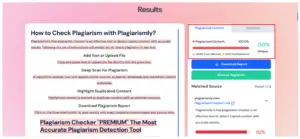
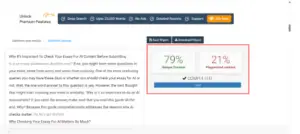
This plagiarism detector offers exact insights into the originality of the input text. We tested it by entering text directly from its own official page, and it flagged all the content as plagiarized. That’s a clear indication that you can rely on it instead of Turnitin without any doubts.


Is It Free Or Paid?


Plagiarismly.com is mainly a paid plagiarism detector, allowing you to start your premium journey at just $12.00 per month. However, it also provides you with 3 free checks per day, helping you meet your occasional plagiarism detection needs without paying a single penny. 


What Are Its Pros?


  • Displays word statistics along with plagiarism percentage. 
  • Marks plagiarized sections in red for easy identification.
  • Facilitates an ad-free text assessment experience.
  • Allows changing the language with a simple button.


What Are Its Cons?


  • Restricts word count in even limited free checks.
  • Lacks weekly subscription options for minimal needs.


2. DupliChecker


DupliChecker is one of the pioneers in online plagiarism detection, offering a simple yet powerful platform for students, writers, and professionals. Just like Turnitin, this plagiarism detector has also been serving users across the world for a long time. This extensive experience and continued advancements have helped it refine its detection algorithms, making it highly accurate and reliable.


Especially after the integration with AI, its ability to perform an in-depth text analysis and trace every hidden sign of similarity has improved significantly. Now, it’s fully capable of detecting all types of plagiarism, including poorly rephrased similarities and patch working. 


What Makes It Stand Out?


  • Comes with an incredibly vast database.
  • Integrated with cloud and device storage.
  • Supports plagiarism checks through URLs.
  • Allows eliminating specific pages from results.
  • It can accept input documents in 7 formats.


How Accurate Is It?


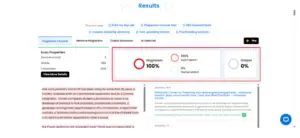
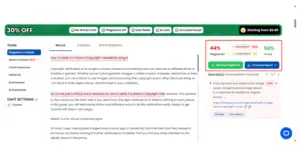
DupliChecker also performed perfectly when tested for an entirely copied article from the web. The screenshot below proves how it accurately detected all duplicated content, highlighted the plagiarized sections, and provided a clear percentage of plagiarism.


Is It Free Or Paid?


DupliChecker is a freemium tool. It provides you with unlimited free checks, each with 1000 words. However, if your documents are often longer than this word limit, you’ll need one of its paid plans, starting at just $5 per week.


What Are Its Pros?


  • Includes an integrated plagiarism remover.
  • Detects both exact and partially matching parts.
  • Shows the similarity score for each match separately.
  • Keeps your input content 100% private.


What Are Its Cons?


  • Each check requires a reCAPTCHA verification.
  • Needs the page to be reloaded for the next attempt.


3. PlagiarismDetector.net


PlagiarismDetector.net is also a decent alternative to Turnitin. You get the same level of detection accuracy with this free plagiarism checker as you would expect from any top-tier plagiarism tool. So, everyone who has to pay close attention to writing originality in different tasks can count on the results of this tool, including you. 


When it comes to running an instant check with this plagiarism detector, all you have to do is either upload your file or paste copied text. Once input is detected, the tool analyzes each sentence in a few seconds and compares it across online and offline resources. As a result, a clean and clear report appears on your screen that you can even download to your device. 


What Makes It Stand Out?


  • Backed by smart NLP and ML algorithms.
  • Precise originality assessment through URLs.
  • Facility to generate citations for plagiarized text.
  • Color-coded highlights for partial and exact matches.
  • Instant reports without missing any matching source.


How Accurate Is It?


PlagiarismDetector.net claims to be 100% correct, and it truly lived up to its promise when we checked a unique article through it. The tool didn’t flag any part as plagiarized, as the content was already original. That means it ensures a nearly zero false positive rate in its detections.


Is It Free Or Paid?


This plagiarism checker also has both free and paid options. Just like the above one, it gives you freedom to check 1000 words whenever you want without any charges. For any text exceeding this limit, you will need the “Student” plan, which is available for just $20.”


What Are Its Pros?


  • Easy-to-navigate web layout with minimal ads.
  • Option to import text files from Dropbox.
  • 24/7 support in case of any technical issues.
  • Facility to check up to 25k words in a single attempt.


What Are Its Cons?


  • Lacks direct document importing from Google Drive.
  • Supports fewer languages than other similar tools.


4. Check-Plagiarism.com


Turnitin is not the only option out there, and Check-Plagiarism.com has proved it by maintaining a track record of delivering accurate results consistently. While it appeared on the scene many years after Turnitin had already made its name, this tool quickly gained significant attention by offering true value. That’s the reason students and researchers rely on this tool.


So, just like them, you can also count on this plagiarism checker for fast, reliable, and thorough originality checks. The good thing is that it has a built-in option to cite sources in different styles. That means if your work contains any unintentionally copied parts, you can create citations for them to avoid plagiarism. 


What Makes It Stand Out?


  • Pretty simple interface with no extra graphics or text.
  • Equipped with cutting-edge AI text analysis technology.
  • Facility to exclude a particular URL from the detection process. 
  • Scans the web in real time to locate all possible matches.
  • Gives originality assessment detailed reports, just like Turnitin. 


How Accurate Is It?


Check-Plagiarism.com also delivered accurate results, making it a reliable alternative to Turnitin. This time, we tested it with a freshly written article as a reference. The tool efficiently highlighted the plagiarized parts that we were not even aware of. This impressive precision ensures that it will not disappoint you at all.


Is It Free Or Paid?


Check-Plagiarism.com gives users a flexible way to run originality checks without forcing them into a paid plan right away. You can perform basic scans for free that have a limit of 1000 words each. But if this free version doesn’t meet your needs, you can increase the word limit by subscribing to its monthly plan, which costs just $14.99. 


What Are Its Pros:


  • No technical steps are required to get started.
  • There is no such barrier as creating a user account.
  • Cross-platform compatibility for user convenience.
  • Multilingual and multi-format support.


What Are Its Cons?


  • No separate similarity scoring for every match.
  • No option to check plagiarism using URLs.


5. SmallSEOTools – Plagiarism Checker


One more powerful web platform that allows you to check plagiarism is SmallSEOTools.com. This plagiarism checker is widely used by students, writers, and content creators to ensure originality. That means it could also be your helpful partner in checking the uniqueness of your text, just like Turnitin. 


So, instead of sticking to a single option, try this plagiarism detector as an alternative. You can consider it either simply as another choice or as a reliable backup to double-check your content. 


This way, it adds an extra layer of verification, helping you catch any plagiarized parts that you might have missed in the first check.  


What Makes It Stand Out?


  • Matches input text with billions of web pages.
  • Automated rewriting feature for plagiarism removal.
  • Provides a list-based preview of plagiarized sentences.
  • Facilitates effortless source navigation for easy comparison.
  • Accessible through all desktop and mobile devices.


How Accurate Is It?


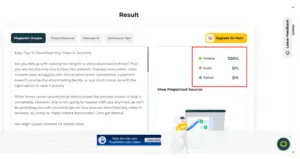
If we talk about the accuracy of the plagiarism checker by SmallSEOTools, it performs impressively for both short and long texts. When tested with a piece of partially copied content, the tool successfully identified the duplicated and unique sections with a minimal false positive rate.


Here is a glimpse of its results:


Is It Free Or Paid?


This tool is mainly a paid utility, but it also offers limited free access for occasional use. You can unlock its advanced features like deep search and citation generation by paying $9.80 monthly. However, this plan also has a word limit that can be exceeded by upgrading to a higher-tier subscription.


What Are Its Pros:


  • Offers a dark mode to let you feel comfortable.
  • Allows removing plagiarism within the same interface.
  • Provides reports in both PDF and Word versions.
  • Facility to share generated reports on the spot.


What Are Its Cons?


  • The interface has a few ads that may annoy you.
  • Deep search functionality is limited to the paid version only.


The Final Thoughts


These five plagiarism checkers are more than enough to help you make the shift from Turnitin. Each tool offers reliable detection, unique features, and flexible options for both free and paid users. So, try each of them right away using the content you normally produce and find out which works the best for you. Once you find a suitable choice, you can confidently rely on it to ensure your work remains original, accurate, and plagiarism-free every time you write content.


GATE 2026: Complete Exam Information

GATE 2026: Complete Exam Information for M.Tech, ME & PHD Programs


The GATE exam, also called the Graduate Aptitude Test in Engineering, is a national exam that students take after finishing or nearing the end of their engineering or science degree. The purpose of this exam is to help students get admission into M.Tech, ME, or PhD programs at renowned institutions. Every year, around 8 to 9 lakh students apply for GATE. The exam is conducted by IISc Bengaluru and the seven IITs, and the responsibility of organising it changes from one IIT to another each year. The application process is done completely online and usually stays open for about a month, with some extra days available if students apply with a late fee. The exam is held in a computer-based format, and students are given three hours to complete it. A GATE score stays valid for three years, which means students can use it later for admissions or job opportunities.


Highlights of GATE


IISc Bangalore and seven IITs conduct GATE, and each year, one of these institutes is responsible for conducting this exam. Find a quick overview of GATE exam in the table shown below:


Feature Details
Courses Offered Admission to M.Tech, ME, MS, and PhD programmes; also used for PSU recruitment, such as IOCL, ONGC, Power Grid and others
Conducting Body Conducted every year by IISc Bengaluru and the seven IITs on a rotational basis.
Age Limit No age limit, students, graduates, and working professionals can apply.
Eligibility Candidates who have completed or are in the final year of a Bachelor’s degree in Engineering, Technology, Architecture, or Science-related fields.
Exam Mode & Duration Held online as a computer-based test with a duration of 3 hours.
Application Process Fully online and remains open for around one month, with an additional late-fee window
Score Validity GATE score is valid for 3 years for admissions and job opportunities.
Number of Applicants Around 8–9 lakh students apply every year
Subject Options Candidates can choose from multiple subject papers based on their academic
background and interests.


Eligibility Criteria for GATE


The eligibility rules for the GATE exam are simple. There is no age limit, and even students who are still completing their degree can appear for this exam. The criteria focus mainly on educational qualification, year of study, and valid documentation. Below are the detailed eligibility requirements for GATE exam:


Educational Qualification Requirement:

Students must have completed or be currently studying in the final year of a Bachelor’s degree in Engineering, Technology, Architecture, or a Science-related field.


Accepted Degree Types:

Eligible degrees include BE, BTech, BArch, BSc, BPharma, BS, and equivalent degrees from recognised universities or institutions.


Final-Year Students Can Apply:

Students who are in the final year or later of their qualifying degree can appear for the exam, provided they upload the required proof.


No Age Limit:

There is no maximum or minimum age restriction, making the exam open to fresh graduates and working professionals.


Nationality Flexibility:

Indian students, as well as foreign nationals from countries like Nepal, Bangladesh, Sri Lanka, Ethiopia, and UAE, can apply.


Required Documents:

Candidates must upload educational proof (certificate or final-year confirmation), a valid photo ID, and other details during registration.


How to Apply for GATE?


Applying for the GATE exam is done online; hence, students can complete it from home using a laptop or mobile device. The registration happens through the official GATE application portal, where candidates need to fill in their details, upload documents, and pay the fee. The application window usually stays open for about a month, with an extra period available for late submissions. Following the correct steps makes the process smooth and avoids mistakes that could lead to form rejection.


  • Visit the official GATE application portal when registration opens.
  • Create a new account using a valid email ID, mobile number, and password.
  • Log in to the portal and fill out personal, academic, and communication details.
  • Select the preferred GATE paper, exam city choices, and other required options.
  • Upload scanned documents, including photo, signature, and eligibility proof, in the correct format.
  • Pay the application fee online using a debit card, a credit card, UPI, or net banking.
  • SC/ ST/ PwD/ Female Candidates: INR 1000 (Regular period, single paper), and INR 1500 (Extended period, single paper)
  • All other candidates: INR 2000 (Regular period, single paper), and INR 2500 (Extended period, single paper)
  • Review the form carefully and submit it before the deadline.
  • Download and save the confirmation page for future reference.


Subject Specialisation for GATE


Students preparing for GATE can score better by focusing on subjects that match their strengths, have higher exam weightage, and align with their desired specialisation.

Listed below are the major GATE branches along with their specialisations:


Engineering Branch Key Specialisation Areas
Electronics & Telecommunication Engineering VLSI Design Tool Technology, Integrated Electronics & Circuits, Micro Electronics, Microwave Engineering, Communication Engineering, Telecommunication Technology & Management, Optoelectronics & Optical Communication, Nanotechnology, Digital Signal Processing, Control & Automation
Electrical Engineering Power Electronics, Machines & Drives, Power Systems, Control & Automation, Digital Signal Processing, Instrumentation Technology
Mechanical Engineering Design of Mechanical Equipment or Machine Design, Thermal
Engineering, Manufacturing Science & Engineering, Production Engineering, Industrial Engineering, Material Science & Management
Civil Engineering Structural Engineering, Geotechnical Engineering, Construction Engineering & Management, Transportation Engineering, Environmental Engineering, Earthquake Engineering, Water Resources Engineering, Rock Engineering & Underground Structure
Computer Science and Engineering & Information Technology Computer Science, Information Technology, Information Security, Software Engineering, Distributed Computing, Image Processing, Computer Systems and Hardware, Database and Information Systems, Programming Languages, Computer Networks and Distributed Systems, Artificial Intelligence, Advanced Computing


Exam Pattern for GATE Exam


GATE 2026 follows a unified exam pattern for most papers, but there are some subject-specific variations in the mark distribution. Every paper has a General Aptitude (GA) section, and then the rest comes from the chosen subjects. The total duration is always 3 hours, and the exam is held in computer-based mode. Questions are of three types: MCQ, MSQ, and NAT, and the total marks are 100 for every paper. Tabulated below is the complete GATE 2026 Exam Pattern for students’ reference:


Paper Code (Subject) GA Marks Subject / Compulsory Section Optional / Additional Section Total Marks Duration
AE, AG, BM, BT, CE, CH, CS, EC, EE, ES, IN, ME, MN, MT, NM, PE, PI, TF 15 85 marks from core subject (includes Engineering Mathematics for some) 100 180 min
CY, DA, EY, MA, PH, ST 15 85 marks from the subject (no separate Maths) 100 180 min
AR (Architecture & Planning) 15 Part A (Compulsory) = 60 marks Part B (choose B1 Architecture or B2 Planning) = 25 marks 100 180 min
GE (Geomatics Engineering) 15 Part A (Surveying & Mapping / common) = 55 marks Part B (choose B1 or B2) = 30 marks 100 180 min
GG (Geology & Geophysics) 15 Part A = 25 marks Part B1 (Geology) or B2 (Geophysics) = 60 marks 100 180 min
XE (Engineering Mathematics + Optional Sections) 15 Section A (Engineering Mathematics) = 15 marks TWO more sections (chosen by candidate), each of 35 marks 100 180 min
XH (Reasoning & Comprehension + Optional) 15 Section B1 (Reasoning & Comprehension) = 25 marks Choose one additional section = 60 marks 100 180 min
XL (Chemistry + Life Sciences) 15 Section P (Chemistry) = 25 marks Choose any TWO other life science sections = 2 × 30 marks 100 180 min


Syllabus of GATE


The GATE syllabus covers a wide range of topics based on the subject paper chosen by the candidate. While every paper has its own subjects, all students are required to answer a common General Aptitude section. The syllabus mainly focuses on testing core understanding, analytical thinking, and problem-solving ability. Below is an overview of the syllabus for GATE exam presented in a tabular format:


Syllabus Component Key Topics Covered
General Aptitude (GA) Verbal ability, logical reasoning, numerical ability, data interpretation, basic English usage.
Engineering Mathematics (for selected papers) Linear algebra, calculus, probability, differential equations, complex numbers, numerical methods.
Computer Science (CS) Programming, data structures, algorithms, operating systems,
DBMS, theory of computation, networks
Electronics & Communication (EC) Signals and systems, circuits, digital electronics, communication theory, EMT, control systems
Mechanical Engineering (ME) Thermodynamics, fluid mechanics, manufacturing, strength of materials, heat transfer, and design
Civil Engineering (CE) Structural engineering, geotechnical engineering, environmental engineering, surveying, and transportation
Electrical Engineering (EE) Electric circuits, power systems, machines, control systems, signals, electromagnetics
Chemical Engineering (CH) Chemical reaction engineering, heat transfer, mass transfer, process calculations, fluid flow
Biotechnology (BT) Cell biology, molecular biology, bioprocessing, genetics, microbiology, and bioinformatics basics
Physics (PH) Mechanics, quantum physics, mathematical physics, thermodynamics, electronics, EM theory
Mathematics (MA) Algebra, analysis, calculus, topology, ODE/PDE, numerical methods, statistics
Life Sciences (XL) Chemistry (compulsory), plus two sections from biochemistry, botany, microbiology, zoology, and food technology
Humanities & Social Sciences (XH) Reasoning and comprehension (compulsory), plus optional sections like sociology, psychology, philosophy, linguistics, economics, and English
Architecture & Planning (AR) Planning, building materials, structures, design, sustainability,
and urban development


Preparation Tips for GATE


Here are some simple and student-friendly tips to help aspirants get ready for the GATE exam:


Know the syllabus well:

Before starting their preparation, aspirants must check the GATE syllabus for their chosen paper and note the key topics. This helps candidates study with a clear direction and avoid putting time into areas that are not included.


Understand the exam pattern:

Students must be familiar with the marks distribution, types of questions, and the role of General Aptitude. This allows aspirants to plan better and focus on sections that carry more weight.


Focus on core subject concepts:

Since most marks come from the core paper, candidates should strengthen fundamental theories, formulas, and applications. Clear concepts help students solve tricky and analytical questions.


Solve previous year papers:

Practicing past GATE papers helps students understand the difficulty level, question flow, and commonly repeated concepts. It also builds confidence and improves problem-solving ability.


Take regular mock tests:

Candidates must attempt mock tests to improve speed, accuracy, and time management. It also helps students identify weak areas that need extra attention.


Make short and revision-friendly notes:

Aspirants should prepare quick notes for formulas, definitions, and key points. These notes become extremely useful during the last phase of preparation.


Stay consistent and avoid stress:

Students should make a simple study routine and follow it steadily. Proper breaks, rest, and a calm mindset help aspirants perform better in preparation and on exam day.


Cutoff for GATE


The GATE cutoff for the general category sees the highest competition, and for the CSE branch, the general cutoff usually ranges from 30 to 31. On the other hand, the OBC-NCL or EWS cutoff remains at 27.5. Check out the subject-wise and category-wise Exam Cutoff in the table presented below:


Subject General OBC-NCL / EWS SC / ST / PwD
Computer Science & Engineering (CSE) 30.0 – 31.0 27.5 20.0
Data Science (DA) 31.0 – 32.0 27.5 20.0
Mechanical Engineering (ME) 32.0 29.5 23.0
Electrical Engineering (EE) 26.0 – 27.0 23.5 – 24.0 17.5
Electronics & Communication Engineering (ECE) 25.0 – 26.0 23.5 17.5
Civil Engineering (CE) 30.0 – 31.0 27.5 20.0


List of Colleges Accepting GATE Score


GATE scores are widely accepted across India for postgraduate admissions, like M.Tech/M.E/M.Sc and research programs. Other than IITs, IIITs, and NITs, there are central and state universities that accept GATE scores. Students can check out the list provided below for more details:


Institute / College
Indian Institutes of Technology (IITs)
National Institutes of Technology (NITs)
Indian Institutes of Information Technology (IIITs)
Indian Institute of Science (IISc), Bengaluru
Indian Institutes of Engineering Science and Technology (IIEST)
Indian Institutes of Science Education and Research (IISERs)
Centre for Development of Advanced Computing (CDAC)
Jawaharlal Nehru University (JNU)
Delhi Technological University (DTU)
Netaji Subhas University of Technology (NSUT)
Jadavpur University
Anna University
Vellore Institute of Technology (VIT)
Birla Institute of Technology, Mesra
Punjab Engineering College (PEC)
COEP Technological University, Pune
Aligarh Muslim University (AMU)
Thapar Institute of Engineering & Technology
SRM Institute of Science & Technology
Defence Research & Development Organisation (DRDO)


Summing Up


Preparing for the GATE exam can feel challenging, but if students have the right approach and strategy, they can make the preparation feel much easier. Students are required to choose the right specialisation, understand the syllabus and exam pattern well, aim for top scores, and sit for the exam with confidence. This way, they can easily achieve their expected score and get into their desired college.


From FAQ to Face-Time:Answering with Avatars

From FAQs to Face-Time: Answering Customer Questions with Avatars


Ever wished your company could directly address every customer, without hiring twice the support staff? That’s precisely the kind of quantum jump companies are taking by bringing avatars into their communication. What used to be multiple typed-out responses or stale tutorial recordings can now be converted to interactive, person-to-person moments, without anyone having to grab a camera. Imagine a customer visits your product’s support page and instead of a scroll of text, they’re met with a smiling face guiding them through the number one five FAQs. Or imagine someone launching your app for the first time and rather than a procedural walkthrough, they’re greeted by a brief, customized welcome message from a digital ambassador. These interactions aren’t just handy, they’re memorable.


And here’s the interesting part: with a link to video, you can demonstrate to your audience just how simple it is to integrate these avatar-driven interactions into your everyday content. With platforms like Pippit, brands are revolutionizing how users interact with tutorials, demos, and on boarding sequences.


Why your FAQ page might need a face


Customers yearn for clarity. But occasionally consuming a long support page isn’t always the most silky smooth experience. With avatars, you can turn your frequently asked questions into visual answers. Picture this: a user asking, ‘How do I reset my password?’ Rather than directing them to a static article, you provide them with a 30-second avatar-powered clip that guides them step by step. It’s like it’s human, it injects personality, and it saves support teams hours upon hours.


This visual change also plays to current attention spans. Short videos presented via an avatar engage more attention than mere text. And when your avatar incorporates your brand’s style, tone, and audience, it speaks volumes of authority.


Interactive tutorials that actually teach


Tutorial apps are neglected, particularly if they appear as pop-ups or slides. Yet picture going into an app and seeing a guide, someone who resembles a legitimate representative, who says she can take you through the initial steps. Avatars make online interactions feel more intuitive and less robotic. For instance, a banking app can utilize avatars to describe major features such as how to initiate a transfer, monitor spending, or lock a card. Each step is akin to getting a one-on-one session, but without an actual agent. It’s the ultimate combination of efficiency and personalization.


Friendly faces in your dms


Messaging is another influential area where avatars are altering the tone. Rather than a dry, robotic message, consumers can receive a brief video message that answers their question. Whether a purchase inquiry or just a hello, that extra visual element increases engagement, and brand recognition. It also brings a sense of warmth to pre-recorded messages. Saying, ‘We’ll get back to you in 24 hours,’ in the voice of a friendly avatar, is much more friendly than a bland text message.


What Drives These Videos?


And you may be wondering how these videos are created. Well, that’s where intelligent tools enter the picture. Brands can make videos that contain speech, images, and characters, without capturing anything in a studio. One particularly thrilling way is through photo to video AI, which turns photos into expressive, talking avatars that convey your message with crispness and panache. You can construct the entire customer experience on this. From feature demos to support clips, it’s all about showing your solutions in formats that folks actually want to see.


Before you begin, get to know the real star: your custom avatar


Before I dive into the how-to, let’s discuss your main character, the custom avatar. This is not a generic character. It’s one that represents your brand. You can customize their voice, appearance, facial expression, and even mannerisms, building a digital spokesperson that is on-brand no matter what situation you put them in. Having a custom avatar, makes your videos consistent. It builds familiarity. Whether you’re answering a common query or guiding someone through account setup, your avatar becomes the face customers trust.


The friendly guide: 3 steps to making avatar-based videos with Pippit

Step into character: creating support videos that feel personal


Step 1: Access avatars and voices


Begin by signing in to your Pippit account. Go to the page titled ‘avatars and voices.’ Click the ‘+’ symbol to start uploading a profile photo which will be the starting point for your avatar.


Step 2: Upload your photo profile


Once you’re on the upload page, drag your image into position. Pippit will then walk you through labeling your avatar, choosing a voice that suits your tone, and posting your image. In a few moments, your avatar will be available to customize with various appearances, expressions, and voices.


Step 3: Customize and export


Once you have your avatar complete, click ‘apply’ to go into edit mode. There, you can script your message and turn it into speech. Add polish, music, transitions, even your own branding. Once you’re happy, click ‘Export’ and select your final resolution and file format.


How to use these videos throughout your business


  • On support pages: Respond to the top 5 FAQs in video form.
  • Within onboarding flows: Welcome users with a step-by-step tour.
  • Within direct messages: Offer personable-looking answers to frequent questions.
  • On social media: Answer follower questions in story-style videos.
The loveliness of this system is scalability. Record once, reuse everywhere.


Final thought: it’s time to humanize your help desk


These days, people expect assistance quickly and, ideally, cheerfully. This is what videos with avatars provide: amiable, always-on reactions that seem normal and human. And it’s easier than ever to create these videos using tools like Pippit. If your company is ready to move beyond text and create richer interactions with your users, this is your time. Interested in seeing how it works? Begin constructing your avatar support assistant with Pippit today!