Category: Subjects

Instruction Pipelining | Performance

Instruction Pipelining-


Before you go through this article, make sure that you have gone through the previous article on Instruction Pipelining.


In instruction pipelining,

  • A form of parallelism called as instruction level parallelism is implemented.
  • Multiple instructions execute simultaneously.
  • The efficiency of pipelined execution is more than that of non-pipelined execution.


Performance of Pipelined Execution-


The following parameters serve as criterion to estimate the performance of pipelined execution-

  • Speed Up
  • Efficiency
  • Throughput


1. Speed Up-


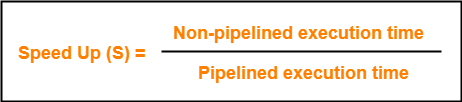
It gives an idea of “how much faster” the pipelined execution is as compared to non-pipelined execution.

It is calculated as-


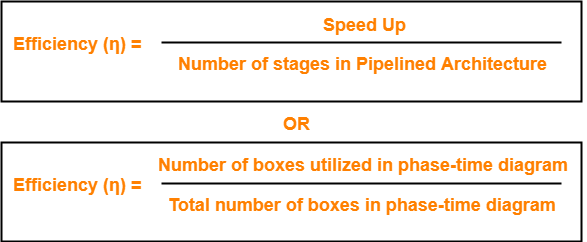
2. Efficiency-


The efficiency of pipelined execution is calculated as-


3. Throughput-


Throughput is defined as number of instructions executed per unit time.

It is calculated as-



Calculation of Important Parameters-


Let us learn how to calculate certain important parameters of pipelined architecture.

Consider-

  • A pipelined architecture consisting of k-stage pipeline
  • Total number of instructions to be executed = n


Point-01: Calculating Cycle Time-


In pipelined architecture,

  • There is a global clock that synchronizes the working of all the stages.
  • Frequency of the clock is set such that all the stages are synchronized.
  • At the beginning of each clock cycle, each stage reads the data from its register and process it.
  • Cycle time is the value of one clock cycle.


There are two cases possible-


Case-01: All the stages offer same delay-


If all the stages offer same delay, then-

Cycle time = Delay offered by one stage including the delay due to its register


Case-02: All the stages do not offer same delay-


If all the stages do not offer same delay, then-

Cycle time = Maximum delay offered by any stage including the delay due to its register


Point-02: Calculating Frequency Of Clock-


Frequency of the clock (f) = 1 / Cycle time


Point-03: Calculating Non-Pipelined Execution Time-


In non-pipelined architecture,

  • The instructions execute one after the other.
  • The execution of a new instruction begins only after the previous instruction has executed completely.
  • So, number of clock cycles taken by each instruction = k clock cycles


Thus,

Non-pipelined execution time

= Total number of instructions x Time taken to execute one instruction

= n x k clock cycles


Point-04: Calculating Pipelined Execution Time-


In pipelined architecture,

  • Multiple instructions execute parallely.
  • Number of clock cycles taken by the first instruction = k clock cycles
  • After first instruction has completely executed, one instruction comes out per clock cycle.
  • So, number of clock cycles taken by each remaining instruction = 1 clock cycle


Thus,

Pipelined execution time

= Time taken to execute first instruction + Time taken to execute remaining instructions

= 1 x k clock cycles + (n-1) x 1 clock cycle

= (k + n – 1) clock cycles


Point-04: Calculating Speed Up-


Speed up

= Non-pipelined execution time / Pipelined execution time

= n x k clock cycles / (k + n – 1) clock cycles

= n x k / (k + n – 1)

= n x k / n + (k – 1)

= k / { 1 + (k – 1)/n }


  • For very large number of instructions, n→∞. Thus, speed up = k.
  • Practically, total number of instructions never tend to infinity.
  • Therefore, speed up is always less than number of stages in pipeline.


Important Notes-


Note-01:


  • The aim of pipelined architecture is to execute one complete instruction in one clock cycle.
  • In other words, the aim of pipelining is to maintain CPI ≅ 1.
  • Practically, it is not possible to achieve CPI ≅ 1 due to delays that get introduced due to registers.
  • Ideally, a pipelined architecture executes one complete instruction per clock cycle (CPI=1).


Note-02:


  • The maximum speed up that can be achieved is always equal to the number of stages.
  • This is achieved when efficiency becomes 100%.
  • Practically, efficiency is always less than 100%.
  • Therefore speed up is always less than number of stages in pipelined architecture.


Note-03:


Under ideal conditions,

  • One complete instruction is executed per clock cycle i.e. CPI = 1.
  • Speed up = Number of stages in pipelined architecture


Note-04:


  • Experiments show that 5 stage pipelined processor gives the best performance.


Note-05:


In case only one instruction has to be executed, then-

  • Non-pipelined execution gives better performance than pipelined execution.
  • This is because delays are introduced due to registers in pipelined architecture.
  • Thus, time taken to execute one instruction in non-pipelined architecture is less.


Note-06:


High efficiency of pipelined processor is achieved when-

  • All the stages are of equal duration.
  • There are no conditional branch instructions.
  • There are no interrupts.
  • There are no register and memory conflicts.

Performance degrades in absence of these conditions.


To gain better understanding about Pipelining in Computer Architecture,

Watch this Video Lecture


Next Article- Practice Problems On Pipelining


Get more notes and other study material of Computer Organization and Architecture.

Watch video lectures by visiting our YouTube channel LearnVidFun.

Pipelining in Computer Architecture

Introduction-


  • A program consists of several number of instructions.
  • These instructions may be executed in the following two ways-


  1. Non-Pipelined Execution
  2. Pipelined Execution


1. Non-Pipelined Execution-


In non-pipelined architecture,

  • All the instructions of a program are executed sequentially one after the other.
  • A new instruction executes only after the previous instruction has executed completely.
  • This style of executing the instructions is highly inefficient.


Example-


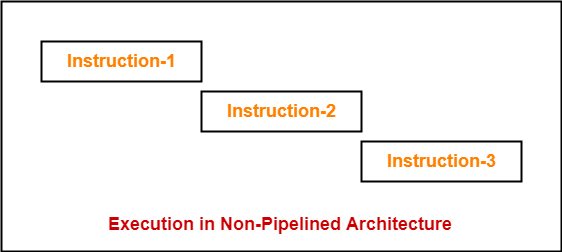
Consider a program consisting of three instructions.

In a non-pipelined architecture, these instructions execute one after the other as-


If time taken for executing one instruction = t, then-

Time taken for executing ‘n’ instructions = n x t


2. Pipelined Execution-


In pipelined architecture,

  • Multiple instructions are executed parallely.
  • This style of executing the instructions is highly efficient.


Now, let us discuss instruction pipelining in detail.


Instruction Pipelining-


Instruction pipelining is a technique that implements a form of parallelism called as instruction level parallelism within a single processor.


  • A pipelined processor does not wait until the previous instruction has executed completely.
  • Rather, it fetches the next instruction and begins its execution.


Pipelined Architecture-


In pipelined architecture,

  • The hardware of the CPU is split up into several functional units.
  • Each functional unit performs a dedicated task.
  • The number of functional units may vary from processor to processor.
  • These functional units are called as stages of the pipeline.
  • Control unit manages all the stages using control signals.
  • There is a register associated with each stage that holds the data.
  • There is a global clock that synchronizes the working of all the stages.
  • At the beginning of each clock cycle, each stage takes the input from its register.
  • Each stage then processes the data and feed its output to the register of the next stage.


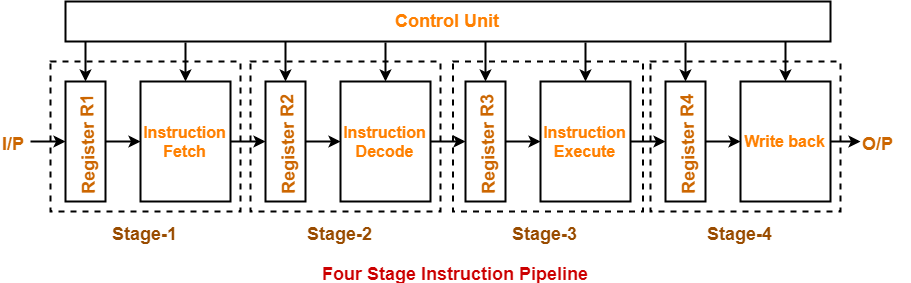
Four-Stage Pipeline-


In four stage pipelined architecture, the execution of each instruction is completed in following 4 stages-

  1. Instruction fetch (IF)
  2. Instruction decode (ID)
  3. Instruction Execute (IE)
  4. Write back (WB)


To implement four stage pipeline,

  • The hardware of the CPU is divided into four functional units.
  • Each functional unit performs a dedicated task.


Stage-01:


At stage-01,

  • First functional unit performs instruction fetch.
  • It fetches the instruction to be executed.


Stage-02:


At stage-02,

  • Second functional unit performs instruction decode.
  • It decodes the instruction to be executed.


Stage-03:


At stage-03,

  • Third functional unit performs instruction execution.
  • It executes the instruction.


Stage-04:


At stage-04,

  • Fourth functional unit performs write back.
  • It writes back the result so obtained after executing the instruction.


Execution-


In pipelined architecture,

  • Instructions of the program execute parallely.
  • When one instruction goes from nth stage to (n+1)th stage, another instruction goes from (n-1)th stage to nth stage.


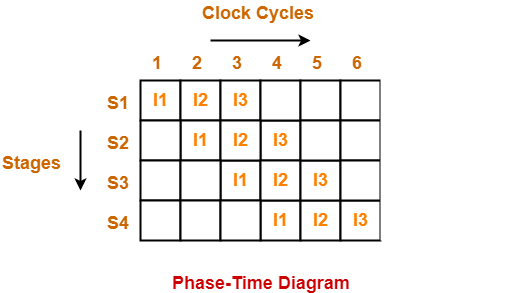
Phase-Time Diagram-


  • Phase-time diagram shows the execution of instructions in the pipelined architecture.
  • The following diagram shows the execution of three instructions in four stage pipeline architecture.


Time taken to execute three instructions in four stage pipelined architecture = 6 clock cycles.


NOTE-


In non-pipelined architecture,

Time taken to execute three instructions would be

= 3 x Time taken to execute one instruction

= 3 x 4 clock cycles

= 12 clock cycles

Clearly, pipelined execution of instructions is far more efficient than non-pipelined execution.


To gain better understanding about Pipelining in Computer Architecture,

Watch this Video Lecture


Next Article- Instruction Pipeline | Formulas


Get more notes and other study material of Computer Organization and Architecture.

Watch video lectures by visiting our YouTube channel LearnVidFun.
Memory Hierarchy | Memory Hierarchy Diagram

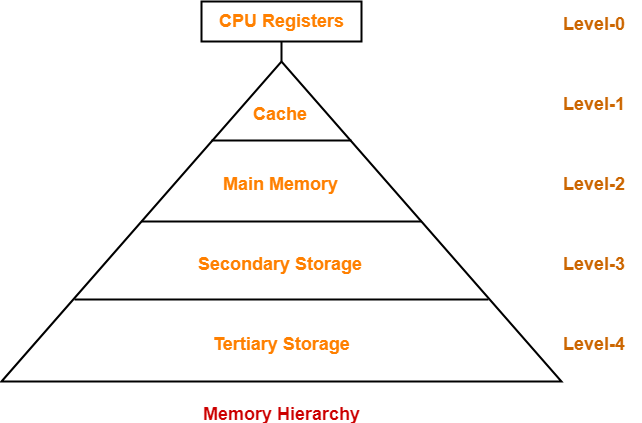
Memory Hierarchy-


  • Memory hierarchy is the hierarchy of memory and storage devices found in a computer system.
  • It ranges from the slowest but high capacity auxiliary memory to the fastest but low capacity cache memory.


Need-


There is a trade-off among the three key characteristics of memory namely-

  • Cost
  • Capacity
  • Access time

Memory hierarchy is employed to balance this trade-off.


Memory Hierarchy Diagram-


Level-0:


  • At level-0, registers are present which are contained inside the CPU.
  • Since they are present inside the CPU, they have least access time.
  • They are most expensive and therefore smallest in size (in KB).
  • Registers are implemented using Flip-Flops.


Level-1:


  • At level-1, Cache Memory is present.
  • It stores the segments of program that are frequently accessed by the processor.
  • It is expensive and therefore smaller in size (in MB).
  • Cache memory is implemented using static RAM.


Level-2:


  • At level-2, main memory is present.
  • It can communicate directly with the CPU and with auxiliary memory devices through an I/O processor.
  • It is less expensive than cache memory and therefore larger in size (in few GB).
  • Main memory is implemented using dynamic RAM.


Level-3:


  • At level-3, secondary storage devices like Magnetic Disk are present.
  • They are used as back up storage.
  • They are cheaper than main memory and therefore much larger in size (in few TB).


Level-4:


  • At level-4, tertiary storage devices like magnetic tape are present.
  • They are used to store removable files.
  • They are cheapest and largest in size (1-20 TB).


Observations-


The following observations can be made when going down in the memory hierarchy-

  • Cost / bit decreases
  • Frequency of access decreases
  • Capacity increases
  • Access time increases


Goals of Memory Hierarchy-


The goals of memory hierarchy are-

  • To obtain the highest possible average access speed
  • To minimize the total cost of the entire memory system


To gain better understanding about Memory Hierarchy-

Watch this Video Lecture


Next Article- Memory Organization | Simultaneous Vs Hierarchical


Get more notes and other study material of Computer Organization and Architecture.

Watch video lectures by visiting our YouTube channel LearnVidFun.
Addressing Modes | Practice Problems | COA

Addressing Modes in Computer Architecture-


Before you go through this article, make sure that you have gone through the previous article on Addressing Modes.


We have discussed-

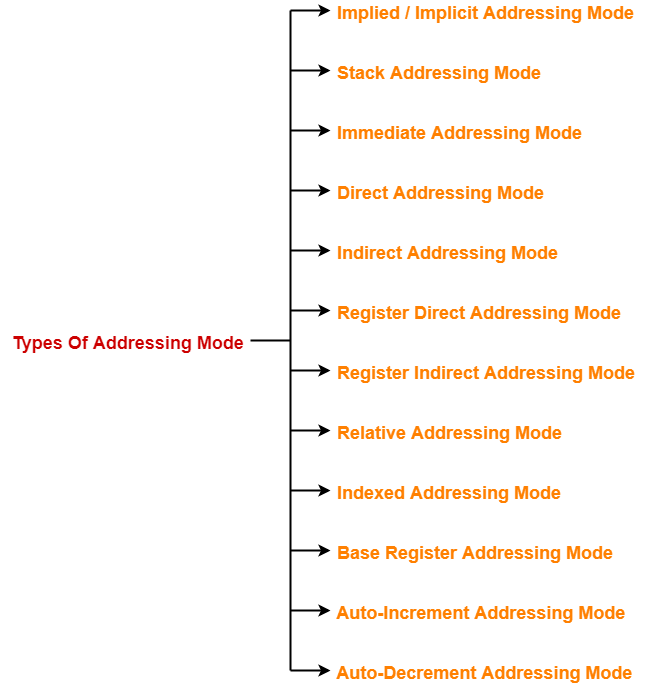
  • Addressing modes are the different ways of specifying the location of an operand.
  • Various kinds of addressing modes and their applications.


Also Read- Syntax Of Addressing Modes


In this article, we will discuss practice problems based on addressing modes.


PRACTICE PROBLEMS BASED ON ADDRESSING MODES-


Problem-01:


The most appropriate matching for the following pairs is-


Column-1:

X: Indirect addressing

Y: Immediate addressing

Z: Auto decrement addressing


Column-2:

1. Loops

2. Pointers

3. Constants


  1. X-3, Y-2, Z-1
  2. X-1, Y-3, Z-2
  3. X-2, Y-3, Z-1
  4. X-3, Y-1, Z-2


Solution-


Option (C) is correct.


Problem-02:


In the absolute addressing mode,

  1. The operand is inside the instruction
  2. The address of the operand is inside the instruction
  3. The register containing the address of the operand is specified inside the instruction
  4. The location of the operand is implicit


Solution-


Option (B) is correct.


Problem-03:


Which of the following addressing modes are suitable for program relocation at run time?

  1. Absolute addressing
  2. Base addressing
  3. Relative addressing
  4. Indirect addressing


  1. 1 and 4
  2. 1 and 2
  3. 2 and 3
  4. 1, 2 and 4


Solution-


Option (C) is correct.


Problem-04:


What is the most appropriate match for the items in the first column with the items in the second column-


Column-1:

X: Indirect addressing

Y: Indexed addressing

Z: Base register addressing


Column-2:

1. Array implementation

2. Writing relocatable code

3. Passing array as parameter


  1. X-3, Y-1, Z-2
  2. X-2, Y-3, Z-1
  3. X-3, Y-2, Z-1
  4. X-1, Y-3, Z-2


Solution-


Option (A) is correct.


Problem-05:


Which of the following addressing modes permits relocation without any change whatsoever in the code?

  1. Indirect addressing
  2. Indexed addressing
  3. Base register addressing
  4. PC relative addressing


Solution-


Option (C) is correct.


Problem-06:


Consider a three word machine instruction-

ADD A[R0], @B

The first operand (destination) “A[R0]” uses indexed addressing mode with R0 as the index register. The second operand operand (source) “@B” uses indirect addressing mode. A and B are memory addresses residing at the second and the third words, respectively. The first word of the instruction specifies the opcode, the index register designation and the source and destination addressing modes. During execution of ADD instruction, the two operands are added and stored in the destination (first operand).

The number of memory cycles needed during the execution cycle of the instruction is-

  1. 3
  2. 4
  3. 5
  4. 6


Solution-


For the first operand,

  • It uses indexed addressing mode.
  • Thus, one memory cycle will be needed to fetch the operand.


For the second operand,

  • It uses indirect addressing mode.
  • Thus, two memory cycles will be needed to fetch the operand.


After fetching the two operands,

  • The operands will be added and result is stored back in the memory.
  • Thus, one memory cycle will be needed to store the result.


Total number of memory cycles needed

=  1 + 2 + 1

= 4


Thus, Option (B) is correct.

To watch video solution, click here.


Problem-07:


Consider a hypothetical processor with an instruction of type LW R1, 20(R2), which during execution reads a 32-bit word from memory and stores it in a 32-bit register R1. The effective address of the memory location is obtained by the addition of a constant 20 and the contents of register R2. Which of the following best reflects the addressing mode implemented by this instruction for operand in memory?

  1. Immediate Addressing
  2. Register Addressing
  3. Register Indirect Scaled Addressing
  4. Base Indexed Addressing


Solution-


Clearly, the instruction uses base indexed addressing mode.

Thus, Option (D) is correct.


Problem-08:


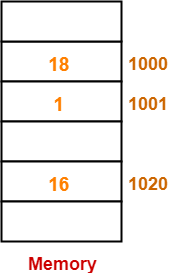
The memory locations 1000, 1001 and 1020 have data values 18, 1 and 16 respectively before the following program is executed.


MOVI Rs, 1 Move immediate
LOAD Rd, 1000(Rs) Load from memory
ADDI Rd, 1000 Add immediate
STOREI 0(Rd), 20 Store immediate


Which of the statements below is TRUE after the program is executed?

  1. Memory location 1000 has value 20
  2. Memory location 1020 has value 20
  3. Memory location 1021 has value 20
  4. Memory location 1001 has value 20


Solution-


Before the execution of program, the memory is-


Now, let us execute the program instructions one by one-


Instruction-01: MOVI Rs, 1


  • This instruction uses immediate addressing mode.
  • The instruction is interpreted as Rs ← 1.
  • Thus, value = 1 is moved to the register Rs.


Instruction-02: LOAD Rd, 1000(Rs)


  • This instruction uses displacement addressing mode.
  • The instruction is interpreted as Rd ← [1000 + [Rs]].
  • Value of the operand = [1000 + [Rs]] = [1000 + 1] = [1001] = 1.
  • Thus, value = 1 is moved to the register Rd.


Instruction-03: ADDI Rd, 1000


  • This instruction uses immediate addressing mode.
  • The instruction is interpreted as Rd ← [Rd] + 1000.
  • Value of the operand = [Rd] + 1000 = 1 + 1000 = 1001.
  • Thus, value = 1001 is moved to the register Rd.


Instruction-04: STOREI 0(Rd), 20


  • This instruction uses displacement addressing mode.
  • The instruction is interpreted as 0 + [Rd] ← 20.
  • Value of the destination address = 0 + [Rd] = 0 + 1001 = 1001.
  • Thus, value = 20 is moved to the memory location 1001.


Thus,

  • After the program execution is completed, memory location 1001 has value 20.
  • Option (D) is correct.


To watch video solution, click here.


Problem-09:


Consider the following memory values and a one-address machine with an accumulator, what values do the following instructions load into accumulator?

  • Word 20 contains 40
  • Word 30 contains 50
  • Word 40 contains 60
  • Word 50 contains 70

Instructions are-

  1. Load immediate 20
  2. Load direct 20
  3. Load indirect 20
  4. Load immediate 30
  5. Load direct 30
  6. Load indirect 30


Solution-


Instruction-01: Load immediate 20


  • This instruction uses immediate addressing mode.
  • The instruction is interpreted as Accumulator ← 20.
  • Thus, value 20 is loaded into the accumulator.


Instruction-02: Load direct 20


  • This instruction uses direct addressing mode.
  • The instruction is interpreted as Accumulator ← [20].
  • It is given that word 20 contains 40.
  • Thus, value 40 is loaded into the accumulator


Instruction-03: Load indirect 20


  • This instruction uses indirect addressing mode.
  • The instruction is interpreted as Accumulator ← [[20]].
  • It is given that word 20 contains 40 and word 40 contains 60.
  • Thus, value 60 is loaded into the accumulator.


Instruction-04: Load immediate 30


  • This instruction uses immediate addressing mode.
  • The instruction is interpreted as Accumulator ← 30.
  • Thus, value 30 is loaded into the accumulator.


Instruction-02: Load direct 30


  • This instruction uses direct addressing mode.
  • The instruction is interpreted as Accumulator ← [30].
  • It is given that word 30 contains 50.
  • Thus, value 50 is loaded into the accumulator


Instruction-03: Load indirect 30


  • This instruction uses indirect addressing mode.
  • The instruction is interpreted as Accumulator ← [[30]].
  • It is given that word 30 contains 50 and word 50 contains 70.
  • Thus, value 70 is loaded into the accumulator.


To watch video solution, click here.


Next Article- System Bus in Computer Architecture


Get more notes and other study material of Computer Organization and Architecture.

Watch video lectures by visiting our YouTube channel LearnVidFun.
Addressing Modes in Computer Architecture

Addressing Modes in Computer Architecture-


Before you go through this article, make sure that you have gone through the previous article on Addressing Modes.


We have discussed-

  • Addressing modes are the different ways of specifying the location of an operand.
  • Various kinds of addressing modes and their applications.


In this article, we will discuss syntax used for addressing modes.


Syntax Of Addressing Modes-


  • The computer instructions may use different addressing modes.
  • Different addressing modes use different syntax for their representation.


The syntax used for addressing modes are discussed below-


1. Immediate Addressing Mode-


Syntax-

# Expression


Interpretation-

Operand = Expression


Examples-


  • Load R1, #1000 is interpreted as R1 ← 1000
  • ADD R2, #3 is interpreted as R2 ← [R2] + 3


2. Direct Addressing Mode-


Syntax-

Constant


Interpretation-


Effective address of the operand = Constant

Operand = Content of the memory location ‘Constant’

Operand = [Constant]


Examples-


  • Load R1, 1000 is interpreted as R1 ← [1000]
  • ADD R2, 3 is interpreted as R2 ← [R2] + [3]


3. Register Direct Addressing Mode-


Syntax-

Rn or [Rn]


Interpretation-


Operand = Content of the register Rn

Operand = [Rn]


Examples-


  • Load R1, R2 is interpreted as R1 ← [R2]
  • ADD R1, R2 is interpreted as R1 ← [R1] + [R2]


4. Indirect Addressing Mode-


Syntax-

@Expression or @(Expression) or (Expression)


Interpretation-


Effective address of the operand = Content of the memory location ‘expression’

Operand = [[ Expression]]


Examples-


  • Load R1, @1000 is interpreted as R1 ← [[1000]]
  • ADD R1, @(1000) is interpreted as R1 ← [R1] + [[1000]]
  • ADD R1, (1000) is interpreted as R1 ← [R1] + [[1000]]


5. Register Indirect Addressing Mode-


Syntax-

@Rn or @(Rn) or (Rn)


Interpretation-


Effective address of the operand = Content of the register Rn

Operand = [[ Rn ]]


Examples-


  • Load R1, @R2 is interpreted as R1 ← [[R1]]
  • ADD R1, @(R2) is interpreted as R1 ← [R1] + [[R2]]
  • ADD R1, (R2) is interpreted as R1 ← [R1] + [[R2]]


6. Displacement Addressing Mode-


This addressing mode may be-

  • Relative addressing mode
  • Index addressing mode
  • Base register addressing mode


Syntax-

disp (Rn)


Interpretation-


Effective address of the operand = disp + Content of the register Rn

Operand = [disp + [ Rn ]]


Examples-


  • Load R1, 100(R2) is interpreted as R1 ← [100 + [R1]]
  • ADD R1, 100(R2) is interpreted as R1 ← [R1] + [100 + [R2]]


7. Auto-Increment Addressing Mode-


Syntax-

(Rn)+


Interpretation-


Effective address of the operand = Content of the register Rn

Operand = [[ Rn ]]

After fetching the operand, increment [Rn] by step size ‘d’


Examples-


  • Load R1, (R2)+ is interpreted as R1 ← [[R2]] followed by R2 ← [R2] + d
  • ADD R1, (R2)+ is interpreted as R1 ← [R1] + [[R2]] followed by R2 ← [R2] + d


8. Auto-Decrement Addressing Mode-


Syntax-

-(Rn)


Interpretation-


Before fetching the operand, decrement [Rn] by step size ‘d’

Then, Effective address of the operand = Content of the register Rn

Operand = [[ Rn ]]


Examples-


  • Load R1, -(R2) is interpreted as R2 ← [R2] – d followed by R1 ← [[R2]]
  • ADD R1, -(R2) is interpreted as R2 ← [R2] – d followed by R1 ← [R1] + [[R2]]


To gain better understanding about Syntax of Addressing Modes,

Watch this Video Lecture


Next Article- Practice Problems On Addressing Modes


Get more notes and other study material of Computer Organization and Architecture.

Watch video lectures by visiting our YouTube channel LearnVidFun.