Category: Subjects

Lock Variable | Process Synchronization

Process Synchronization-


Before you go through this article, make sure that you have gone through the previous article on Process Synchronization.


We have discussed-

  • Process Synchronization provides a synchronization among the processes.
  • Synchronization mechanisms allow the processes to access critical section in a synchronized manner.
  • This avoids the inconsistent results.


Lock Variable-


  • Lock variable is a synchronization mechanism.
  • It uses a lock variable to provide the synchronization among the processes executing concurrently.
  • However, it completely fails to provide the synchronization.


It is implemented as-
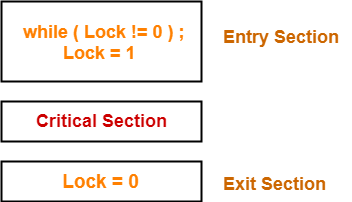


Initially, lock value is set to 0.

  • Lock value = 0 means the critical section is currently vacant and no process is present inside it.
  • Lock value = 1 means the critical section is currently occupied and a process is present inside it.


Working-


This synchronization mechanism is supposed to work as explained in the following scenes-


Scene-01:


  • Process P0 arrives.
  • It executes the lock!=0 instruction.
  • Since lock value is set to 0, so it returns value 0 to the while loop.
  • The while loop condition breaks.
  • It sets the lock value to 1 and enters the critical section.
  • Now, even if process P0 gets preempted in the middle, no other process can enter the critical section.
  • Any other process can enter only after process P0 completes and sets the lock value to 0.


Scene-02:


  • Another process P1 arrives.
  • It executes the lock!=0 instruction.
  • Since lock value is set to 1, so it returns value 1 to the while loop.
  • The returned value 1 does not break the while loop condition.
  • The process P1 is trapped inside an infinite while loop.
  • The while loop keeps the process P1 busy until the lock value becomes 0 and its condition breaks.


Scene-03:


  • Process P0 comes out of the critical section and sets the lock value to 0.
  • The while loop condition of process P1 breaks.
  • It sets the lock value to 1 and enters the critical section.
  • Now, even if process P1 gets preempted in the middle, no other process can enter the critical section.
  • Any other process can enter only after process P1 completes and sets the lock value to 0.


Failure of the Mechanism-


  • The mechanism completely fails to provide the synchronization among the processes.
  • It can not even guarantee to meet the basic criterion of mutual exclusion.


Also Read- Criteria For Synchronization Mechanisms


Explanation-


The occurrence of the following scenes may lead to two processes present inside the critical section at the same time-


Scene-01:


  • Process P0 arrives.
  • It executes the lock!=0 instruction.
  • Since lock value is set to 0, so it returns value 0 to the while loop.
  • The while loop condition breaks.
  • Now, process P0 gets preempted before it sets the lock value to 1.


Scene-02:


  • Another process P1 arrives.
  • It executes the lock!=0 instruction.
  • Since lock value is still 0, so it returns value 0 to the while loop.
  • The while loop condition breaks.
  • It sets the lock value to 1 and enters the critical section.
  • Now, process P1 gets preempted in the middle of the critical section.


Scene-03:


  • Process P0 gets scheduled again.
  • It resumes its execution.
  • Before preemption, it had already failed the while loop condition.
  • Now, it begins execution from the next instruction.
  • It sets the lock value to 1 (which is already 1) and enters the critical section.


Thus, both the processes get to present inside the critical section at the same time.


Similarly,

  • If there are n processes, then all of them may be present inside the critical section at the same time.
  • This happens when each process gets preempted immediately after breaking the while loop condition.


Characteristics-


The characteristics of this synchronization mechanism are-

  • It can be used for any number of processes.
  • It is a software mechanism implemented in user mode.
  • There is no support required from the operating system.
  • It is a busy waiting solution which keeps the CPU busy when the process is actually waiting.
  • It does not fulfill any criteria of synchronization mechanism.


Conclusion-


  • The lock variable synchronization mechanism is a complete failure.
  • Thus, it is never used.


To gain better understanding about Lock Variable,

Watch this Video Lecture


Next Article- Test and Set Lock | Synchronization Mechanism


Get more notes and other study material of Operating System.

Watch video lectures by visiting our YouTube channel LearnVidFun.
Critical Section | Critical Section Problem

Critical Section-


Before you go through this article, make sure that you have gone through the previous article on Process Synchronization.


We have discussed-

  • Process Synchronization controls the execution of processes running concurrently so as to produce the consistent results.
  • Critical section is a part of the program where shared resources are accessed by the process.


Critical Section Problem-


  • If multiple processes access the critical section concurrently, then results produced might be inconsistent.
  • This problem is called as critical section problem.


Synchronization Mechanisms-


Synchronization mechanisms allow the processes to access critical section in a synchronized manner to avoid the inconsistent results.


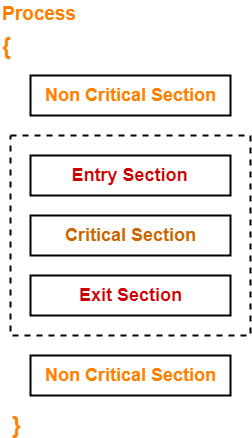
For every critical section in the program, a synchronization mechanism adds-

  • An entry section before the critical section
  • An exit section after the critical section


Entry Section-


  • It acts as a gateway for a process to enter inside the critical section.
  • It ensures that only one process is present inside the critical section at any time.
  • It does not allow any other process to enter inside the critical section if one process is already present inside it.


Exit Section-


  • It acts as an exit gate for a process to leave the critical section.
  • When a process takes exit from the critical section, some changes are made so that other processes can enter inside the critical section.


Criteria For Synchronization Mechanisms-


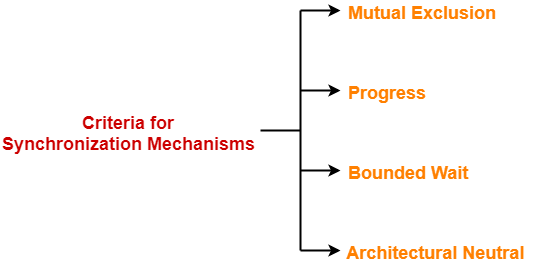
Any synchronization mechanism proposed to handle the critical section problem should meet the following criteria-


  1. Mutual Exclusion
  2. Progress
  3. Bounded Wait
  4. Architectural Neutral


1. Mutual Exclusion-


The mechanism must ensure-

  • The processes access the critical section in a mutual exclusive manner.
  • Only one process is present inside the critical section at any time.
  • No other process can enter the critical section until the process already present inside it completes.


2. Progress-


The mechanism must ensure-

  • An entry of a process inside the critical section is not dependent on the entry of another process inside the critical section.
  • A process can freely enter inside the critical section if there is no other process present inside it.
  • A process enters the critical section only if it wants to enter.
  • A process is not forced to enter inside the critical section if it does not want to enter.


3. Bounded Wait-


The mechanism should ensure-

  • The wait of a process to enter the critical section is bounded.
  • A process gets to enter the critical section before its wait gets over.


4. Architectural Neutral-


The mechanism should ensure-

  • It can run on any architecture without any problem.
  • There is no dependency on the architecture.


Important Notes-


Note-01:


  • Mutual Exclusion and Progress are the mandatory criteria.
  • They must be fulfilled by all the synchronization mechanisms.


Note-02:


  • Bounded waiting and Architectural neutrality are the optional criteria.
  • However, it is recommended to meet these criteria if possible.


To gain better understanding of Critical Section in OS,

Watch this Video Lecture


Next Article- Lock Variable | Synchronization Mechanism


Get more notes and other study material of Operating System.

Watch video lectures by visiting our YouTube channel LearnVidFun.
Process Synchronization | Race Condition in OS

Process Synchronization-


When multiple processes execute concurrently sharing system resources, then inconsistent results might be produced.

  • Process Synchronization is a mechanism that deals with the synchronization of processes.
  • It controls the execution of processes running concurrently to ensure that consistent results are produced.


Need of Synchronization-


Process synchronization is needed-

  • When multiple processes execute concurrently sharing some system resources.
  • To avoid the inconsistent results.


Critical Section-


Critical section is a section of the program where a process access the shared resources during its execution.


Example-


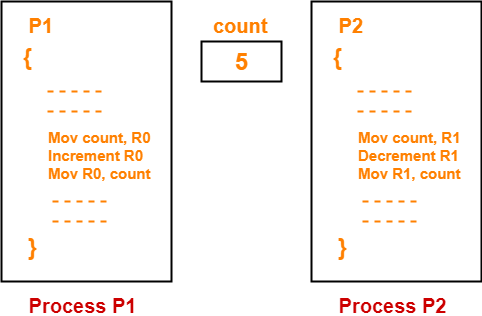
The following illustration shows how inconsistent results may be produced if multiple processes execute concurrently without any synchronization.


Consider-

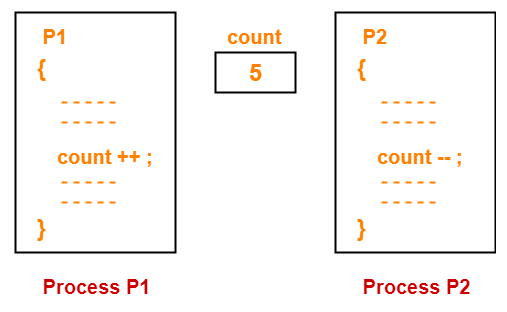
  • Two processes P1 and P2 are executing concurrently.
  • Both the processes share a common variable named “count” having initial value = 5.
  • Process P1 tries to increment the value of count.
  • Process P2 tries to decrement the value of count.


In assembly language, the instructions of the processes may be written as-


Now, when these processes execute concurrently without synchronization, different results may be produced.


Case-01:


The execution order of the instructions may be-

P1(1), P1(2), P1(3), P2(1), P2(2), P2(3)

In this case,

Final value of count = 5


Case-02:


The execution order of the instructions may be-

P2(1), P2(2), P2(3), P1(1), P1(2), P1(3)

In this case,

Final value of count = 5


Case-03:


The execution order of the instructions may be-

P1(1), P2(1), P2(2), P2(3), P1(2), P1(3)

In this case,

Final value of count = 6


Case-04:


The execution order of the instructions may be-

P2(1), P1(1), P1(2), P1(3), P2(2), P2(3)

In this case,

Final value of count = 4


Case-05:


The execution order of the instructions may be-

P1(1), P1(2), P2(1), P2(2), P1(3), P2(3)

In this case,

Final value of count = 4


It is clear from here that inconsistent results may be produced if multiple processes execute concurrently without any synchronization.


Race Condition-


Race condition is a situation where-

  • The final output produced depends on the execution order of instructions of different processes.
  • Several processes compete with each other.

The above example is a good illustration of race condition.


PRACTICE PROBLEM BASED ON PROCESS SYNCHRONIZATION-


Problem-


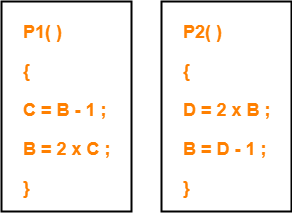
The following two functions P1 and P2 that share a variable B with an initial value of 2 execute concurrently-


The number of distinct values that B can possibly take after the execution is-

  1. 3
  2. 2
  3. 5
  4. 4


Solution-


Different execution order of the instructions of P1 and P2 produce different results.


Case-01:


The execution order of the instructions may be-

P1(1), P1(2), P2(1), P2(2)

In this case,

Final value of B = 3


Case-02:


The execution order of the instructions may be-

P2(1), P2(2), P1(1), P1(2)

In this case,

Final value of B = 4


Case-03:


The execution order of the instructions may be-

P1(1), P2(1), P2(2), P1(2)

In this case,

Final value of B = 2


Case-04:


The execution order of the instructions may be-

P2(1), P1(1), P1(2), P2(2)

In this case,

Final value of B = 3


Case-05:


The execution order of the instructions may be-

P1(1), P2(1), P1(2), P2(2)

In this case,

Final value of B = 3


Case-06:


The execution order of the instructions may be-

P2(1), P1(1), P2(2), P1(2)

In this case,

Final value of B = 2


From here,

  • Distinct values that may be produced are 2, 3 and 4.
  • Number of distinct values that may be produced = 3

Thus, Option (A) is correct.


To gain better understanding of Process Synchronization,

Watch this Video Lecture


Next Article- Synchronization Mechanisms


Get more notes and other study material of Operating System.

Watch video lectures by visiting our YouTube channel LearnVidFun.
CPU Scheduling | Practice Problems | Numericals

CPU Scheduling Algorithms-


Various CPU scheduling algorithms are-


PRACTICE PROBLEMS BASED ON CPU SCHEDULING ALGORITHMS-


Problem-01:


Consider three process, all arriving at time zero, with total execution time of 10, 20 and 30 units respectively. Each process spends the first 20% of execution time doing I/O, the next 70% of time doing computation, and the last 10% of time doing I/O again. The operating system uses a shortest remaining compute time first scheduling algorithm and schedules a new process either when the running process gets blocked on I/O or when the running process finishes its compute burst. Assume that all I/O operations can be overlapped as much as possible. For what percentage of does the CPU remain idle?

  1. 0%
  2. 10.6%
  3. 30.0%
  4. 89.4%


Solution-


According to question, we have-


Total Burst Time I/O Burst CPU Burst I/O Burst
Process P1 10 2 7 1
Process P2 20 4 14 2
Process P3 30 6 21 3


The scheduling algorithm used is Shortest Remaining Time First.


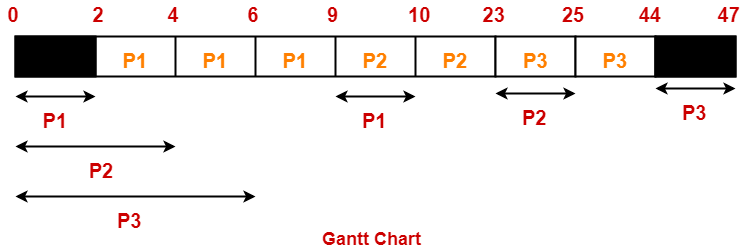
Gantt Chart-


Percentage of time CPU remains idle

= (5 / 47) x 100

= 10.638%

Thus, Option (B) is correct.


Problem-02:


Consider the set of 4 processes whose arrival time and burst time are given below-


Process No. Arrival Time Burst Time
CPU Burst I/O Burst CPU Burst
P1 0 3 2 2
P2 0 2 4 1
P3 2 1 3 2
P4 5 2 2 1


If the CPU scheduling policy is Shortest Remaining Time First, calculate the average waiting time and average turn around time.


Solution-


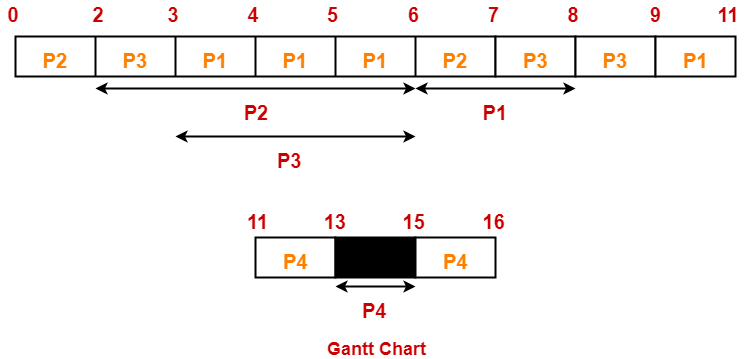
Gantt Chart-


Now, we know-

  • Turn Around time = Exit time – Arrival time
  • Waiting time = Turn Around time – Burst time


Also read- Various Times Of Process


Process Id Exit time Turn Around time Waiting time
P1 11 11 – 0 = 11 11 – (3+2) = 6
P2 7 7 – 0 = 7 7 – (2+1) = 4
P3 9 9 – 2 = 7 7 – (1+2) = 4
P4 16 16 – 5 = 11 11 – (2+1) = 8


Now,

  • Average Turn Around time = (11 + 7 + 7 + 11) / 4 = 36 / 4 = 9 units
  • Average waiting time = (6 + 4 + 4 + 8) / 4 = 22 / 5 = 4.4 units


Problem-03:


Consider the set of 4 processes whose arrival time and burst time are given below-


Process No. Arrival Time Priority  Burst Time
CPU Burst I/O Burst CPU Burst
P1 0 2 1 5 3
P2 2 3 3 3 1
P3 3 1 2 3 1


If the CPU scheduling policy is Priority Scheduling, calculate the average waiting time and average turn around time. (Lower number means higher priority)


Solution-


The scheduling algorithm used is Priority Scheduling.


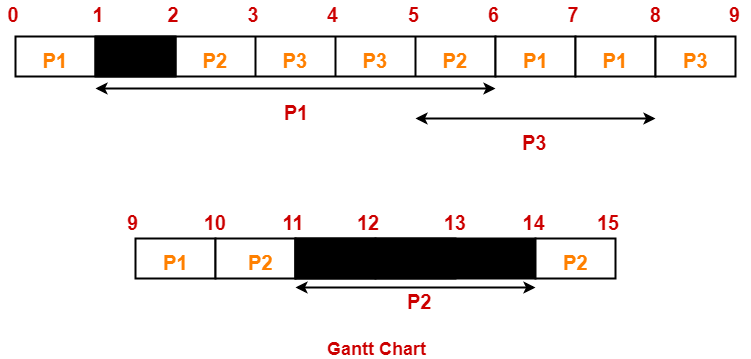
Gantt Chart-


Now, we know-

  • Turn Around time = Exit time – Arrival time
  • Waiting time = Turn Around time – Burst time


Process Id Exit time Turn Around time Waiting time
P1 10 10 – 0 = 10 10 – (1+3) = 6
P2 15 15 – 2 = 13 13 – (3+1) = 9
P3 9 9 – 3 = 6 6 – (2+1) = 3


Now,

  • Average Turn Around time = (10 + 13 + 6) / 3 = 29 / 3 = 9.67 units
  • Average waiting time = (6 + 9 + 3) / 3 = 18 / 3 = 6 units


Next Article- Introduction to Process Synchronization


Get more notes and other study material of Operating System.

Watch video lectures by visiting our YouTube channel LearnVidFun.
Resource Allocation Graph | Deadlock Detection

Resource Allocation Graph-


Before you go through this article, make sure that you have gone through the previous article on Resource Allocation Graph.


We have discussed-

  • Resource Allocation Graph (RAG) is a graph that represents the state of a system pictorially.
  • There are two components of RAG- Vertices and Edges.


Deadlock Detection-


Using Resource Allocation Graph, it can be easily detected whether system is in a Deadlock state or not.

The rules are-


Rule-01:


In a Resource Allocation Graph where all the resources are single instance,

  • If a cycle is being formed, then system is in a deadlock state.
  • If no cycle is being formed, then system is not in a deadlock state.


Rule-02:


In a Resource Allocation Graph where all the resources are NOT single instance,

  • If a cycle is being formed, then system may be in a deadlock state.
  • Banker’s Algorithm is applied to confirm whether system is in a deadlock state or not.
  • If no cycle is being formed, then system is not in a deadlock state.
  • Presence of a cycle is a necessary but not a sufficient condition for the occurrence of deadlock.


Also Read- Deadlock Handling Strategies


PRACTICE PROBLEMS BASED ON DETECTING DEADLOCK USING RAG-


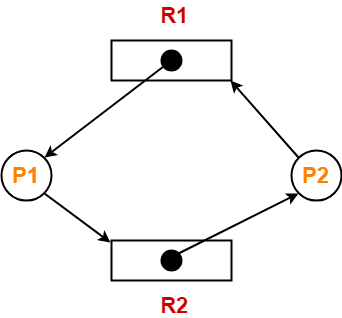
Problem-01:


Consider the resource allocation graph in the figure-


Find if the system is in a deadlock state otherwise find a safe sequence.


Solution-


Method-01:


  • The given resource allocation graph is single instance with a cycle contained in it.
  • Thus, the system is definitely in a deadlock state.


Method-02:


Using the given resource allocation graph, we have-


Allocation Need
R1 R2 R1 R2
Process P1 1 0 0 1
Process P2 0 1 1 0

Available = [ R1 R2 ] = [ 0 0 ]


Now,

  • There are no instances available currently and both the processes require a resource to execute.
  • Therefore, none of the process can be executed and both keeps waiting infinitely.
  • Thus, the system is in a deadlock state.


Problem-02:


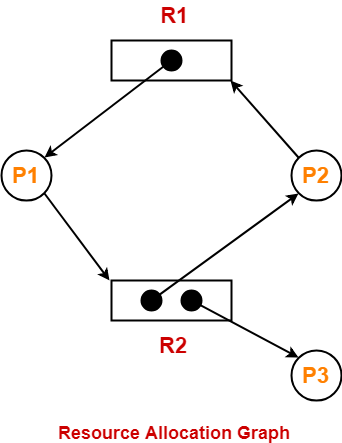
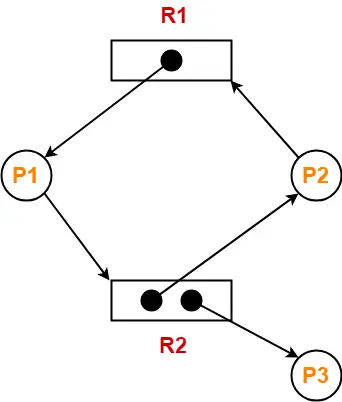
Consider the resource allocation graph in the figure-


Find if the system is in a deadlock state otherwise find a safe sequence.


Solution-


  • The given resource allocation graph is multi instance with a cycle contained in it.
  • So, the system may or may not be in a deadlock state.


Using the given resource allocation graph, we have-


Allocation Need
R1 R2 R1 R2
Process P1 1 0 0 1
Process P2 0 1 1 0
Process P3 0 1 0 0

Available = [ R1 R2 ] = [ 0 0 ]


Step-01:


  • Since process P3 does not need any resource, so it executes.
  • After execution, process P3 release its resources.


Then,

Available

= [ 0 0 ] + [ 0 1 ]

= [ 0 1 ]


Step-02:


  • With the instances available currently, only the requirement of the process P1 can be satisfied.
  • So, process P1 is allocated the requested resources.
  • It completes its execution and then free up the instances of resources held by it.


Then-

Available

= [ 0 1 ] + [ 1 0 ]

= [ 1 1 ]


Step-03:


  • With the instances available currently, the requirement of the process P2 can be satisfied.
  • So, process P2 is allocated the requested resources.
  • It completes its execution and then free up the instances of resources held by it.


Then-

Available

= [ 1 1 ] + [ 0 1 ]

= [ 1 2 ]


Thus,

  • There exists a safe sequence P3, P1, P2 in which all the processes can be executed.
  • So, the system is in a safe state.


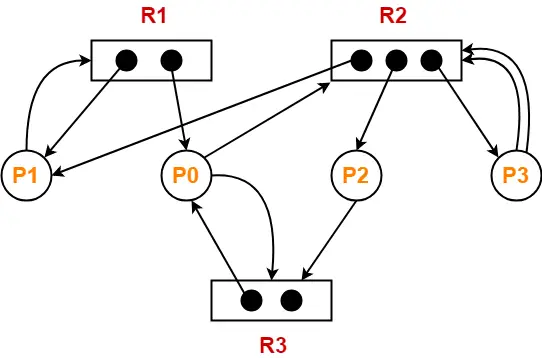
Problem-03:


Consider the resource allocation graph in the figure-


Find if the system is in a deadlock state otherwise find a safe sequence.


Solution-


  • The given resource allocation graph is multi instance with a cycle contained in it.
  • So, the system may or may not be in a deadlock state.


Using the given resource allocation graph, we have-


Allocation Need
R1 R2 R3 R1 R2 R3
Process P0 1 0 1 0 1 1
Process P1 1 1 0 1 0 0
Process P2 0 1 0 0 0 1
Process P3 0 1 0 0 2 0

Available = [ R1 R2 R3 ] = [ 0 0 1 ]


Step-01:


  • With the instances available currently, only the requirement of the process P2 can be satisfied.
  • So, process P2 is allocated the requested resources.
  • It completes its execution and then free up the instances of resources held by it.


Then-

Available

= [ 0 0 1 ] + [ 0 1 0 ]

= [ 0 1 1 ]


Step-02:


  • With the instances available currently, only the requirement of the process P0 can be satisfied.
  • So, process P0 is allocated the requested resources.
  • It completes its execution and then free up the instances of resources held by it.


Then-

Available

= [ 0 1 1 ] + [ 1 0 1 ]

= [ 1 1 2 ]


Step-03:


  • With the instances available currently, only the requirement of the process P1 can be satisfied.
  • So, process P1 is allocated the requested resources.
  • It completes its execution and then free up the instances of resources held by it.


Then-

Available

= [ 1 1 2 ] + [ 1 1 0 ]

= [ 2 2 2 ]


Step-04:


  • With the instances available currently, the requirement of the process P3 can be satisfied.
  • So, process P3 is allocated the requested resources.
  • It completes its execution and then free up the instances of resources held by it.


Then-

Available

= [ 2 2 2 ] + [ 0 1 0 ]

= [ 2 3 2 ]


Thus,

  • There exists a safe sequence P2, P0, P1, P3 in which all the processes can be executed.
  • So, the system is in a safe state.


To watch video solutions and practice other problems,

Watch this Video Lecture


Next Article- Contiguous Memory Allocation


Get more notes and other study material of Operating System.

Watch video lectures by visiting our YouTube channel LearnVidFun.