Category: Subjects

Packet Switching in Networking | Switching

Switching in Computer Networks-


The process of moving the data packets towards their destination by forwarding them from one port to the other port is called as switching.


Switching Techniques-


Various switching techniques are-
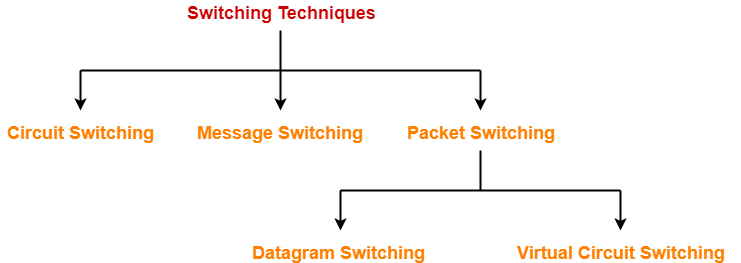


  1. Circuit Switching
  2. Message Switching
  3. Packet Switching


In this article, we will discuss about Packet Switching.


Packet Switching-


In packet switching,

  • The entire message to be sent is divided into multiple smaller size packets.
  • This process of dividing a single message into smaller size packets is called as packetization.
  • These smaller packets are sent after the other.
  • It gives the advantage of pipelining and reduces the total time taken to transmit the message.


Optimal Packet Size-


If the packet size is not chosen wisely, then-

  • It may result in adverse effects.
  • It might increase the time taken to transmit the message.

So, it is very important to choose the packet size wisely.


Example-


Consider-

  • There is a network having bandwidth of 1 MBps.
  • A message of size 1000 bytes has to be sent.
  • Packet switching technique is used.
  • Each packet contains a header of 100 bytes.



Out of the following, in how many packets the message must be divided so that total time taken is minimum-

  1. 1 packet
  2. 5 packets
  3. 10 packets
  4. 20 packets


NOTE

  • While calculating the total time, we often ignore the propagation delay.
  • The reason is in packet switching, transmission delay dominates over propagation delay.
  • This is because each packet is transmitted over the link at each hop.


Let us analyze each case one by one.


Case-01: Sending Message in 1 Packet-


In this case, the entire message is sent in a single packet.


Size Of Packet-


Packet size

= 1000 bytes of data + 100 bytes of header

= 1100 bytes


Transmission Delay-


Transmission delay

= Packet size / Bandwidth

= 1100 bytes / 1 MBps

=  1100 x 10-6 sec

= 1100 μsec

= 1.1 msec


Total Time Taken-


Total time taken to send the complete message from sender to receiver

= 3 x Transmission delay

= 3 x 1.1 msec

= 3.3 msec


Case-02: Sending Message in 5 Packets-


In this case,

  • The entire message is divided into total 5 packets.
  • These packets are then sent one after the other.


Data Sent in One Packet-


Data sent in one packet

= Total data to be sent / Number of packets

= 1000 bytes / 5

= 200 bytes


Size Of One Packet-


Packet size

= 200 bytes of data + 100 bytes of header

= 300 bytes


Transmission Delay-


Transmission delay

= Packet size / Bandwidth

= 300 bytes / 1 MBps

=  300 x 10-6 sec

= 300 μsec

= 0.3 msec


Time Taken By First Packet-


Time taken by the first packet to reach from sender to receiver

= 3 x Transmission delay

= 3 x 0.3 msec

= 0.9 msec


Time Taken By Remaining Packets-


Time taken by the remaining packets to reach from sender to receiver

= Number of remaining packets x Transmission delay

= 4 x 0.3 msec

= 1.2 msec


Total Time Taken-


Total time taken to send the complete message from sender to receiver

= 0.9 msec + 1.2 msec

= 2.1 msec


Case-03: Sending Data in 10 packets-


In this case,

  • The entire message is divided into total 10 packets.
  • These packets are then sent one after the other.


Data Sent in One Packet-


Data sent in one packet

= Total data to be sent / Number of packets

= 1000 bytes / 10

= 100 bytes


Size Of One Packet-


Packet size

= 100 bytes of data + 100 bytes of header

= 200 bytes


Transmission Delay-


Transmission delay

= Packet size / Bandwidth

= 200 bytes / 1 MBps

=  200 x 10-6 sec

= 200 μsec

= 0.2 msec


Time Taken By First Packet-


Time taken by the first packet to reach from sender to receiver

= 3 x Transmission delay

= 3 x 0.2 msec

= 0.6 msec


Time Taken By Remaining Packets-


Time taken by the remaining packets to reach from sender to receiver

= Number of remaining packets x Transmission delay

= 9 x 0.2 msec

= 1.8 msec


Total Time Taken-


Total time taken to send the complete message from sender to receiver

= 0.6 msec + 1.8 msec

= 2.4 msec


Case-04: Sending Data in 20 Packets-


In this case,

  • The entire message is divided into total 5 packets.
  • These packets are then sent one after the other.


Data Sent in One Packet-


Data sent in one packet

= Total data to be sent / Number of packets

= 1000 bytes / 20

= 50 bytes


Size Of One Packet-


Packet size

= 50 bytes of data + 100 bytes of header

= 150 bytes


Transmission Delay-


Transmission delay

= Packet size / Bandwidth

= 150 bytes / 1 MBps

=  150 x 10-6 sec

= 150 μsec

= 0.15 msec


Time Taken By First Packet-


Time taken by the first packet to reach from sender to receiver

= 3 x Transmission delay

= 3 x 0.15 msec

= 0.45 msec


Time Taken By Remaining Packets-


Time taken by the remaining packets to reach from sender to receiver

= Number of remaining packets x Transmission delay

= 19 x 0.15 msec

= 2.85 msec


Total Time Taken-


Total time taken to send the complete message from sender to receiver

= 0.45 msec + 2.85 msec

= 3.3 msec


Observations-


  • When data is sent in 1 packet, total time taken = 3.3 msec
  • When data is sent in 5 packets, total time taken = 2.1 msec
  • When data is sent in 10 packets, total time taken = 2.4 msec
  • When data is sent in 20 packets, total time taken = 3.3 msec


Conclusion-


We conclude-

  • Total time decreases when packet size is reduced but only up to a certain limit.
  • If the packet size is reduced beyond a certain limit, then total time starts increasing.


From the given choices,

  • Sending the message in 5 packets would be most efficient.
  • In other words, packet size = 300 bytes would be the best choice.


Types of Packet Switching-


Packet switching may be carried out in the following 2 ways-
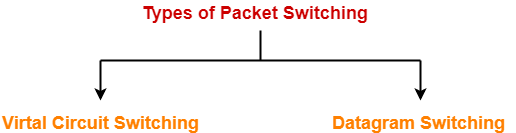


  1. Virtual Circuit Switching
  2. Datagram Switching


Virtual Circuit Switching-


Virtual circuit switching operates in the following three phases-

  1. Establishing a circuit
  2. Transferring the data
  3. Disconnecting the circuit


1. Establishing A Circuit-


In this phase,

  • A logical connection is established between the two ends.
  • It provides a dedicated path for data to travel from one to the other end.
  • Resources are reserved at intermediate switches which are used during the transmission.
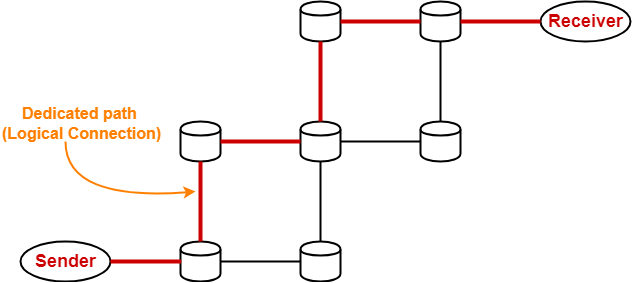


2. Transferring The Data-


After the connection is established,

  • The entire data travels over the dedicated path from one end to the other end.


3. Disconnecting The Circuit-


After the data transfer is completed,

  • The connection is disconnected.


Datagram Switching-


In datagram switching,

  • There exists no dedicated path for data to travel.
  • The header of each packet contains the destination address.
  • When any intermediate switch receives the packet, it examines its destination address.
  • It then consults the routing table.
  • Routing table finds the corresponding port through which the packet should be forwarded.


Virtual Circuit Switching Vs Datagram Switching-


The following table shows a comparison between virtual circuit switching and datagram switching-


Virtual Circuit Switching Datagram Switching
The first packet during its transmission-

1) Informs the intermediate switches that more packets are following.

2) Reserve resources (CPU, bandwidth and buffer) for the following packets at all the switches on the way.

The first packet does not perform any such task during its transmission.
The packets are never discarded at intermediate switches and immediately forwarded since resources are reserved for them. The packets may be discarded at intermediate switches if sufficient resources are not available to process the packets.
It is a connection oriented service since resources are reserved for the packets at intermediate switches. It is a connection less service since no resources are reserved for the packets.
All the packets follow the same dedicated path. All the packets take path independently.
Data appears in order at the destination since all the packets take the same dedicated path. Data may appear out of order at the destination since the packets take path independently.
It is highly reliable since no packets are discarded. It is not reliable since packets may be discarded.
It is costly. It is cost effective.
Only first packet requires a global header which identifies the path from one end to other end.

All the following packets require a local header which identifies the path from hop to hop.

All the packets require a global header which contains full information about the destination.
ATM (Asynchronous Transfer Mode) uses virtual circuit switching. IP Networks use datagram switching.
Virtual circuit switching is normally implemented at data link layer. Datagram switching is normally implemented at network layer.


PRACTICE PROBLEM BASED ON PACKET SWITCHING TECHNIQUE-


Problem-


In a packet switching network, packets are routed from source to destination along a single path having two intermediate nodes. If the message size is 24 bytes and each packet contains a header of 3 bytes, then the optimum packet size is-

  1. 4 bytes
  2. 6 bytes
  3. 7 bytes
  4. 9 bytes


Solution-


Let bandwidth of the network = X Bps and 1 / X = a


Option-A: Packet Size = 4 Bytes


In this case,

  • The entire message is divided into packets of size 4 bytes.
  • These packets are then sent one after the other.


Data Sent in One Packet- 


Data size

= Packet size – Header size

= 4 bytes – 3 bytes

= 1 byte

Thus, only 1 byte of data can be sent in each packet.


Number Of Packets-


Number of packets required

= Total data to be sent / Data contained in one packet

= 24 bytes / 1 byte

= 24 packets


Transmission Delay-


Transmission delay

= Packet size / Bandwidth

= 4 bytes / X Bps

=  4a sec


Time Taken By First Packet-


Time taken by the first packet to reach from sender to receiver

= 3 x Transmission delay

= 3 x 4a sec

= 12a sec


Time Taken By Remaining Packets-


Time taken by the remaining packets to reach from sender to receiver

= Number of remaining packets x Transmission delay

= 23 x 4a sec

= 92a sec


Total Time Taken-


Total time taken to send the complete message from sender to receiver

= 12a sec + 92a sec

= 104a sec


Option-B: Packet Size = 6 bytes


In this case,

  • The entire message is divided into packets of size 6 bytes.
  • These packets are then sent one after the other.


Data Sent in One Packet-


Data size

= Packet size – Header size

= 6 bytes – 3 bytes

= 3 bytes

Thus, only 3 bytes of data can be sent in each packet.


Number Of Packets-


Number of packets required

= Total data to be sent / Data contained in one packet

= 24 bytes / 3 bytes

= 8 packets


Transmission Delay-


Transmission delay

= Packet size / Bandwidth

= 6 bytes / X Bps

=  6a sec


Time Taken By First Packet-


Time taken by the first packet to reach from sender to receiver

= 3 x Transmission delay

= 3 x 6a sec

= 18a sec


Time Taken By Remaining Packets-


Time taken by the remaining packets to reach from sender to receiver

= Number of remaining packets x Transmission delay

= 7 x 6a sec

= 42a sec


Total Time Taken-


Total time taken to send the complete message from sender to receiver

= 18a sec + 42a sec

= 60a sec


Option-C: Packet Size = 7 bytes


In this case,

  • The entire message is divided into packets of size 7 bytes.
  • These packets are then sent one after the other.


Data Sent in One Packet-


Data size

= Packet size – Header size

= 7 bytes – 3 bytes

= 4 bytes

Thus, only 4 bytes of data can be sent in each packet.


Number Of Packets-


Number of packets required

= Total data to be sent / Data contained in one packet

= 24 bytes / 4 bytes

= 6 packets


Transmission Delay-


Transmission delay

= Packet size / Bandwidth

= 7 bytes / X Bps

=  7a sec


Time Taken By First Packet-


Time taken by the first packet to reach from sender to receiver

= 3 x Transmission delay

= 3 x 7a sec

= 21a sec


Time Taken By Remaining Packets-


Time taken by the remaining packets to reach from sender to receiver

= Number of remaining packets x Transmission delay

= 5 x 7a sec

= 35a sec


Total Time Taken-


Total time taken to send the complete message from sender to receiver

= 21a sec + 35a sec

= 56a sec


Option-D: Packet size = 9 Bytes


In this case,

  • The entire message is divided into packets of size 9 bytes.
  • These packets are then sent one after the other.


Data Sent in One Packet-


Data size

= Packet size – Header size

= 9 bytes – 3 bytes

= 6 bytes

Thus, only 6 bytes of data can be sent in each packet.


Number Of Packets-


Number of packets required

= Total data to be sent / Data contained in one packet

= 24 bytes / 6 bytes

= 4 packets


Transmission Delay-


Transmission delay

= Packet size / Bandwidth

= 9 bytes / X Bps

=  9a sec


Time Taken By First Packet-


Time taken by the first packet to reach from sender to receiver

= 3 x Transmission delay

= 3 x 9a sec

= 27a sec


Time Taken By Remaining Packets-


Time taken by the remaining packets to reach from sender to receiver

= Number of remaining packets x Transmission delay

= 3 x 9a sec

= 27a sec


Total Time Taken-


Total time taken to send the complete message from sender to receiver

= 27a sec + 27a sec

= 54a sec


Observations-


From here,

  • Total time taken when packet size is 4 bytes = 104a sec
  • Total time taken when packet size is 6 bytes = 60a sec
  • Total time taken when packet size is 7 bytes = 56a sec
  • Total time taken when packet size is 9 bytes = 54a sec


Result-


Time taken is minimum when packet size is 9 bytes.

Thus, Option (D) is correct.


To gain better understanding about Packet Switching,

Watch this Video Lecture


Next Article- Circuit Switching Vs Packet Switching


Get more notes and other study material of Computer Networks.

Watch video lectures by visiting our YouTube channel LearnVidFun.

Circuit Switching in Networking | Switching

Switching in Computer Networks-


The process of moving the data packets towards their destination by forwarding them from one port to the other port is called as switching.


Switching Techniques-


Various switching techniques are-


  1. Circuit Switching
  2. Message Switching
  3. Packet Switching


In this article, we will discuss about Circuit Switching.


Circuit Switching-


This switching technique operates in the following three phases-

  1. Establishing a circuit
  2. Transferring the data
  3. Disconnecting the circuit


1. Establishing A Circuit-


In this phase,

  • A circuit is established between the two ends.
  • Circuit provides a dedicated path for data to travel from one to the other end.
  • Resources are reserved at intermediate switches which are used during the transmission.
  • The intermediate switches are connected by the physical links.


2. Transferring The Data-


After the circuit is established,

  • The entire data travels over the dedicated path from one end to the other end.


3. Disconnecting The Circuit-


After the data transfer is completed,

  • The circuit is torn down i.e. disconnected.


Total Time-


Total time taken to transmit a message in circuit switched network

= Connection set up time + Transmission delay + Propagation delay + Tear down time


where-

  • Transmission delay = Message size / Bandwidth
  • Propagation delay = (Number of hops on way x Distance between 2 hops) / Propagation speed


Also Read- Packet Switching


Advantages-


Circuit switching has the following advantages-

  • A well defined and dedicated path exists for the data to travel.
  • There is no header overhead.
  • There is no waiting time at any switch and the data is transmitted without any delay.
  • Data always reaches the other end in order.
  • No re ordering is required.


Disadvantages-


Circuit switching has the following disadvantages-

  • The channel is blocked for two ends only.
  • It is inefficient in terms of utilization of system resources.
  • The time required for establishing the circuit between the two ends is too long.
  • Dedicated channels require more bandwidth.
  • It is more expensive than other switching techniques.
  • Routing decisions can not be changed once the circuit is established.


Important Notes-


  • Circuit switching is implemented at physical layer.
  • Circuit switching is now outdated.


PRACTICE PROBLEM BASED ON CIRCUIT SWITCHING TECHNIQUE-


Problem-


Consider all links in the network use TDM with 24 slots and have a data rate of 1.536 Mbps. Assume that host A takes 500 msec to establish an end to end circuit with host B before begin to transmit the file. If the file is 512 kilobytes, then how much time will it take to send the file from host A to host B?


Solution-


Given-

  • Total bandwidth = 1.536 Mbps
  • Bandwidth is shared among 24 slots
  • Connection set up time = 500 msec
  • File size = 512 KB


Calculating Bandwidth Per User-


Total bandwidth = Number of users x Bandwidth per user

So, Bandwidth per user

= Total bandwidth / Number of users

= 1.536 Mbps / 24

= 0.064 Mbps

= 64 Kbps


Calculating Transmission Delay-


Transmission delay (Tt)

= File size / Bandwidth

= 512 KB / 64 Kbps

=  (512 x 210 x 8 bits) / (64 x 103 bits per sec)

= 65.536 sec

= 65536 msec


Calculating Time Required To Send File-


Time taken to send a file in circuit switched network

= Connection set up time + Transmission delay

= 500 msec + 65536 msec

= 66036 sec

= 66.036 msec


To gain better understanding about Circuit Switching,

Watch this Video Lecture


Next Article- Message Switching


Get more notes and other study material of Computer Networks.

Watch video lectures by visiting our YouTube channel LearnVidFun.
Checksum in Networking | Checksum Example

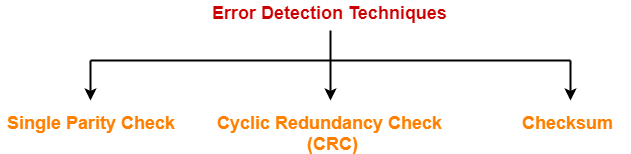
Error Detection in Computer Networks-


Error detection is a technique that is used to check if any error occurred in the data during the transmission.


Some popular error detection methods are-


  1. Single Parity Check
  2. Cyclic Redundancy Check (CRC)
  3. Checksum


In this article, we will discuss about Checksum Method.


Checksum-


Checksum is an error detection method.

Error detection using checksum method involves the following steps-


Step-01:


At sender side,

  • If m bit checksum is used, the data unit to be transmitted is divided into segments of m bits.
  • All the m bit segments are added.
  • The result of the sum is then complemented using 1’s complement arithmetic.
  • The value so obtained is called as checksum.


Step-02:


  • The data along with the checksum value is transmitted to the receiver.


Step-03:


At receiver side,

  • If m bit checksum is being used, the received data unit is divided into segments of m bits.
  • All the m bit segments are added along with the checksum value.
  • The value so obtained is complemented and the result is checked.


Then, following two cases are possible-


Case-01: Result = 0


If the result is zero,

  • Receiver assumes that no error occurred in the data during the transmission.
  • Receiver accepts the data.


Case-02: Result ≠ 0


If the result is non-zero,

  • Receiver assumes that error occurred in the data during the transmission.
  • Receiver discards the data and asks the sender for retransmission.


Checksum Example-


Consider the data unit to be transmitted is-

10011001111000100010010010000100

Consider 8 bit checksum is used.


Step-01:


At sender side,

The given data unit is divided into segments of 8 bits as-


Now, all the segments are added and the result is obtained as-

  • 10011001 + 11100010 + 00100100 + 10000100 = 1000100011
  • Since the result consists of 10 bits, so extra 2 bits are wrapped around.
  • 00100011 + 10 = 00100101 (8 bits)
  • Now, 1’s complement is taken which is 11011010.
  • Thus, checksum value = 11011010


Step-02:


  • The data along with the checksum value is transmitted to the receiver.


Step-03:


At receiver side,

  • The received data unit is divided into segments of 8 bits.
  • All the segments along with the checksum value are added.
  • Sum of all segments + Checksum value = 00100101 + 11011010 = 11111111
  • Complemented value = 00000000
  • Since the result is 0, receiver assumes no error occurred in the data and therefore accepts it.


Also Read- Parity Check


Important Notes-


Note-01:


  • Consider while adding the m bit segments, the result obtained consists of more than m bits.
  • Then, wrap around the extra bits and add to the result so that checksum value consists of m bits.


Note-02:


  • While calculating the checksum, if checksum value is needed, then assume it to be zero.
  • After calculating the checksum value, substitute the checksum value in the checksum field.
  • This will be required during checksum calculation of IP Header, TCP Header and UDP Header.


Note-03:


  • The checksum is used in the internet by several protocols although not at the data link layer.


Also Read- Cyclic Redundancy Check (CRC)


PRACTICE PROBLEM BASED ON CHECKSUM ERROR DETECTION METHOD-


Problem-


Checksum value of 1001001110010011 and 1001100001001101 of 16 bit segment is-

  1. 1010101000011111
  2. 1011111000100101
  3. 1101010000011110
  4. 1101010000111111


Solution-


We apply the above discussed algorithm to calculate the checksum.

  • 1001001110010011 + 1001100001001101 = 10010101111100000
  • Since, the result consists of 17 bits, so 1 bit is wrapped around and added to the result.
  • 0010101111100000 + 1 = 0010101111100001
  • Now, result consists of 16 bits.
  • Now, 1’s complement is taken which is 1101010000011110
  • Thus, checksum value = 1101010000011110


Thus, Option (C) is correct.


To gain better understanding about Checksum Method,

Watch this Video Lecture


Next Article- Access Control Methods | Introduction


Get more notes and other study material of Computer Networks.

Watch video lectures by visiting our YouTube channel LearnVidFun.

Error Detection in Computer Networks | Parity Check

Error Detection in Computer Networks-


When sender transmits data to the receiver, the data might get scrambled by noise or data might get corrupted during the transmission.


Error detection is a technique that is used to check if any error occurred in the data during the transmission.


Error Detection Methods-


Some popular error detection methods are-


  1. Single Parity Check
  2. Cyclic Redundancy Check (CRC)
  3. Checksum


In this article, we will discuss about Single Parity Check.


Single Parity Check-


In this technique,

  • One extra bit called as parity bit is sent along with the original data bits.
  • Parity bit helps to check if any error occurred in the data during the transmission.


Steps Involved-


Error detection using single parity check involves the following steps-


Step-01:


At sender side,

  • Total number of 1’s in the data unit to be transmitted is counted.
  • The total number of 1’s in the data unit is made even in case of even parity.
  • The total number of 1’s in the data unit is made odd in case of odd parity.
  • This is done by adding an extra bit called as parity bit.


Step-02:


  • The newly formed code word (Original data + parity bit) is transmitted to the receiver.


Step-03:


At receiver side,

  • Receiver receives the transmitted code word.
  • The total number of 1’s in the received code word is counted.


Then, following cases are possible-

  • If total number of 1’s is even and even parity is used, then receiver assumes that no error occurred.
  • If total number of 1’s is even and odd parity is used, then receiver assumes that error occurred.
  • If total number of 1’s is odd and odd parity is used, then receiver assumes that no error occurred.
  • If total number of 1’s is odd and even parity is used, then receiver assumes that error occurred.


Parity Check Example-


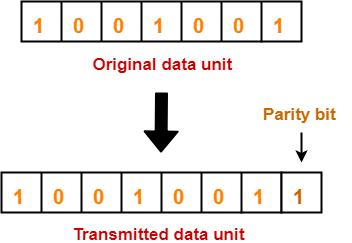
Consider the data unit to be transmitted is 1001001 and even parity is used.

Then,


At Sender Side-


  • Total number of 1’s in the data unit is counted.
  • Total number of 1’s in the data unit = 3.
  • Clearly, even parity is used and total number of 1’s is odd.
  • So, parity bit = 1 is added to the data unit to make total number of 1’s even.
  • Then, the code word 10010011 is transmitted to the receiver.


At Receiver Side-


  • After receiving the code word, total number of 1’s in the code word is counted.
  • Consider receiver receives the correct code word = 10010011.
  • Even parity is used and total number of 1’s is even.
  • So, receiver assumes that no error occurred in the data during the transmission.


Advantage-


  • This technique is guaranteed to detect an odd number of bit errors (one, three, five and so on).
  • If odd number of bits flip during transmission, then receiver can detect by counting the number of 1’s.


Also Read- Checksum


Limitation-


  • This technique can not detect an even number of bit errors (two, four, six and so on).
  • If even number of bits flip during transmission, then receiver can not catch the error.


EXAMPLE


  • Consider the data unit to be transmitted is 10010001 and even parity is used.
  • Then, code word transmitted to the receiver = 100100011
  • Consider during transmission, code word modifies as 101100111. (2 bits flip)
  • On receiving the modified code word, receiver finds the number of 1’s is even and even parity is used.
  • So, receiver assumes that no error occurred in the data during transmission though the data is corrupted.


To gain better understanding about single parity check,

Watch this Video Lecture


Next Article- Cyclic Redundancy Check


Get more notes and other study material of Computer Networks.

Watch video lectures by visiting our YouTube channel LearnVidFun.
Cyclic Redundancy Check | CRC | Example

Error Detection in Computer Networks-


Error detection is a technique that is used to check if any error occurred in the data during the transmission.


Some popular error detection methods are-


  1. Single Parity Check
  2. Cyclic Redundancy Check (CRC)
  3. Checksum


In this article, we will discuss about Cyclic Redundancy Check (CRC).


Cyclic Redundancy Check-


  • Cyclic Redundancy Check (CRC) is an error detection method.
  • It is based on binary division.


CRC Generator-


  • CRC generator is an algebraic polynomial represented as a bit pattern.
  • Bit pattern is obtained from the CRC generator using the following rule-


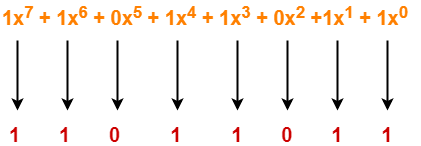
The power of each term gives the position of the bit and the coefficient gives the value of the bit.


Example-


Consider the CRC generator is x7 + x6 + x4 + x3 + x + 1.

The corresponding binary pattern is obtained as-


Thus, for the given CRC generator, the corresponding binary pattern is 11011011.


Properties Of CRC Generator-


The algebraic polynomial chosen as a CRC generator should have at least the following properties-


Rule-01:


  • It should not be divisible by x.
  • This condition guarantees that all the burst errors of length equal to the length of polynomial are detected.


Rule-02:


  • It should be divisible by x+1.
  • This condition guarantees that all the burst errors affecting an odd number of bits are detected.


Important Notes-


If the CRC generator is chosen according to the above rules, then-

  • CRC can detect all single-bit errors
  • CRC can detect all double-bit errors provided the divisor contains at least three logic 1’s.
  • CRC can detect any odd number of errors provided the divisor is a factor of x+1.
  • CRC can detect all burst error of length less than the degree of the polynomial.
  • CRC can detect most of the larger burst errors with a high probability.


Steps Involved-


Error detection using CRC technique involves the following steps-


Step-01: Calculation Of CRC At Sender Side-


At sender side,

  • A string of n 0’s is appended to the data unit to be transmitted.
  • Here, n is one less than the number of bits in CRC generator.
  • Binary division is performed of the resultant string with the CRC generator.
  • After division, the remainder so obtained is called as CRC.
  • It may be noted that CRC also consists of n bits.


Step-02: Appending CRC To Data Unit-


At sender side,

  • The CRC is obtained after the binary division.
  • The string of n 0’s appended to the data unit earlier is replaced by the CRC remainder.


Step-03: Transmission To Receiver-


  • The newly formed code word (Original data + CRC) is transmitted to the receiver.


Step-04: Checking at Receiver Side-


At receiver side,

  • The transmitted code word is received.
  • The received code word is divided with the same CRC generator.
  • On division, the remainder so obtained is checked.


The following two cases are possible-


Case-01: Remainder = 0


If the remainder is zero,

  • Receiver assumes that no error occurred in the data during the transmission.
  • Receiver accepts the data.


Case-02: Remainder ≠ 0


If the remainder is non-zero,

  • Receiver assumes that some error occurred in the data during the transmission.
  • Receiver rejects the data and asks the sender for retransmission.


Also Read- Parity Check


PRACTICE PROBLEMS BASED ON CYCLIC REDUNDANCY CHECK (CRC)-


Problem-01:


A bit stream 1101011011 is transmitted using the standard CRC method. The generator polynomial is x4+x+1. What is the actual bit string transmitted?


Solution-


  • The generator polynomial G(x) = x4 + x + 1 is encoded as 10011.
  • Clearly, the generator polynomial consists of 5 bits.
  • So, a string of 4 zeroes is appended to the bit stream to be transmitted.
  • The resulting bit stream is 11010110110000.


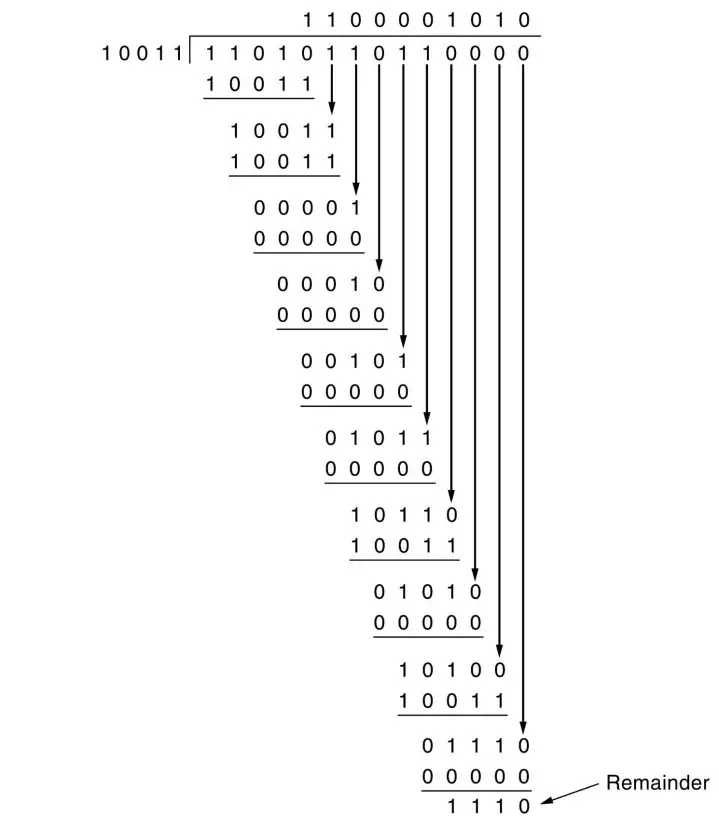
Now, the binary division is performed as-


From here, CRC = 1110.

Now,

  • The code word to be transmitted is obtained by replacing the last 4 zeroes of 11010110110000 with the CRC.
  • Thus, the code word transmitted to the receiver = 11010110111110.


Problem-02:


A bit stream 10011101 is transmitted using the standard CRC method. The generator polynomial is x3+1.

  1. What is the actual bit string transmitted?
  2. Suppose the third bit from the left is inverted during transmission. How will receiver detect this error?


Solution-


Part-01:


  • The generator polynomial G(x) = x3 + 1 is encoded as 1001.
  • Clearly, the generator polynomial consists of 4 bits.
  • So, a string of 3 zeroes is appended to the bit stream to be transmitted.
  • The resulting bit stream is 10011101000.


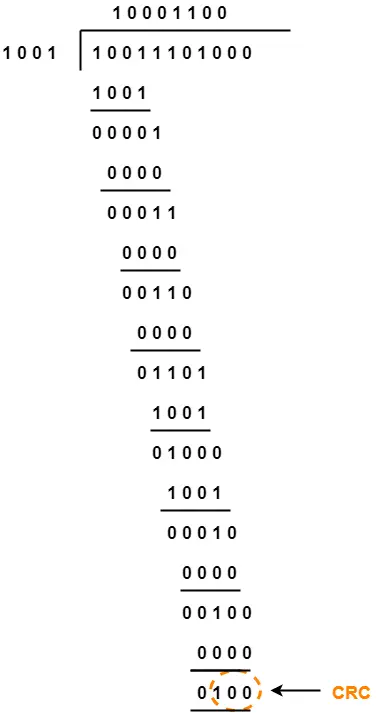
Now, the binary division is performed as-


From here, CRC = 100.

Now,

  • The code word to be transmitted is obtained by replacing the last 3 zeroes of 10011101000 with the CRC.
  • Thus, the code word transmitted to the receiver = 10011101100.


Part-02:


According to the question,

  • Third bit from the left gets inverted during transmission.
  • So, the bit stream received by the receiver = 10111101100.


Now,

  • Receiver receives the bit stream = 10111101100.
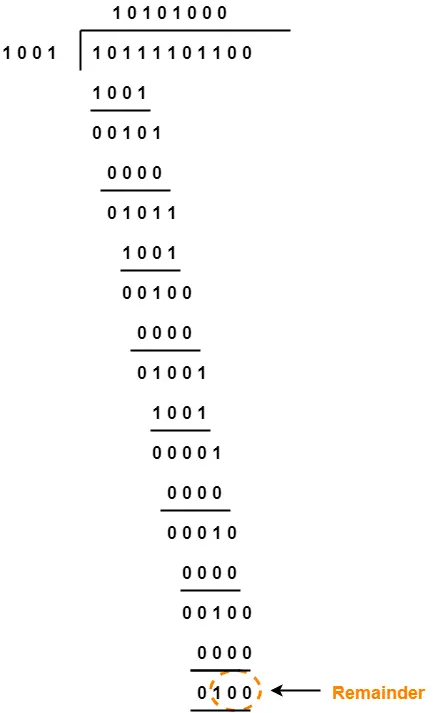
  • Receiver performs the binary division with the same generator polynomial as-


From here,

  • The remainder obtained on division is a non-zero value.
  • This indicates to the receiver that an error occurred in the data during the transmission.
  • Therefore, receiver rejects the data and asks the sender for retransmission.


To watch video solution, click here.


To gain better understanding about Cyclic Redundancy Check,

Watch this Video Lecture


Next Article- Checksum


Get more notes and other study material of Computer Networks.

Watch video lectures by visiting our YouTube channel LearnVidFun.