Month: November 2018

Direct Mapping | Cache | Practice Problems

Direct Mapping-


Before you go through this article, make sure that you have gone through the previous article on Direct Mapping.


In direct mapping,

  • A particular block of main memory can be mapped to one particular cache line only.
  • Block ‘j’ of main memory will map to line number (j mod number of cache lines) of the cache.
  • There is no need of any replacement algorithm.


In this article, we will discuss practice problems based on direct mapping.


Also Read- Cache Mapping Techniques


PRACTICE PROBLEMS BASED ON DIRECT MAPPING-


Problem-01:


Consider a direct mapped cache of size 16 KB with block size 256 bytes. The size of main memory is 128 KB. Find-

  1. Number of bits in tag
  2. Tag directory size


Solution-


Given-

  • Cache memory size = 16 KB
  • Block size = Frame size = Line size = 256 bytes
  • Main memory size = 128 KB


We consider that the memory is byte addressable.


Number of Bits in Physical Address-


We have,

Size of main memory

= 128 KB

= 217 bytes

Thus, Number of bits in physical address = 17 bits



Number of Bits in Block Offset-


We have,

Block size

= 256 bytes

= 28 bytes

Thus, Number of bits in block offset = 8 bits
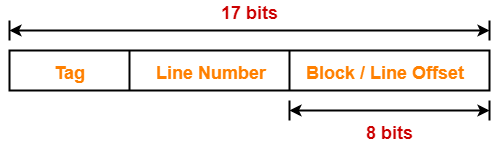


Number of Bits in Line Number-


Total number of lines in cache

= Cache size / Line size

= 16 KB / 256 bytes

= 214 bytes / 28 bytes

= 26 lines

Thus, Number of bits in line number = 6 bits
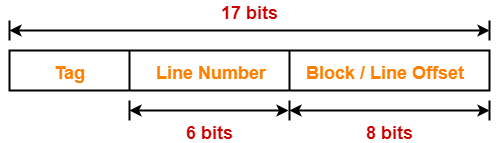


Number of Bits in Tag-


Number of bits in tag

= Number of bits in physical address – (Number of bits in line number + Number of bits in block offset)

= 17 bits – (6 bits + 8 bits)

= 17 bits – 14 bits

= 3 bits

Thus, Number of bits in tag = 3 bits
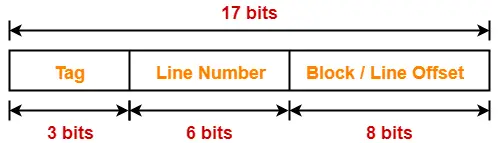


Tag Directory Size-


Tag directory size

= Number of tags x Tag size

= Number of lines in cache x Number of bits in tag

= 26 x 3 bits

= 192 bits

= 24 bytes

Thus, size of tag directory = 24 bytes


Problem-02:


Consider a direct mapped cache of size 512 KB with block size 1 KB. There are 7 bits in the tag. Find-

  1. Size of main memory
  2. Tag directory size


Solution-


Given-

  • Cache memory size = 512 KB
  • Block size = Frame size = Line size = 1 KB
  • Number of bits in tag = 7 bits


We consider that the memory is byte addressable.


Number of Bits in Block Offset-


We have,

Block size

= 1 KB

= 210 bytes

Thus, Number of bits in block offset = 10 bits



Number of Bits in Line Number-


Total number of lines in cache

= Cache size / Line size

= 512 KB / 1 KB

= 29 lines

Thus, Number of bits in line number = 9 bits



Number of Bits in Physical Address-


Number of bits in physical address

= Number of bits in tag + Number of bits in line number + Number of bits in block offset

= 7 bits + 9 bits + 10 bits

= 26 bits

Thus, Number of bits in physical address = 26 bits


Size of Main Memory-


We have,

Number of bits in physical address = 26 bits

Thus, Size of main memory

= 226 bytes

= 64 MB


Tag Directory Size-


Tag directory size

= Number of tags x Tag size

= Number of lines in cache x Number of bits in tag

= 29 x 7 bits

= 3584 bits

= 448 bytes

Thus, size of tag directory = 448 bytes


Problem-03:


Consider a direct mapped cache with block size 4 KB. The size of main memory is 16 GB and there are 10 bits in the tag. Find-

  1. Size of cache memory
  2. Tag directory size


Solution-


Given-

  • Block size = Frame size = Line size = 4 KB
  • Size of main memory = 16 GB
  • Number of bits in tag = 10 bits


We consider that the memory is byte addressable.


Number of Bits in Physical Address-


We have,

Size of main memory

= 16 GB

= 234 bytes

Thus, Number of bits in physical address = 34 bits
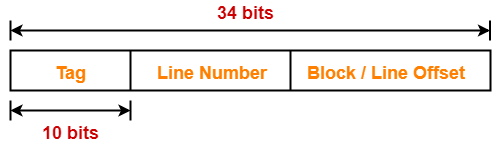


Number of Bits in Block Offset-


We have,

Block size

= 4 KB

= 212 bytes

Thus, Number of bits in block offset = 12 bits
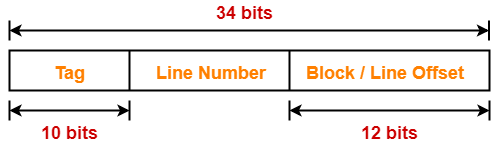


Number of Bits in Line Number-


Number of bits in line number

= Number of bits in physical address – (Number of bits in tag + Number of bits in block offset)

= 34 bits – (10 bits + 12 bits)

= 34 bits – 22 bits

= 12 bits

Thus, Number of bits in line number = 12 bits
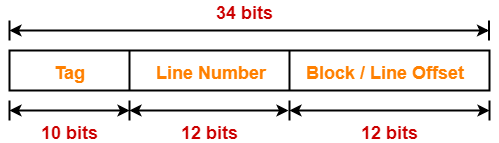


Number of Lines in Cache-


We have-

Number of bits in line number = 12 bits

Thus, Total number of lines in cache = 212 lines


Size of Cache Memory-


Size of cache memory

= Total number of lines in cache x Line size

= 212 x 4 KB

= 214 KB

= 16 MB

Thus, Size of cache memory = 16 MB


Tag Directory Size-


Tag directory size

= Number of tags x Tag size

= Number of lines in cache x Number of bits in tag

= 212 x 10 bits

= 40960 bits

= 5120 bytes

Thus, size of tag directory = 5120 bytes


Also Read- Practice Problems On Set Associative Mapping


Problem-04:


Consider a direct mapped cache of size 32 KB with block size 32 bytes. The CPU generates 32 bit addresses. The number of bits needed for cache indexing and the number of tag bits are respectively-

  1. 10, 17
  2. 10, 22
  3. 15, 17
  4. 5, 17


Solution-


Given-

  • Cache memory size = 32 KB
  • Block size = Frame size = Line size = 32 bytes
  • Number of bits in physical address = 32 bits


Number of Bits in Block Offset-


We have,

Block size

= 32 bytes

= 25 bytes

Thus, Number of bits in block offset = 5 bits
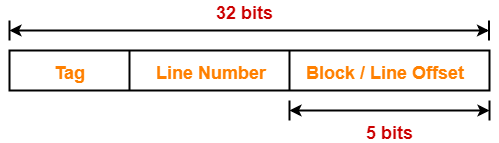


Number of Bits in Line Number-


Total number of lines in cache

= Cache size / Line size

= 32 KB / 32 bytes

= 210 lines

Thus, Number of bits in line number = 10 bits
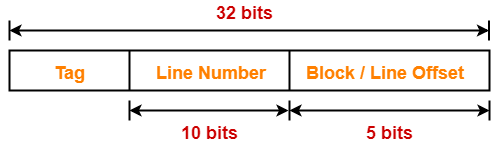


Number of Bits Required For Cache Indexing-


Number of bits required for cache indexing

= Number of bits in line number

= 10 bits


Number Of Bits in Tag-


Number of bits in tag

= Number of bits in physical address – (Number of bits in line number + Number of bits in block offset)

= 32 bits – (10 bits + 5 bits)

= 32 bits – 15 bits

= 17 bits

Thus, Number of bits in tag = 17 bits
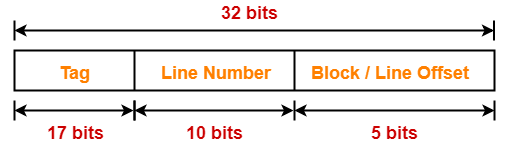


Thus, Option (A) is correct.


Problem-05:


Consider a machine with a byte addressable main memory of 232 bytes divided into blocks of size 32 bytes. Assume that a direct mapped cache having 512 cache lines is used with this machine. The size of the tag field in bits is ______.


Solution-


Given-

  • Main memory size = 232 bytes
  • Block size = Frame size = Line size = 32 bytes
  • Number of lines in cache = 512 lines


Number of Bits in Physical Address-


We have,

Size of main memory

= 232 bytes

Thus, Number of bits in physical address = 32 bits



Number of Bits in Block Offset-


We have,

Block size

= 32 bytes

= 25 bytes

Thus, Number of bits in block offset = 5 bits
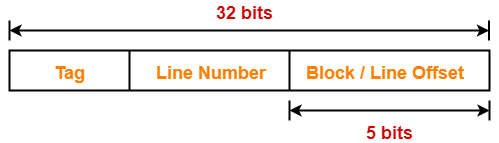


Number of Bits in Line Number-


Total number of lines in cache

= 512 lines

= 29 lines

Thus, Number of bits in line number = 9 bits
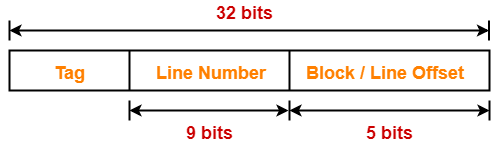


Number Of Bits in Tag-


Number of bits in tag

= Number of bits in physical address – (Number of bits in line number + Number of bits in block offset)

= 32 bits – (9 bits + 5 bits)

= 32 bits – 14 bits

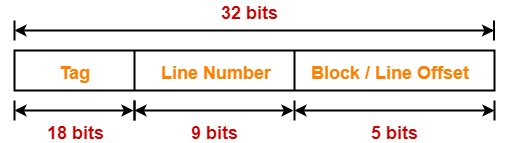
= 18 bits

Thus, Number of bits in tag = 18 bits


Problem-06:


An 8 KB direct-mapped write back cache is organized as multiple blocks, each of size 32 bytes. The processor generates 32 bit addresses. The cache controller maintains the tag information for each cache block comprising of the following-

  • 1 valid bit
  • 1 modified bit
  • As many bits as the minimum needed to identify the memory block mapped in the cache

What is the total size of memory needed at the cache controller to store meta data (tags) for the cache?

  1. 4864 bits
  2. 6144 bits
  3. 6656 bits
  4. 5376 bits


Solution-


Given-

  • Cache memory size = 8 KB
  • Block size = Frame size = Line size = 32 bytes
  • Number of bits in physical address = 32 bits


Number of Bits in Block Offset-


We have,

Block size

= 32 bytes

= 25 bytes

Thus, Number of bits in block offset = 5 bits
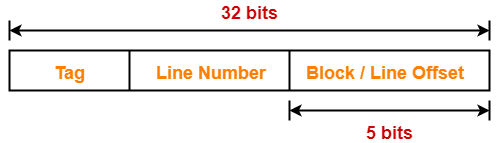


Number of Bits in Line Number-


Total number of lines in cache

= Cache memory size / Line size

= 8 KB / 32 bytes

= 213 bytes / 25 bytes

= 28 lines

Thus, Number of bits in line number = 8 bits
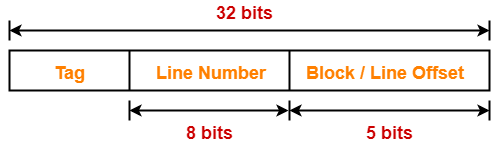


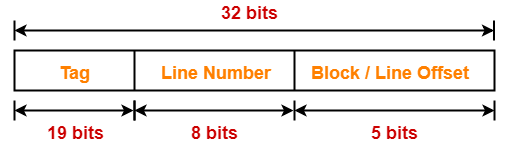
Number Of Bits in Tag-


Number of bits in tag

= Number of bits in physical address – (Number of bits in line number + Number of bits in block offset)

= 32 bits – (8 bits + 5 bits)

= 32 bits – 13 bits

= 19 bits

Thus, Number of bits in tag = 19 bits


Memory Size Needed At Cache Controller-


Size of memory needed at cache controller

= Number of lines in cache x (1 valid bit + 1 modified bit + 19 bits to identify block)

= 28 x 21 bits

= 5376 bits


To watch video solutions and practice more problems,

Watch this Video Lecture


Next Article- Practice Problems On Fully Associative Mapping


Get more notes and other study material of Computer Organization and Architecture.

Watch video lectures by visiting our YouTube channel LearnVidFun.
Direct Mapping | Direct Mapped Cache

Cache Mapping-


Before you go through this article, make sure that you have gone through the previous article on Cache Mapping.


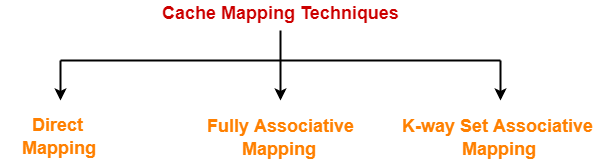
Cache mapping is a technique by which the contents of main memory are brought into the cache memory.


Different cache mapping techniques are-


  1. Direct Mapping
  2. Fully Associative Mapping
  3. K-way Set Associative Mapping


In this article, we will discuss about direct mapping in detail.


Direct Mapping-


In direct mapping,

  • A particular block of main memory can map to only one particular line of the cache.
  • The line number of cache to which a particular block can map is given by-


Cache line number

= ( Main Memory Block Address ) Modulo (Number of lines in Cache)


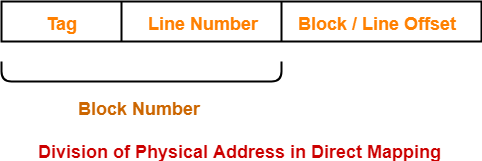
Division of Physical Address-


In direct mapping, the physical address is divided as-


Direct Mapped Cache-


Direct mapped cache employs direct cache mapping technique.


The following steps explain the working of direct mapped cache-


After CPU generates a memory request,

  • The line number field of the address is used to access the particular line of the cache.
  • The tag field of the CPU address is then compared with the tag of the line.
  • If the two tags match, a cache hit occurs and the desired word is found in the cache.
  • If the two tags do not match, a cache miss occurs.
  • In case of a cache miss, the required word has to be brought from the main memory.
  • It is then stored in the cache together with the new tag replacing the previous one.


Implementation-


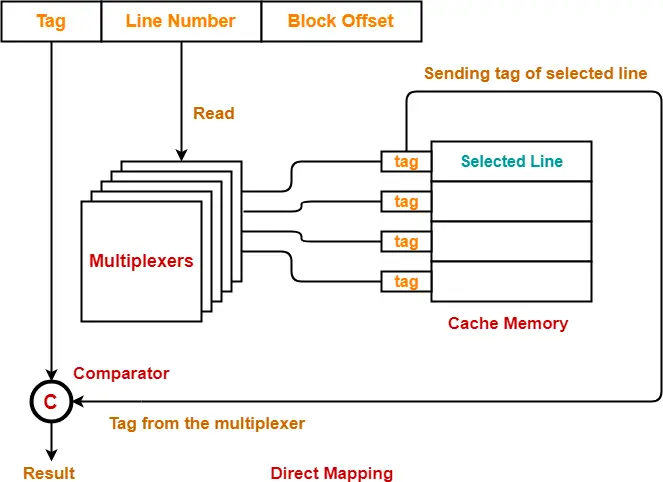
The following diagram shows the implementation of direct mapped cache-


(For simplicity, this diagram shows does not show all the lines of multiplexers)


The steps involved are as follows-


Step-01:


  • Each multiplexer reads the line number from the generated physical address using its select lines in parallel.
  • To read the line number of L bits, number of select lines each multiplexer must have = L.


Step-02:


  • After reading the line number, each multiplexer goes to the corresponding line in the cache memory using its input lines in parallel.
  • Number of input lines each multiplexer must have = Number of lines in the cache memory


Step-03:


  • Each multiplexer outputs the tag bit it has selected from that line to the comparator using its output line.
  • Number of output line in each multiplexer = 1.


UNDERSTAND


It is important to understand-

  • A multiplexer can output only a single bit on output line.
  • So, to output the complete tag to the comparator,

Number of multiplexers required = Number of bits in the tag

  • Each multiplexer is configured to read the tag bit at specific location.


Example-


  • 1st multiplexer is configured to output the first bit of the tag.
  • 2nd multiplexer is configured to output the second bit of the tag.
  • 3rd multiplexer is configured to output the third bit of the tag and so on.

So,

  • Each multiplexer selects the tag bit of the selected line for which it has been configured and outputs on the output line.
  • The complete tag as a whole is sent to the comparator for comparison in parallel.


Step-04:


  • Comparator compares the tag coming from the multiplexers with the tag of the generated address.
  • Only one comparator is required for the comparison where-

Size of comparator = Number of bits in the tag

  • If the two tags match, a cache hit occurs otherwise a cache miss occurs.


Hit latency-


The time taken to find out whether the required word is present in the Cache Memory or not is called as hit latency.


For direct mapped cache,

Hit latency = Multiplexer latency + Comparator latency


Also Read- Set Associative Cache | Implementation & Formulas


Important Results-


Following are the few important results for direct mapped cache-

  • Block j of main memory can map to line number (j mod number of lines in cache) only of the cache.
  • Number of multiplexers required = Number of bits in the tag
  • Size of each multiplexer = Number of lines in cache x 1
  • Number of comparators required = 1
  • Size of comparator = Number of bits in the tag
  • Hit latency = Multiplexer latency + Comparator latency


To gain better understanding about direct mapping,

Watch this Video Lecture


Next Article- Practice Problems On Direct Mapping


Get more notes and other study material of Computer Organization and Architecture.

Watch video lectures by visiting our YouTube channel LearnVidFun.
Semaphore | Binary Semaphore | Practice Problems

Semaphore in OS-


Before you go through this article, make sure that you have gone through the previous article on Semaphores in OS.


We have discussed-

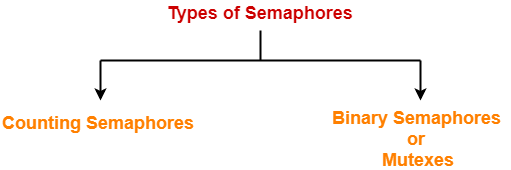
  • A semaphore is a simple integer variable used to provide synchronization among the processes.
  • There are mainly two types of semaphores-


In this article, we will discuss practice problems based on Binary Semaphores.


PRACTICE PROBLEMS BASED ON BINARY SEMAPHORES IN OS-


Problem-01:


Each process Pi, i = 1, 2, …, 9 is coded as follows-

repeat
   P(mutex)
   { Critical Section }
   V(mutex)
forever


The code for P10 is identical except that it uses V(mutex) in place of P(mutex). What is the largest number of processes that can be inside the critical section at any moment?

  1. 1
  2. 2
  3. 3
  4. None of these


Solution-


Code for Processes P1, P2, … , P9


repeat
   P(mutex)
   { Critical Section }
   V(mutex)
forever


Code for Process P10


repeat
   V(mutex)
   { Critical Section }
   V(mutex)
forever


Consider mutex is initialized with 1.

Then-

  • All the 10 processes may be present inside the critical section at the same time.
  • If there would have been more number of processes, then they could also be present inside the critical section at the same time.


The explanation is as follows-


Explanation-


Scene-01:


  • Initially, process P1 arrives.
  • It performs the wait operation on mutex and sets its value to 0.
  • It then enters the critical section.


Scene-02:


  • Consider the processes P2, P3, … , P9 arrives when process P1 is executing the critical section.
  • All the other processes get blocked and are put to sleep in the waiting list.


Scene-03:


  • Process P10 arrives.
  • It performs the signal operation on mutex.
  • It selects one process from the waiting list say process P2 and wakes it up.
  • Process P2 can now enter the critical section (P1 is already present).
  • Now, process P10 enters the critical section (P1 and P2 are already present).
  • After executing critical section, during exit, it again performs the signal operation on mutex.
  • It selects one process from the waiting list say process P3 and wakes it up.
  • Process P3 can now enter the critical section (P1 and P2 are already present).
  • Process P10 may keep on executing repeatedly.
  • It wakes up 2 processes each time during its course of execution.
  • In this manner, all the processes blocked in the waiting list may get entry inside the critical section.


Thus, Option (D) is correct.


Problem-02:


Let m[0]…m[4] be mutexes (binary semaphores) and P[0]…P[4] be processes. Suppose each process P[i] executes the following:

wait(m[i]);

wait(m[(i+1) mod 4]);

………….

release(m[i]);

release(m[(i+1) mod 4]);

This could cause-

  1. Thrashing
  2. Deadlock
  3. Starvation but not deadlock
  4. None of the above


Solution-


Given processes have to execute the wait operations as-

  • Process P0 : wait(m[0]); wait(m[1]);
  • Process P1 : wait(m[1]); wait(m[2]);
  • Process P2 : wait(m[2]); wait(m[3]);
  • Process P3 : wait(m[3]); wait(m[0]);
  • Process P4 : wait(m[4]); wait(m[1]);


Now,

  • A deadlock may be caused when different processes execute the wait operations on mutexes.
  • The occurrence of following scenes will give birth to a deadlock.


Scene-01:


  • Process P0 arrives.
  • It executes wait(m[0]) and gets preempted.


Scene-02:


  • Process P1 gets scheduled.
  • It executes wait(m[1]) and gets preempted.


Scene-03:


  • Process P2 gets scheduled.
  • It executes wait(m[2]) and gets preempted.


Scene-04:


  • Process P3 gets scheduled.
  • It executes wait(m[3]) and gets preempted.


Scene-05:


  • Process P4 gets scheduled.
  • It executes wait(m[4]) and gets preempted.


Now,

  • The system is in a deadlock state since no process can proceed its execution.
  • Thus, Option (B) is correct.


Problem-03:


In the above question, which of the following pairs of processes may be present inside the critical section at the same time?

  1. (P0, P2)
  2. (P1, P3)
  3. (P2, P4)
  4. (P3, P4)
  5. All of these


Solution-


  • All the given pair of processes in options execute wait operation on different mutexes.
  • Hence, they can get entry inside the critical section at the same time.
  • Thus, Option (E) is correct.


NOTE-


  • Mutual exclusion is violated here.
  • Maximum number of processes that may be present inside the critical section at the same time = 2.


Problem-04:


The following program consists of 3 concurrent processes and 3 binary semaphores. The semaphores are initialized as S0 = 1, S1 = 0 and S2 = 0.


Process P0 Process P1 Process P2
while (true)

{

wait (S0);

print ‘0’

release (S1);

release (S2);

}

wait (S1);

release (S0);


wait (S2);

release (S0);


How many times will process P0 print ‘0’?

  1. At least twice
  2. Exactly twice
  3. Exactly thrice
  4. Exactly once


Solution-


Maximum Number Of Times Process P0 Can Print ‘0’-


Maximum number of times process P0 can print ‘0’ = 3


The occurrence of following scenes will cause process P0 to print ‘0’ three times-


Scene-01:


  • Process P0 arrives.
  • It executes wait operation on semaphore S0 successfully. Now, S0 = 0.
  • It then prints ‘0’. (1st time)
  • It executes signal operation on semaphore S1. Now, S1 = 1.
  • It executes signal operation on semaphore S2. Now, S2 = 1.
  • While loop causes process P0 to execute again.
  • It executes wait operation on semaphore S0 unsuccessfully and gets blocked.


Scene-02:


  • Process P1 gets scheduled.
  • It executes wait operation on semaphore S1 successfully. Now, S1 = 0.
  • It executes signal operation on semaphore S0 which wakes up the process P0.
  • The execution of process P1 is completed.


Scene-03:


  • Process P0 gets scheduled again.
  • It prints ‘0’. (2nd time)
  • It executes signal operation on semaphore S1. Now, S1 = 1.
  • It executes signal operation on semaphore S2. Now, S2 = 1.
  • While loop causes process P0 to execute again.
  • It executes wait operation on semaphore S0 unsuccessfully and gets blocked.


Scene-04:


  • Process P2 gets scheduled.
  • It executes wait operation on semaphore S2 successfully. Now, S2 = 0.
  • It executes signal operation on semaphore S0 which wakes up the process P0.
  • The execution of process P2 is completed.


Scene-05:


  • Process P0 gets scheduled again.
  • It prints ‘0’. (3rd time)
  • It executes signal operation on semaphore S1. Now, S1 = 1.
  • It executes signal operation on semaphore S2. Now, S2 = 1.
  • While loop causes process P0 to execute again.
  • It executes wait operation on semaphore S0 unsuccessfully and gets blocked.


Now,

  • The execution of processes P1 and P2 is already completed.
  • There is no other process in the system which can perform signal operation on semaphore S0.
  • Thus, process P0 can not execute any more.


Thus, maximum number of times process P0 can print ‘0’ = 3 times.


Minimum Number Of Times Process P0 Can Print ‘0’-


Minimum number of times process P0 can print ‘0’ = 2


The occurrence of following scenes will cause process P0 to print ‘0’ two times-


Scene-01:


  • Process P0 arrives.
  • It executes wait operation on semaphore S0 successfully. Now, S0 = 0.
  • It then prints ‘0’. (1st time)
  • It executes signal operation on semaphore S1. Now, S1 = 1.
  • It executes signal operation on semaphore S2. Now, S2 = 1.
  • Now, process P0 gets preempted.


Scene-02:


  • Process P1 gets scheduled.
  • It executes wait operation on semaphore S1 successfully. Now, S1 = 0.
  • It executes signal operation on semaphore S0. Now, S0 = 1.
  • The execution of process P1 is completed.


Scene-03:


  • Process P2 gets scheduled.
  • It executes wait operation on semaphore S2 successfully. Now, S2 = 0.
  • It executes signal operation on semaphore S0. Now, S0 = 1.
  • The execution of process P2 is completed.


Scene-04:


  • Process P0 gets scheduled again.
  • While loop causes process P0 to execute again.
  • It executes wait operation on semaphore S0 successfully.
  • It prints ‘0’. (2nd time)
  • It executes signal operation on semaphore S1. Now, S1 = 1.
  • It executes signal operation on semaphore S2. Now, S2 = 1.
  • While loop causes process P0 to execute again.
  • It executes wait operation on semaphore S0 unsuccessfully and gets blocked.


Now,

  • The execution of processes P1 and P2 is already completed.
  • There is no other process in the system which can perform signal operation on semaphore S0.
  • Thus, process P0 can not execute any more.


Thus, minimum number of times process P0 can print ‘0’ = 2 times.

Thus, Option (A) is correct.


Problem-05:


Suppose we want to synchronize two concurrent processes P and Q using binary semaphores S and T. The code for the processes P and Q is shown below-


Process P:

while(1)
{
   W:
   print '0';
   print '0';
   X:
}


Process Q:

while(1)
{
   Y:
   print '1';
   print '1';
   Z:
}


Synchronization statements can be inserted only at points W, X, Y and Z. Which of the following will always lead to an output string with ‘001100110011’?

  1. P(S) at W, V(S) at X, P(T) at Y, V(T) at Z, S and T initially 1
  2. P(S) at W, V(T) at X, P(T) at Y, V(S) at Z, S initially 1 and T initially 0
  3. P(S) at W, V(T) at X, P(T) at Y, V(S) at Z, S and T initially 1
  4. P(S) at W, V(S) at X, P(T) at Y, V(T) at Z, S initially 1 and T initially 0


Solution-


The correct option is (B).

The explanation is as follows-


Explanation-


For better understanding, let us write-

  • P(S) = wait(S) and P(T) = wait(T)
  • V(S) = signal(S) and V(T) = signal(T)


Process P:

while(1)
{
   wait(S)
   print '0';
   print '0';
   signal(T)
}


Process Q:

while(1)
{
   wait(T)
   print '1';
   print '1';
   signal(S)
}


  • S is initialized with value 1.
  • T is initialized with value 0.


Scene-01:


  • Semaphore T is initialized with value 0.
  • So, process Q can not execute first and if it tries to execute first, it will be blocked.
  • Semaphore S is initialized with value 1.
  • So, process P can execute.


Scene-02:


  • Process P begins its execution.
  • It executes wait(S) operation successfully and sets the value of semaphore S to 0.
  • It prints ‘0’ two times.
  • It executes signal(T) operation successfully and sets the value of semaphore T to 1.
  • Now, process P can not execute again since S = 0 and if it tries, it will be blocked.
  • Since value of semaphore T is now 1, so process Q can now execute.

Output string till now = 00


Scene-03:


  • Process Q begins its execution.
  • It executes wait(T) operation successfully and sets the value of semaphore S to 0.
  • It prints ‘1’ two times.
  • It executes signal(S) operation successfully and sets the value of semaphore S to 1.
  • Now, process Q can not execute again since T = 0 and if it tries, it will be blocked.
  • Since value of semaphore S is now 1, so process P can now execute.

Output string till now = 0011


In this way,

  • The procedure goes on and both the processes keep executing alternately following strict alternation approach and prints 00 and 11 alternately.
  • Thus, Correct Option is (B).


Problem-06:


In problem-05, which of the following will ensure that the output string never contains a sub string of the form 01n0 or 10n1 where n is odd?

  1. P(S) at W, V(S) at X, P(T) at Y, V(T) at Z, S and T initially 1
  2. P(S) at W, V(T) at X, P(T) at Y, V(S) at Z, S and T initially 1
  3. P(S) at W, V(S) at X, P(S) at Y, V(S) at Z, S initially 1
  4. V(S) at W, V(T) at X, P(S) at Y, V(T) at Z, S and T initially 1


Solution-


The correct option is (C).

The explanation is as follows-


Explanation-


  • To obtain the strings of desired form, we must ensure that the other process is able to execute only after the first process has executed completely.
  • Only option (C) ensures that the other process is not able to execute if the executing process gets preempted in the middle.
  • In all other options, the other process is able to execute if the executing process gets preempted in the middle.
  • In option (C), the process will have to compulsorily complete its execution to give chance to the other process to execute or to repeat itself.
  • Thus, Option (C) is correct.


Problem-07:


Three concurrent processes X, Y and Z execute three different code segments that access and update certain shared variables. Process X executes the P operation (i.e. wait) on semaphores a, b and c; process Y executes the P operation on semaphores b, c and d; process Z executes the P operation on semaphores c, d and a before entering the respective code segments. After completing the execution of its code segment, each process invokes the V operation (i.e. signal) on its three semaphores. All semaphores are binary semaphores initialized to one. Which one of the following represents a deadlock-free order of invoking the P operations by the processes?

  1. X:P(a)P(b)P(c) , Y: P(b)P(c)P(d) , Z: P(c)P(d)P(a)
  2. X:P(b)P(a)P(c) , Y: P(b)P(c)P(d) , Z: P(a)P(c)P(d)
  3. X:P(b)P(a)P(c) , Y: P(c)P(b)P(d) , Z: P(a)P(c)P(d)
  4. X:P(a)P(b)P(c) , Y: P(b)P(c)P(d) , Z: P(c)P(d)P(a)


Solution-


The correct option is (B).

The explanation is as follows-


Explanation-


  • Except option (B), all other options can give birth to a deadlock.
  • Among processes X and Y, the process which arrives first executes the wait operation on semaphore ‘b’.
  • The later process when tries to execute the wait operation on semaphore ‘b’ gets blocked.
  • Therefore, it won’t be able to execute until the former process completes execution.
  • Now, it is possible that the former process may get preempted in the middle after executing the wait operation on one or more variables and process Z gets scheduled.
  • Consider the former process gets preempted just after executing the wait operation on semaphore ‘b’.
  • Now, process Z arrives and executes the wait operation on one or more variables.
  • Consider process Z executes the wait operation on semaphore ‘a’ or on semaphores ‘a’ and ‘c’.
  • In both these cases, the former process will not be able to continue its execution.
  • But it won’t give birth to a deadlock.
  • In that case, process Z will complete its execution first and then former process will complete its execution and then later process will complete its execution.
  • To sum up, no matter in which order the processes get execute and where they get preempt, no deadlock will occur.


Example Where Option-(A) Gives Birth To Deadlock-


  • X: P(a) executes and preempts.
  • Y: P(b) executes and preempts.
  • Z: P(c)P(d) executes.
  • Now, no process can execute and system is in a deadlock state.


Example Where Option-(C) Gives Birth To Deadlock-


  • X: P(b) executes and preempts.
  • Y: P(c) executes and preempts.
  • Z: P(a) executes.
  • Now, no process can execute and system is in a deadlock state.


Example Where Option-(D) Gives Birth To Deadlock-


  • X: P(a) executes and preempts.
  • Y: P(b) executes and preempts.
  • Z: P(c)P(d) executes.
  • Now, no process can execute and system is in a deadlock state.


NOTE-


In  general,

  • To decrease the chances of deadlock, it is recommended to execute the wait operation on all the similar semaphores for all processes in the same order.
  • As a short trick, you may first compare the execution order of the semaphore variables of all the processes.
  • The option where most of the processes execute the wait operation on similar semaphores in the same order is likely to be deadlock-free.
  • This can also be observed in the above question.


Problem-08:


Suppose we want to synchronize two concurrent processes P and Q using binary semaphores S1 and S2. The code for the processes P and Q is shown below-


Process P:

while(1)
{
   P(S1);
   P(S2);
   Critical Section
   V(S1);
   V(S2);
}


Process Q:

while(1)
{
   P(S1);
   P(S2);
   Critical Section
   V(S1);
   V(S2);
}


This ensures-

  1. Mutual Exclusion
  2. Deadlock
  3. Starvation but not deadlock
  4. None of these


Solution-


  • The process which so ever arrives first performs the wait operation on the semaphores.
  • If the other process arrives in the middle, it will get blocked and put to sleep in the waiting list.
  • When the former process performs the signal operation on semaphores, it wakes up the latter process.
  • This ensures mutual exclusion.
  • There is no possibility of deadlock or starvation.


Thus, Option (A) is correct.


NOTE-


  • In the code of above processes, there is no need of using two semaphores.
  • Mutual exclusion could be achieved by using only one semaphore too.


Problem-09:


Suppose we want to synchronize two concurrent processes P and Q using binary semaphores S1 and S2. The code for the processes P and Q is shown below-


Process P:

while(1)
{
   P(S1);
   P(S2);
   Critical Section
   V(S1);
   V(S2);
}


Process Q:

while(1)
{
   P(S2);
   P(S1);
   Critical Section
   V(S1);
   V(S2);
}


This ensures-

  1. Mutual Exclusion
  2. Deadlock
  3. Both (A) and (B)
  4. None of these


Solution-


The occurrence of following scenes may cause deadlock-


Scene-01:


  • Process P arrives.
  • It executes wait operation on semaphore S1 successfully.
  • Process P gets preempted.


Scene-02:


  • Process Q gets scheduled.
  • It executes wait operation on semaphore S2 successfully.
  • Process Q gets preempted.


Scene-03:


  • Process P gets scheduled again.
  • It executes wait operation on semaphore S2 unsuccessfully and gets blocked.
  • Process P gets preempted.


Scene-04:


  • Process Q gets scheduled again.
  • It executes wait operation on semaphore S1 unsuccessfully and gets blocked.


Now,

  • Both the processes are blocked and keeps waiting for the signal from the each other.
  • The system is in a deadlock state.
  • Also, mutual exclusion can be guaranteed.
  • Thus, Option (C) is correct.


Problem-10:


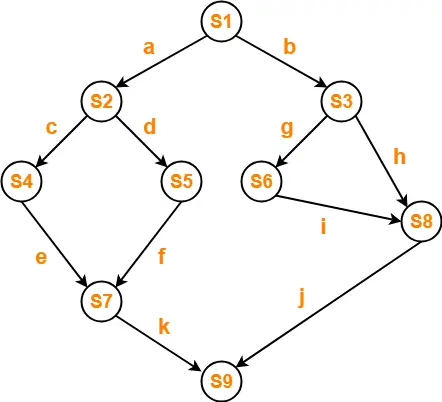
Consider the following program segment for concurrent processing using semaphore operators P and V for synchronization. Draw the precedence graph for the statements S1 to S9.


var
a,b,c,d,e,f,g,h,i,j,k : semaphore;
begin
cobegin
    begin S1; V(a); V(b) end;
    begin P(a); S2; V(c); V(d) end;
    begin P(c); S4; V(e) end;
    begin P(d); S5; V(f) end;
    begin P(e); P(f); S7; V(k) end
    begin P(b); S3; V(g); V(h) end;
    begin P(g); S6; V(i) end;
    begin P(h); P(i); S8; V(j) end;
    begin P(j); P(k); S9 end;
coend
end;


Solution-


Precedence graph will be as shown below-


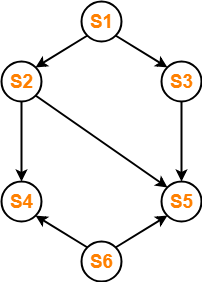
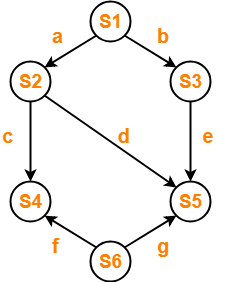
Problem-11:


Write a concurrent program using parbegin-parend and semaphores to represent the precedence constraints of the statements S1 to S6 as shown in given figure-


Solution-


var
a,b,c,d,e,f,g : semaphore;
begin
cobegin
    begin S1; V(a); V(b) end;
    begin P(a); S2; V(c); V(d) end;
    begin P(b); S3; V(e) end;
    begin P(c); P(f); S4 end;
    begin P(d); P(e); P(g); S5 end
    begin S6; V(f); V(g) end;
coend
end;


To watch video solutions and practice other problems,

Watch this Video Lecture


Next Article- Deadlock in OS


Get more notes and other study material of Operating System.

Watch video lectures by visiting our YouTube channel LearnVidFun.
Semaphore | Semaphore in OS | Binary Semaphore

Semaphores in OS-


Before you go through this article, make sure that you have gone through the previous article on Semaphores in OS.


We have discussed-

  • A semaphore is a simple integer variable used to provide synchronization among the processes.
  • There are mainly two types of semaphores-


In this article, we will discuss about Binary Semaphores.


Binary Semaphores-


A binary semaphore is implemented as-


struct semaphore
{
   enum value (0,1);
   Queue type L;
}

Wait (semaphore s)
{
   if (s.value == 1)
   {
      s.value=0;
   }
   else
   {
      put process (PCB) in s.L;
      sleep();
   }
}

Signal (semaphore s)
{
   if (s.L is empty)
   {
      s.value=1;
   }
   else
   {
       select a process (PCB) from s.L;
       wake up();
   }
}


Explanation-


The above implementation of binary semaphore has been explained in the following points-


Point-01:


A binary semaphore has two components-

  • An integer value which can be either 0 or 1
  • An associated waiting list (usually a queue)


Point-02:


  • The waiting list of binary semaphore contains the processes that got blocked when trying to enter the critical section.
  • In waiting list, the blocked processes are put to sleep.
  • The waiting list is usually implemented using a queue data structure.
  • Using a queue as waiting list ensures bounded waiting.
  • This is because the process which arrives first in the waiting queue gets the chance to enter the critical section first.


Point-03:


  • The wait operation is executed when a process tries to enter the critical section.
  • Then, there are two cases possible-


Case-01: Binary Semaphore Value = 1


If the value of binary semaphore is 1,

  • The value of binary semaphore is set to 0.
  • The process is allowed to enter the critical section.


Case-02: Binary Semaphore Value = 0


If the value of binary semaphore is 0,

  • The process is blocked and not allowed to enter the critical section.
  • The process is put to sleep in the waiting list.


Point-04:


  • The signal operation is executed when a process takes exit from the critical section.
  • Then, there are two cases possible-


Case-01: Waiting List is Empty-


  • If the waiting list is empty, the value of binary semaphore is set to 1.


Case-02: Waiting List is Not Empty-


  • If the waiting list is not empty, a process is chosen from the waiting list and wake up to execute.


Point-05:


Binary semaphores are mainly used for two purposes-

  • To ensure mutual exclusion.
  • To implement the order in which the processes must execute.


Example-


Wait (S1)

Process P1

Signal (S2)

Process P2

Signal (S1)

Wait (S2)

Process P3


In this example-

  • Two binary semaphores S1 and S2 both initialized with 0 are used.
  • The execution order of the processes is P2 → P1 → P3.


To gain better understanding about Binary Semaphores,

Watch this Video Lecture


Next Article- Practice Problems On Binary Semaphores


Get more notes and other study material of Operating System.

Watch video lectures by visiting our YouTube channel LearnVidFun.
Semaphore in OS | Practice Problems

Semaphore in OS-


Before you go through this article, make sure that you have gone through the previous article on Semaphores in OS.


We have discussed-

  • A semaphore is a simple integer variable used to provide synchronization among the processes.
  • There are mainly two types of semaphores-


In this article, we will discuss practice problems based on counting semaphores.


PRACTICE PROBLEMS BASED ON COUNTING SEMAPHORES IN OS-


Problem-01:


A counting semaphore S is initialized to 10. Then, 6 P operations and 4 V operations are performed on S. What is the final value of S?


Solution-


We know-

  • P operation also called as wait operation decrements the value of semaphore variable by 1.
  • V operation also called as signal operation increments the value of semaphore variable by 1.


Thus,

Final value of semaphore variable S

= 10 – (6 x 1) + (4 x 1)

= 10 – 6 + 4

= 8


Problem-02:


A counting semaphore S is initialized to 7. Then, 20 P operations and 15 V operations are performed on S. What is the final value of S?


Solution-


We know-

  • P operation also called as wait operation decrements the value of semaphore variable by 1.
  • V operation also called as signal operation increments the value of semaphore variable by 1.


Thus,

Final value of semaphore variable S

= 7 – (20 x 1) + (15 x 1)

= 7 – 20 + 15

= 2


Problem-03:


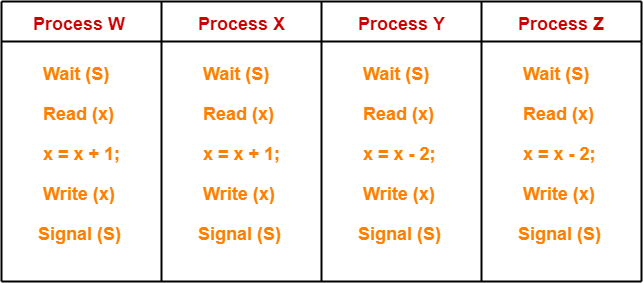
A shared variable x, initialized to zero, is operated on by four concurrent processes W, X, Y, Z as follows. Each of the processes W and X reads x from memory, increments by one, stores it to memory and then terminates. Each of the processes Y and Z reads x from memory, decrements by two, stores it to memory, and then terminates. Each process before reading x invokes the P operation (i.e. wait) on a counting semaphore S and invokes the V operation (i.e. signal) on the semaphore S after storing x to memory. Semaphore S is initialized to two. What is the maximum possible value of x after all processes complete execution?

  1. -2
  2. -1
  3. 1
  4. 2


Solution-


The given question may be pictorially represented as-


Initially, counting semaphore S is initialized with value 2.


Now, We have been asked the maximum possible value of x after all the processes complete execution.


Clearly,

  • Processes W and X increments the value of x.
  • Processes Y and Z decrements the value of x.


To obtain the maximum value of x, the processes must execute in such a way that-

  • Only the impact of the processes W and X remains on the value of x.
  • The impact of processes Y and Z gets lost on the value of x.


STRATEGY


  • First of all, make the process W read the value of x = 0.
  • Then, preempt the process W.
  • Now, schedule process Y and process Z to execute one by one.
  • After executing them, reschedule process W.
  • Now, when process W gets scheduled again, it starts with value x = 0 and increments this value.
  • This is because before preemption it had read the value x = 0.
  • The updates from the processes Y and Z gets lost.
  • Later, execute process X which again increments the value of x.
  • Here, the lost update problem has been exploited.


This is achieved as-


Step-01:


  • Process W arrives.
  • It executes the wait(S) operation and the value of S decrements by 1. Now, S = 1.
  • It reads the value x = 0.
  • It gets preempted.


Step-02:


  • Process Y arrives.
  • It executes the wait(S) operation and the value of S decrements by 1. Now, S = 0.
  • It reads the value x = 0.
  • It decrements the value of x by 2. Now, x = 0 – 2 = -2.
  • It writes the value x = -2 in the memory.
  • It executes the signal(S) operation and the value of S increments by 1. Now, S = 1.
  • Now, execution of process Y is completed.


Step-03:


  • Process Z arrives.
  • It executes the wait(S) operation and the value of S decrements by 1. Now, S = 0.
  • It reads the value x = -2.
  • It decrements the value of x by 2. Now, x = – 2 – 2 = -4.
  • It writes the value x = -4 in the memory.
  • It executes the signal(S) operation and the value of S increments by 1. Now, S = 1.
  • Now, execution of process Z is completed.


Step-04:


  • Process W gets scheduled again.
  • It resumes its execution from where it left.
  • Before preemption it had already read the value x = 0.
  • Now, it increments the value of x by 1. Now, x = 0 + 1 = 1.
  • It writes the value x = 1 in the memory.
  • It executes the signal(S) operation and the value of S increments by 1. Now, S = 2.
  • Now, execution of process W is completed.


Step-05:


  • Process X arrives.
  • It executes the wait(S) operation and the value of S decrements by 1. Now, S = 1.
  • It reads the value x = 1.
  • It increments the value of x by 1. Now, x = 1 + 1 = 2.
  • It writes the value x = 2 in the memory.
  • It executes the signal(S) operation and the value of S increments by 1. Now, S = 2.
  • Now, execution of process X is completed.


Thus,

  • Final value of x = 2.
  • This is the maximum possible value of x that can be achieved after executing all the 4 processes.
  • Option (D) is correct.


Problem-04:


In problem-03, what is the minimum possible value of x after all processes complete execution?

  1. -4
  2. -2
  3. 2
  4. 4


Solution-


To obtain the minimum value of x, the processes must execute in such a way that-

  • Only the impact of the processes Y and Z remains on the value of x.
  • The impact of processes W and X gets lost on the value of x.


This can be achieved if processes execute in the following manner-


Step-01:


  • Process Y arrives.
  • It executes the wait(S) operation and the value of S decrements by 1. Now, S = 1.
  • It reads the value x = 0.
  • It gets preempted.


Step-02:


  • Process W arrives.
  • It executes the wait(S) operation and the value of S decrements by 1. Now, S = 0.
  • It reads the value x = 0.
  • It increments the value of x by 1. Now, x = 0 + 1 = 1.
  • It writes the value x = 1 in the memory.
  • It executes the signal(S) operation and the value of S increments by 1. Now, S = 1.
  • Now, execution of process W is completed.


Step-03:


  • Process X arrives.
  • It executes the wait(S) operation and the value of S decrements by 1. Now, S = 0.
  • It reads the value x = 1.
  • It increments the value of x by 1. Now, x = 1 + 1 = 2.
  • It writes the value x = 2 in the memory.
  • It executes the signal(S) operation and the value of S increments by 1. Now, S = 1.
  • Now, execution of process X is completed.


Step-04:


  • Process Y gets scheduled again.
  • It resumes its execution from where it left.
  • Before preemption it had already read the value x = 0.
  • Now, it decrements the value of x by 2. Now, x = 0 – 2 = -2.
  • It writes the value x = -2 in the memory.
  • It executes the signal(S) operation and the value of S increments by 1. Now, S = 2.
  • Now, execution of process Y is completed.


Step-05:


  • Process Z arrives.
  • It executes the wait(S) operation and the value of S decrements by 1. Now, S = 1.
  • It reads the value x = -2.
  • It decrements the value of x by 2. Now, x = -2 – 2 = -4.
  • It writes the value x = -4 in the memory.
  • It executes the signal(S) operation and the value of S increments by 1. Now, S = 2.
  • Now, execution of process Z is completed.


Thus,

  • Final value of x = -4.
  • This is the minimum possible value of x that can be achieved after executing all the 4 processes.


Thus, Option (A) is correct.


To watch video solutions and practice other problems,

Watch this Video Lecture


Next Article- Binary Semaphores


Get more notes and other study material of Operating System.

Watch video lectures by visiting our YouTube channel LearnVidFun.