Category: Subjects

Batch Operating System | Types of Operating System

Types of Operating System-


The most popularly used types of operating system are-
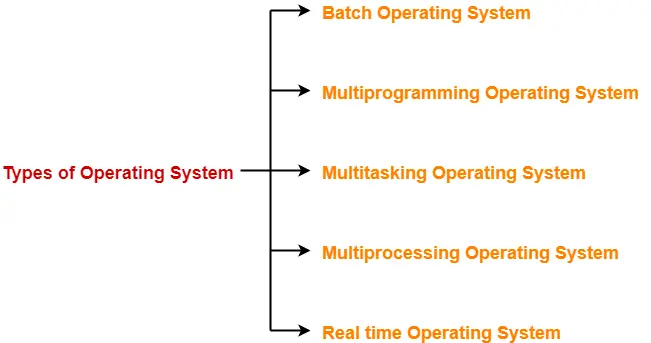


  1. Batch Operating System
  2. Multiprogramming Operating System
  3. Multitasking Operating System
  4. Multiprocessing Operating System
  5. Real time Operating System


In this article, we will discuss about Batch Operating System.


Batch Operating System-


In batch operating system,

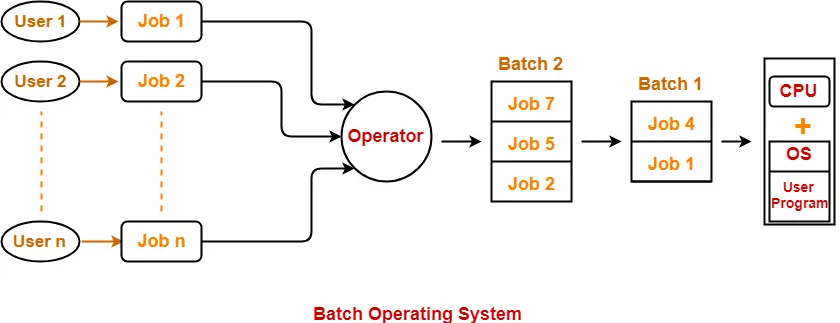
  • Firstly, user prepares his job using punch cards.
  • Then, he submits the job to the computer operator.
  • Operator collects the jobs from different users and sort the jobs into batches with similar needs.
  • Then, operator submits the batches to the processor one by one.
  • All the jobs of one batch are executed together.


Advantages-


  • It saves the time that was being wasted earlier for each individual process in context switching from one environment to another environment.
  • No manual intervention is needed.


Disadvantages-


Point-01:


Priority can not be set for the jobs.


In batch operating system,

  • All the jobs of a batch are executed sequentially one after the other.
  • The output is obtained only after all the jobs are executed.
  • Thus, priority can not be implemented if a certain job has to be executed on an urgent basis.


Point-02:


Batch operating system may lead to starvation.


In batch operating system,

  • The jobs of a particular batch might take long time for their execution.
  • This might lead to starvation to other jobs in other batches.


Point-03:


CPU may remain idle for a long time.


In batch operating system,

  • If the jobs of a batch require some I/O operation, then CPU must wait till the I/O operation gets completed.
  • Since I/O devices are very slow, CPU remains idle for a long time.
  • CPU can not take any other job and execute it.


Point-04:


There is a lack of interaction between a user and his job.


In batch operating system,

  • Once a batch is submitted for execution, the user is not able to interact with any of his jobs.
  • If a job requires the user to input data during run time, then user must wait till the other jobs of the batch get executed.
  • This also increases the overall execution time.


To gain better understanding about Batch Operating System,

Watch this Video Lecture


Next Article- Process States | Diagram


Get more notes and other study material of Operating System.

Watch video lectures by visiting our YouTube channel LearnVidFun.
Process Control Block | Process Attributes

Process Control Block-


  • Process Control Block (PCB) is a data structure that stores information about a particular process.
  • This information is required by the CPU while executing the process.


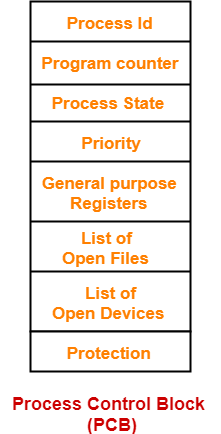
The Process Control Block of a process looks like-


  • Each process is identified by its own process control block (PCB).
  • It is also called as context of the process.


Process Attributes-


The various attributes of process stored in the PCB are-


1. Process Id-


  • Process Id is a unique Id that identifies each process of the system uniquely.
  • A process Id is assigned to each process during its creation.


2. Program Counter-


  • Program counter specifies the address of the instruction to be executed next.
  • Before execution, program counter is initialized with the address of the first instruction of the program.
  • After executing an instruction, value of program counter is automatically incremented to point to the next instruction.
  • This process repeats till the end of the program.


3. Process State-


  • Each process goes through different states during its lifetime.
  • Process state specifies the current state of the process.


Read more- Process States in OS


4. Priority-


  • Priority specifies how urgent is to execute the process.
  • Process with the highest priority is allocated the CPU first among all the processes.


5. General Purpose Registers-


  • General purpose registers are used to hold the data of process generated during its execution.
  • Each process has its own set of registers which are maintained by its PCB.


6. List of Open Files-


  • Each process requires some files which must be present in the main memory during its execution.
  • PCB maintains a list of files used by the process during its execution.


7. List of Open Devices-


  • PCB maintains a list of open devices used by the process during its execution.


Important Notes-


  • PCB of each process resides in the main memory.
  • There exists only one PCB corresponding to each process.
  • PCB of all the processes are present in a linked list.


To gain better understanding about Process Control Block,

Watch this Video Lecture


Next Article- Schedulers in OS


Get more notes and other study material of Operating System.

Watch video lectures by visiting our YouTube channel LearnVidFun.
Process States in Operating System

Process States in Operating System-


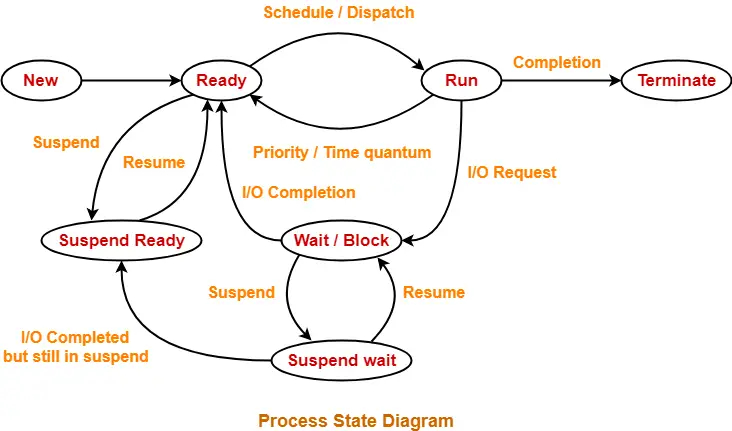
Each process goes through different states in its life cycle-


1. New State-


  • A process is said to be in new state when a program present in the secondary memory is initiated for execution.


2. Ready State-


  • A process moves from new state to ready state after it is loaded into the main memory and is ready for execution.
  • In ready state, the process waits for its execution by the processor.
  • In multiprogramming environment, many processes may be present in the ready state.


3. Run State-


  • A process moves from ready state to run state after it is assigned the CPU for execution.


4. Terminate State-


  • A process moves from run state to terminate state after its execution is completed.
  • After entering the terminate state, context (PCB) of the process is deleted by the operating system.


5. Block Or Wait State-


  • A process moves from run state to block or wait state if it requires an I/O operation or some blocked resource during its execution.
  • After the I/O operation gets completed or resource becomes available, the process moves to the ready state.


6. Suspend Ready State-


  • A process moves from ready state to suspend ready state if a process with higher priority has to be executed but the main memory is full.
  • Moving a process with lower priority from ready state to suspend ready state creates a room for higher priority process in the ready state.
  • The process remains in the suspend ready state until the main memory becomes available.
  • When main memory becomes available, the process is brought back to the ready state.


6. Suspend Wait State-


  • A process moves from wait state to suspend wait state if a process with higher priority has to be executed but the main memory is full.
  • Moving a process with lower priority from wait state to suspend wait state creates a room for higher priority process in the ready state.
  • After the resource becomes available, the process is moved to the suspend ready state.
  • After main memory becomes available, the process is moved to the ready state.


Important Notes-


Note-01:


A process necessarily goes through minimum 4 states.


  • The minimum number of states through which a process compulsorily goes through is 4.
  • These states are new state, ready state, run state and terminate state.
  • However, if a process also requires the I/O operation, then minimum number of states is 5.


Note-02:


A single processor can execute only one process at a time.


  • A single processor can not more than one processes simultaneously.
  • If n processors are present in the system, then only n processes can be executed simultaneously.


Note-03:


State Present in Memory
New state Secondary Memory
Ready state Main Memory
Run state Main Memory
Wait state Main Memory
Suspend wait state Secondary Memory
Suspend ready state Secondary Memory
Terminate state


Note-04:


Moving a process from wait state to suspend wait state is a better alternative.


  • Consider a process with higher priority arrives and the main memory is full.
  • Then, there are two ways to make room for it.


These two ways are-

  1. Moving a process with lower priority from ready state to suspend ready state.
  2. Moving a process with lower priority from wait state to suspend wait state.


Out of these-

  • Moving a process from wait state to suspend wait state is a better alternative.
  • This is because the process is already waiting for some blocked resource.


To gain better understanding about Process States in Operating System,

Watch this Video Lecture


Next Article- Process Control Block | PCB


Get more notes and other study material of Operating System.

Watch video lectures by visiting our YouTube channel LearnVidFun.
Difference between Circuit Switching And Packet Switching

Switching in Computer Networks-


The process of moving the data packets towards their destination by forwarding them from one port to the other port is called as switching.


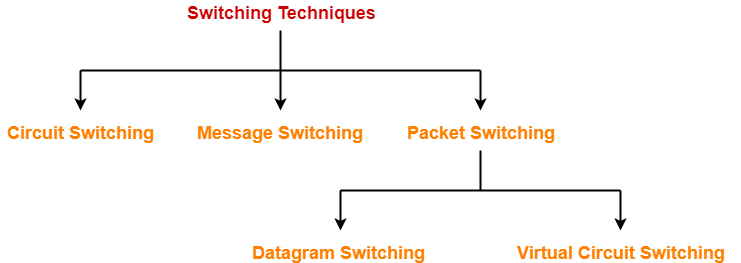
Switching Techniques-


Various switching techniques are-


  1. Circuit Switching
  2. Message Switching
  3. Packet Switching


In this article, we will perform a comparison between circuit switching and packet switching.


Difference Between Circuit Switching And Packet Switching-


The following table compares circuit switching and packet switching techniques-


Circuit Switching Packet Switching
Virtual Circuit Switching Datagram Switching
Connection oriented service Connection oriented service Connection less service
Ensures in order delivery Ensures in order delivery Packets may be delivered out of order
No reordering is required No reordering is required Reordering is required
A dedicated path exists for data transfer A dedicated path exists for data transfer No dedicated path exists for data transfer
All the packets take the same path All the packets take the same path All the packets may not take the same path
Resources are allocated before data transfer Resources are allocated on demand using 1st packet No resources are allocated
Stream oriented Packet oriented Packet oriented
Fixed bandwidth Dynamic Bandwidth Dynamic bandwidth
Reliable Reliable Unreliable
No header overheads Only label overheads Higher overheads
Implemented at physical layer Implemented at data link layer Implemented at network layer
Inefficient in terms of resource utilization Provides better efficiency than circuit switched systems Provides better efficiency than message switched systems
Example- Telephone systems Examples- X.25, Frame relay Example- Internet


To gain better understanding about Circuit Switching Vs Packet Switching,

Watch this Video Lecture


Next Article- Distance Vector Routing | Routing Algorithms


Get more notes and other study material of Computer Networks.

Watch video lectures by visiting our YouTube channel LearnVidFun.

Message Switching | Switching Techniques

Switching in Computer Networks-


The process of moving the data packets towards their destination by forwarding them from one port to the other port is called as switching.


Switching Techniques-


Various switching techniques are-


  1. Circuit Switching
  2. Message Switching
  3. Packet Switching


In this article, we will discuss about Message Switching.


Message Switching-


In message switching,

  • There exists no dedicated path to transfer data.
  • The entire message is treated as a single data unit.
  • The message is then forwarded from hop to hop.
  • Store and Forward is an important characteristic of message switching.
  • The message carries a header that contains the full information about the destination.
  • When any intermediate switch receives the message, it stores the entire message.
  • The message is stored until sufficient resources become available to transfer it to the next switch.
  • When resources become available, the switch forwards the message to the next switch.


Advantages-


Point-01:


  • It improves the channel efficiency over Circuit Switched Network.
  • In circuit switched network, the channel is blocked for two ends only.
  • But here, more devices can share the channel.


Point-02:


  • It is helpful in reducing traffic congestion.
  • The message may be temporarily stored in the route and then forwarded whenever required.


Point-03:


  • It is helpful in setting the message priorities due to store and forward technique.


Disadvantages-


Point-01:


  • It requires enough storage at every switch to accommodate the entire message during the transmission.


Point-02:


  • It is extremely slow due to store and forward technique.
  • Also, the message has to wait until sufficient resources become available to transfer it to the next switch.


Message switching is replaced by Packet switching.


To gain better understanding about Message Switching,

Watch this Video Lecture


Next Article- Packet Switching


Get more notes and other study material of Computer Networks.

Watch video lectures by visiting our YouTube channel LearnVidFun.