Category: Subjects

CSMA CD Protocol | CSMA CD Flowchart

Access Control in Networking-


Before you go through this article, make sure that you have gone through the previous article on Access Control.


We have discussed-

  • Access Control is a mechanism that controls the access of stations to the transmission link.
  • Broadcast links require the access control mechanism.
  • There are various access control methods-
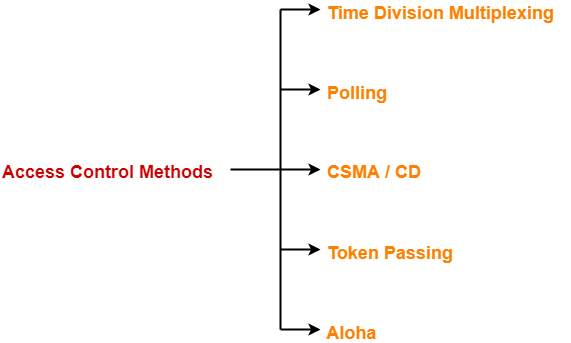


  1. Time Division Multiplexing
  2. Polling
  3. CSMA / CD
  4. Token Passing
  5. Aloha


In this article, we will discuss about CSMA / CD.


CSMA / CD-


CSMA / CD stands for Carrier Sense Multiple Access / Collision Detection.


This access control method works as follows-


Step-01: Sensing the Carrier-


  • Any station willing to transmit the data senses the carrier.
  • If it finds the carrier free, it starts transmitting its data packet otherwise not.


How?


  • Each station can sense the carrier only at its point of contact with the carrier.
  • It is not possible for any station to sense the entire carrier.
  • Thus, there is a huge possibility that a station might sense the carrier free even when it is actually not.


Example-


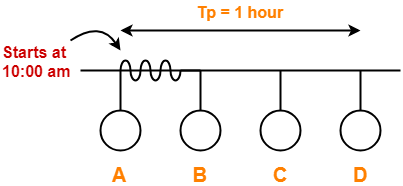
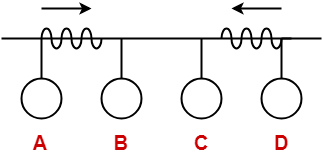
Consider the following scenario-
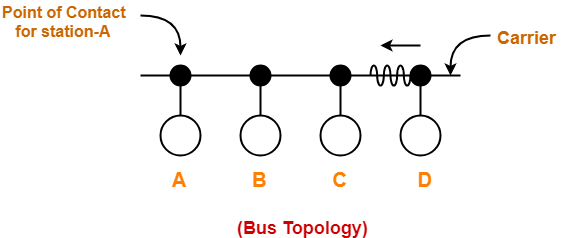


At the current instance,

  • If station A senses the carrier at its point of contact, then it will find the carrier free.
  • But the carrier is actually not free because station D is already transmitting its data.
  • If station A starts transmitting its data now, then it might lead to a collision with the data transmitted by station D.


Step-02: Detecting the Collision-


In CSMA / CD,

  • It is the responsibility of the transmitting station to detect the collision.
  • For detecting the collision, CSMA / CD implements the following condition.
  • This condition is followed by each station-


Transmission delay >= 2 x Propagation delay


Meaning-


According to this condition,

  • Each station must transmit the data packet of size whose transmission delay is at least twice its propagation delay.
  • If the size of data packet is smaller, then collision detection would not be possible.


Length Of Data Packet-


We know-

  • Transmission delay = Length of data packet (L) / Bandwidth (B)
  • Propagation delay = Distance between the two stations (D) / Propagation speed (V)


Substituting values in the above condition, we get-

 L / B >= 2 x D / V

Thus,


L >= 2 x B x D / V


Understanding the Condition To Detect Collision With Example


  • Consider at time 10:00 am, station A senses the carrier.
  • It finds the carrier free and starts transmitting its data packet to station D.
  • Let the propagation delay be 1 hour.

(We are considering station D for the worst case)


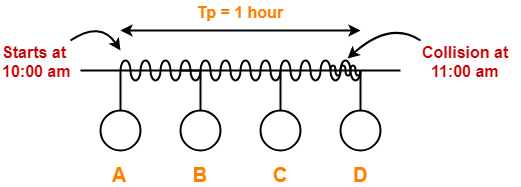
  • Let us consider the scenario at time 10:59:59:59 when the packet is about to reach the station D.
  • At this time, station D senses the carrier.
  • It finds the carrier free and starts transmitting its data packet.
  • Now, as soon as station D starts transmitting its data packet, a collision occurs with the data packet of station A at time 11:00 am.


  • After collision occurs, the collided signal starts travelling in the backward direction.
  • The collided signal takes 1 hour to reach the station A after the collision has occurred.
  • For station A to detect the collided signal, it must be still transmitting the data.
  • So, transmission delay of station A must be >= 1 hour + 1 hour >= 2 hours to detect the collision.
  • That is why, for detecting the collision, condition is Tt >= 2Tp.


Two cases are possible-


Case-01:


If no collided signal comes back during the transmission,

  • It indicates that no collision has occurred.
  • The data packet is transmitted successfully.


Case-02:


If the collided signal comes back during the transmission,

  • It indicates that the collision has occurred.
  • The data packet is not transmitted successfully.
  • Step-03 is followed.


Step-03: Releasing Jam Signal-


  • Jam signal is a 48 bit signal.
  • It is released by the transmitting stations as soon as they detect a collision.
  • It alerts the other stations not to transmit their data immediately after the collision.
  • Otherwise, there is a possibility of collision again with the same data packet.
  • Ethernet sends the jam signal at a frequency other than the frequency of data signals.
  • This ensures that jam signal does not collide with the data signals undergone collision.


Step-04: Waiting For Back Off Time-


  • After the collision, the transmitting station waits for some random amount of time called as back off time.
  • After back off time, it tries transmitting the data packet again.
  • If again the collision occurs, then station again waits for some random back off time and then tries again.
  • The station keeps trying until the back off time reaches its limit.
  • After the limit is reached, station aborts the transmission.
  • Back off time is calculated using Back Off Algorithm.


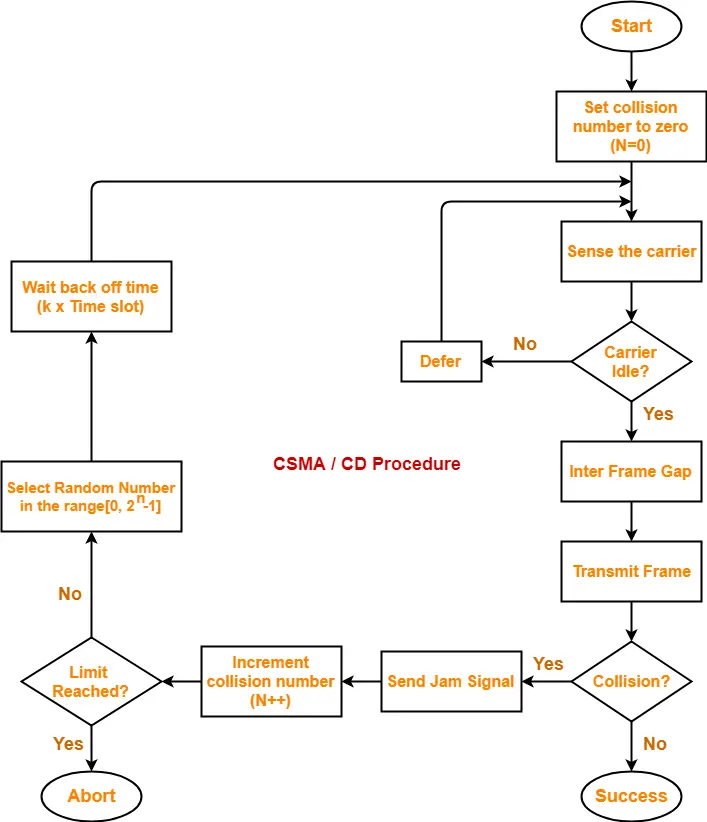
CSMA / CD Flowchart-


The following CSMA / CD flowchart represents the CSMA / CD procedure-
 

Efficiency-


Efficiency (η) = Useful Time / Total Time


Before a successful transmission,

  • There may occur many number of collisions.
  • 2 x Tp time is wasted during each collision.


Thus,

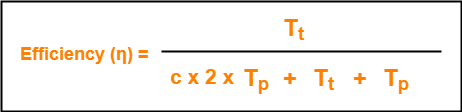
  • Useful time = Transmission delay of data packet = Tt
  • Useless time = Time wasted during collisions + Propagation delay of data packet = c x 2 x Tp + Tp
  • Here, c = Number of contention slots / collision slots.


Thus,


Here,

  • c is a variable.
  • This is because number of collisions that might occur before a successful transmission are variable.


Probabilistic Analysis shows-


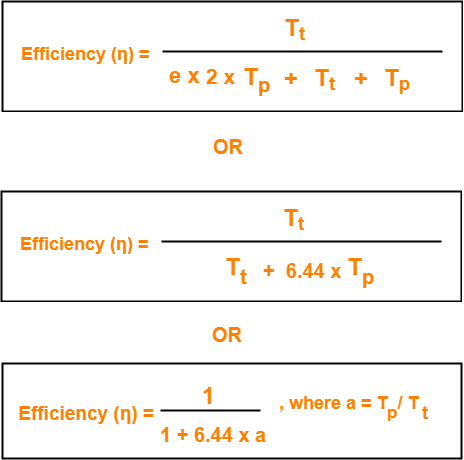
Average number of collisions before a successful transmission = e


Substituting c = e in the above relation, we get-


Probabilistic Analysis-


Let us perform the probabilistic analysis to find the average number of collisions before a successful transmission.


Consider-

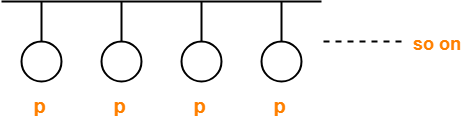
  • Number of stations connected to a CSMA / CD network = n
  • Probability of each station to transmit the data = p


Transmission will be successful only when-

  • One station transmits the data
  • Other (n-1) stations do not transmit the data.


Thus, Probability of successful transmission is given by-



Now, let us find the maximum value of Psuccessful transmission.

For maximum value, we put-
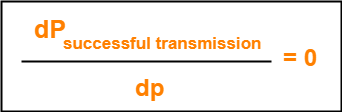


On solving,


At p = 1/n, we get the maximum value of Psuccessful transmission


Thus,

(Psuccessful transmission)max

= nC1 x 1/n x (1 – 1/n)n-1

= n x 1/n x (1 – 1/n)n-1

= (1 – 1/n)n-1


(Psuccessful transmission)max = (1 – 1/n)n-1


If there are sufficiently large number of stations i.e. n → ∞, then we have-
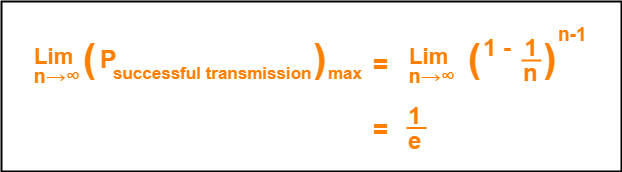


Number of times a station must try before successfully transmitting the data packet

= 1 / Pmax         (Using Poisson’s distribution)

= 1 / (1/e)

= e


From here, we conclude-

Average number of collisions that might occur before a successful transmission = e


Important Notes-


Note-01:


  • CSMA / CD is used in wired LANs.
  • CSMA / CD is standardized in IEEE 802.3


Note-02:


  • CSMA / CD only minimizes the recovery time.
  • It does not take any steps to prevent the collision until it has taken place.


Important Formulas-


  • Condition to detect collision: Transmission delay >= 2 x Propagation delay
  • Minimum length of data packets in CSMA / CD = 2 x Bandwidth x Distance / Speed
  • Efficiency of CSMA / CD = 1 / (1 + 6.44 x a) where a = Tp / Tt
  • Probability of successful transmission = nC1 x p x (1-p)n-1
  • Average number of collisions before a successful transmission = e


To gain better understanding about CSMA / CD,

Watch this Video Lecture


Next Article- Binary Exponential Back Off Algorithm


Get more notes and other study material of Computer Networks.

Watch video lectures by visiting our YouTube channel LearnVidFun.
Polling in Networking | Access Control Method

Access Control in Networking-


Before you go through this article, make sure that you have gone through the previous article on Access Control.


We have discussed-

  • Access Control is a mechanism that controls the access of stations to the transmission link.
  • Broadcast links require the access control mechanism.
  • There are various access control methods-


  1. Time Division Multiplexing
  2. Polling
  3. CSMA / CD
  4. Token Passing
  5. Aloha


In this article, we will discuss about polling.


Polling-


In this access control method,

  • A polling is conducted in which all the stations willing to send data participates.
  • The polling algorithm chooses one of the stations to send the data.
  • The chosen station sends the data to the destination.
  • After the chosen station has sent the data, the cycle repeats.


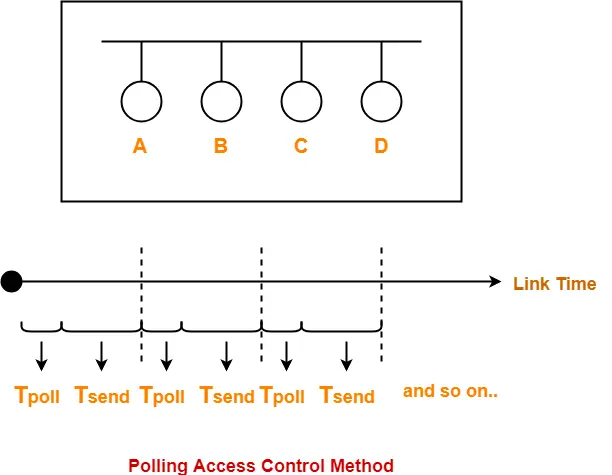
Example-


Here-

  • Tpoll = Time taken for polling
  • Tsend = Time taken for sending the data = Transmission delay + Propagation delay = Tt + Tp


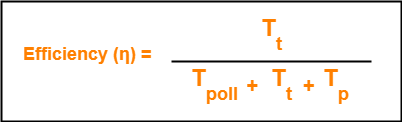
Efficiency-


Efficiency (η) = Useful Time / Total Time


  • Useful time = Transmission delay of data packet = Tt
  • Useless time = Time wasted during polling + Propagation delay of data packet = Tpoll + Tp


Thus,


Advantages-


  • Unlike in Time Division Multiplexing, no slot is ever wasted.
  • It leads to maximum efficiency and bandwidth utilization.


Disadvantages-


  • Time is wasted during polling.
  • Link sharing is not fair since each station has the equal probability of winning in each round.
  • Few stations might starve for sending the data.


Important Formulas-


  • Efficiency (η) = Tt / (Tpoll + Tt + Tp)
  • Effective Bandwidth / Bandwidth Utilization / Throughput = Efficiency(η) x Bandwidth
  • Maximum Available Effective Bandwidth = Total number of stations x Bandwidth requirement of 1 station


To gain better understanding about Polling Access Control Method,

Watch this Video Lecture


Next Article- CSMA / CD | Access Control Method


Get more notes and other study material of Computer Networks.

Watch video lectures by visiting our YouTube channel LearnVidFun.
Time Division Multiplexing | Access Control

Access Control in Networking-


Before you go through this article, make sure that you have gone through the previous article on Access Control.


We have discussed-

  • Access Control is a mechanism that controls the access of stations to the transmission link.
  • Broadcast links require the access control mechanism.
  • There are various access control methods-


  1. Time Division Multiplexing
  2. Polling
  3. CSMA / CD
  4. Token Passing
  5. Aloha


In this article, we will discuss about Time Division Multiplexing (TDM).


Time Division Multiplexing-


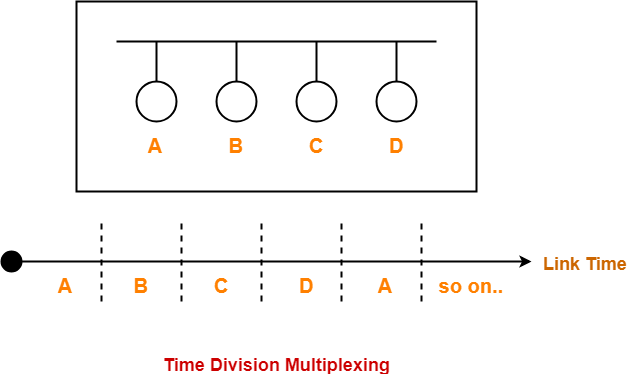
In Time Division Multiplexing (TDM),

  • Time of the link is divided into fixed size intervals called as time slots or time slices.
  • Time slots are allocated to the stations in Round Robin manner.
  • Each station transmit its data during the time slot allocated to it.
  • In case, station does not have any data to send, its time slot goes waste.


Example-


Size Of Time Slots-


The size of each time slot is kept such that each station gets sufficient time for the following tasks-

  • To put its data packet on to the transmission link
  • Last bit of the packet is able to get out of the transmission link


Thus,


Size of each time slot = Tt + Tp


where-

  • Tt = Transmission delay
  • Tp = Propagation delay


NOTE-


To keep the size of time slots constant,

  • We have assumed that all the stations want to send the packets of same size.
  • This keeps Tt constant for all the stations.
  • We have considered the worst case when both the stations are present at the two extreme ends.
  • This ensures Tp will be maximum and all the stations will get sufficient time to propagate their data.


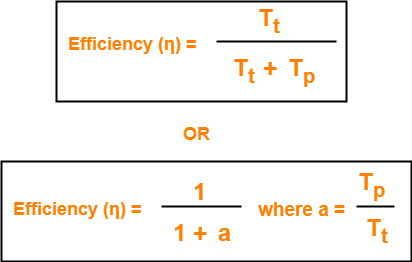
Efficiency-


Efficiency (η) = Useful Time / Total Time


  • Useful time = Transmission delay of data packet = Tt
  • Useless time = Propagation delay of data packet = Tp


Thus,


Important Formulas-


  • Size of each time slot in Time Division Multiplexing = Tt + Tp
  • Efficiency (η) = 1 / (1+a) where a = Tp / Tt
  • Effective Bandwidth / Bandwidth Utilization / Throughput = Efficiency(η) x Bandwidth
  • Maximum Available Effective Bandwidth = Total number of stations x Bandwidth requirement of 1 station


Disadvantage-


  • If any station does not have the data to send during its time slot, then its time slot goes waste.
  • This reduces the efficiency.
  • This time slot could have been allotted to some other station willing to send data.


PRACTICE PROBLEM BASED ON TIME DIVISION MULTIPLEXING (TDM)-


Problem-


If transmission delay and propagation delay of a packet in Time Division Multiplexing is 1 msec each at 4 Mbps bandwidth, then-

  1. Find the efficiency.
  2. Find the effective bandwidth.
  3. How many maximum stations can be connected to the network if each station requires 2 Kbps bandwidth?


Solution-


Given-

  • Transmission delay (Tt) = 1msec
  • Propagation delay (Tp) = 1msec
  • Bandwidth = 4 Mbps


Part-01:


For a TDM Network,


Efficiency (η) = 1 / 1+a where a = Tp / Tt


Calculating Value Of ‘a’-


a = Tp / Tt

a = 1 msec / 1 msec

a = 1


Calculating Efficiency-


Efficiency (η)

= 1 / (1+a)

= 1 / (1 + 1)

= 1 / 2

= 0.5

= 50%


Part-02:


We know-


Effective Bandwidth = Efficiency (η) x Bandwidth


Thus,

Effective Bandwidth

= 0.5 x 4 Mbps

= 2 Mbps


Part-03:


We know-


Maximum Effective Bandwidth

= Total number of stations x Bandwidth requirement of 1 station


Let the total number of stations that can be connected be N.

Then, we have-

2 Mbps = N x 2 Kbps

N = 1000

Thus, maximum 1000 stations can be connected.


To gain better understanding about Time Division Multiplexing (TDM),

Watch this Video Lecture


Next Article- Polling | Access Control Method


Get more notes and other study material of Computer Networks.

Watch video lectures by visiting our YouTube channel LearnVidFun.
Access Control in Networking | Methods

Types of Communication Links-


In computer networking,

  • Communication links enable the stations to communicate with each other.
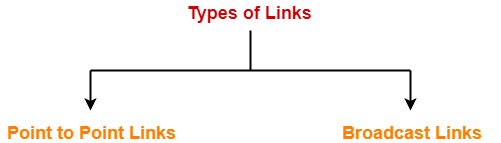
  • Stations may communicate using the following types of links-


  1. Point to Point Link
  2. Broadcast Link


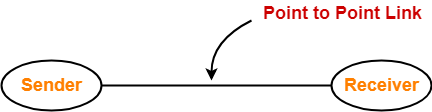
1. Point to Point Link-


  • Point to Point link is a dedicated link that exists between the two stations.
  • The entire capacity of the link is used for transmission between the two connected stations only.
  • Depending upon the Type Of Channel, the data flow takes place between the stations.


Example-


2. Broadcast Link-


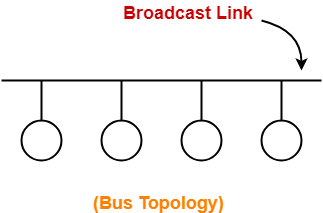
  • Broadcast link is a common link to which multiple stations are connected.
  • The capacity of the link is shared among the connected stations for transmission.


Example-


Access Control-


Access Control is a mechanism that controls the access of stations to the transmission link.


  • Broadcast links require the access control.
  • This is because the link is shared among several stations.


Need of Access Control-


To prevent the occurrence of collision or if the collision occurs, to deal with it.


Consider a situation where-

  • Multiple stations place their data packets on the link and starts transmitting simultaneously.
  • Such a situation gives rise to a collision among the data packets.
  • Collision of data packets causes the data to get corrupt.


Example-


Consider the following scenario-


Here,

  • Two stations A and D starts transmitting their data packets simultaneously.
  • This situation gives rise to a collision between the data packets transmitted by them.
  • Thus, to prevent the collision or to deal with it, access control is needed.


Access Control Methods-


Access control methods are the methods used for providing access control.


  • They prevent the collision or deal with it and ensures smooth flow of traffic on the network.
  • They are implemented at the data link layer of the OSI reference model.


Various access control methods used are-


  1. Time Division Multiplexing
  2. Polling
  3. CSMA / CD
  4. Token Passing
  5. Aloha


We will discuss all these methods one by one in detail.


To gain better understanding about Access Control,

Watch this Video Lecture


Next Article- Time Division Multiplexing (TDM)


Get more notes and other study material of Computer Networks.

Watch video lectures by visiting our YouTube channel LearnVidFun.
Stop and Wait ARQ | Sliding Window Protocols

Stop and Wait Protocol-


Before you go through this article, make sure that you have gone through the previous article on Stop and Wait Protocol.


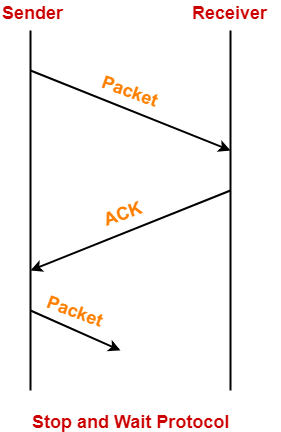
In stop and wait protocol,

  • Sender sends one data packet and then waits for its acknowledgement.
  • Sender sends the next packet only after it receives the acknowledgement for the previous packet.


The main problem faced by the Stop and Wait protocol is the occurrence of deadlock due to-

  1. Loss of data packet
  2. Loss of acknowledgement


Stop and Wait ARQ-


Stop and Wait ARQ is an improved and modified version of Stop and Wait protocol.


Stop and Wait ARQ assumes-

  • The communication channel is noisy.
  • Errors may get introduced in the data during the transmission.


Working-


  • Stop and wait ARQ works similar to stop and wait protocol.
  • It provides a solution to all the limitations of stop and wait protocol.
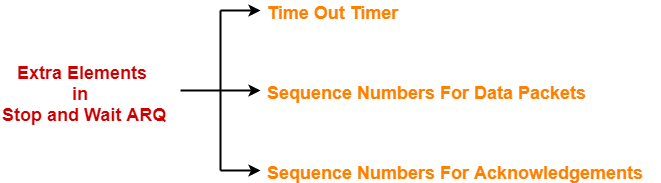
  • Stop and wait ARQ includes the following three extra elements.


Thus, we can say-


Stop and Wait ARQ

= Stop and Wait Protocol + Time Out Timer + Sequence Numbers for Data Packets and Acknowledgements


Number of Sequence Numbers Required-


NOTE

For any sliding window protocol to work without any problem,

the following condition must be satisfied-

Available Sequence Numbers >= Sender Window Size + Receiver Window Size


Stop and wait ARQ is a one bit sliding window protocol where-

  • Sender window size = 1
  • Receiver window size = 1


Thus, in stop and wait ARQ,

Minimum number of sequence numbers required

= Sender Window Size + Receiver Window Size

= 1 + 1

= 2


Thus,

  • Minimum number of sequence numbers required in Stop and Wait ARQ = 2.
  • The two sequence numbers used are 0 and 1.


How Stop and Wait ARQ Solves All Problems?


1. Problem of Lost Data Packet-


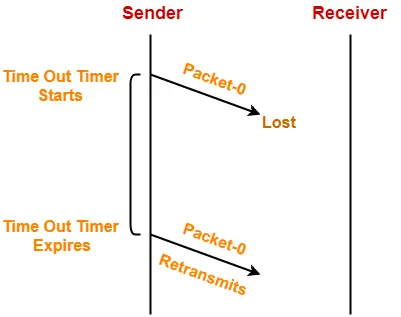
  • Time out timer helps to solve the problem of lost data packet.
  • After sending a data packet  to the receiver, sender starts the time out timer.
  • If the data packet gets acknowledged before the timer expires, sender stops the time out timer.
  • If the timer goes off before receiving the acknowledgement, sender retransmits the same data packet.
  • After retransmission, sender resets the timer.
  • This prevents the occurrence of deadlock.


2. Problem of Lost Acknowledgement-


  • Sequence number on data packets help to solve the problem of delayed acknowledgement.
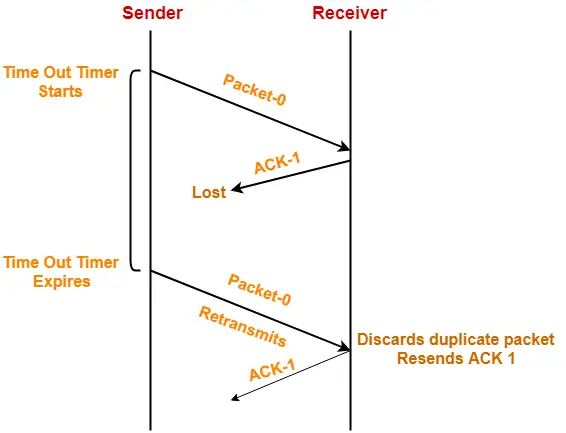
  • Consider the acknowledgement sent by the receiver gets lost.
  • Then, sender retransmits the same data packet after its timer goes off.
  • This prevents the occurrence of deadlock.
  • The sequence number on the data packet helps the receiver to identify the duplicate data packet.
  • Receiver discards the duplicate packet and re-sends the same acknowledgement.


Role of Sequence Number on Data Packets


Consider the above example-


Step-01:


  • Sender sends a data packet with sequence number-0 to the receiver.


Step-02:


  • Receiver receives the data packet correctly.
  • Receiver now expects data packet with sequence number-1.
  • Receiver sends the acknowledgement ACK-1.


Step-03:


  • Acknowledgement ACK-1 sent by the receiver gets lost on the way.


Step-04:


  • Sender receives no acknowledgement and time out occurs.
  • Sender retransmits the same data packet with sequence number-0.
  • This will be a duplicate packet for the receiver.


Step-05:


  • Receiver receives the data packet and discovers it is the duplicate packet.
  • It expects the data packet with sequence number-1 but receiving the data packet with sequence number-0.
  • It discards the duplicate data packet and re-sends acknowledgement ACK-1.
  • ACK-1 requests the sender to send a data packet with sequence number-1.
  • This avoids the inconsistency of data.


Conclusion-


  • Had the sequence numbers not been allotted to the data packets, receiver would have accepted the duplicate data packet thinking of it as the new data packet.
  • This is how sequence numbers allotted to the data packets prove to be useful for identifying the duplicate data packets and discarding them.


3. Problem of Delayed Acknowledgement-


  • Sequence number on acknowledgements help to solve the problem of delayed acknowledgement.


Role of Sequence Number on Acknowledgements


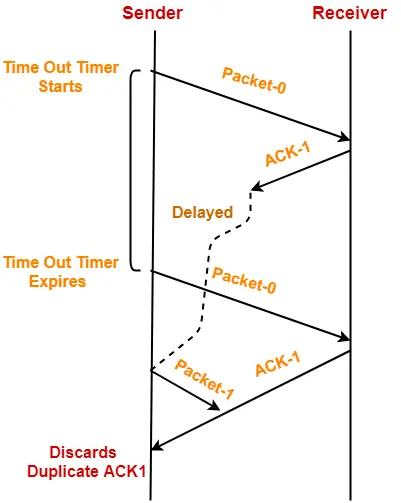
Consider the above example-


Step-01:


  • Sender sends a data packet with sequence number-0 to the receiver.


Step-02:


  • Receiver receives the data packet correctly.
  • Receiver now expects data packet with sequence number-1.
  • Receiver sends the acknowledgement ACK-1.


Step-03:


  • Acknowledgement ACK-1 sent by the receiver gets delayed in reaching the sender.


Step-04:


  • Sender receives no acknowledgement and time out occurs.
  • Sender retransmits the same data packet with sequence number-0.
  • This will be a duplicate packet for the receiver.


Step-05:


  • Receiver receives the data packet and discovers it is the duplicate packet.
  • It expects the data packet with sequence number-1 but receiving the data packet with sequence number-0.
  • It discards the duplicate data packet and re-sends acknowledgement ACK-1.
  • ACK-1 requests the sender to send a data packet with sequence number-1.


Step-06:


  • Two acknowledgements ACK1 reaches the sender.
  • When first acknowledgement ACK1 reaches the sender, sender sends the next data packet with sequence number 1.
  • When second acknowledgement ACK1 reaches the sender, sender rejects the duplicate acknowledgement.
  • This is because it has already sent the data packet with sequence number-1 and now sender expects the acknowledgement with sequence number 0 from the receiver.


Conclusion-


  • Had the sequence numbers not been allotted to the acknowledgements, sender would have accepted the duplicate acknowledgement thinking of it as the new acknowledgement for the latest data packet sent by it.
  • This is how sequence numbers allotted to the acknowledgements prove to be useful for identifying duplicate acknowledgements and discarding them.


4. Problem of Damaged Packet-


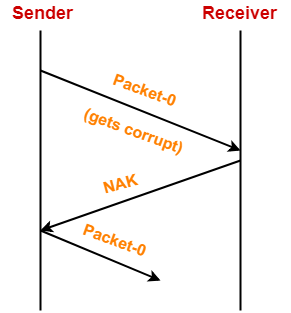
  • If receiver receives a corrupted data packet from the sender, it sends a negative acknowledgement (NAK) to the sender.
  • NAK requests the sender to send the data packet again.


Stop and Wait Protocol Vs Stop and Wait ARQ-


The following comparison table states the differences between the two protocols-


Stop and Wait Protocol Stop and Wait ARQ
It assumes that the communication channel is perfect and noise free. It assumes that the communication channel is imperfect and noisy.
Data packet sent by the sender can never get corrupt. Data packet sent by the sender may get corrupt.
There is no concept of negative acknowledgements. A negative acknowledgement is sent by the receiver if the data packet is found to be corrupt.
There is no concept of time out timer. Sender starts the time out timer after sending the data packet.
There is no concept of sequence numbers. Data packets and acknowledgements are numbered using sequence numbers.


Limitation of Stop and Wait ARQ-


The major limitation of Stop and Wait ARQ is its very less efficiency.


To increase the efficiency, protocols like Go back N and Selective Repeat are used.


Explanation-


In stop and wait ARQ,

  • Sender window size is 1.
  • This allows the sender to keep only one frame unacknowledged.
  • So, sender sends one frame and then waits until the sent frame gets acknowledged.
  • After receiving the acknowledgement from the receiver, sender sends the next frame.


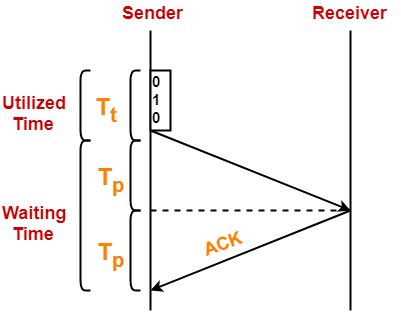
Here,

  • Sender uses Tt time for transmitting the packet over the link.
  • Then, sender waits for 2 x Tp time.
  • After 2 x Tp time, sender receives the acknowledgement for the sent frame from the receiver.
  • Then, sender sends the next frame.
  • This 2 x Tp waiting time is the actual cause of less efficiency.


Efficiency Improvement-


  • The efficiency of stop and wait ARQ can be improved by increasing the window size.
  • This allows the sender to keep more than one unacknowledged frame in its window.
  • Thus, sender can send frames in the waiting time too.

This gives rise to the concept of sliding window protocols.


To gain better understanding about Stop and Wait ARQ,

Watch this Video Lecture


Next Article- Practice Problems On Stop and Wait Protocol


Get more notes and other study material of Computer Networks.

Watch video lectures by visiting our YouTube channel LearnVidFun.