Category: Subjects

Open Addressing | Linear Probing | Collision

Collision Resolution Techniques-


Before you go through this article, make sure that you have gone through the previous article on Collision Resolution Techniques.


We have discussed-

  • Hashing is a well-known searching technique.
  • Collision occurs when hash value of the new key maps to an occupied bucket of the hash table.
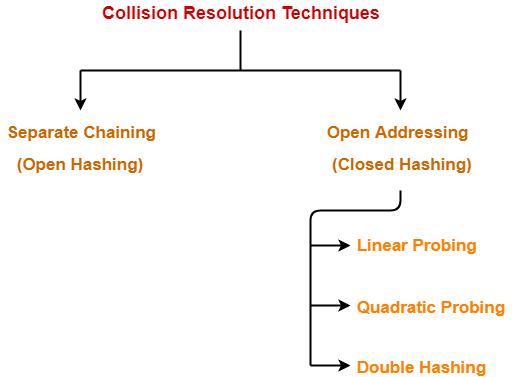
  • Collision resolution techniques are classified as-


In this article, we will discuss about Open Addressing.


Open Addressing-


In open addressing,

  • Unlike separate chaining, all the keys are stored inside the hash table.
  • No key is stored outside the hash table.


Techniques used for open addressing are-

  • Linear Probing
  • Quadratic Probing
  • Double Hashing


Operations in Open Addressing-


Let us discuss how operations are performed in open addressing-


Insert Operation-


  • Hash function is used to compute the hash value for a key to be inserted.
  • Hash value is then used as an index to store the key in the hash table.


In case of collision,

  • Probing is performed until an empty bucket is found.
  • Once an empty bucket is found, the key is inserted.
  • Probing is performed in accordance with the technique used for open addressing.


Search Operation-


To search any particular key,

  • Its hash value is obtained using the hash function used.
  • Using the hash value, that bucket of the hash table is checked.
  • If the required key is found, the key is searched.
  • Otherwise, the subsequent buckets are checked until the required key or an empty bucket is found.
  • The empty bucket indicates that the key is not present in the hash table.


Delete Operation-


  • The key is first searched and then deleted.
  • After deleting the key, that particular bucket is marked as “deleted”.


NOTE-


  • During insertion, the buckets marked as “deleted” are treated like any other empty bucket.
  • During searching, the search is not terminated on encountering the bucket marked as “deleted”.
  • The search terminates only after the required key or an empty bucket is found.


Open Addressing Techniques-


Techniques used for open addressing are-


1. Linear Probing-


In linear probing,

  • When collision occurs, we linearly probe for the next bucket.
  • We keep probing until an empty bucket is found.


Advantage-


  • It is easy to compute.


Disadvantage-


  • The main problem with linear probing is clustering.
  • Many consecutive elements form groups.
  • Then, it takes time to search an element or to find an empty bucket.


Time Complexity-


Worst time to search an element in linear probing is O (table size).


This is because-

  • Even if there is only one element present and all other elements are deleted.
  • Then, “deleted” markers present in the hash table makes search the entire table.


2. Quadratic Probing-


In quadratic probing,

  • When collision occurs, we probe for i2‘th bucket in ith iteration.
  • We keep probing until an empty bucket is found.


3. Double Hashing-


In double hashing,

  • We use another hash function hash2(x) and look for i * hash2(x) bucket in ith iteration.
  • It requires more computation time as two hash functions need to be computed.


Comparison of Open Addressing Techniques-


Linear Probing
Quadratic Probing
Double Hashing
Primary Clustering
Yes No No
Secondary Clustering
Yes Yes No
Number of Probe Sequence
(m = size of table)
m m m2
Cache performance
Best Lies between the two Poor


Conclusions-


  • Linear Probing has the best cache performance but suffers from clustering.
  • Quadratic probing lies between the two in terms of cache performance and clustering.
  • Double caching has poor cache performance but no clustering.


Load Factor (α)-


Load factor (α) is defined as-



In open addressing, the value of load factor always lie between 0 and 1.


This is because-

  • In open addressing, all the keys are stored inside the hash table.
  • So, size of the table is always greater or at least equal to the number of keys stored in the table.


PRACTICE PROBLEM BASED ON OPEN ADDRESSING-


Problem-


Using the hash function ‘key mod 7’, insert the following sequence of keys in the hash table-

50, 700, 76, 85, 92, 73 and 101


Use linear probing technique for collision resolution.


Solution-


The given sequence of keys will be inserted in the hash table as-


Step-01:


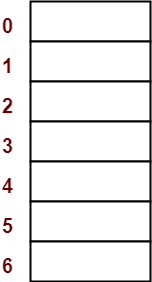
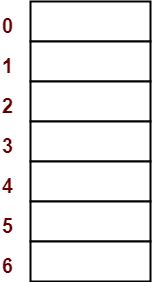
  • Draw an empty hash table.
  • For the given hash function, the possible range of hash values is [0, 6].
  • So, draw an empty hash table consisting of 7 buckets as-


Step-02:


  • Insert the given keys in the hash table one by one.
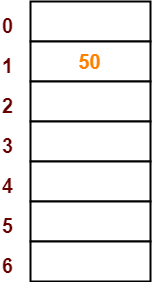
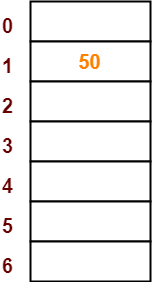
  • The first key to be inserted in the hash table = 50.
  • Bucket of the hash table to which key 50 maps = 50 mod 7 = 1.
  • So, key 50 will be inserted in bucket-1 of the hash table as-


Step-03:


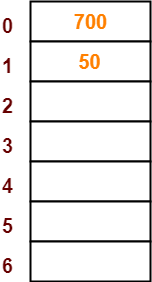
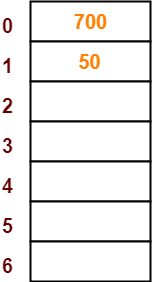
  • The next key to be inserted in the hash table = 700.
  • Bucket of the hash table to which key 700 maps = 700 mod 7 = 0.
  • So, key 700 will be inserted in bucket-0 of the hash table as-


Step-04:


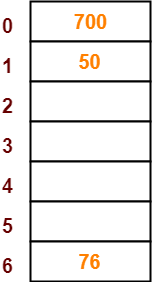
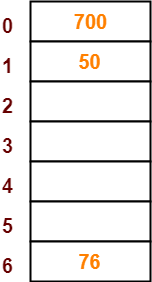
  • The next key to be inserted in the hash table = 76.
  • Bucket of the hash table to which key 76 maps = 76 mod 7 = 6.
  • So, key 76 will be inserted in bucket-6 of the hash table as-


Step-05:


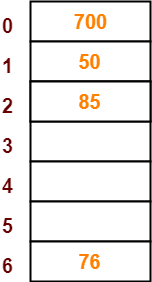
  • The next key to be inserted in the hash table = 85.
  • Bucket of the hash table to which key 85 maps = 85 mod 7 = 1.
  • Since bucket-1 is already occupied, so collision occurs.
  • To handle the collision, linear probing technique keeps probing linearly until an empty bucket is found.
  • The first empty bucket is bucket-2.
  • So, key 85 will be inserted in bucket-2 of the hash table as-


Step-06:


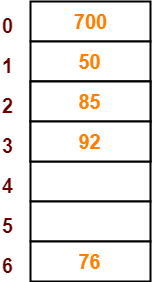
  • The next key to be inserted in the hash table = 92.
  • Bucket of the hash table to which key 92 maps = 92 mod 7 = 1.
  • Since bucket-1 is already occupied, so collision occurs.
  • To handle the collision, linear probing technique keeps probing linearly until an empty bucket is found.
  • The first empty bucket is bucket-3.
  • So, key 92 will be inserted in bucket-3 of the hash table as-


Step-07:


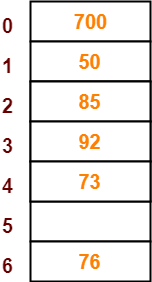
  • The next key to be inserted in the hash table = 73.
  • Bucket of the hash table to which key 73 maps = 73 mod 7 = 3.
  • Since bucket-3 is already occupied, so collision occurs.
  • To handle the collision, linear probing technique keeps probing linearly until an empty bucket is found.
  • The first empty bucket is bucket-4.
  • So, key 73 will be inserted in bucket-4 of the hash table as-


Step-08:


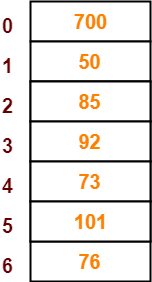
  • The next key to be inserted in the hash table = 101.
  • Bucket of the hash table to which key 101 maps = 101 mod 7 = 3.
  • Since bucket-3 is already occupied, so collision occurs.
  • To handle the collision, linear probing technique keeps probing linearly until an empty bucket is found.
  • The first empty bucket is bucket-5.
  • So, key 101 will be inserted in bucket-5 of the hash table as-


To gain better understanding about Open Addressing,

Watch this Video Lecture


Next Article- Separate Chaining Vs Open Addressing


Get more notes and other study material of Data Structures.

Watch video lectures by visiting our YouTube channel LearnVidFun.
Separate Chaining | Collision Resolution Techniques

Hashing in Data Structure-


Before you go through this article, make sure that you have gone through the previous article on Hashing.


We have discussed-

  • Hashing is a well-known searching technique.
  • It minimizes the number of comparisons while performing the search.
  • It completes the search with constant time complexity O(1).


In this article, we will discuss about Collisions in Hashing.


Collision in Hashing-


In hashing,

  • Hash function is used to compute the hash value for a key.
  • Hash value is then used as an index to store the key in the hash table.
  • Hash function may return the same hash value for two or more keys.


When the hash value of a key maps to an already occupied bucket of the hash table,

it is called as a Collision.


Collision Resolution Techniques-


Collision Resolution Techniques are the techniques used for resolving or handling the collision.


Collision resolution techniques are classified as-


  1. Separate Chaining
  2. Open Addressing


In this article, we will discuss about separate chaining.


Separate Chaining-


To handle the collision,

  • This technique creates a linked list to the slot for which collision occurs.
  • The new key is then inserted in the linked list.
  • These linked lists to the slots appear like chains.
  • That is why, this technique is called as separate chaining.


Time Complexity-


For Searching-


  • In worst case, all the keys might map to the same bucket of the hash table.
  • In such a case, all the keys will be present in a single linked list.
  • Sequential search will have to be performed on the linked list to perform the search.
  • So, time taken for searching in worst case is O(n).


For Deletion-


  • In worst case, the key might have to be searched first and then deleted.
  • In worst case, time taken for searching is O(n).
  • So, time taken for deletion in worst case is O(n).


Load Factor (α)-


Load factor (α) is defined as-


If Load factor (α) = constant, then time complexity of Insert, Search, Delete = Θ(1)


PRACTICE PROBLEM BASED ON SEPARATE CHAINING-


Problem-


Using the hash function ‘key mod 7’, insert the following sequence of keys in the hash table-

50, 700, 76, 85, 92, 73 and 101


Use separate chaining technique for collision resolution.


Solution-


The given sequence of keys will be inserted in the hash table as-


Step-01:


  • Draw an empty hash table.
  • For the given hash function, the possible range of hash values is [0, 6].
  • So, draw an empty hash table consisting of 7 buckets as-


Step-02:


  • Insert the given keys in the hash table one by one.
  • The first key to be inserted in the hash table = 50.
  • Bucket of the hash table to which key 50 maps = 50 mod 7 = 1.
  • So, key 50 will be inserted in bucket-1 of the hash table as-


Step-03:


  • The next key to be inserted in the hash table = 700.
  • Bucket of the hash table to which key 700 maps = 700 mod 7 = 0.
  • So, key 700 will be inserted in bucket-0 of the hash table as-


Step-04:


  • The next key to be inserted in the hash table = 76.
  • Bucket of the hash table to which key 76 maps = 76 mod 7 = 6.
  • So, key 76 will be inserted in bucket-6 of the hash table as-


Step-05:


  • The next key to be inserted in the hash table = 85.
  • Bucket of the hash table to which key 85 maps = 85 mod 7 = 1.
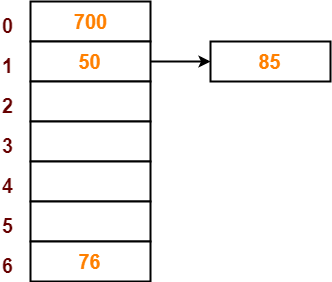
  • Since bucket-1 is already occupied, so collision occurs.
  • Separate chaining handles the collision by creating a linked list to bucket-1.
  • So, key 85 will be inserted in bucket-1 of the hash table as-


Step-06:


  • The next key to be inserted in the hash table = 92.
  • Bucket of the hash table to which key 92 maps = 92 mod 7 = 1.
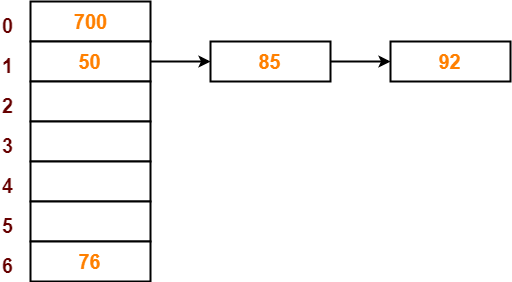
  • Since bucket-1 is already occupied, so collision occurs.
  • Separate chaining handles the collision by creating a linked list to bucket-1.
  • So, key 92 will be inserted in bucket-1 of the hash table as-


Step-07:


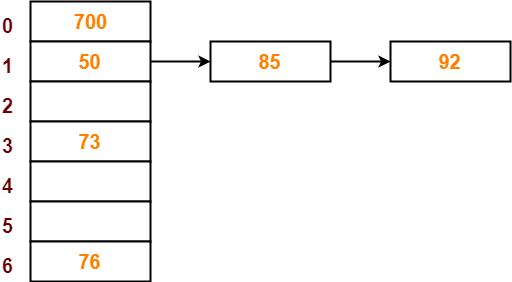
  • The next key to be inserted in the hash table = 73.
  • Bucket of the hash table to which key 73 maps = 73 mod 7 = 3.
  • So, key 73 will be inserted in bucket-3 of the hash table as-


Step-08:


  • The next key to be inserted in the hash table = 101.
  • Bucket of the hash table to which key 101 maps = 101 mod 7 = 3.
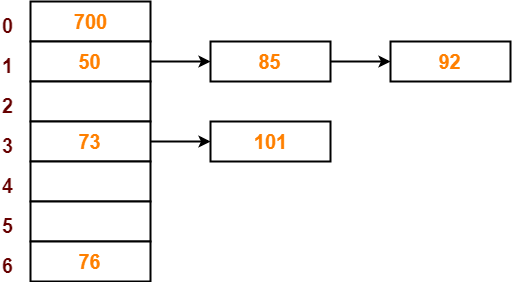
  • Since bucket-3 is already occupied, so collision occurs.
  • Separate chaining handles the collision by creating a linked list to bucket-3.
  • So, key 101 will be inserted in bucket-3 of the hash table as-


To gain better understanding about Separate Chaining,

Watch this Video Lecture


Next Article- Open Addressing


Get more notes and other study material of Data Structures.

Watch video lectures by visiting our YouTube channel LearnVidFun.
Hashing in Data Structure | Hash Functions

Searching Techniques-


In data structures,

  • There are several searching techniques like linear search, binary search, search trees etc.
  • In these techniques, time taken to search any particular element depends on the total number of elements.


Example-


  • Linear Search takes O(n) time to perform the search in unsorted arrays consisting of n elements.
  • Binary Search takes O(logn) time to perform the search in sorted arrays consisting of n elements.
  • It takes O(logn) time to perform the search in Binary Search Tree consisting of n elements.


Drawback-


The main drawback of these techniques is-

  • As the number of elements increases, time taken to perform the search also increases.
  • This becomes problematic when total number of elements become too large.


Hashing in Data Structure-


In data structures,

  • Hashing is a well-known technique to search any particular element among several elements.
  • It minimizes the number of comparisons while performing the search.


Advantage-


Unlike other searching techniques,

  • Hashing is extremely efficient.
  • The time taken by it to perform the search does not depend upon the total number of elements.
  • It completes the search with constant time complexity O(1).


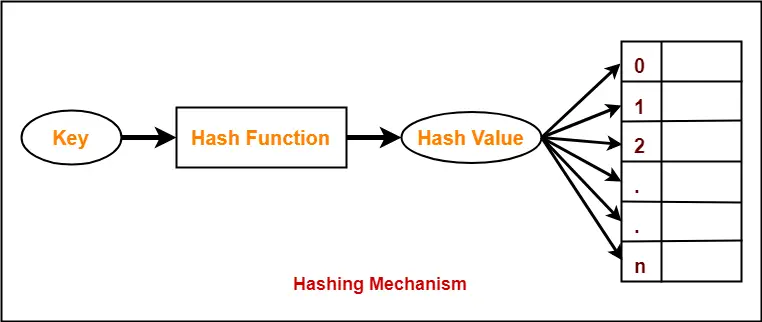
Hashing Mechanism-


In hashing,

  • An array data structure called as Hash table is used to store the data items.
  • Based on the hash key value, data items are inserted into the hash table.


Hash Key Value-


  • Hash key value is a special value that serves as an index for a data item.
  • It indicates where the data item should be be stored in the hash table.
  • Hash key value is generated using a hash function.


Hash Function-


Hash function is a function that maps any big number or string to a small integer value.


  • Hash function takes the data item as an input and returns a small integer value as an output.
  • The small integer value is called as a hash value.
  • Hash value of the data item is then used as an index for storing it into the hash table.


Types of Hash Functions-


There are various types of hash functions available such as-

  1. Mid Square Hash Function
  2. Division Hash Function
  3. Folding Hash Function etc


It depends on the user which hash function he wants to use.


Properties of Hash Function-


The properties of a good hash function are-

  • It is efficiently computable.
  • It minimizes the number of collisions.
  • It distributes the keys uniformly over the table.


To gain better understanding about Hashing in Data Structures,

Watch this Video Lecture


Next Article- Collision in Hashing


Get more notes and other study material of Data Structures.

Watch video lectures by visiting our YouTube channel LearnVidFun.
Addressing Modes | Types of Addressing Modes

Addressing Modes-


The different ways of specifying the location of an operand in an instruction are called as addressing modes.


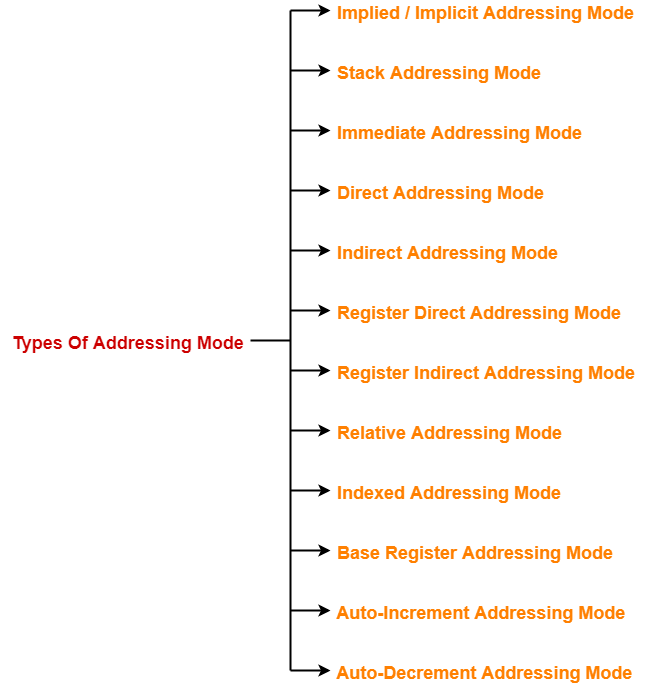
Types of Addressing Modes-


In computer architecture, there are following types of addressing modes-


  1. Implied / Implicit Addressing Mode
  2. Stack Addressing Mode
  3. Immediate Addressing Mode
  4. Direct Addressing Mode
  5. Indirect Addressing Mode
  6. Register Direct Addressing Mode
  7. Register Indirect Addressing Mode
  8. Relative Addressing Mode
  9. Indexed Addressing Mode
  10. Base Register Addressing Mode
  11. Auto-Increment Addressing Mode
  12. Auto-Decrement Addressing Mode


In this article, we will discuss about these addressing modes in detail.


1. Implied Addressing Mode-


In this addressing mode,

  • The definition of the instruction itself specify the operands implicitly.
  • It is also called as implicit addressing mode.


Examples-


  • The instruction “Complement Accumulator” is an implied mode instruction.
  • In a stack organized computer, Zero Address Instructions are implied mode instructions.

(since operands are always implied to be present on the top of the stack)


2. Stack Addressing Mode-


In this addressing mode,

  • The operand is contained at the top of the stack.


Example-


ADD

  • This instruction simply pops out two symbols contained at the top of the stack.
  • The addition of those two operands is performed.
  • The result so obtained after addition is pushed again at the top of the stack.


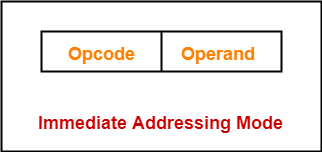
3. Immediate Addressing Mode-


In this addressing mode,

  • The operand is specified in the instruction explicitly.
  • Instead of address field, an operand field is present that contains the operand.


Examples-


  • ADD 10 will increment the value stored in the accumulator by 10.
  • MOV R #20 initializes register R to a constant value 20.


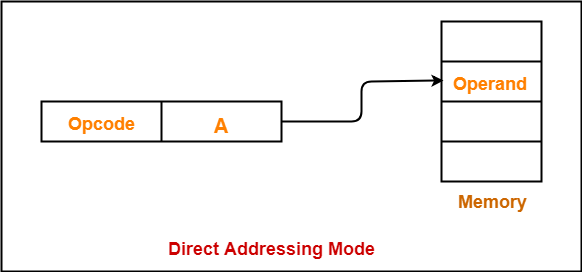
4. Direct Addressing Mode-


In this addressing mode,

  • The address field of the instruction contains the effective address of the operand.
  • Only one reference to memory is required to fetch the operand.
  • It is also called as absolute addressing mode.


Example-


  • ADD X will increment the value stored in the accumulator by the value stored at memory location X.

AC ← AC + [X]


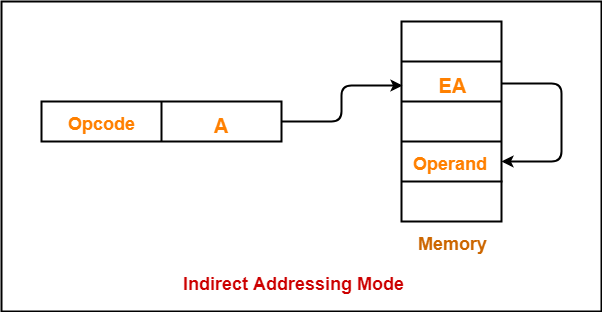
5. Indirect Addressing Mode-


In this addressing mode,

  • The address field of the instruction specifies the address of memory location that contains the effective address of the operand.
  • Two references to memory are required to fetch the operand.


Example-


  • ADD X will increment the value stored in the accumulator by the value stored at memory location specified by X.

AC ← AC + [[X]]


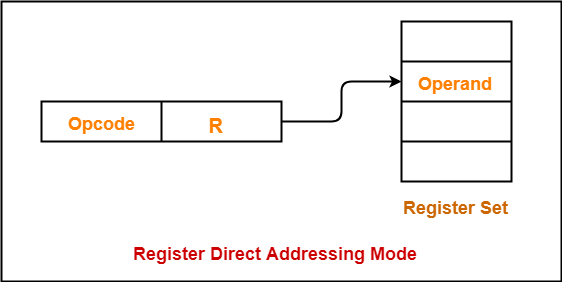
6. Register Direct Addressing Mode-


In this addressing mode,

  • The operand is contained in a register set.
  • The address field of the instruction refers to a CPU register that contains the operand.
  • No reference to memory is required to fetch the operand.


Example-


  • ADD R will increment the value stored in the accumulator by the content of register R.

AC ← AC + [R]


NOTE-


It is interesting to note-

  • This addressing mode is similar to direct addressing mode.
  • The only difference is address field of the instruction refers to a CPU register instead of main memory.


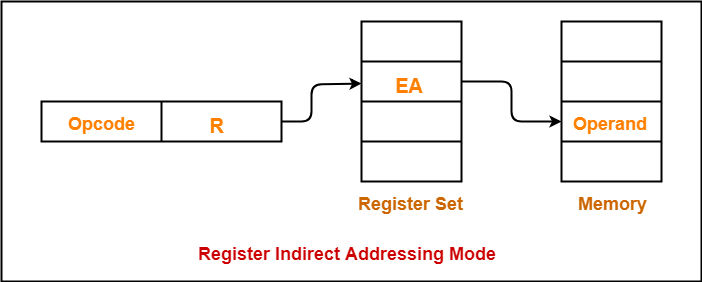
7. Register Indirect Addressing Mode-


In this addressing mode,

  • The address field of the instruction refers to a CPU register that contains the effective address of the operand.
  • Only one reference to memory is required to fetch the operand.


Example-


  • ADD R will increment the value stored in the accumulator by the content of memory location specified in register R.

AC ← AC + [[R]]


NOTE-


It is interesting to note-

  • This addressing mode is similar to indirect addressing mode.
  • The only difference is address field of the instruction refers to a CPU register.


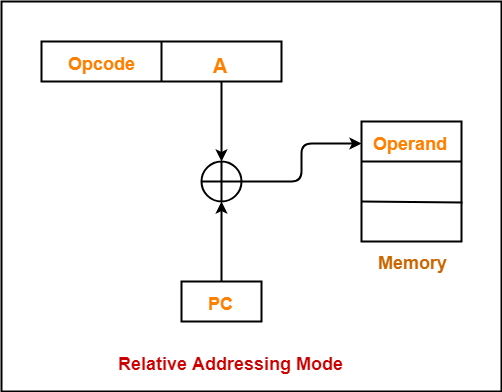
8. Relative Addressing Mode-


In this addressing mode,

  • Effective address of the operand is obtained by adding the content of program counter with the address part of the instruction.


Effective Address

= Content of Program Counter + Address part of the instruction


NOTE-


  • Program counter (PC) always contains the address of the next instruction to be executed.
  • After fetching the address of the instruction, the value of program counter immediately increases.
  • The value increases irrespective of whether the fetched instruction has completely executed or not.


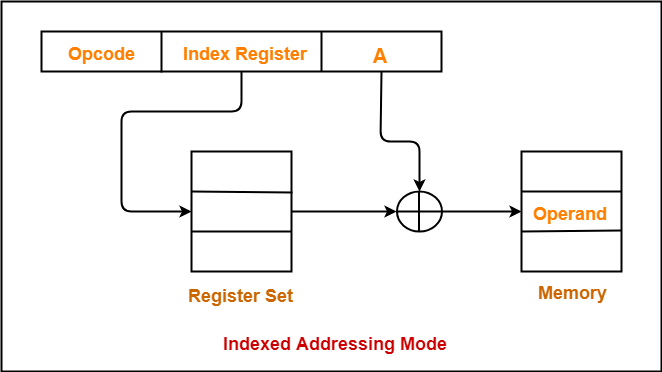
9. Indexed Addressing Mode-


In this addressing mode,

  • Effective address of the operand is obtained by adding the content of index register with the address part of the instruction.


Effective Address

= Content of Index Register + Address part of the instruction


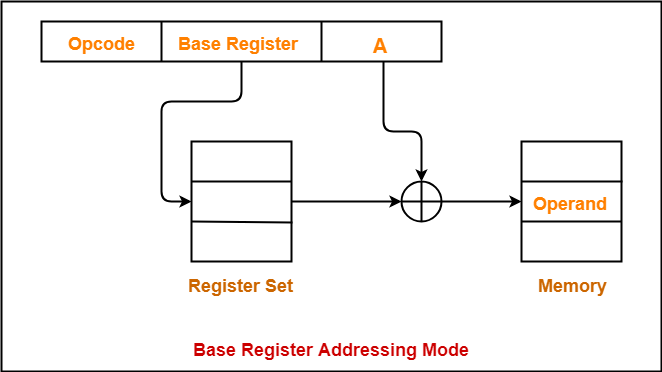
10. Base Register Addressing Mode-


In this addressing mode,

  • Effective address of the operand is obtained by adding the content of base register with the address part of the instruction.


Effective Address

= Content of Base Register + Address part of the instruction


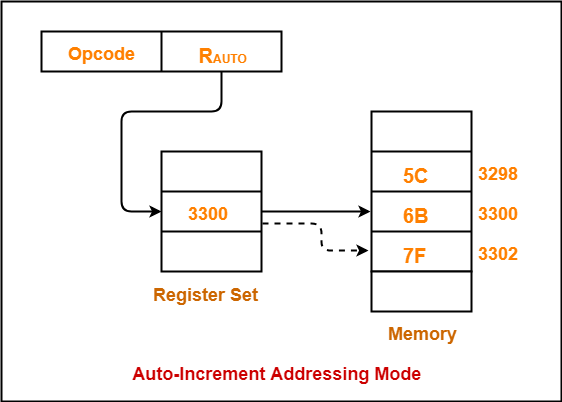
11. Auto-Increment Addressing Mode-


  • This addressing mode is a special case of Register Indirect Addressing Mode where-


Effective Address of the Operand

= Content of Register


In this addressing mode,

  • After accessing the operand, the content of the register is automatically incremented by step size ‘d’.
  • Step size ‘d’ depends on the size of operand accessed.
  • Only one reference to memory is required to fetch the operand.


Example-


Assume operand size = 2 bytes.

Here,

  • After fetching the operand 6B, the instruction register RAUTO will be automatically incremented by 2.
  • Then, updated value of RAUTO will be 3300 + 2 = 3302.
  • At memory address 3302, the next operand will be found.


NOTE-


In auto-increment addressing mode,

  • First, the operand value is fetched.
  • Then, the instruction register RAUTO value is incremented by step size ‘d’.


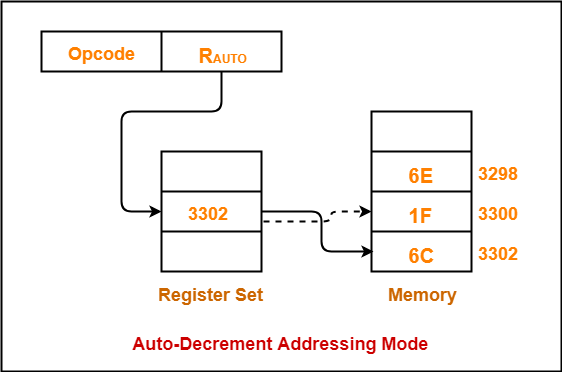
12. Auto-Decrement Addressing Mode-


  • This addressing mode is again a special case of Register Indirect Addressing Mode where-


Effective Address of the Operand

Content of Register – Step Size


In this addressing mode,

  • First, the content of the register is decremented by step size ‘d’.
  • Step size ‘d’ depends on the size of operand accessed.
  • After decrementing, the operand is read.
  • Only one reference to memory is required to fetch the operand.


Example-


Assume operand size = 2 bytes.

Here,

  • First, the instruction register RAUTO will be decremented by 2.
  • Then, updated value of RAUTO will be 3302 – 2 = 3300.
  • At memory address 3300, the operand will be found.


NOTE-


In auto-decrement addressing mode,

  • First, the instruction register RAUTO value is decremented by step size ‘d’.
  • Then, the operand value is fetched.


Also Read- Practice Problems On Addressing Modes


Applications of Addressing Modes-


Addressing Modes Applications
Immediate Addressing Mode
  • To initialize registers to a constant value
Direct Addressing Mode

and

Register Direct Addressing Mode

  • To access static data
  • To implement variables
Indirect Addressing Mode

and

Register Indirect Addressing Mode

  • To implement pointers because pointers are memory locations that store the address of another variable
  • To pass array as a parameter because array name is the base address and pointer is needed to point the address
Relative Addressing Mode
  • For program relocation at run time i.e. for position independent code
  • To change the normal sequence of execution of instructions
  • For branch type instructions since it directly updates the program counter
Index Addressing Mode
  • For array implementation or array addressing
  • For records implementation
Base Register Addressing Mode
  • For writing relocatable code i.e. for relocation of program in memory even at run time
  • For handling recursive procedures
Auto-increment Addressing Mode

and

Auto-decrement Addressing Mode

  • For implementing loops
  • For stepping through arrays in a loop
  • For implementing a stack as push and pop


To gain better understanding about Addressing Modes,

Watch this Video Lecture


Next Article- Syntax Of Addressing Modes


Get more notes and other study material of Computer Organization and Architecture.

Watch video lectures by visiting our YouTube channel LearnVidFun.
Cache Memory in Computer Architecture

Cache Memory-


  • Cache memory is a Random Access Memory.
  • The main advantage of cache memory is its very fast speed.
  • It can be accessed by the CPU at much faster speed than main memory.


Location-


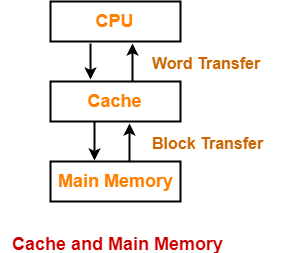
  • Cache memory lies on the path between the CPU and the main memory.
  • It facilitates the transfer of data between the processor and the main memory at the speed which matches to the speed of the processor.


  • Data is transferred in the form of words between the cache memory and the CPU.
  • Data is transferred in the form of blocks or pages between the cache memory and the main memory.


Purpose-


  • The fast speed of the cache memory makes it extremely useful.
  • It is used for bridging the speed mismatch between the fastest CPU and the main memory.
  • It does not let the CPU performance suffer due to the slower speed of the main memory.


Execution Of Program-


  • Whenever any program has to be executed, it is first loaded in the main memory.
  • The portion of the program that is mostly probably going to be executed in the near future is kept in the cache memory.
  • This allows CPU to access the most probable portion at a faster speed.


Step-01:


Whenever CPU requires any word of memory, it is first searched in the CPU registers.

Now, there are two cases possible-


Case-01:


  • If the required word is found in the CPU registers, it is read from there.


Case-02:


  • If the required word is not found in the CPU registers, Step-02 is followed.


Step-02:


  • When the required word is not found in the CPU registers, it is searched in the cache memory.
  • Tag directory of the cache memory is used to search whether the required word is present in the cache memory or not.


Now, there are two cases possible-


Case-01:


  • If the required word is found in the cache memory, the word is delivered to the CPU.
  • This is known as Cache hit.


Case-02:


  • If the required word is not found in the cache memory, Step-03 is followed.
  • This is known as Cache miss.


Step-03:


  • When the required word is not found in the cache memory, it is searched in the main memory.
  • Page Table is used to determine whether the required page is present in the main memory or not.


Now, there are two cases possible-


Case-01:


If the page containing the required word is found in the main memory,

  • The page is mapped from the main memory to the cache memory.
  • This mapping is performed using cache mapping techniques.
  • Then, the required word is delivered to the CPU.


Case-02:


If the page containing the required word is not found in the main memory,

  • A page fault occurs.
  • The page containing the required word is mapped from the secondary memory to the main memory.
  • Then, the page is mapped from the main memory to the cache memory.
  • Then, the required word is delivered to the CPU.


Multilevel Cache Organization-


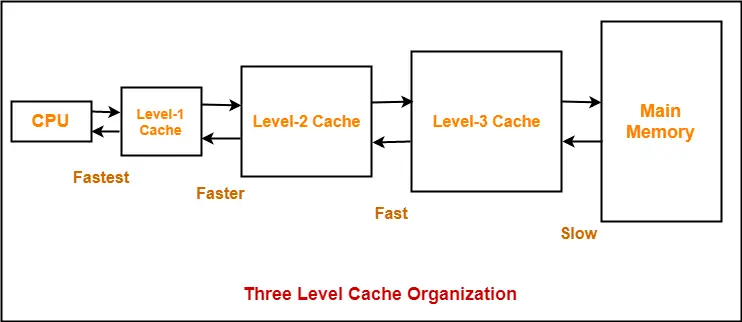
  • A multilevel cache organization is an organization where cache memories of different sizes are organized at multiple levels to increase the processing speed to a greater extent.
  • The smaller the size of cache, the faster its speed.
  • The smallest size cache memory is placed closest to the CPU.
  • This helps to achieve better performance in terms of speed.


Example-


Three level cache organization consists of three cache memories of different size organized at three different levels as shown below-


Size (L1 Cache) < Size (L2 Cache) < Size (L3 Cache) < Size (Main Memory)


To gain better understanding about Cache Memory,

Watch this Video Lecture


Next Article- Cache Mapping Techniques


Get more notes and other study material of Computer Organization and Architecture.

Watch video lectures by visiting our YouTube channel LearnVidFun.