What Happens After You Type a Web Address? DNS, HTTPS, Redirects and Official Domains Explained
Typing a website address into a browser feels like a single action.
Enter the URL, press Enter, and the page appears.
Behind that simple interaction, however, several different networking systems have to work correctly. The browser has to understand the URL, resolve the domain name, establish a connection, negotiate encryption, send an HTTP request and sometimes follow one or more redirects before the final page is displayed.
These steps are easy to treat as one process because they happen quickly. From a networking perspective, they solve different problems.
Understanding those differences is useful not only for students learning computer networks, but also for anyone troubleshooting a website that does not load, redirects unexpectedly or appears under a domain they did not intend to visit.
A URL Contains More Than a Domain Name
Consider a simple address such as:
https://example.com/download/
It contains several pieces of information.
https tells the browser which scheme is being used.
example.com is the hostname.
/download/ identifies a resource or path on that host.
These parts perform different jobs.
The hostname helps the client locate the server. The path tells the server which resource the user wants. The scheme determines how the browser should communicate with that service.
Before the browser can request /download/, however, it first needs to determine how to reach example.com.
That is where DNS enters the process.
DNS Converts Human-Readable Names Into Network Information
People prefer names such as:
example.com
Computers ultimately need network addresses.
The Domain Name System, or DNS, provides the mapping between the two.
When a browser needs to reach a domain, it may first check information already available locally. Depending on the operating system and browser, cached DNS information can prevent an unnecessary lookup.
If the answer is not already available, the request is normally sent to a DNS resolver.
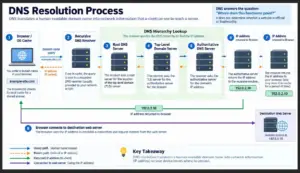
That resolver may already know the answer from its own cache. If not, it follows the DNS hierarchy until it can obtain the appropriate record from an authoritative source.
A simplified flow looks like this:
Browser → DNS Resolver → DNS Infrastructure → IP Address
The details can involve root servers, top-level-domain servers and authoritative name servers, but the main purpose remains the same:
DNS tells the client where a domain name currently points.
For users, this is why a recognizable domain is far more practical than memorizing an IP address. Someone looking for a software service, for example, will normally begin with a named web destination such as a Telegram 官網 reference rather than attempting to identify the service from raw network addresses.
The domain is the human-friendly starting point. DNS handles the translation needed by the network.
DNS Resolution Does Not Prove That a Website Is Official
This is an important distinction.
A domain can resolve successfully without being the official website of the service a user had in mind.
DNS answers questions such as:
Which network address is associated with this hostname?
It does not independently answer:
Does this hostname belong to the organization I intended to visit?
Any properly configured domain can have valid DNS records.
Two completely different websites may both:
- resolve correctly;
- accept HTTPS connections;
- return normal web pages;
- load without browser errors.
Yet they may belong to unrelated organizations.
That means successful DNS resolution is a networking result, not a complete trust decision.
The Client Must Establish a Connection
Once the browser has an address for the destination, it needs to establish communication with the server.
For traditional HTTPS using HTTP/1.1 or HTTP/2, this usually involves a TCP connection.
TCP provides a reliable, ordered byte stream between two endpoints.
Before application data is exchanged, the connection is established through the familiar TCP handshake.
At a high level:
Client → SYN
Server → SYN-ACK
Client → ACK
After that, the client and server have a TCP connection over which higher-layer protocols can operate.
Modern HTTP/3 works differently. It uses QUIC, which runs over UDP and integrates transport and security functions differently from the traditional TCP-plus-TLS model.
For a student learning the networking stack, the important lesson is that reaching a web page involves more than simply “connecting to a website.”
Several protocol layers participate.
HTTPS Adds Encryption and Hostname Authentication
For an HTTPS site, establishing basic network connectivity is not enough.
The client must also create a secure connection.
In the common HTTP/1.1 or HTTP/2 case, this is done using TLS over TCP.
During the TLS handshake, the browser and server establish cryptographic parameters and the server presents a certificate.
The browser checks whether that certificate is valid for the hostname being visited and whether it chains back to a certificate authority the browser trusts.
If the checks succeed, the connection can be encrypted.
This gives HTTPS two important properties:
Confidentiality: third parties on the network should not be able to read the traffic simply by observing packets.
Integrity and server authentication: the client receives cryptographic evidence that it is communicating with a server authorized for the hostname represented by the certificate.
But there is another distinction worth remembering:
A valid HTTPS certificate does not automatically make a website the official site of a particular brand.
A completely unrelated domain can obtain its own valid certificate.
TLS authenticates the connection to the hostname.
It does not decide whether that hostname is the one the user intended to visit.
The Browser Sends an HTTP Request
After the secure connection is ready, the browser can request the desired web resource.
A simplified HTTP request might look conceptually like:
GET /download/
The server receives that request and responds with an HTTP status code, headers and possibly a response body.
A successful page might return:
200 OK
Other status codes describe different results.
For example:
404 Not Found
means the requested resource could not be found.
403 Forbidden
means the server understood the request but refused access.
Redirect responses such as 301, 302, 307 or 308 tell the client to request a different location.
This is where the final destination can start to differ from the address originally typed by the user.
Redirects Can Change the Destination
Redirects are common on the web.
A site might redirect:
example.com
to:
www.example.com
Or it might redirect:
example.com/download
to:
example.com/apps/download
Redirects can be used for many legitimate reasons:
- migrating old URLs;
- forcing HTTPS;
- consolidating www and non-www versions;
- sending users to a regional page;
- changing site structure.
The browser normally follows the redirect automatically.
As a result, users may pay attention only to where they started and not where they ended.
From a troubleshooting and security perspective, the final hostname matters.
A redirect to another path on the same site is different from a redirect to a completely different domain.
That is why checking the address bar after navigation can be useful, particularly when the user expects to reach an official software or service website.
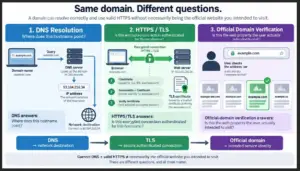
DNS, HTTPS and Official Identity Solve Different Problems
Several web technologies can appear to provide “trust,” but they actually answer different questions.
DNS tells the client where a hostname resolves.
The transport layer provides a communication path.
TLS protects and authenticates the encrypted connection for that hostname.
HTTP carries requests and responses.
The domain itself tells the user which web property they are visiting.
These layers work together, but one cannot fully replace another.
A useful mental model is:
DNS: Where does this hostname point?
Transport: Can the client communicate with the server?
TLS: Is this encrypted connection valid for this hostname?
HTTP: What resource is being requested and returned?
Domain verification: Is this actually the web property the user intended to visit?
This final question often requires human or application-level context.
For example, someone trying to identify the Telegram 官方網站 should not assume that a page is official merely because it loads successfully over HTTPS or uses familiar colors and branding.
The hostname itself still matters.
Similar-Looking Domains Are Still Different Domains
Domain names are exact identifiers.
example.com
is not the same as:
example-download.com
or:
example.net
Even when two pages look nearly identical, the underlying hostnames can represent completely separate properties.
Visual design is relatively easy to imitate.
Domain ownership is a different matter.
That is why browsers display the current hostname prominently in the address bar.
When the task involves:
- logging into an account;
- downloading software;
- changing security settings;
- entering sensitive information;
the hostname deserves more attention than the page’s visual appearance.
The browser is showing an important piece of networking and identity information directly to the user.
A Complete Browser-to-Server Walkthrough
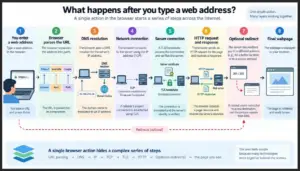
The overall process can be summarized as:
User enters URL
↓
Browser parses scheme, hostname and path
↓
DNS resolves hostname
↓
Network address is returned
↓
Transport connection is established
↓
TLS secures the connection when HTTPS is used
↓
Browser sends HTTP request
↓
Server returns HTTP response
↓
Browser follows redirects if required
↓
Final resource is displayed
This sequence is simplified, but it gives a useful model for troubleshooting.
If DNS fails, the browser may never obtain an address.
If the transport connection fails, the server cannot be reached.
If TLS validation fails, the browser may show a certificate warning.
If the HTTP request succeeds but the resource does not exist, the user may receive a 404 response.
If a redirect occurs, the final destination may differ from the original URL.
Each failure belongs to a different part of the stack.
Troubleshooting Becomes Easier When the Layers Are Separated
Suppose a user reports:
“The website is not working.”
That statement alone does not identify the failure.
A more useful troubleshooting process asks what actually happened.
Did the domain resolve?
Could a network connection be established?
Did TLS succeed?
What HTTP status code was returned?
Was there a redirect?
What was the final hostname?
This is why networking tools are useful.
nslookup can help inspect DNS resolution.
dig can provide more detailed DNS information on systems where it is available.
Browser developer tools can show HTTP requests, redirects, status codes and timing.
The address bar shows the final hostname.
Together, these tools make the invisible steps behind a web request easier to observe.
A Simple Student Experiment
This process can be explored without writing any application code.
Choose a public test website and record the following:
| Observation | Result |
| Original hostname | Record from browser |
| DNS result | Check with nslookup or dig |
| HTTPS available | Yes / No |
| Initial HTTP status | Check in developer tools |
| Redirect present | Yes / No |
| Final hostname | Record after navigation |
Then compare what each observation tells you.
The DNS result tells you about name resolution.
The status code tells you about the HTTP response.
The certificate relates to the HTTPS connection.
The final hostname shows where the browser ultimately arrived.
None of those pieces alone describes the entire interaction.
Together, they show how several layers cooperate to turn a typed URL into a working web page.
The Web Looks Simple Because the Complexity Is Hidden
Modern browsers deliberately hide most of this process.
That is good for everyday use.
A person should not need to understand recursive DNS queries or TLS negotiation simply to open a webpage.
For computer science students, however, that hidden complexity is exactly what makes the browser such a useful networking example.
One action at the application layer can involve:
DNS name resolution,
transport establishment,
cryptographic negotiation,
HTTP requests,
redirect processing,
and domain-level identity decisions.
Seeing those as separate steps makes many networking concepts easier to understand.
It also explains why statements such as “the domain works,” “HTTPS works” and “this is the official website” are not interchangeable.
They refer to different properties of the system.
The browser may make the experience feel like a single click, but underneath it is a sequence of protocols, checks and decisions working together to deliver the final page.